
00 redis基本操作
一、安装介绍
1.1 介绍
内存数据库数据读写在内存中,传统关系型数据库数据读写在硬盘中。硬盘太慢所有需要使用内存key-value数据库。
1.2 下载redis
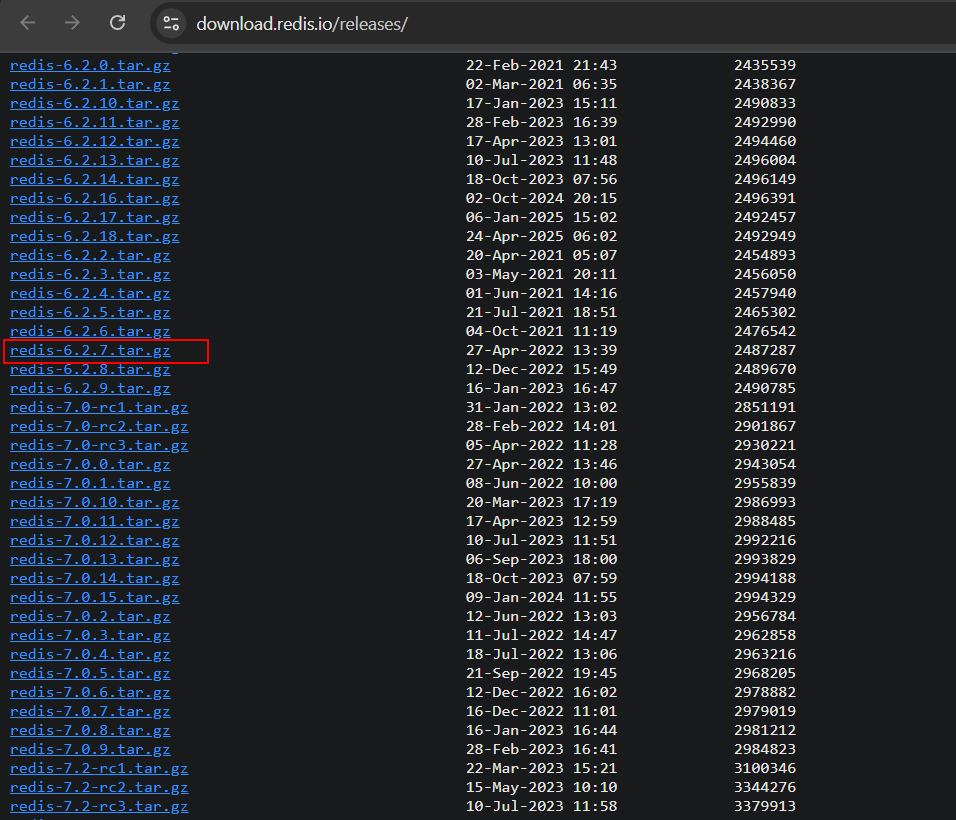
1. 进入官网下载稳定版
https://download.redis.io/releases/
1.3 安装redis
1.3.1 解压源码包
1.3.2 源码包make
1.3.3 二进制文件安装
1.3.4 修改配置文件
| bind 127.0.0.1 | 这个绑定路径,默认是127.0.0.1,表示只允许本地连接,如果需要远程连接,要注释掉 |
| protected-mode yes | 这个也限制了只能本地连接,如果要远程连接,要改成no |
| requirepass 你的密码 | 是否需要使用密码,默认是被注释掉的,需要的话,可以打开 |
| daemonize yes | 开启redis后台运行 |
1.3.5 复制配置文件
将 redis-stable/redis.conf 文件复制一份到 /etc/redis/:
sudo mkdir /etc/redis/
sudo cp redis-stable/redis.conf /etc/redis/6379.conf
1.3.6 创建启动服务
创建一个 systemd 服务文件 /etc/systemd/system/redis.service:
[Unit]
Description=Redis persistent key-value database
After=network.target


[Service]
User=redis
Group=redis
ExecStart=/usr/local/bin/redis-server /etc/redis/6379.conf
ExecStop=/usr/local/bin/redis-cli shutdown
Restart=on-failure
umask 0077
1.3.6 验证服务是否启动
1.查看进程
[root@centos8 bin]# ps -ef |grep redis
root       15034       1  0 13:07 ?        00:00:00 redis-server 127.0.0.1:6379
root       15050    1185  0 13:14 pts/0    00:00:00 grep --color=auto redis
2.本地录验证
[root@centos8 bin]# redis-cli -h 127.0.0.1 -p 6379 -a 123456
Warning: Using a password with '-a' or '-u' option on the command line interface may not be safe.
127.0.0.1:6379> ping
PONG
1.4 redis报错
1.4.1 启动服务报错
这个警告表明系统内存过度提交(memory overcommit)未启用,可能导致 Redis 在执行后台保存(如 RDB 或 AOF)或数据复制操作时失败。
[root@centos8 bin]# redis-server redis.conf
15033:C 27 Jun 2025 13:07:44.517 # WARNING Memory overcommit must be enabled! Without it, a background save or replication may fail under low memory condition. Being disabled, it can also cause failures without low memory condition, see https://github.com/jemalloc/jemalloc/issues/1328. To fix this issue add 'vm.overcommit_memory = 1' to /etc/sysctl.conf and then reboot or run the command 'sysctl vm.overcommit_memory=1' for this to take effect.
2. 永久解决方法
[root@centos8 bin]# tail -n 2 /etc/sysctl.conf
vm.overcommit_memory = 1

[root@centos8 bin]# sysctl -p

 浙公网安备 33010602011771号