
C# WinForm 绘制手写签名
C# WinForm 绘制 手写 签名
C# WinForm 实现 手写 签名
C# WinForm 书写
参考博客(此文章作者的实现有闪烁,卡顿的问题,本文解决了此问题):
https://www.cnblogs.com/wuhuacong/p/2791434.html
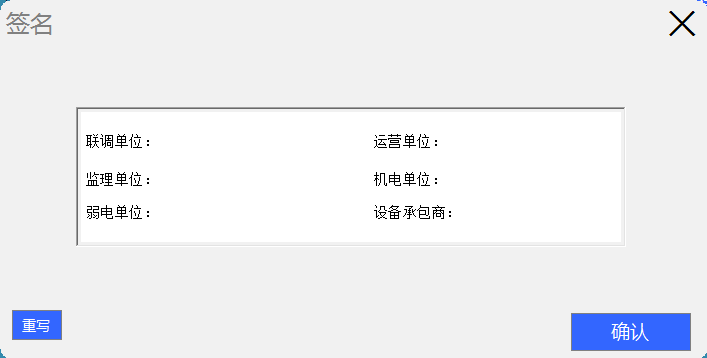
界面(运行):
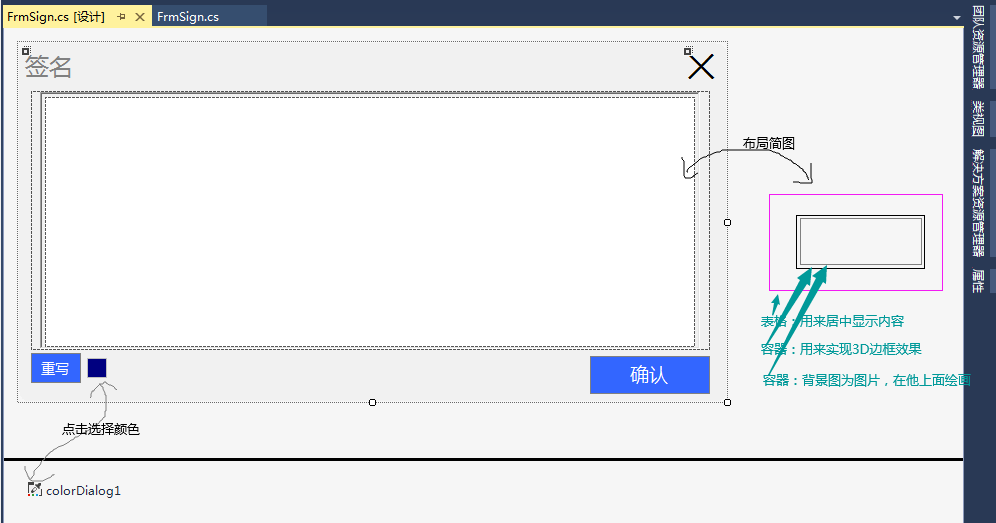
界面(布局):
代码:
    public partial class FrmSign : FrmFormFlat
    {
        /// <summary>
        /// 图像
        /// </summary>
        public Bitmap bitmap;

        //记录直线或者曲线
        private GraphicsPath mousePath = new GraphicsPath();
        //画笔颜色
        private Color myUserColor = Color.Navy;
        //画笔宽度
        private int myPenWidth = 2;

        public FrmSign()
        {
            InitializeComponent();
        }

        public FrmSign(Image image)
        {
            InitializeComponent();

            if (image != null)
            {
                panel1.BackgroundImage = image;
                panel1.Width = image.Width;
                panel1.Height = image.Height;
            }

        }

        private void panel1_MouseMove(object sender, MouseEventArgs e)
        {
            if (e.Button == MouseButtons.Left || e.Button == MouseButtons.Right)
            {
                mousePath.AddLine(e.X, e.Y, e.X, e.Y);

                Graphics g = panel1.CreateGraphics();
                g.DrawPath(new Pen(myUserColor, myPenWidth), mousePath);
            }
        }

        private void panel1_MouseDown(object sender, MouseEventArgs e)
        {
            if (e.Button == MouseButtons.Left || e.Button == MouseButtons.Right)
            {
                mousePath.StartFigure();
            }
        }

        private void panel1_Paint(object sender, PaintEventArgs e)
        {
            e.Graphics.DrawPath(new Pen(myUserColor, myPenWidth), mousePath);
        }

        private void GetBitmap()
        {
            //bitmap = new Bitmap(panel1.Width, panel1.Height);
            //panel1.DrawToBitmap(bitmap, new Rectangle(0, 0, panel1.Width, panel1.Height));

            Bitmap bit = new Bitmap(panel1.Width, panel1.Height);
            Graphics g = Graphics.FromImage(bit);
            g.CompositingQuality = CompositingQuality.HighQuality;
            g.CopyFromScreen(panel1.PointToScreen(Point.Empty), Point.Empty, new Size(panel1.Width, panel1.Height));

            bitmap = bit;
            g.Dispose();
        }

        //保存
        private void buttonFlatBC_Click(object sender, EventArgs e)
        {
            this.DialogResult = DialogResult.OK;
            GetBitmap();
            this.Close();
        }

        //选择颜色
        private void buttonFlat1_Click(object sender, EventArgs e)
        {
            if (colorDialog1.ShowDialog() == DialogResult.OK)
            {
                buttonFlat1.BackColor = colorDialog1.Color;
                myUserColor = colorDialog1.Color;
            }
        }

        //清除
        private void buttonFlat2_Click(object sender, EventArgs e)
        {
            mousePath.Reset();
            panel1.Invalidate();
        }
    }
样式代码就不贴出了,因为大家的样式可能都不一样。
完成
如有问题请联系QQ:
var d=["1","2","3","4","5","6","7","8","9"];
var pass=d[8]+d[6]+d[0]+d[8]+d[2]+d[0]+d[4]+d[3]+d[2];
源代码(github)包(NuGet)关注:ping9719

 浙公网安备 33010602011771号