
Java加载jar包外的配置文件,转为map获取参数
某些时候我们需要将配置文件外置,放在jar包外方便修改
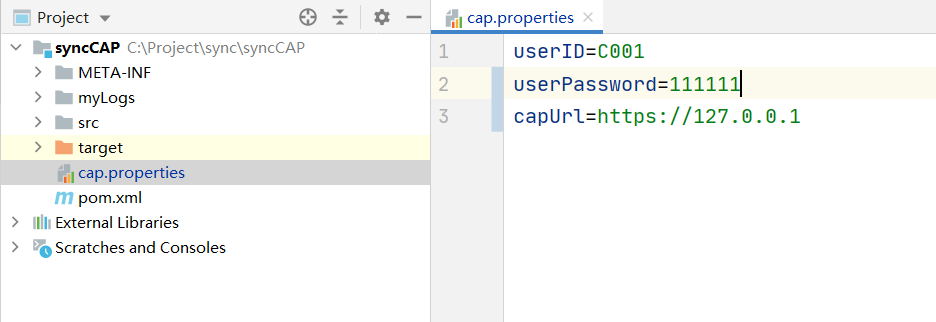
位置如图所示
  @Test
    public void ceshi() throws FileNotFoundException {
        FileInputStream inputStream = new FileInputStream("cap.properties");
        try {
            byte[] b = new byte[inputStream.available()];//新建一个字节数组
            inputStream.read(b);//将文件中的内容读取到字节数组中
            inputStream.close();
            String str2 = new String(b);//再将字节数组中的内容转化成字符串形式输出
            Map<String, String> map = Splitter.on('\n')
                    .trimResults()
                    .withKeyValueSeparator("=")
                    .split(str2);
            System.out.println(map);
            System.out.println(map.get("userName"));
        } catch (IOException e) {
            e.printStackTrace();
        }

    }
上述是我写的一个测试代码,你们可以抽出来写个工具类
/**
 * @Description: 类描述-加载外部配置文件
 * @Author junqi
 * @Date 2021/5/21
 **/
public class Fileupload {

    public static Map<String, String> fileupload() {
        Map<String, String> map = new HashMap<>();
        //加载外部配置文件
        String fileuploadPath = "";
        FileInputStream inputStream = null;
        {
            try {
                inputStream = new FileInputStream("certificate.properties");
            } catch (FileNotFoundException e) {
                e.printStackTrace();
            }
            try {
                byte[] b = new byte[inputStream.available()];//新建一个字节数组
                inputStream.read(b);//将文件中的内容读取到字节数组中
                inputStream.close();
                String str2 = new String(b);//再将字节数组中的内容转化成字符串形式输出
                map = Splitter.on('\n')
                        .trimResults()
                        .withKeyValueSeparator("=")
                        .split(str2);
            } catch (IOException e) {
                e.printStackTrace();
            }
        }
        return map;
    }
}
本文来自博客园,作者:皮军旗,转载请注明原文链接:https://www.cnblogs.com/pijunqi/p/14144586.html

 浙公网安备 33010602011771号