
进程/线程/协程
理解
线程:就是一个一个独立的办公室,这个办公室负责整体一个项目
线程:办公室中的一个个员工,每个员工处理这个项目中的不同板块,有的负责接收消息,有的负责出报告
协程:一种员工的办公方式,员工甲在接收消息的时候,可以先去做另一件事,等消息接收完毕后再回来继续做
进程与线程
# -*- coding: utf-8 -*-
# @Time    : 2025/12/16 14:25
# @Author  : 范晨伟
import time
from multiprocessing import Process
from concurrent.futures import ProcessPoolExecutor  # 进程池
from concurrent.futures import ThreadPoolExecutor   # 线程池
from threading import Thread


def cal(n):
    time.sleep(1)
    print(f'{n}程序执行完毕!')


if __name__ == '__main__':
    start = time.time()

    # with ProcessPoolExecutor(max_workers=5) as executor:  # 进程池
    #     res = executor.map(cal, range(10))

    with ThreadPoolExecutor() as executor:   # 线程池
        res = executor.map(cal, range(10))

    end = time.time()
    print(f'程序运行总时长:{end - start}s')
协程
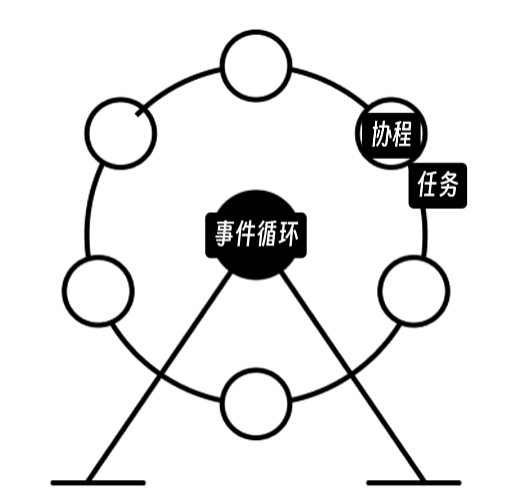
# 协程:可以暂停运行和恢复运行的函数 async def协程函数 await暂停运行
# 事件循环: 1检查协程:检查是否有可运行的协程 2让出控制:将控制权传递给可以执行的协程 3等待协程:等当前协程暂停或运行完成放开控制权给自己
# 任务:是对协程的一个封装,里边记录了协程的状态 运行中 暂停 完成等等 让事件循环知道 这个协程现在能不能运行 只要一个协程被包装成任务 就会被事件循环调度执行
# 三步走: 1.定义协程函数 2.包装协程任务 3.建立事件循环
import asyncio
import time
import aiohttp
import aiofiles


async def fetch_url(url):
    print('请求链接中')
    await asyncio.sleep(1)
    print('完成链接')
    return 'url_content'


async def read_file(filepath):
    print('文件读取中')
    await asyncio.sleep(1)
    print('文件读取完毕')
    return 'file_content'


async def main():
    url = 'example.com'
    filepath = 'example.txt'
    # res1 = fetch_url(url)
    # res2 = read_file(filepath)

    # 手动包装成任务
    # task1 = asyncio.create_task(fetch_url(url))
    # task2 = asyncio.create_task(read_file(filepath))
    # res1 = await task1
    # res2 = await task2

    # 自动包装成任务的两种方式 asyncio.gather 和 asyncio.as_completed
    # asyncio.gather 会等所有任务都完成后 一起返回结果
    # result = await asyncio.gather(
    #     fetch_url(url),
    #     read_file(filepath)
    # )
    # print(result)

    # asyncio.as_completed 接收一个包含协程的可迭代对象 返回一个迭代器 不会等所有协程都完成才返回 而是会在一有协程任务完成后 立即返回结果
    result = asyncio.as_completed([fetch_url(url), read_file(filepath)])
    for res in result:
        print(await res)

if __name__ == '__main__':
    start_time = time.perf_counter()
    # main()
    asyncio.run(main())
    end_time = time.perf_counter()
    print(f'运行时间:{end_time - start_time}s')

 浙公网安备 33010602011771号