
Apache HTTP Server入门操作-apachehttpserver
前言
Apache HTTP Server 是业内使用很广泛的 web 服务器之一,支持 HTTP,HTTPS 协议,正向,反向代理等功能。但是对于其配置和使用还是有很多朋友不太清楚,今天我们就一起来了解下其基础的配置和使用。
安装
yum -y install  httpd
systemctl start httpd
systemctl enable httpd

# 关闭防火墙
systemctl stop firewalld
systemctl disable firewalld
setenforce 0

# 修改/etc/selinux/config
SELINUX=disabled
HTTP 配置
安装完 httpd 后,httpd 服务已经启动。我们访问服务器的http://{server_ip}即可看到 Apache HTTP Server 的欢迎页。

修改欢迎页
在/var/www/html 路径下新建 index.html
<!DOCTYPE html>
<html lang="en">
<head>
    <meta charset="UTF-8">
    <meta http-equiv="X-UA-Compatible" content="IE=edge">
    <meta name="viewport" content="width=device-width, initial-scale=1.0">
    <title>Document</title>
    <script src="https://cdn.jsdelivr.net/npm/vue@2.5.16/dist/vue.js"></script>
<body>
    <div id="appv">
        请输入内容:<br><br>
		<textarea rows="" cols="" v-model="info"></textarea>
        <!-- <input v-model="info"> -->
        <p style="white-space: pre-line;">你输入的内容是:<br><br>{{ info }}</p>
    </div>
    <script>
        app = new Vue({
            el: "#appv",
            data: {
                info: "placeholder",
            }
        })
    </script>
</body>
</html>
重新访问:http://

你会发现 403 Forbidden,请求被拒绝,这是为什么呢?因为新建的 index.html 的默认权限为:640,我们需要赋予 apache 用户对于 index.html 的查看权限:646
chmod 646 index.html
再试试
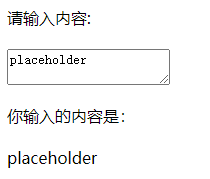
其实,在研发测试阶段,我们可以将打包好的静态网站直接放到
/var/www/html这个路径下,即可实现站点在Apache HTTP Server的托管。
HTTPS 配置
在 HTTP 的配置下,我们尝试访问https://{server_ip}:

你会发现,我们的请求直接被拒绝,浏览器无法通过 https 协议来访问 web server。现在我们来进行配置让 Apache HTTP Server 支持 https。
安装依赖
yum -y install mod_ssl openssl httpd
证书相关配置
创建 CA 证书存放目录
mkdir /etc/httpd/ca
打开 HTTPS 相关配置
修改/etc/httpd/conf.d/ssl.conf
确保配置项和下列配置相同。
Listen 443 https
DocumentRoot "/var/www/html"
ServerName apache.xyc.com:443

ErrorLog logs/ssl_error_log
TransferLog logs/ssl_access_log
LogLevel warn
SSLEngine on
SSLProtocol all -SSLv2 -SSLv3
SSLCipherSuite HIGH:3DES:!aNULL:!MD5:!SEED:!IDEA
SSLCipherSuite RC4-SHA:AES128-SHA:HIGH:MEDIUM:!aNULL:!MD5
SSLHonorCipherOrder on
SSLCertificateFile /etc/pki/tls/certs/apache.xyc.com.crt
SSLCertificateKeyFile /etc/pki/tls/private/apache.xyc.com.key
创建秘钥证书
在/etc/httpd/ca/下创建证书。
cd /etc/httpd/ca/
openssl req -newkey rsa:4096 -nodes -sha256 -keyout ca.key -x509 -days 1000 -out ca.crt

openssl req -newkey rsa:4096 -nodes -sha256 -keyout apache.xyc.com.key -out apache.xyc.com.csr

openssl x509 -req -days 365 -in apache.xyc.com.csr -CA ca.crt -CAkey ca.key -CAcreateserial -out apache.xyc.com.crt
将证书拷贝到/etc/pki/tls/xx 下。
cp apache.xyc.com.crt /etc/pki/tls/certs/
cp apache.xyc.com.key /etc/pki/tls/private/
重启 httpd 服务:
systemctl restart httpd
https 测试
再次访问https://{server_ip}:

我们点击高级,继续前往即可打开我们的页面。
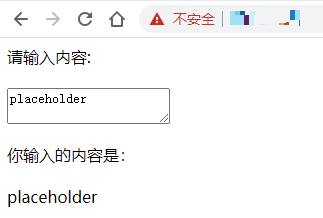
关于 Apache HTTP Server 我们就介绍到这里,更多内容请持续关注。
更多内容关注我


 浙公网安备 33010602011771号