
[二] Numpy数据存取与函数
Numpy数据存取与函数
CSV文件:存取一维和二维数据
- CSV文件是一种常见的文件格式,用来存储批量数据。
- CSV文件只能有效的存储一维和二维数组。
- np.savetxt(), np.loadtxt()只能有效的存取一维和二维数组。
Numpy将数据存入CSV文件,函数如下:
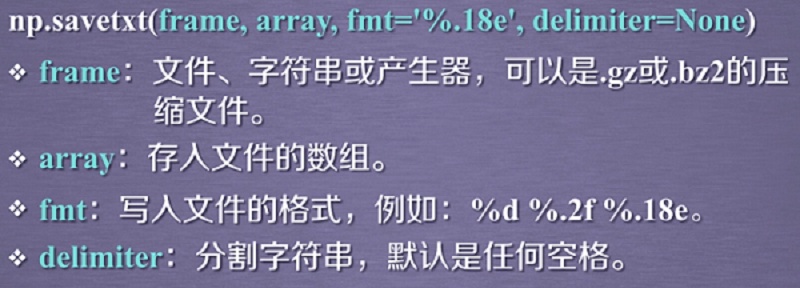
import numpy as np
a = np.arange(100).reshape(5, 20)
np.savetxt('a.csv', a, fmt="%d", delimiter=',')

Numpy读入CSV文件,函数如下:

b = np.loadtxt('a.csv', delimiter=',')
b
array([[ 0., 1., 2., 3., 4., 5., 6., 7., 8., 9., 10., 11., 12.,
13., 14., 15., 16., 17., 18., 19.],
[20., 21., 22., 23., 24., 25., 26., 27., 28., 29., 30., 31., 32.,
33., 34., 35., 36., 37., 38., 39.],
[40., 41., 42., 43., 44., 45., 46., 47., 48., 49., 50., 51., 52.,
53., 54., 55., 56., 57., 58., 59.],
[60., 61., 62., 63., 64., 65., 66., 67., 68., 69., 70., 71., 72.,
73., 74., 75., 76., 77., 78., 79.],
[80., 81., 82., 83., 84., 85., 86., 87., 88., 89., 90., 91., 92.,
93., 94., 95., 96., 97., 98., 99.]])
b = np.loadtxt('a.csv', dtype=np.int32, delimiter=',')
b
array([[ 0, 1, 2, 3, 4, 5, 6, 7, 8, 9, 10, 11, 12, 13, 14, 15,
16, 17, 18, 19],
[20, 21, 22, 23, 24, 25, 26, 27, 28, 29, 30, 31, 32, 33, 34, 35,
36, 37, 38, 39],
[40, 41, 42, 43, 44, 45, 46, 47, 48, 49, 50, 51, 52, 53, 54, 55,
56, 57, 58, 59],
[60, 61, 62, 63, 64, 65, 66, 67, 68, 69, 70, 71, 72, 73, 74, 75,
76, 77, 78, 79],
[80, 81, 82, 83, 84, 85, 86, 87, 88, 89, 90, 91, 92, 93, 94, 95,
96, 97, 98, 99]])
多维数据的存取
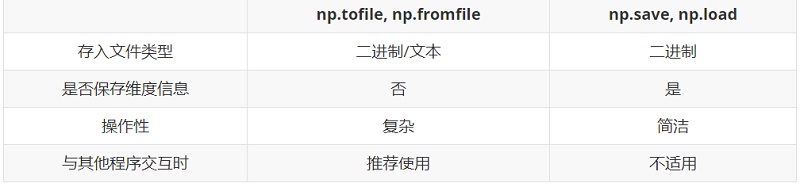
- 数据存入:tofile,数据加载loadfile
- 便捷的文件存取方法:np.save,np.load
多维数据的存入:tofile函数

a = np.arange(100).reshape(5, 10, 2)
a.tofile("b.dat", sep=",", format='%d')
结果将会平铺为一维数据,如下

多维数据的加载:np.fromfile函数
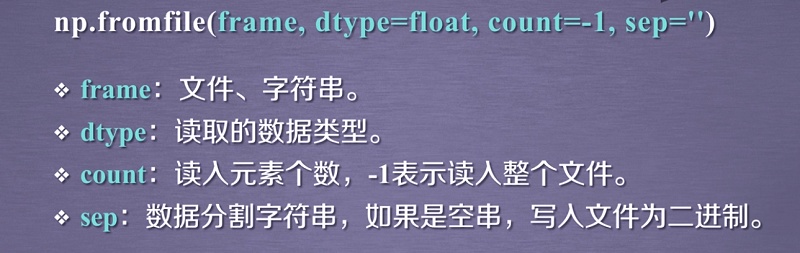
c = np.fromfile("b.dat", dtype=np.int32, sep=",")
c
array([ 0, 1, 2, 3, 4, 5, 6, 7, 8, 9, 10, 11, 12, 13, 14, 15, 16,
17, 18, 19, 20, 21, 22, 23, 24, 25, 26, 27, 28, 29, 30, 31, 32, 33,
34, 35, 36, 37, 38, 39, 40, 41, 42, 43, 44, 45, 46, 47, 48, 49, 50,
51, 52, 53, 54, 55, 56, 57, 58, 59, 60, 61, 62, 63, 64, 65, 66, 67,
68, 69, 70, 71, 72, 73, 74, 75, 76, 77, 78, 79, 80, 81, 82, 83, 84,
85, 86, 87, 88, 89, 90, 91, 92, 93, 94, 95, 96, 97, 98, 99])
# 要想还原数据,还要知道原先数组的尺寸
c = c.reshape(5, 10, 2)
c
array([[[ 0, 1],
[ 2, 3],
[ 4, 5],
[ 6, 7],
[ 8, 9],
[10, 11],
[12, 13],
[14, 15],
[16, 17],
[18, 19]],
[[20, 21],
[22, 23],
[24, 25],
[26, 27],
[28, 29],
[30, 31],
[32, 33],
[34, 35],
[36, 37],
[38, 39]],
[[40, 41],
[42, 43],
[44, 45],
[46, 47],
[48, 49],
[50, 51],
[52, 53],
[54, 55],
[56, 57],
[58, 59]],
[[60, 61],
[62, 63],
[64, 65],
[66, 67],
[68, 69],
[70, 71],
[72, 73],
[74, 75],
[76, 77],
[78, 79]],
[[80, 81],
[82, 83],
[84, 85],
[86, 87],
[88, 89],
[90, 91],
[92, 93],
[94, 95],
[96, 97],
[98, 99]]])
便捷的文件存取:np.save,np.load

np.save("a.npy", a)
b = np.load("a.npy")
b
array([[[ 0, 1],
[ 2, 3],
[ 4, 5],
[ 6, 7],
[ 8, 9],
[10, 11],
[12, 13],
[14, 15],
[16, 17],
[18, 19]],
[[20, 21],
[22, 23],
[24, 25],
[26, 27],
[28, 29],
[30, 31],
[32, 33],
[34, 35],
[36, 37],
[38, 39]],
[[40, 41],
[42, 43],
[44, 45],
[46, 47],
[48, 49],
[50, 51],
[52, 53],
[54, 55],
[56, 57],
[58, 59]],
[[60, 61],
[62, 63],
[64, 65],
[66, 67],
[68, 69],
[70, 71],
[72, 73],
[74, 75],
[76, 77],
[78, 79]],
[[80, 81],
[82, 83],
[84, 85],
[86, 87],
[88, 89],
[90, 91],
[92, 93],
[94, 95],
[96, 97],
[98, 99]]])
两种存取方法比较
Numpy的随机数函数
np.random的随机数函数(一)
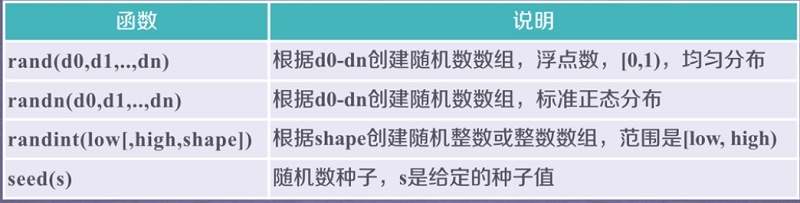
a = np.random.rand(3, 4, 5)
a
array([[[0.15257507, 0.02480371, 0.62325075, 0.30554174, 0.71039419],
[0.16793472, 0.11053303, 0.18702078, 0.59347635, 0.18655296],
[0.34498871, 0.82380281, 0.62474943, 0.09706273, 0.84723209],
[0.32304167, 0.97391336, 0.34865744, 0.69825689, 0.33477139]],
[[0.97218235, 0.547869 , 0.01222512, 0.47606408, 0.55055613],
[0.18585335, 0.06653516, 0.32867498, 0.59954051, 0.36819215],
[0.23493346, 0.75768867, 0.48641578, 0.98568222, 0.83763441],
[0.44208099, 0.96234619, 0.93853069, 0.23875454, 0.64855734]],
[[0.21927259, 0.54326216, 0.5728762 , 0.30291199, 0.30875352],
[0.70463617, 0.16616126, 0.9389809 , 0.99866047, 0.84941496],
[0.66782308, 0.80883132, 0.83030115, 0.21593487, 0.11052866],
[0.50227729, 0.7373498 , 0.08622482, 0.1546465 , 0.7673344 ]]])
sn = np.random.randn(3, 4, 5)
sn
array([[[-0.13899166, 0.81753401, -1.51661175, 1.12756715,
0.47075786],
[ 1.58396047, -0.21436527, 1.60210739, 0.50196767,
-0.70752227],
[-1.07846307, 0.24308953, 1.31379971, 1.37007777,
1.0744217 ],
[ 0.91036789, 1.22711205, -0.36849642, 0.32428547,
0.14387649]],
[[-1.02127348, -0.41833756, -0.95767588, 0.51808076,
0.96952932],
[-0.86687153, 1.51265849, 0.10725677, 0.54024379,
-1.16591356],
[ 1.45679455, -1.12580397, 0.70885802, -1.13800884,
0.46957394],
[ 2.03218182, -0.53277405, -2.19688155, -0.20649949,
2.00457427]],
[[-0.04384466, -0.67094456, -0.50440545, -1.38355559,
-1.75376971],
[-0.52912614, 0.44385732, -1.89686488, 0.16396965,
0.96562041],
[ 1.37031847, -0.20085887, 0.56562333, -0.27319559,
-1.34236485],
[-0.28952533, -0.5397941 , -0.61748276, 1.35898526,
-1.09242035]]])
b = np.random.randint(100, 200, (3, 4))
b
array([[178, 153, 195, 183],
[197, 160, 146, 157],
[161, 134, 120, 156]])
np.random.seed(10)
np.random.randint(100, 200, (3, 4))
array([[109, 115, 164, 128],
[189, 193, 129, 108],
[173, 100, 140, 136]])
# 使用同一个种子,可以发现生成结果是相同的
np.random.seed(10)
np.random.randint(100, 200, (3, 4))
array([[109, 115, 164, 128],
[189, 193, 129, 108],
[173, 100, 140, 136]])
np.random的随机数函数(二)

a = np.random.randint(100, 200, (3, 4))
a
array([[116, 111, 154, 188],
[162, 133, 172, 178],
[149, 151, 154, 177]])
# 原来的数组a改变了
np.random.shuffle(a)
a
array([[116, 111, 154, 188],
[149, 151, 154, 177],
[162, 133, 172, 178]])
a = np.random.randint(100, 200, (3, 4))
a
array([[125, 113, 192, 186],
[130, 130, 189, 112],
[165, 131, 157, 136]])
np.random.permutation(a)
array([[125, 113, 192, 186],
[130, 130, 189, 112],
[165, 131, 157, 136]])
# 使用permutation乱序数组时,不会改变原来的数组a
a
array([[125, 113, 192, 186],
[130, 130, 189, 112],
[165, 131, 157, 136]])
np.random的随机数函数(三)
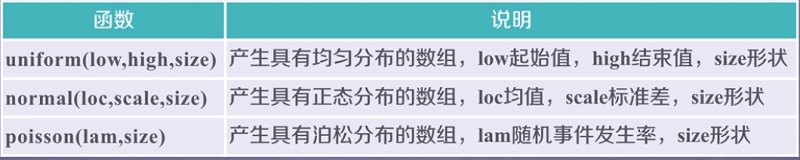
u = np.random.uniform(0, 10, (3,4))
u
array([[6.01038953, 8.05223197, 5.21647152, 9.08648881],
[3.19236089, 0.90459349, 3.00700057, 1.13984362],
[8.28681326, 0.46896319, 6.26287148, 5.47586156]])
n = np.random.normal(0, 1, (3,3))
n
array([[-0.49561818, 0.52563742, -0.38964647],
[ 0.9372965 , -0.8169742 , 1.01961544],
[-0.34143633, 0.7512814 , -0.36225179]])
p = np.random.poisson(0.5, (3, 3))
p
array([[0, 1, 0],
[2, 1, 0],
[1, 0, 0]])
numpy统计函数(一)
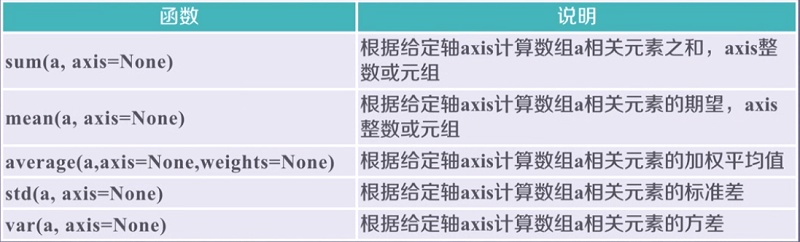
a = np.arange(15).reshape(3, 5)
a
array([[ 0, 1, 2, 3, 4],
[ 5, 6, 7, 8, 9],
[10, 11, 12, 13, 14]])
np.sum(a)
105
np.mean(a, axis=1)
array([ 2., 7., 12.])
np.mean(a, axis=0)
array([5., 6., 7., 8., 9.])
np.average(a, axis=0, weights=[10, 5, 1])
array([2.1875, 3.1875, 4.1875, 5.1875, 6.1875])
np.std(a)
4.320493798938574
np.var(a)
18.666666666666668
numpy统计函数(二)

b = np.arange(15, 0, -1).reshape(3, 5)
b
array([[15, 14, 13, 12, 11],
[10, 9, 8, 7, 6],
[ 5, 4, 3, 2, 1]])
np.max(b)
15
np.min(b)
1
np.argmax(b)
0
# 生成多维下标
np.unravel_index(np.argmax(b), b.shape)
(0, 0)
np.ptp(b)
14
np.median(b)
8.0
numpy的梯度函数

a = np.random.randint(0, 20, (5))
a
array([18, 3, 16, 18, 16])
np.gradient(a)
array([-15. , -1. , 7.5, 0. , -2. ])
b = np.random.randint(0, 50,(3, 5))
b
array([[14, 15, 17, 25, 46],
[48, 42, 17, 32, 17],
[41, 16, 41, 26, 12]])
np.gradient(b)
[array([[ 34. , 27. , 0. , 7. , -29. ],
[ 13.5, 0.5, 12. , 0.5, -17. ],
[ -7. , -26. , 24. , -6. , -5. ]]),
array([[ 1. , 1.5, 5. , 14.5, 21. ],
[ -6. , -15.5, -5. , 0. , -15. ],
[-25. , 0. , 5. , -14.5, -14. ]])]

 浙公网安备 33010602011771号