【Python】将表格图片批量导出到本地文件夹
import os
import zipfile
import xml.etree.ElementTree as ET
from openpyxl import load_workbook
from PIL import Image
import shutil


def extract_excel_images(excel_path, output_base_dir="output"):
    """
    从Excel文件中按列提取图片到不同的文件夹

    参数:
        excel_path: Excel文件路径
        output_base_dir: 输出图片的基础目录
    """

    # 加载Excel工作簿
    print(f"正在加载Excel文件: {excel_path}")
    wb = load_workbook(excel_path)

    # 获取所有工作表
    for sheet_name in wb.sheetnames:
        print(f"\n处理工作表: {sheet_name}")
        ws = wb[sheet_name]

        # 将Excel文件重命名为zip文件来解压
        excel_dir = os.path.dirname(excel_path)
        excel_name = os.path.basename(excel_path)
        zip_path = os.path.join(excel_dir, "temp_" + excel_name.replace('.xlsx', '.zip'))

        try:
            # 复制Excel文件为zip文件
            shutil.copy(excel_path, zip_path)

            # 解压zip文件
            extract_dir = os.path.join(excel_dir, "temp_extract")
            with zipfile.ZipFile(zip_path, 'r') as zip_ref:
                zip_ref.extractall(extract_dir)

            # 读取drawings文件以获取图片位置信息
            drawings_path = os.path.join(extract_dir, "xl", "drawings", "drawing1.xml")
            if not os.path.exists(drawings_path):
                print(f"  工作表中没有找到图片")
                continue

            # 解析XML文件
            tree = ET.parse(drawings_path)
            root = tree.getroot()

            # 命名空间
            namespaces = {
                'xdr': 'http://schemas.openxmlformats.org/drawingml/2006/spreadsheetDrawing',
                'a': 'http://schemas.openxmlformats.org/drawingml/2006/main'
            }

            # 查找所有图片的锚点信息
            images_data = []

            for twoCellAnchor in root.findall('.//xdr:twoCellAnchor', namespaces):
                # 获取图片位置信息
                from_col_elem = twoCellAnchor.find('.//xdr:col', namespaces)
                from_row_elem = twoCellAnchor.find('.//xdr:row', namespaces)

                if from_col_elem is not None and from_row_elem is not None:
                    col = int(from_col_elem.text) + 1  # 转换为1-based索引
                    row = int(from_row_elem.text) + 1  # 转换为1-based索引

                    # 获取图片引用
                    blip_elem = twoCellAnchor.find('.//a:blip', namespaces)
                    if blip_elem is not None:
                        embed_id = blip_elem.get(
                            '{http://schemas.openxmlformats.org/officeDocument/2006/relationships}embed')

                        if embed_id:
                            # 读取图片关系文件
                            rels_path = os.path.join(extract_dir, "xl", "drawings", "_rels", "drawing1.xml.rels")
                            rels_tree = ET.parse(rels_path)
                            rels_root = rels_tree.getroot()

                            # 查找对应的图片文件
                            target = None
                            for rel in rels_root.findall(
                                    './/{http://schemas.openxmlformats.org/package/2006/relationships}Relationship'):
                                if rel.get('Id') == embed_id:
                                    target = rel.get('Target')
                                    break

                            if target:
                                # 构建图片路径
                                image_path = os.path.join(extract_dir, "xl", target.replace('..', '').lstrip('/'))
                                if os.path.exists(image_path):
                                    # 获取列字母
                                    col_letter = get_column_letter(col)
                                    images_data.append({
                                        'path': image_path,
                                        'col': col,
                                        'col_letter': col_letter,
                                        'row': row
                                    })

            # 按列分组并导出图片
            if images_data:
                print(f"  找到 {len(images_data)} 张图片")

                # 按列分组
                columns_dict = {}
                for img_data in images_data:
                    col = img_data['col']
                    if col not in columns_dict:
                        columns_dict[col] = []
                    columns_dict[col].append(img_data)

                # 为每个列创建文件夹并导出图片
                for col, images in columns_dict.items():
                    col_letter = get_column_letter(col)
                    col_folder = os.path.join(output_base_dir, sheet_name, f"列{col_letter}")

                    # 创建文件夹
                    os.makedirs(col_folder, exist_ok=True)

                    print(f"    列 {col_letter}: {len(images)} 张图片")

                    # 导出该列的所有图片
                    for i, img_data in enumerate(images):
                        # 构建输出文件名
                        # filename = f"图片_{img_data['row']}_{i + 1}{os.path.splitext(img_data['path'])[1]}"
                        filename = f"{i + 1}{os.path.splitext(img_data['path'])[1]}"
                        output_path = os.path.join(col_folder, filename)

                        # 复制图片文件
                        shutil.copy(img_data['path'], output_path)
                        print(f"      已导出: {filename}")

            else:
                print(f"  未找到图片")

        finally:
            # 清理临时文件
            if os.path.exists(zip_path):
                os.remove(zip_path)
            if os.path.exists(extract_dir):
                shutil.rmtree(extract_dir)

    print(f"\n所有图片已导出到: {output_base_dir}")
    wb.close()


def get_column_letter(col_idx):
    """
    将列索引转换为字母(1->A, 2->B, ...)
    """
    result = ""
    while col_idx > 0:
        col_idx, remainder = divmod(col_idx - 1, 26)
        result = chr(65 + remainder) + result
    return result


# 使用示例
if __name__ == "__main__":
    # 示例用法
    excel_file = r"C:\Users\TYW\Desktop\导出图片.xlsx"  # 替换为你的Excel文件路径
    output_base_dir = "s32-es"
    # 确保Excel文件存在
    if os.path.exists(excel_file):
        extract_excel_images(excel_file,output_base_dir)
    else:
        print(f"文件不存在: {excel_file}")
        # print("\n请先创建一个示例Excel文件进行测试:")
        #
        # # 创建示例Excel文件
        # from openpyxl import Workbook
        # from openpyxl.drawing.image import Image as ExcelImage
        # import tempfile
        #
        # print("正在创建示例Excel文件...")
        #
        # # 创建新的工作簿
        # wb = Workbook()
        # ws = wb.active
        # ws.title = "示例工作表"
        #
        # # 创建一些测试图片并添加到Excel
        # try:
        #     # 在A列添加图片
        #     img1 = ExcelImage("path/to/your/image1.jpg")  # 替换为实际图片路径
        #     img1.width = 100
        #     img1.height = 100
        #     ws.add_image(img1, 'A1')
        #
        #     img2 = ExcelImage("path/to/your/image2.jpg")  # 替换为实际图片路径
        #     img2.width = 100
        #     img2.height = 100
        #     ws.add_image(img2, 'A3')
        #
        #     # 在B列添加图片
        #     img3 = ExcelImage("path/to/your/image3.jpg")  # 替换为实际图片路径
        #     img3.width = 100
        #     img3.height = 100
        #     ws.add_image(img3, 'B2')
        #
        #     # 在C列添加图片
        #     img4 = ExcelImage("path/to/your/image4.jpg")  # 替换为实际图片路径
        #     img4.width = 100
        #     img4.height = 100
        #     ws.add_image(img4, 'C1')
        #
        #     wb.save(excel_file)
        #     print(f"示例Excel文件已创建: {excel_file}")
        #
        #     # 运行提取
        #     extract_excel_images(excel_file)
        #
        # except Exception as e:
        #     print(f"创建示例文件时出错: {e}")
        #     print("\n请确保您有一个包含图片的Excel文件")
运行结果
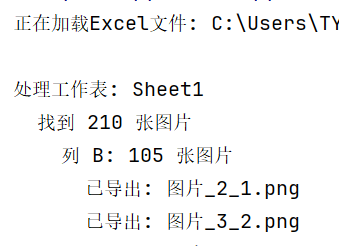
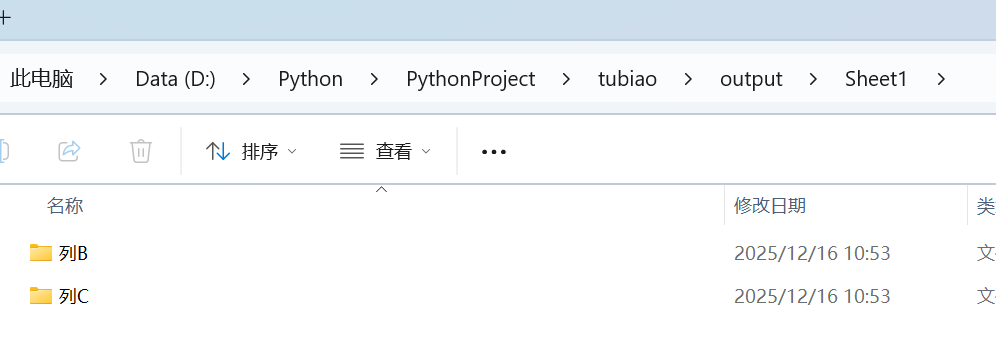
-------------------------------------------------------------------------------------
如果万事开头难 那请结局一定圆满 @ Phoenixy
-------------------------------------------------------------------------------------
 浙公网安备 33010602011771号