
前端 Table 用 JS 导出EXCEL(支持大量数据,保留报表格式)
最近项目上,需要用到将网页上的table报表导出Excel。原先一直用PHPExcel.php,面对简单的数结构时PHPExcel.php只要简单的套用就能导出了,但是table结构相对复杂时,很难在PHPExcel.php组成一样结构,要花很多时间调;这时就想到在百度上搜没有用JS的形式来导出为EXCEL表的,找了一下果真有,而且再复杂的table表,只需简单套用就能导出,挺好的,省心省力。下面是详细。
1,因为是用的JQ的形式页面上必须引用JQ库,如
<script src="cssjs/lib/jquery-1.7.2.min.js" type="text/javascript"></script>
2,还有一个相应的js也要引入 FileSaver.js ,如
<script src="cssjs/js/FileSaver.js" type="text/javascript"></script>
FileSaver.js 可在 原网址:https://github.com/eligrey/FileSaver.js/tree/master/dist 下载下来,其文件代码也不多,展示如下可直接保存成FileSave.js来去用
/*
* FileSaver.js
* A saveAs() FileSaver implementation.
*
* By Eli Grey, http://eligrey.com
*
* License : https://github.com/eligrey/FileSaver.js/blob/master/LICENSE.md (MIT)
* source  : http://purl.eligrey.com/github/FileSaver.js
*/

// The one and only way of getting global scope in all environments
// https://stackoverflow.com/q/3277182/1008999
var _global = typeof window === 'object' && window.window === window
  ? window : typeof self === 'object' && self.self === self
  ? self : typeof global === 'object' && global.global === global
  ? global
  : this

function bom (blob, opts) {
  if (typeof opts === 'undefined') opts = { autoBom: false }
  else if (typeof opts !== 'object') {
    console.warn('Deprecated: Expected third argument to be a object')
    opts = { autoBom: !opts }
  }

  // prepend BOM for UTF-8 XML and text/* types (including HTML)
  // note: your browser will automatically convert UTF-16 U+FEFF to EF BB BF
  if (opts.autoBom && /^\s*(?:text\/\S*|application\/xml|\S*\/\S*\+xml)\s*;.*charset\s*=\s*utf-8/i.test(blob.type)) {
    return new Blob([String.fromCharCode(0xFEFF), blob], { type: blob.type })
  }
  return blob
}

function download (url, name, opts) {
  var xhr = new XMLHttpRequest()
  xhr.open('GET', url)
  xhr.responseType = 'blob'
  xhr.onload = function () {
    saveAs(xhr.response, name, opts)
  }
  xhr.onerror = function () {
    console.error('could not download file')
  }
  xhr.send()
}

function corsEnabled (url) {
  var xhr = new XMLHttpRequest()
  // use sync to avoid popup blocker
  xhr.open('HEAD', url, false)
  try {
    xhr.send()
  } catch (e) {}
  return xhr.status >= 200 && xhr.status <= 299
}

// `a.click()` doesn't work for all browsers (#465)
function click (node) {
  try {
    node.dispatchEvent(new MouseEvent('click'))
  } catch (e) {
    var evt = document.createEvent('MouseEvents')
    evt.initMouseEvent('click', true, true, window, 0, 0, 0, 80,
                          20, false, false, false, false, 0, null)
    node.dispatchEvent(evt)
  }
}

// Detect WebView inside a native macOS app by ruling out all browsers
// We just need to check for 'Safari' because all other browsers (besides Firefox) include that too
// https://www.whatismybrowser.com/guides/the-latest-user-agent/macos
var isMacOSWebView = /Macintosh/.test(navigator.userAgent) && /AppleWebKit/.test(navigator.userAgent) && !/Safari/.test(navigator.userAgent)

var saveAs = _global.saveAs || (
  // probably in some web worker
  (typeof window !== 'object' || window !== _global)
    ? function saveAs () { /* noop */ }

  // Use download attribute first if possible (#193 Lumia mobile) unless this is a macOS WebView
  : ('download' in HTMLAnchorElement.prototype && !isMacOSWebView)
  ? function saveAs (blob, name, opts) {
    var URL = _global.URL || _global.webkitURL
    var a = document.createElement('a')
    name = name || blob.name || 'download'

    a.download = name
    a.rel = 'noopener' // tabnabbing

    // TODO: detect chrome extensions & packaged apps
    // a.target = '_blank'

    if (typeof blob === 'string') {
      // Support regular links
      a.href = blob
      if (a.origin !== location.origin) {
        corsEnabled(a.href)
          ? download(blob, name, opts)
          : click(a, a.target = '_blank')
      } else {
        click(a)
      }
    } else {
      // Support blobs
      a.href = URL.createObjectURL(blob)
      setTimeout(function () { URL.revokeObjectURL(a.href) }, 4E4) // 40s
      setTimeout(function () { click(a) }, 0)
    }
  }

  // Use msSaveOrOpenBlob as a second approach
  : 'msSaveOrOpenBlob' in navigator
  ? function saveAs (blob, name, opts) {
    name = name || blob.name || 'download'

    if (typeof blob === 'string') {
      if (corsEnabled(blob)) {
        download(blob, name, opts)
      } else {
        var a = document.createElement('a')
        a.href = blob
        a.target = '_blank'
        setTimeout(function () { click(a) })
      }
    } else {
      navigator.msSaveOrOpenBlob(bom(blob, opts), name)
    }
  }

  // Fallback to using FileReader and a popup
  : function saveAs (blob, name, opts, popup) {
    // Open a popup immediately do go around popup blocker
    // Mostly only available on user interaction and the fileReader is async so...
    popup = popup || open('', '_blank')
    if (popup) {
      popup.document.title =
      popup.document.body.innerText = 'downloading...'
    }

    if (typeof blob === 'string') return download(blob, name, opts)

    var force = blob.type === 'application/octet-stream'
    var isSafari = /constructor/i.test(_global.HTMLElement) || _global.safari
    var isChromeIOS = /CriOS\/[\d]+/.test(navigator.userAgent)

    if ((isChromeIOS || (force && isSafari) || isMacOSWebView) && typeof FileReader !== 'undefined') {
      // Safari doesn't allow downloading of blob URLs
      var reader = new FileReader()
      reader.onloadend = function () {
        var url = reader.result
        url = isChromeIOS ? url : url.replace(/^data:[^;]*;/, 'data:attachment/file;')
        if (popup) popup.location.href = url
        else location = url
        popup = null // reverse-tabnabbing #460
      }
      reader.readAsDataURL(blob)
    } else {
      var URL = _global.URL || _global.webkitURL
      var url = URL.createObjectURL(blob)
      if (popup) popup.location = url
      else location.href = url
      popup = null // reverse-tabnabbing #460
      setTimeout(function () { URL.revokeObjectURL(url) }, 4E4) // 40s
    }
  }
)

_global.saveAs = saveAs.saveAs = saveAs

if (typeof module !== 'undefined') {
  module.exports = saveAs;
}
3,前端页面底部放入如下js代码 即可成功 导出excel表
<script>
  var template =
    ' <style type="text/css">' +
    'table {' +
    '    font-family: verdana,arial,sans-serif;' +
    '    font-size:14px;' +
    '    color:#333333;' +

    '}' +
    'table th {' +
    '    padding: 8px;' +
    '    width: 60px;' +
    '  height: 30px;' +

    '    color: #ffffff;' +
    '    background-color: #009688;' +
    '}' +
    'table td {' +
    '    width: 60px;' +
    '  height: 30px;' +
    '    padding: 8px;' +
    '    text-align: center;' +

    '}' +
    '' +
    '.td_class_0{' +
    '    background-color: #ffffff;' +
    '}' +
    '' +
    '.td_class_1{' +
    '    background-color: #f1f5fa;' +
    '}'+
    '</style>';
</script>
<script>
  function tableToExcel(tableid, sheetName, template, fileName) {
    if (!tableid.nodeType) tableid = document.getElementById(tableid);
    var html = "<html xmlns:x=\"urn:schemas-microsoft-com:office:excel\">\n" +
        "    <head>\n" +
        "        <!--[if gte mso 9]><xml>\n" +
        "            <x:ExcelWorkbook>\n" +
        "                <x:ExcelWorksheets>\n" +
        "                    <x:ExcelWorksheet>\n" +
        "                        <x:Name>"+ sheetName +"</x:Name>\n" +
        "                        <x:WorksheetOptions>\n" +
        "                            <x:Print>\n" +
        "                                <x:ValidPrinterInfo />\n" +
        "                            </x:Print>\n" +
        "                        </x:WorksheetOptions>\n" +
        "                    </x:ExcelWorksheet>\n" +
        "                </x:ExcelWorksheets>\n" +
        "            </x:ExcelWorkbook>\n" +
        "        </xml>\n" +
        "        <![endif]-->\n" + template +
        "    </head>" +
        "<body>" + tableid.outerHTML +
        "</body></html>";
    var blob = new Blob([html], {type: "text/plain;charset=utf-8"});
    saveAs(blob, fileName);
}
</script>
<script>
//调用
tableToExcel('网页上tabel的ID名', 'excel表格的sheet名', template, 'excel表格名.xlsx');
</script>
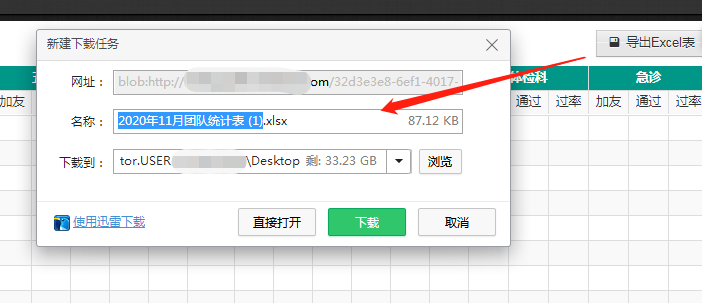
END

 浙公网安备 33010602011771号