


Session实现验证码
验证码
需求:
1.访问带有验证码的登录页面login.jsp
2.用户输入用户名,密码以及验证码
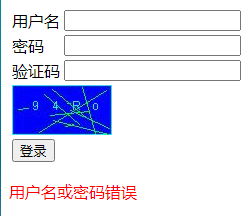
如果用户名和密码输入有误,跳转登录页面,提示:用户名或密码错误
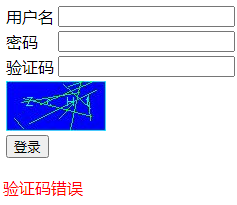
如果验证码输入有误,跳转登录页面,提示:验证码错误
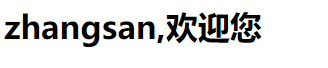
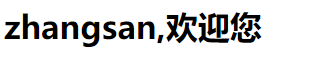
如果全部输入正确,则跳转到主页success.jsp,显示:用户名,欢迎您
分析:
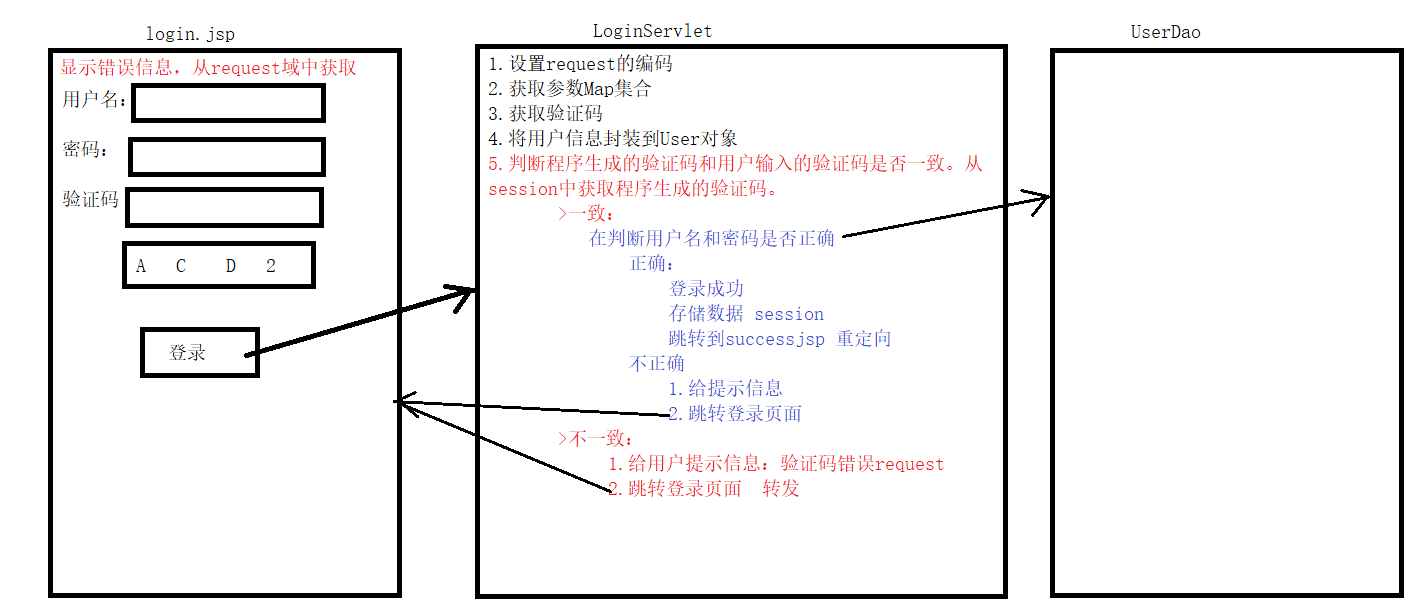
代码实现:
CheckCodeServlet:验证码
@WebServlet("/checkCodeServlet")
public class CheckCodeServlet extends HttpServlet {
    protected void doPost(HttpServletRequest request, HttpServletResponse response) throws ServletException, IOException {
        int width = 100;
        int height = 50;
        //创建一对象,在内存中图片(验证码图片对象)
        BufferedImage image = new BufferedImage(width,height,BufferedImage.TYPE_INT_RGB);
        //美化图片
        //1.填充背景色
        Graphics g = image.getGraphics();
        g.setColor(Color.blue);
        g.fillRect(0,0,width,height);
        //2.画边框
        g.setColor(Color.CYAN);
        g.drawRect(0,0,width-1,height-1);
        //写验证码
        //页面的页码数字
        String str = "ABCDEFGHIGKLMNOPQRSTUVWXYZabcdefghigklmnopqrstuvwxyz0123456789";
        //生成随机角标
        Random ran = new Random();
        StringBuilder sb = new StringBuilder();
        for (int i = 1; i <=4; i++) {
            int index = ran.nextInt(str.length());
            //获取字符
            char ch = str.charAt(index);//随机字符
            sb.append(ch);
            g.drawString(ch+"",width/5*i,height/2);
        }
        String checkCode_session = sb.toString();
        //将验证码存入session
        request.getSession().setAttribute("checkCode_session",checkCode_session);
        //画干扰线
        g.setColor(Color.green);
        //随机生成坐标点
        for (int i = 1; i <=10; i++) {
            int x1 = ran.nextInt(width);
            int x2 = ran.nextInt(width);

            int y1 = ran.nextInt(height);
            int y2 = ran.nextInt(height);
            g.drawLine(x1,y1,x2,y2);
        }

        //将图片输出到页面展示
        ImageIO.write(image,"jpg",response.getOutputStream());
    }

    protected void doGet(HttpServletRequest request, HttpServletResponse response) throws ServletException, IOException {
        this.doPost(request, response);
    }
}
LoginServlet:判断
@WebServlet("/loginServlet1")
public class LoginServlet extends HttpServlet {
    protected void doPost(HttpServletRequest request, HttpServletResponse response) throws ServletException, IOException {
        //设置request编码
        request.setCharacterEncoding("utf-8");
        //获取参数
        String username = request.getParameter("username");
        String password = request.getParameter("password");
        String checkCode = request.getParameter("checkCode");
        //先获取生成的验证码
        HttpSession session = request.getSession();
        String checkCode_session = (String) session.getAttribute("checkCode_session");
        //删除session中存储的验证码
        session.removeAttribute("checkCode_session");
        //先判断验证码是否正确
        if (checkCode_session!=null && checkCode_session.equalsIgnoreCase(checkCode)){
            //忽略大小写比较
            //验证码一致
            //写死账号:张三  密码:123
            if ("zhangsan".equals(username) && "123".equals(password)){
                //登录成功
                //存储信息,用户信息
                session.setAttribute("user",username);
                //重定向到success.jsp
                response.sendRedirect(request.getContextPath()+"/success.jsp");
            }else {
                //登录失败
                //存储提示信息到request
                request.setAttribute("login_error","用户名或密码错误");
                //转发到登录页面
                request.getRequestDispatcher("/login.jsp").forward(request,response);
            }


            //判断用户名和密码是否一致

        }else {
            //验证码不一致
            //存储提示信息到request
            request.setAttribute("cc_error","验证码错误");
            //转发到登录页面
            request.getRequestDispatcher("/login.jsp").forward(request,response);
        }


    }

    protected void doGet(HttpServletRequest request, HttpServletResponse response) throws ServletException, IOException {
        this.doPost(request, response);
    }
}
login.jsp:登录页面
<%@ page contentType="text/html;charset=UTF-8" language="java" %>
<html>
<head>
    <title>login</title>
    <script>
        window.onload = function () {
            document.getElementById("img").onclick = function () {
                var time = new Date().getTime();
                this.src = "/checkCodeServlet?time="+time;
            }
        }
    </script>
    <style>
        div{
            color: red;
        }
    </style>
</head>
<body>

    <form action="${pageContext.request.contextPath}/loginServlet1" method="post">
        <table>
            <tr>
                <td>用户名</td>
                <td><input type="text" name="username"></td>
            </tr>
            <tr>
                <td>密码</td>
                <td><input type="password" name="password"></td>
            </tr>
            <tr>
                <td>验证码</td>
                <td><input type="text" name="checkCode"></td>
            </tr>
            <tr>
                <td colspan="2"><img id="img" src="${pageContext.request.contextPath}/checkCodeServlet"></td>
            </tr>
            <tr>
                <td colspan="2"><input type="submit" value="登录"></td>
            </tr>
        </table>
    </form>
    <div>
        <%=request.getAttribute("cc_error") == null ? "" : request.getAttribute("cc_error")%>
    </div>

    <div>
        <%=request.getAttribute("login_error") == null ? "" : request.getAttribute("login_error")%>
    </div>

</body>
</html>
success.jsp登录成功页面
<%@ page contentType="text/html;charset=UTF-8" language="java" %>
<html>
<head>
    <title>Title</title>
</head>
<body>
    <h1><%=request.getSession().getAttribute("user")%>,欢迎您</h1>
</body>
</html>
登录成功

 浙公网安备 33010602011771号