

第一次结对作业-今日共同报告-07
第一次结对作业-今日共同报告
今天的合作任务:我和锁群都分别承担了一部分的前端优化和后端逻辑的实现,现在我们的地铁查询系统已经初具雏形,可以初步使用了。
今天的合作照:

今天的进度报告:
今天我和伙伴将我们的地铁查询系统前后端相结合,整个系统完善到可以使用了,界面也更加好看了。
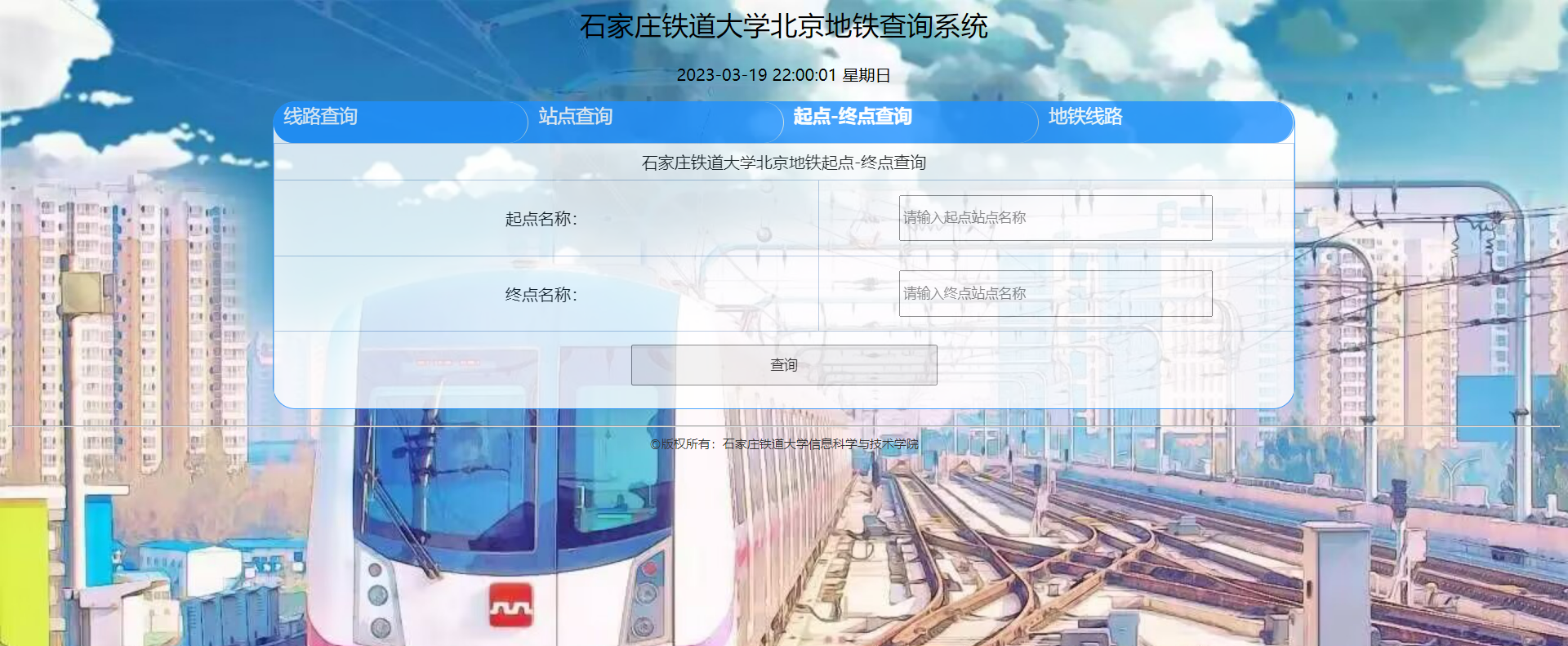
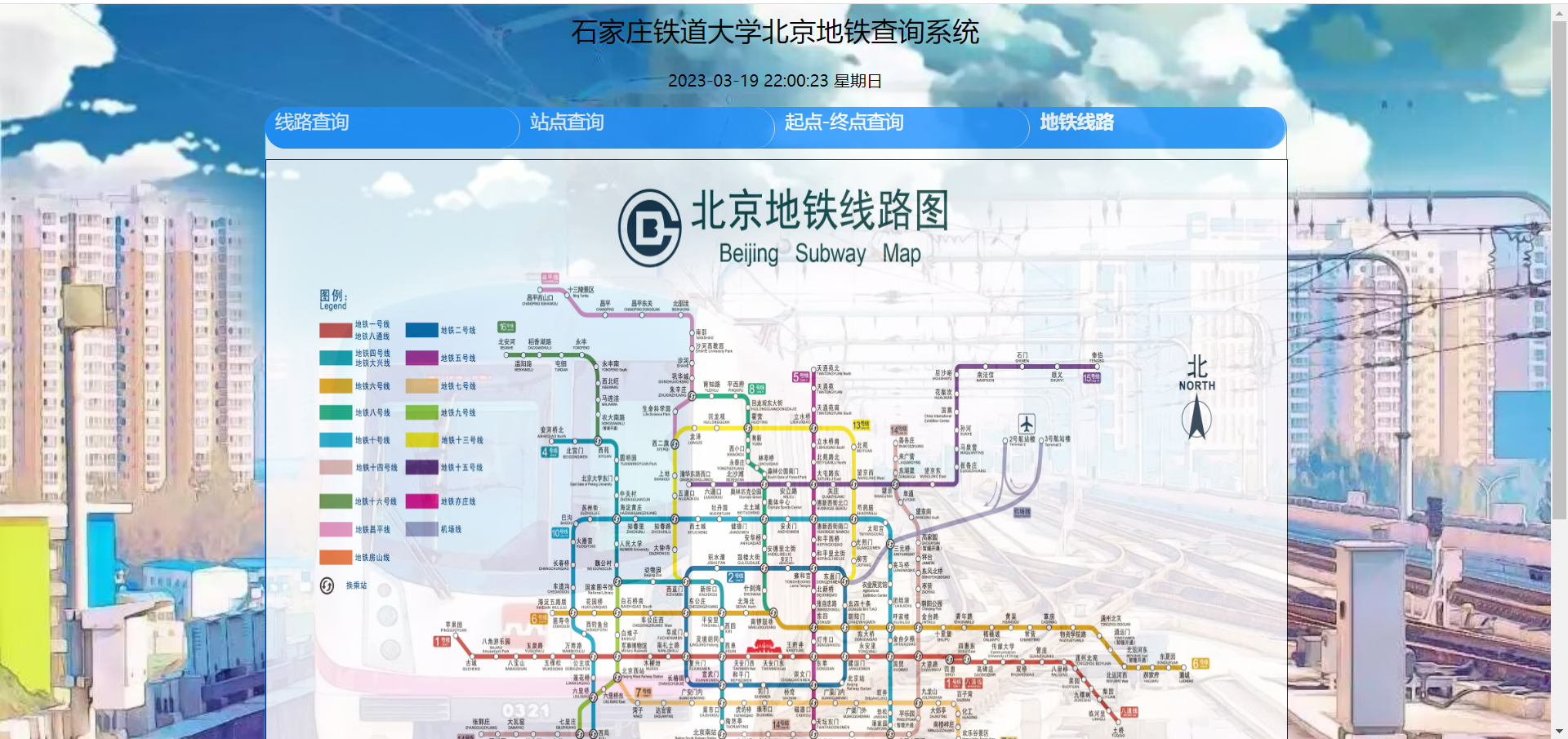
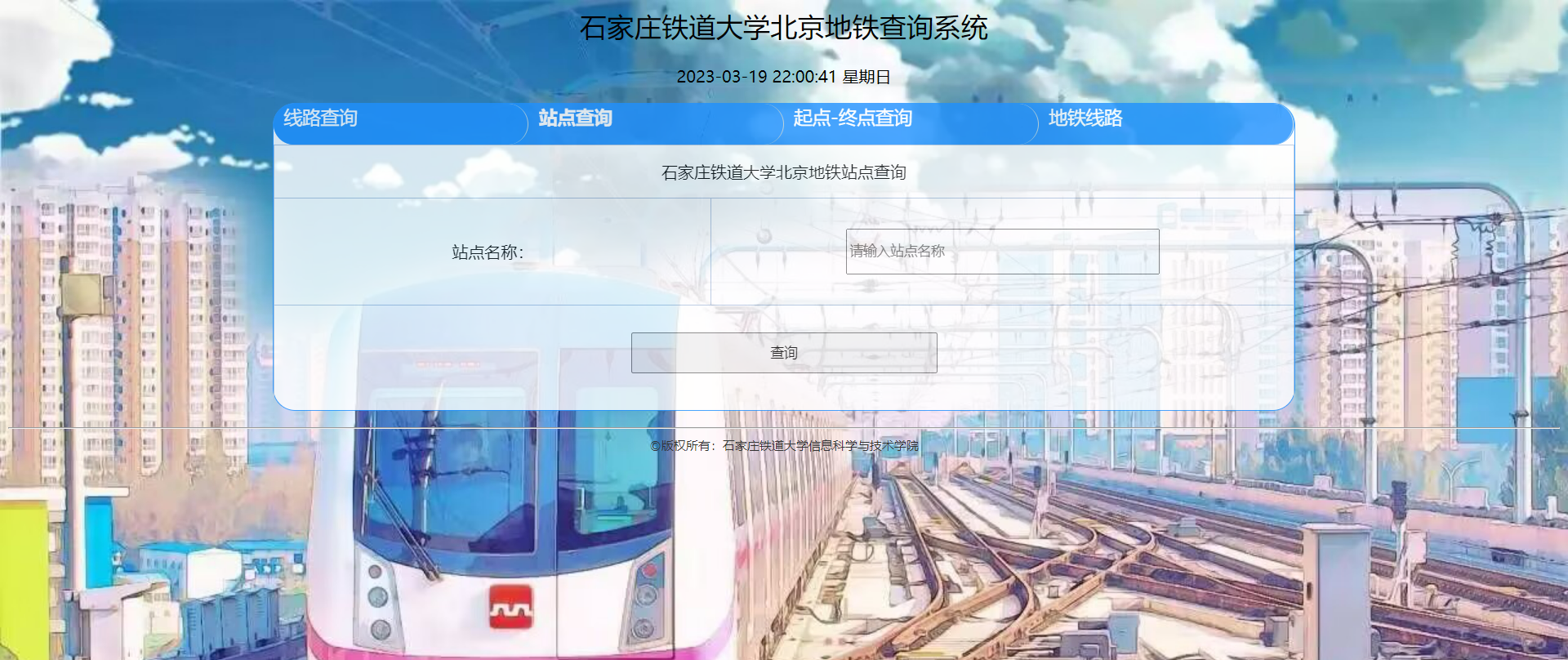
部分代码:
<%@ page language= "java" contentType= "text/html; charset=UTF-8"
pageEncoding= "UTF-8" %>
<!DOCTYPE html>
<html xmlns="http://www.w3.org/1999/html">
<%@page import="java.sql.*" %>
<head>
<title>石家庄铁道大学北京地铁查询系统</title>
<meta http-equiv="content-type" content="text/html; charset=UTF-8">
<link rel="stylesheet" href="css/style.css">
<script type="text/jscript">
//图片定时转换
var curIndex=0;
var timeInterval=2000;
var arr=new Array();
arr[0]="./images/p_14.jpg";
arr[1]="./images/p__15.jpg";
arr[2]="./images/p_16.jpg";
setInterval("changeImg()",timeInterval);
function changeImg(){
var obj=document.getElementById("obj");
if(curIndex==arr.length-1){
curIndex=0;
}else{
curIndex+=1;
}
obj.src=arr[curIndex];
}
//显示当前时间
function showLocale(objD) {
var str, colorhead, colorfoot;
var yy = objD.getYear();
if (yy < 1900)
yy = yy + 1900;
var MM = objD.getMonth() + 1;
if (MM < 10)
MM = '0' + MM;
var dd = objD.getDate();
if (dd < 10)
dd = '0' + dd;
var hh = objD.getHours();
if (hh < 10)
hh = '0' + hh;
var mm = objD.getMinutes();
if (mm < 10)
mm = '0' + mm;
var ss = objD.getSeconds();
if (ss < 10)
ss = '0' + ss;
var ww = objD.getDay();
colorhead = "<font color=\"#000000\">";
if (ww == 0)
ww = "星期日";
if (ww == 1)
ww = "星期一";
if (ww == 2)
ww = "星期二";
if (ww == 3)
ww = "星期三";
if (ww == 4)
ww = "星期四";
if (ww == 5)
ww = "星期五";
if (ww == 6)
ww = "星期六";
colorfoot = "</font>"
str = colorhead + yy + "-" + MM + "-" + dd + " " + hh + ":" + mm
+ ":" + ss + " " + ww + colorfoot;
return (str);
}
function tick() {
var today;
today = new Date();
document.getElementById("localtime").innerHTML = showLocale(today);
window.setTimeout("tick()", 1000);
}
window.onload = function() {
tick();
}
//显示tab(tabHeadId:tab头中当前的超链接;tabContentId要显示的层ID)
function showTab(tabHeadId,tabContentId)
{
//tab层
var tabDiv = document.getElementById("tabDiv");
//将tab层中所有的内容层设为不可见
//遍历tab层下的所有子节点
// var taContents = tabDiv.childNodes;
// for(i=0; i<taContents.length; i++)
// {
//将所有内容层都设为不可见
// if(taContents[i].id!=null && taContents[i].id != 'tabsHead')
// {
// taContents[i].style.display = 'none';
// }
//}
document.getElementById('tabContent1').style.display='none';
document.getElementById('tabContent2').style.display='none';
document.getElementById('tabContent3').style.display='none';
document.getElementById('tabContent4').style.display='none'
//将要显示的层设为可见
document.getElementById(tabContentId).style.display = 'block';
//遍历tab头中所有的超链接
var tabHeads = document.getElementById('tabsHead').getElementsByTagName('a');
for(i=0; i<tabHeads.length; i++)
{
//将超链接的样式设为未选的tab头样式
tabHeads[i].className='tabs';
}
//将当前超链接的样式设为已选tab头样式
document.getElementById(tabHeadId).className='curtab';
document.getElementById(tabHeadId).blur();
}
</script>
</head>
<body>
<div style="width: 100%; font-family: 微软雅黑; text-align: center; font-size: 20pt; ">石家庄铁道大学北京地铁查询系统</div><br/>
<div id="localtime" style="text-align: center;"></div>
<div id="tabDiv" style="width: 1000px;">
<div id="tabsHead" >
<a id="tabs1" class="curtab" style="height:40px;width:229px;" href="javascript:showTab('tabs1','tabContent1')">线路查询</a>
<a id="tabs2" class="tabs" style="height:40px;width:229px;" href="javascript:showTab('tabs2','tabContent2')">站点查询</a>
<a id="tabs3" class="tabs" style="height:40px;width:229px;" href="javascript:showTab('tabs3','tabContent3')">起点-终点查询</a>
<a id="tabs4" class="tabs" style="height:40px;width:229px;" href="javascript:showTab('tabs4','tabContent4')">地铁线路</a>
</div>
<div id="tabContent1" style="display: block">
<form action="SubwayLine">
<table style="border-width: 0; width: 100%">
<tr>
<table border="1" style="border-left-color: #B0C4DE; border-bottom-color: #B0C4DE; width: 100%;border-top-style: solid; border-top-color: #B0C4DE; border-right-style: solid; border-left-style: solid; height: 250px; border-right-color: #B0C4DE; border-bottom-style: hidden">
<tr align="center"><td align="center" colspan="2">石家庄铁道大学北京地铁线路查询</td></tr>
<tr><td style="width: 30%" align="center">线路名称:</td><td style="width: 70%" align="center"> <select name="line" style="height:40px;width:300px;">
<option value="地铁1号线">地铁1号线</option>
<option value="地铁2号线">地铁2号线</option>
<option value="地铁4号线">地铁4号线</option>
<option value="地铁5号线">地铁5号线</option>
<option value="地铁6号线">地铁6号线</option>
<option value="地铁7号线">地铁7号线</option>
<option value="地铁8号线">地铁8号线</option>
<option value="地铁9号线">地铁9号线</option>
<option value="地铁10号线">地铁10号线</option>
<option value="地铁13号线">地铁13号线</option>
<option value="地铁14号线">地铁14号线</option>
<option value="地铁15号线">地铁15号线</option>
<option value="地铁房山线">地铁房山线</option>
<option value="地铁昌平线">地铁昌平线</option>
<option value="地铁亦庄线">地铁亦庄线</option>
<option value="机场线">机场线</option>
</select></td></tr>
<tr> <td style="width: 50%" align="center" colspan="2"><input type="submit" style="height:40px;width:300px;" value="查询"/><!--提交 value内的内容是按键内内容--></td>
</tr>
</table>
</td>
</tr>
<tr>
</tr>
<tr>
</tr>
</table>
</form>
</div>
<div id="tabContent2" style="display: none">
<form action="SubwayStation">
<table border="1" style="border-left-color: #B0C4DE; border-bottom-color: #B0C4DE; width: 100%;border-top-style: solid; border-top-color: #B0C4DE; border-right-style: solid; border-left-style: solid; height: 250px; border-right-color: #B0C4DE; border-bottom-style: hidden">
<tr align="center"><td align="center" colspan="2">石家庄铁道大学北京地铁站点查询</td></tr>
<tr><td style="width: 30%" align="center">站点名称:</td><td align="center"> <input type="text" style="height:40px;width:300px;" placeholder="请输入站点名称" name="name"/></td></tr>
<tr> <td style="width: 70%" align="center" colspan="2"><input type="submit" style="height:40px;width:300px;" value="查询"/><!--提交 value内的内容是按键内内容--></td>
</tr>
</table>
</form>
</div>
<div id="tabContent3" style="display: none;text-align:center">
<form action="SubwayMain" method="POST">
<table border="1" style="border-left-color: #B0C4DE; border-bottom-color: #B0C4DE; width: 100%;border-top-style: solid; border-top-color: #B0C4DE; border-right-style: solid; border-left-style: solid; height: 250px; border-right-color: #B0C4DE; border-bottom-style: hidden">
<tr align="center"><td align="center" colspan="2">石家庄铁道大学北京地铁起点-终点查询</td></tr>
<tr><td style="width: 30%" align="center" >起点名称:</td><td> <input type="text" style="height:40px;width:300px;" placeholder="请输入起点站点名称" name="start_station"/></td></tr>
<tr><td style="width: 30%" align="center">终点名称:</td><td> <input type="text" style="height:40px;width:300px;" placeholder="请输入终点站点名称" name="end_station"/></td></tr>
<tr> <td style="width: 50%" align="center" colspan="2"><input type="submit" style="height:40px;width:300px;" value="查询"/><!--提交 value内的内容是按键内内容--></td>
</tr>
</table>
</form>
</div>
<div id="tabContent4" style="display: none;text-align:center;">
<img id="obj" src="./images/p_14.jpg" height="800" width="1000" border="1" style="margin-top:10px;" />
</div>
</div>
<hr />
<div style="text-align: center; width: 100%; font-size: 12px; color: #333;">©版权所有:石家庄铁道大学信息科学与技术学院</div>
</body>
</html>
<%@ page language= "java" contentType= "text/html; charset=UTF-8"
pageEncoding= "UTF-8" %>
<!DOCTYPE html>
<html xmlns="http://www.w3.org/1999/html">
<head>
<title>石家庄铁道大学北京地铁查询系统</title>
<meta http-equiv="content-type" content="text/html; charset=UTF-8">
<link rel="stylesheet" href="css/style.css">
<script type="text/jscript">
//图片定时转换
var curIndex=0;
var timeInterval=2000;
var arr=new Array();
arr[0]="./images/p_14.jpg";
arr[1]="./images/p__15.jpg";
arr[2]="./images/p_16.jpg";
setInterval("changeImg()",timeInterval);
function changeImg(){
var obj=document.getElementById("obj");
if(curIndex==arr.length-1){
curIndex=0;
}else{
curIndex+=1;
}
obj.src=arr[curIndex];
}
//显示当前时间
function showLocale(objD) {
var str, colorhead, colorfoot;
var yy = objD.getYear();
if (yy < 1900)
yy = yy + 1900;
var MM = objD.getMonth() + 1;
if (MM < 10)
MM = '0' + MM;
var dd = objD.getDate();
if (dd < 10)
dd = '0' + dd;
var hh = objD.getHours();
if (hh < 10)
hh = '0' + hh;
var mm = objD.getMinutes();
if (mm < 10)
mm = '0' + mm;
var ss = objD.getSeconds();
if (ss < 10)
ss = '0' + ss;
var ww = objD.getDay();
colorhead = "<font color=\"#000000\">";
if (ww == 0)
ww = "星期日";
if (ww == 1)
ww = "星期一";
if (ww == 2)
ww = "星期二";
if (ww == 3)
ww = "星期三";
if (ww == 4)
ww = "星期四";
if (ww == 5)
ww = "星期五";
if (ww == 6)
ww = "星期六";
colorfoot = "</font>"
str = colorhead + yy + "-" + MM + "-" + dd + " " + hh + ":" + mm
+ ":" + ss + " " + ww + colorfoot;
return (str);
}
function tick() {
var today;
today = new Date();
document.getElementById("localtime").innerHTML = showLocale(today);
window.setTimeout("tick()", 1000);
}
window.onload = function() {
tick();
}
//显示tab(tabHeadId:tab头中当前的超链接;tabContentId要显示的层ID)
function showTab(tabHeadId,tabContentId)
{
//tab层
var tabDiv = document.getElementById("tabDiv");
//将tab层中所有的内容层设为不可见
//遍历tab层下的所有子节点
// var taContents = tabDiv.childNodes;
// for(i=0; i<taContents.length; i++)
// {
//将所有内容层都设为不可见
// if(taContents[i].id!=null && taContents[i].id != 'tabsHead')
// {
// taContents[i].style.display = 'none';
// }
//}
document.getElementById('tabContent1').style.display='none';
document.getElementById('tabContent2').style.display='none';
document.getElementById('tabContent3').style.display='none';
document.getElementById('tabContent4').style.display='none'
//将要显示的层设为可见
document.getElementById(tabContentId).style.display = 'block';
//遍历tab头中所有的超链接
var tabHeads = document.getElementById('tabsHead').getElementsByTagName('a');
for(i=0; i<tabHeads.length; i++)
{
//将超链接的样式设为未选的tab头样式
tabHeads[i].className='tabs';
}
//将当前超链接的样式设为已选tab头样式
document.getElementById(tabHeadId).className='curtab';
document.getElementById(tabHeadId).blur();
}
</script>
</head>
<body>
<div style="width: 100%; font-family: 微软雅黑; text-align: center; font-size: 20pt; ">石家庄铁道大学北京地铁查询系统</div><br/>
<div id="localtime" style="text-align: center;"></div>
<div id="tabDiv" style="width: 1000px">
<div id="tabsHead">
<a id="tabs1" class="curtab" href="javascript:showTab('tabs1','tabContent1')">线路规划查询结果</a>
</div>
<div id="tabContent1" style="display: block">
<form action="lineresult.jsp">
<table style="border-width: 0; width: 100%">
<tr>
<table border="1" style="border-left-color: #B0C4DE; border-bottom-color: #B0C4DE; width: 100%;border-top-style: solid; border-top-color: #B0C4DE; border-right-style: solid; border-left-style: solid; height: 250px; border-right-color: #B0C4DE; border-bottom-style: hidden">
<tr align="center"><td align="center" colspan="1">最优规划查询结果</td></tr>
<tr>
<td align="center" colspan="2">
<%response.setContentType("text/html;charset=UTF-8");
String s =(String)request.getAttribute("routeMain");
out.println(s);%>
</td>
</tr>
</table>
</td>
</tr>
<tr>
</tr>
<tr>
</tr>
</table>
</form>
</div>
</div>
<hr />
<div style="text-align: center; width: 100%; font-size: 12px; color: #333;">©版权所有:石家庄铁道大学信息科学与技术学院</div>
</body>
</html>
@charset "UTF-8";
body{
    background-image: url(../images/p13.jpg);
    background-size: cover;
}
table {
    border-collapse: collapse;
    border-spacing: 0;
}
.btn{

    width:200px;

    height:50px;

    border-radius: 25px;
}
a {
    color: #fFF;
    margin-top: 0px;
    text-decoration: none;
    font-size: 18px;
    display: block;

}

a:hover {
    color: #fff;
    text-decoration: underline;
    font-size: 18px;
}

a:visited {
    color: #fff;
    font-size: 18px;
}
/*整个tab层居中,宽度为600px*/
#tabDiv {
    width: 600px;
    margin: 1em auto;
    padding-bottom: 10px;
    border-right:     #1E90FF 1px solid;
    border-top:     #1E90FF 1px solid;
    border-left:     #1E90FF 1px solid;
    border-bottom:     #1E90FF 1px solid;
    background-color: #ffffff;
    border-radius: 22px;
    opacity:0.8;
}
/*tab头的样式*/
#tabsHead {
    padding-left: 0px;
    height: 40px;
    background-color: #1E90FF;
    font-size: 1em;
    margin: 0px 0px 0px;
    color:     #1E90FF;
    line-height: 26px;
    border-radius: 20px;
}
/*已选tab头(超链接)的样式*/
.curtab {
    padding-top: 0px;
    padding-right: 10px;
    padding-bottom: 0px;
    padding-left: 10px;
    border-right: #b2c9d3 1px solid;
    font-weight: bold;
    float: left;
    cursor: pointer;
    background: #1E90FF;
    border-radius: 20px;
}
/*未选tab头(超链接)的样式*/
.tabs {
    border-right: #c1d8e0 1px solid;
    padding-top: 0px;
    padding-right: 10px;
    padding-bottom: 0px;
    padding-left: 10px;
    font-weight: normal;
    float: left;
    cursor: pointer;
    background: #1E90FF;
    border-radius: 20px;
}
p {
    font-size: 12pt;
    font-family: 华文楷体;

}
li {
    border-bottom-style: solid;
    border-bottom-color: #EEE;
    border-bottom-width: thin;
    height: 25px;
    font-family: "宋体";
    font-size: 12pt;

}
package main;

import com.BaseBean;
import com.DB;
import dao.Sub;

import javax.servlet.ServletException;
import javax.servlet.annotation.WebServlet;
import javax.servlet.http.HttpServlet;
import javax.servlet.http.HttpServletRequest;
import javax.servlet.http.HttpServletResponse;
import java.io.IOException;
import java.io.PrintWriter;
import java.sql.SQLException;
import java.util.ArrayList;

//线路查询
@WebServlet("/SubwayLine")
public class SubwayLine extends HttpServlet {

    protected void doGet(HttpServletRequest req, HttpServletResponse resp) throws ServletException, IOException{

        resp.setContentType("text/html;charset=UTF-8");
        PrintWriter out = resp.getWriter();

        String select =  req.getParameter("line");

        DB db = new DB();
        Sub sub = new Sub();
        switch (select){
            case "地铁1号线":
                String l1 = sub.StationLine("1");
                req.setAttribute("routeLine", l1);
                req.getRequestDispatcher("/lineresult.jsp").forward(req, resp);
                break;
            case "地铁2号线":
                String l2 = sub.StationLine("2");
                req.setAttribute("routeLine", l2);
                req.getRequestDispatcher("/lineresult.jsp").forward(req, resp);
                break;
            default:
                String def = "此线路不存在或尚未录入数据库";
                req.setAttribute("routeLine", def);
                req.getRequestDispatcher("/lineresult.jsp").forward(req, resp);
                break;
        }
    }
    @Override
    protected void doPost(HttpServletRequest req, HttpServletResponse resp) throws ServletException, IOException {
        doGet(req, resp);
    }
    @Override
    public void init() throws ServletException {
    }
    @Override
    public void destroy() {

    }
}

 浙公网安备 33010602011771号