
MiniExcel导出导入

读/导入 Excel
1. Query 查询 Excel 返回强型别 IEnumerable 数据 [Try it]
public class UserAccount
{
    public Guid ID { get; set; }
    public string Name { get; set; }
    public DateTime BoD { get; set; }
    public int Age { get; set; }
    public bool VIP { get; set; }
    public decimal Points { get; set; }
}

var rows = MiniExcel.Query<UserAccount>(path);

// or

using (var stream = File.OpenRead(path))
    var rows = stream.Query<UserAccount>();

2. Query 查询 Excel 返回Dynamic IEnumerable 数据 [Try it]
- Key 系统预设为
A,B,C,D...Z
| MiniExcel | 1 |
|---|---|
| Github | 2 |
var rows = MiniExcel.Query(path).ToList();

// or
using (var stream = File.OpenRead(path))
{
    var rows = stream.Query().ToList();

    Assert.Equal("MiniExcel", rows[0].A);
    Assert.Equal(1, rows[0].B);
    Assert.Equal("Github", rows[1].A);
    Assert.Equal(2, rows[1].B);
}
3. 查询数据以第一行数据当Key [Try it]
注意 : 同名以右边数据为准
Input Excel :
| Column1 | Column2 |
|---|---|
| MiniExcel | 1 |
| Github | 2 |
var rows = MiniExcel.Query(useHeaderRow:true).ToList();

// or

using (var stream = File.OpenRead(path))
{
    var rows = stream.Query(useHeaderRow:true).ToList();

    Assert.Equal("MiniExcel", rows[0].Column1);
    Assert.Equal(1, rows[0].Column2);
    Assert.Equal("Github", rows[1].Column1);
    Assert.Equal(2, rows[1].Column2);
}
4. Query 查询支援延迟加载(Deferred Execution),能配合LINQ First/Take/Skip办到低消耗、高效率复杂查询
举例 : 查询第一笔数据
var row = MiniExcel.Query(path).First();
Assert.Equal("HelloWorld", row.A);

// or

using (var stream = File.OpenRead(path))
{
    var row = stream.Query().First();
    Assert.Equal("HelloWorld", row.A);
}
与其他框架效率比较 :

5. 查询指定 Sheet 名称
MiniExcel.Query(path, sheetName: "SheetName");
//or
stream.Query(sheetName: "SheetName");
6. 查询所有 Sheet 名称跟数据
var sheetNames = MiniExcel.GetSheetNames(path);
foreach (var sheetName in sheetNames)
{
    var rows = MiniExcel.Query(path, sheetName: sheetName);
}
7. 查询所有栏(列)
var columns = MiniExcel.GetColumns(path); // e.g result : ["A","B"...]

or

var columns = MiniExcel.GetColumns(path, useHeaderRow: true);
// e.g result : ["excel表实际的列名称","excel表实际的列名称"...]

var cnt = columns.Count;  // get column count
8. Dynamic Query 转成 IDictionary<string,object> 数据
foreach(IDictionary<string,object> row in MiniExcel.Query(path))
{
    //..
}

// or
var rows = MiniExcel.Query(path).Cast<IDictionary<string,object>>();
9. Query 读 Excel 返回 DataTable
提醒 : 不建议使用,因为DataTable会将数据全载入内存,失去MiniExcel低内存消耗功能。
var table = MiniExcel.QueryAsDataTable(path, useHeaderRow: true);

10. 指定单元格开始读取数据
MiniExcel.Query(path,useHeaderRow:true,startCell:"B3")

11. 合并的单元格填充
注意 : 效率相对于没有使用合并填充来说差
底层原因 : OpenXml 标准将 mergeCells 放在文件最下方,导致需要遍历两次 sheetxml
	var config = new OpenXmlConfiguration()
	{
		FillMergedCells = true
	};
	var rows = MiniExcel.Query(path, configuration: config);

支持不固定长宽多行列填充

12. 读取大文件硬盘缓存 (Disk-Base Cache - SharedString)
概念 : MiniExcel 当判断文件 SharedString 大小超过 5MB,预设会使用本地缓存,如 10x100000.xlsx(一百万笔数据),读取不开启本地缓存需要最高内存使用约195MB,开启后降为65MB。但要特别注意,此优化是以时间换取内存减少,所以读取效率会变慢,此例子读取时间从 7.4 秒提高到 27.2 秒,假如不需要能用以下代码关闭硬盘缓存
var config = new OpenXmlConfiguration { EnableSharedStringCache = false };
MiniExcel.Query(path,configuration: config)
也能使用 SharedStringCacheSize 调整 sharedString 文件大小超过指定大小才做硬盘缓存
var config = new OpenXmlConfiguration { SharedStringCacheSize=500*1024*1024 };
MiniExcel.Query(path, configuration: config);


写/导出 Excel
- 必须是非abstract 类别有公开无参数构造函数
- MiniExcel SaveAs 支援
IEnumerable参数延迟查询,除非必要请不要使用 ToList 等方法读取全部数据到内存
图片 : 是否呼叫 ToList 的内存差别
![image]() 1. 支持集合<匿名类别>或是<强型别> [Try it]
1. 支持集合<匿名类别>或是<强型别> [Try it]
 1. 支持集合<匿名类别>或是<强型别>
 var path = Path.Combine(Path.GetTempPath(), $"{Guid.NewGuid()}.xlsx");
MiniExcel.SaveAs(path, new[] {
new { Column1 = "MiniExcel", Column2 = 1 },
new { Column1 = "Github", Column2 = 2}
});
2. IEnumerable<IDictionary<string, object>>
var values = new List<Dictionary<string, object>>()
{
    new Dictionary<string,object>{{ "Column1", "MiniExcel" }, { "Column2", 1 } },
    new Dictionary<string,object>{{ "Column1", "Github" }, { "Column2", 2 } }
};
MiniExcel.SaveAs(path, values);
output :
| Column1 | Column2 |
|---|---|
| MiniExcel | 1 |
| Github | 2 |
3. IDataReader
- 推荐使用,可以避免载入全部数据到内存
MiniExcel.SaveAs(path, reader);
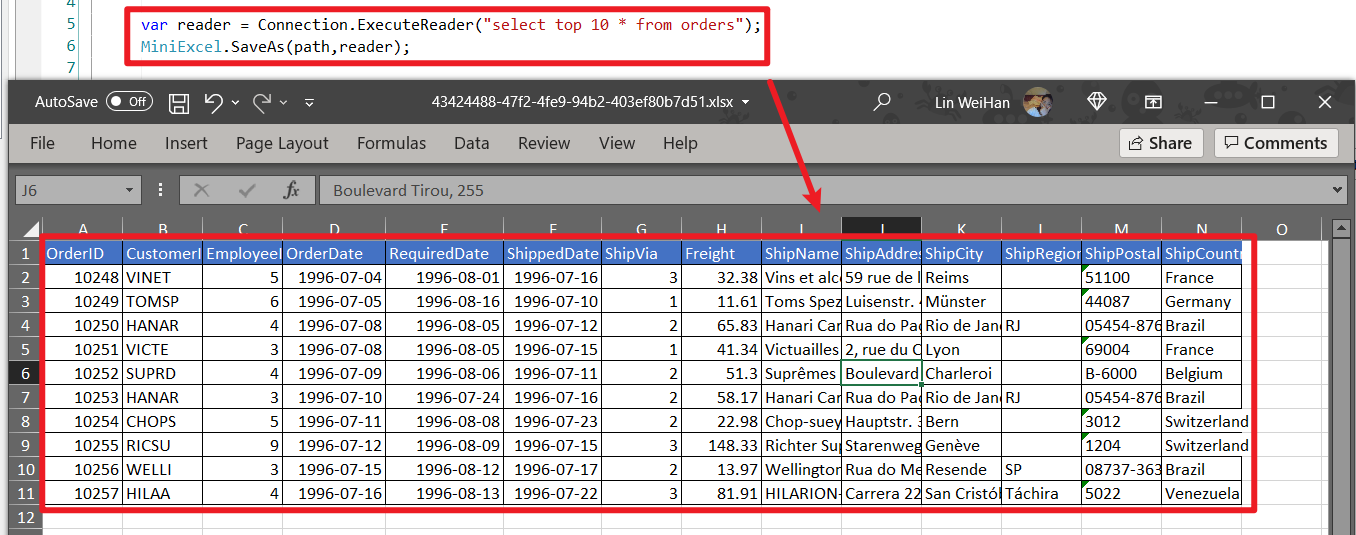
推荐 DataReader 多表格导出方式(建议使用 Dapper ExecuteReader )
using (var cnn = Connection)
{
    cnn.Open();
    var sheets = new Dictionary<string,object>();
    sheets.Add("sheet1", cnn.ExecuteReader("select 1 id"));
    sheets.Add("sheet2", cnn.ExecuteReader("select 2 id"));
    MiniExcel.SaveAs("Demo.xlsx", sheets);
}
4. Datatable
- 不推荐使用,会将数据全载入内存
- 优先使用 Caption 当栏位名称
var path = Path.Combine(Path.GetTempPath(), $"{Guid.NewGuid()}.xlsx");
var table = new DataTable();
{
    table.Columns.Add("Column1", typeof(string));
    table.Columns.Add("Column2", typeof(decimal));
    table.Rows.Add("MiniExcel", 1);
    table.Rows.Add("Github", 2);
}

MiniExcel.SaveAs(path, table);
5. Dapper Query
感谢 @shaofing #552 更正,低内存请使用 CommandDefinition + CommandFlags.NoCache,如下
using (var connection = GetConnection(connectionString))
{
    var rows = connection.Query(
        new CommandDefinition(
            @"select 'MiniExcel' as Column1,1 as Column2 union all select 'Github',2"
            , flags: CommandFlags.NoCache)
        );
    MiniExcel.SaveAs(path, rows);
}
上面的方法已知的问题:不能使用异步QueryAsync的方法,会报连接已经关闭的异常
以下写法会将数据全载入内存
using (var connection = GetConnection(connectionString))
{
    var rows = connection.Query(@"select 'MiniExcel' as Column1,1 as Column2 union all select 'Github',2");
    MiniExcel.SaveAs(path, rows);
}
6. SaveAs 支持 Stream,生成文件不落地 [Try it]
using (var stream = new MemoryStream()) //支持 FileStream,MemoryStream..等
{
    stream.SaveAs(values);
}
像是 API 导出 Excel
public IActionResult DownloadExcel()
{
    var values = new[] {
        new { Column1 = "MiniExcel", Column2 = 1 },
        new { Column1 = "Github", Column2 = 2}
    };

    var memoryStream = new MemoryStream();
    memoryStream.SaveAs(values);
    memoryStream.Seek(0, SeekOrigin.Begin);
    return new FileStreamResult(memoryStream, "application/vnd.openxmlformats-officedocument.spreadsheetml.sheet")
    {
        FileDownloadName = "demo.xlsx"
    };
}
7. 创建多个工作表(Sheet)
// 1. Dictionary<string,object>
var users = new[] { new { Name = "Jack", Age = 25 }, new { Name = "Mike", Age = 44 } };
var department = new[] { new { ID = "01", Name = "HR" }, new { ID = "02", Name = "IT" } };
var sheets = new Dictionary<string, object>
{
    ["users"] = users,
    ["department"] = department
};
MiniExcel.SaveAs(path, sheets);

// 2. DataSet
var sheets = new DataSet();
sheets.Add(UsersDataTable);
sheets.Add(DepartmentDataTable);
//..
MiniExcel.SaveAs(path, sheets);

8. 表格样式选择
预设样式为
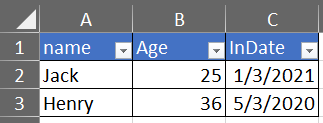
不需要样式
var config = new OpenXmlConfiguration()
{
    TableStyles = TableStyles.None
};
MiniExcel.SaveAs(path, value,configuration:config);

9. AutoFilter 筛选
从 0.19.0 支持,可藉由 OpenXmlConfiguration.AutoFilter 设定,预设为True。关闭 AutoFilter 方式 :
MiniExcel.SaveAs(path, value, configuration: new OpenXmlConfiguration() { AutoFilter = false });
10. 图片生成
注意 : 目前此功能不支持避免OOM
var value = new[] {
    new { Name="github",Image=File.ReadAllBytes(PathHelper.GetFile("images/github_logo.png"))},
    new { Name="google",Image=File.ReadAllBytes(PathHelper.GetFile("images/google_logo.png"))},
    new { Name="microsoft",Image=File.ReadAllBytes(PathHelper.GetFile("images/microsoft_logo.png"))},
    new { Name="reddit",Image=File.ReadAllBytes(PathHelper.GetFile("images/reddit_logo.png"))},
    new { Name="statck_overflow",Image=File.ReadAllBytes(PathHelper.GetFile("images/statck_overflow_logo.png"))},
};
MiniExcel.SaveAs(path, value);

11. Byte Array 文件导出
从 1.22.0 开始,当值类型为 byte[] 系统预设会转成保存文件路径以便导入时转回 byte[],如不想转换可以将 OpenXmlConfiguration.EnableConvertByteArray 改为 false,能提升系统效率。

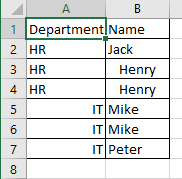
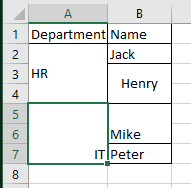
12. 垂直合并相同的单元格
只支持 xlsx 格式合并单元格
var mergedFilePath = Path.Combine(Path.GetTempPath(), $"{Guid.NewGuid().ToString()}.xlsx");

var path = @"../../../../../samples/xlsx/TestMergeSameCells.xlsx";

MiniExcel.MergeSameCells(mergedFilePath, path);
var memoryStream = new MemoryStream();

var path = @"../../../../../samples/xlsx/TestMergeSameCells.xlsx";

memoryStream.MergeSameCells(path);
合并前后对比
13. 是否写入 null values cell
预设:
DataTable dt = new DataTable();

/* ... */

DataRow dr = dt.NewRow();

dr["Name1"] = "Somebody once";
dr["Name2"] = null;
dr["Name3"] = "told me.";

dt.Rows.Add(dr);

MiniExcel.SaveAs(@"C:\temp\Book1.xlsx", dt);
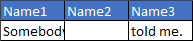
<x:row r="2">
    <x:c r="A2" t ="str" s="2">
        <x:v>Somebody once</x:v>
    </x:c>
    <x:c r="B2" t ="str" s="2">
        <x:v></x:v>
    </x:c>
    <x:c r="C2" t ="str" s="2">
        <x:v>told me.</x:v>
    </x:c>
</x:row>
设定不写入:
OpenXmlConfiguration configuration = new OpenXmlConfiguration()
{
     EnableWriteNullValueCell = false // Default value is true.
};

MiniExcel.SaveAs(@"C:\temp\Book1.xlsx", dt, configuration: configuration);
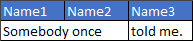
<x:row r="2">
    <x:c r="A2" t ="str" s="2">
        <x:v>Somebody once</x:v>
    </x:c>
    <x:c r="B2" s="2"></x:c>
    <x:c r="C2" t ="str" s="2">
        <x:v>told me.</x:v>
    </x:c>
</x:row>
模板填充 Excel
- 宣告方式类似 Vue 模板
{{变量名称}}, 或是集合渲染{{集合名称.栏位名称}} - 集合渲染支持 IEnumerable/DataTable/DapperRow
1. 基本填充
模板:

最终效果:

代码:
// 1. By POCO
var value = new
{
    Name = "Jack",
    CreateDate = new DateTime(2021, 01, 01),
    VIP = true,
    Points = 123
};
MiniExcel.SaveAsByTemplate(path, templatePath, value);


// 2. By Dictionary
var value = new Dictionary<string, object>()
{
    ["Name"] = "Jack",
    ["CreateDate"] = new DateTime(2021, 01, 01),
    ["VIP"] = true,
    ["Points"] = 123
};
MiniExcel.SaveAsByTemplate(path, templatePath, value);
2. IEnumerable 数据填充
Note1: 同行从左往右以第一个 IEnumerableUse 当列表来源 (不支持同列多集合)
模板:

最终效果:

代码:
//1. By POCO
var value = new
{
    employees = new[] {
        new {name="Jack",department="HR"},
        new {name="Lisa",department="HR"},
        new {name="John",department="HR"},
        new {name="Mike",department="IT"},
        new {name="Neo",department="IT"},
        new {name="Loan",department="IT"}
    }
};
MiniExcel.SaveAsByTemplate(path, templatePath, value);

//2. By Dictionary
var value = new Dictionary<string, object>()
{
    ["employees"] = new[] {
        new {name="Jack",department="HR"},
        new {name="Lisa",department="HR"},
        new {name="John",department="HR"},
        new {name="Mike",department="IT"},
        new {name="Neo",department="IT"},
        new {name="Loan",department="IT"}
    }
};
MiniExcel.SaveAsByTemplate(path, templatePath, value);
3. 复杂数据填充
Note: 支持多 sheet 填充,并共用同一组参数
模板:

最终效果:

代码:
// 1. By POCO
var value = new
{
    title = "FooCompany",
    managers = new[] {
        new {name="Jack",department="HR"},
        new {name="Loan",department="IT"}
    },
    employees = new[] {
        new {name="Wade",department="HR"},
        new {name="Felix",department="HR"},
        new {name="Eric",department="IT"},
        new {name="Keaton",department="IT"}
    }
};
MiniExcel.SaveAsByTemplate(path, templatePath, value);

// 2. By Dictionary
var value = new Dictionary<string, object>()
{
    ["title"] = "FooCompany",
    ["managers"] = new[] {
        new {name="Jack",department="HR"},
        new {name="Loan",department="IT"}
    },
    ["employees"] = new[] {
        new {name="Wade",department="HR"},
        new {name="Felix",department="HR"},
        new {name="Eric",department="IT"},
        new {name="Keaton",department="IT"}
    }
};
MiniExcel.SaveAsByTemplate(path, templatePath, value);
4. 大数据填充效率比较
NOTE: 在 MiniExcel 使用 IEnumerable 延迟 ( 不ToList ) 可以节省内存使用

5. Cell 值自动类别对应
模板

最终效果

类别
public class Poco
{
    public string @string { get; set; }
    public int? @int { get; set; }
    public decimal? @decimal { get; set; }
    public double? @double { get; set; }
    public DateTime? datetime { get; set; }
    public bool? @bool { get; set; }
    public Guid? Guid { get; set; }
}
代码
var poco = new TestIEnumerableTypePoco { @string = "string", @int = 123, @decimal = decimal.Parse("123.45"), @double = (double)123.33, @datetime = new DateTime(2021, 4, 1), @bool = true, @Guid = Guid.NewGuid() };
var value = new
{
    Ts = new[] {
        poco,
        new TestIEnumerableTypePoco{},
        null,
        poco
    }
};
MiniExcel.SaveAsByTemplate(path, templatePath, value);
6. Example : 列出 Github 专案
模板

最终效果

代码
var projects = new[]
{
    new {Name = "MiniExcel",Link="https://github.com/shps951023/MiniExcel",Star=146, CreateTime=new DateTime(2021,03,01)},
    new {Name = "HtmlTableHelper",Link="https://github.com/shps951023/HtmlTableHelper",Star=16, CreateTime=new DateTime(2020,02,01)},
    new {Name = "PocoClassGenerator",Link="https://github.com/shps951023/PocoClassGenerator",Star=16, CreateTime=new DateTime(2019,03,17)}
};
var value = new
{
    User = "ITWeiHan",
    Projects = projects,
    TotalStar = projects.Sum(s => s.Star)
};
MiniExcel.SaveAsByTemplate(path, templatePath, value);
7. 分组数据填充
var value = new Dictionary<string, object>()
{
    ["employees"] = new[] {
        new {name="Jack",department="HR"},
        new {name="Jack",department="HR"},
        new {name="John",department="HR"},
        new {name="John",department="IT"},
        new {name="Neo",department="IT"},
        new {name="Loan",department="IT"}
    }
};
MiniExcel.SaveAsByTemplate(path, templatePath, value);
1. 使用@group tag 和 @header` tag
Before

After

2. 使用 @group tag 没有 @header tag
Before

After

3. 没有 @group tag
Before

After

8. DataTable 当参数
var managers = new DataTable();
{
    managers.Columns.Add("name");
    managers.Columns.Add("department");
    managers.Rows.Add("Jack", "HR");
    managers.Rows.Add("Loan", "IT");
}
var value = new Dictionary<string, object>()
{
    ["title"] = "FooCompany",
    ["managers"] = managers,
};
MiniExcel.SaveAsByTemplate(path, templatePath, value);
9. 其他
1. 检查模版参数
从 V1.24.0 版本开始,预设忽略模版不存在的参数Key,IgnoreTemplateParameterMissing 可以决定是否抛出错误
var config = new OpenXmlConfiguration()
{
    IgnoreTemplateParameterMissing = false,
};
MiniExcel.SaveAsByTemplate(path, templatePath, value, config)

Excel 列属性 (Excel Column Attribute)
1. 指定列名称、指定第几列、是否忽略该列
Excel例子

代码
public class ExcelAttributeDemo
{
    [ExcelColumnName("Column1")]
    public string Test1 { get; set; }
    [ExcelColumnName("Column2")]
    public string Test2 { get; set; }
    [ExcelIgnore]
    public string Test3 { get; set; }
    [ExcelColumnIndex("I")] // 系统会自动转换"I"为第8列
    public string Test4 { get; set; }
    public string Test5 { get; } //系统会忽略此列
    public string Test6 { get; private set; } //set非公开,系统会忽略
    [ExcelColumnIndex(3)] // 从0开始索引
    public string Test7 { get; set; }
}

var rows = MiniExcel.Query<ExcelAttributeDemo>(path).ToList();
Assert.Equal("Column1", rows[0].Test1);
Assert.Equal("Column2", rows[0].Test2);
Assert.Null(rows[0].Test3);
Assert.Equal("Test7", rows[0].Test4);
Assert.Null(rows[0].Test5);
Assert.Null(rows[0].Test6);
Assert.Equal("Test4", rows[0].Test7);
2. 自定义Format格式 (ExcelFormatAttribute)
從 V0.21.0 開始支持有 ToString(string content) 的類別 format
类别
public class Dto
{
    public string Name { get; set; }

    [ExcelFormat("MMMM dd, yyyy")]
    public DateTime InDate { get; set; }
}
代码
var value = new Dto[] {
    new Issue241Dto{ Name="Jack",InDate=new DateTime(2021,01,04)},
    new Issue241Dto{ Name="Henry",InDate=new DateTime(2020,04,05)},
};
MiniExcel.SaveAs(path, value);
效果
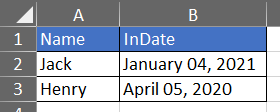
Query 支持自定义格式转换

3. 指定列宽(ExcelColumnWidthAttribute)
public class Dto
{
    [ExcelColumnWidth(20)]
    public int ID { get; set; }
    [ExcelColumnWidth(15.50)]
    public string Name { get; set; }
}
4. 多列名对应同一属性
public class Dto
{
    [ExcelColumnName(excelColumnName:"EmployeeNo",aliases:new[] { "EmpNo","No" })]
    public string Empno { get; set; }
    public string Name { get; set; }
}
5. System.ComponentModel.DisplayNameAttribute = ExcelColumnName.excelColumnNameAttribute
从 1.24.0 开始支持 System.ComponentModel.DisplayNameAttribute 等同于 ExcelColumnName.excelColumnNameAttribute 效果
public class TestIssueI4TXGTDto
{
    public int ID { get; set; }
    public string Name { get; set; }
    [DisplayName("Specification")]
    public string Spc { get; set; }
    [DisplayName("Unit Price")]
    public decimal Up { get; set; }
}
6. ExcelColumnAttribute
从 1.26.0 版本开始,可以简化多Attribute写法
        public class TestIssueI4ZYUUDto
        {
            [ExcelColumn(Name = "ID",Index =0)]
            public string MyProperty { get; set; }
            [ExcelColumn(Name = "CreateDate", Index = 1,Format ="yyyy-MM",Width =100)]
            public DateTime MyProperty2 { get; set; }
        }
7. DynamicColumnAttribute 动态设定 Column
从 1.26.0 版本开始,可以动态设定 Column 的属性
            var config = new OpenXmlConfiguration
            {
                DynamicColumns = new DynamicExcelColumn[] {
                    new DynamicExcelColumn("id"){Ignore=true},
                    new DynamicExcelColumn("name"){Index=1,Width=10},
                    new DynamicExcelColumn("createdate"){Index=0,Format="yyyy-MM-dd",Width=15},
                    new DynamicExcelColumn("point"){Index=2,Name="Account Point"},
                }
            };
            var path = PathHelper.GetTempPath();
            var value = new[] { new { id = 1, name = "Jack", createdate = new DateTime(2022, 04, 12) ,point = 123.456} };
            MiniExcel.SaveAs(path, value, configuration: config);

新增、删除、修改
新增
v1.28.0 开始支持 CSV 插入新增,在最后一行新增N笔数据
// 原始数据
{
    var value = new[] {
          new { ID=1,Name ="Jack",InDate=new DateTime(2021,01,03)},
          new { ID=2,Name ="Henry",InDate=new DateTime(2020,05,03)},
    };
    MiniExcel.SaveAs(path, value);
}
// 最后一行新增一行数据
{
    var value = new { ID=3,Name = "Mike", InDate = new DateTime(2021, 04, 23) };
    MiniExcel.Insert(path, value);
}
// 最后一行新增N行数据
{
    var value = new[] {
          new { ID=4,Name ="Frank",InDate=new DateTime(2021,06,07)},
          new { ID=5,Name ="Gloria",InDate=new DateTime(2022,05,03)},
    };
    MiniExcel.Insert(path, value);
}

删除(未完成)
修改(未完成)
Excel 类别自动判断
- MiniExcel 预设会根据
文件扩展名判断是 xlsx 还是 csv,但会有失准时候,请自行指定。 - Stream 类别无法判断来源于哪种 excel 请自行指定
stream.SaveAs(excelType:ExcelType.CSV);
//or
stream.SaveAs(excelType:ExcelType.XLSX);
//or
stream.Query(excelType:ExcelType.CSV);
//or
stream.Query(excelType:ExcelType.XLSX);
CSV
概念
- 预设全以字串类型返回,预设不会转换为数字或者日期,除非有强型别定义泛型
自定分隔符
预设以 , 作为分隔符,自定义请修改 Seperator 属性
var config = new MiniExcelLibs.Csv.CsvConfiguration()
{
    Seperator=';'
};
MiniExcel.SaveAs(path, values,configuration: config);
自定义换行符
预设以 \r\n 作为换行符,自定义请修改 NewLine 属性
var config = new MiniExcelLibs.Csv.CsvConfiguration()
{
    NewLine='\n'
};
MiniExcel.SaveAs(path, values,configuration: config);
在 V1.30.1 版本开始支持动态更换换行符 (thanks @hyzx86)
var config = new CsvConfiguration()
{
    SplitFn = (row) => Regex.Split(row, $"[\t,](?=(?:[^\"]|\"[^\"]*\")*$)")
        .Select(s => Regex.Replace(s.Replace("\"\"", "\""), "^\"|\"$", "")).ToArray()
};
var rows = MiniExcel.Query(path, configuration: config).ToList();
自定义编码
- 预设编码为「从Byte顺序标记检测编码」(detectEncodingFromByteOrderMarks: true)
- 有自定义编码需求,请修改 StreamReaderFunc / StreamWriterFunc 属性
// Read
var config = new MiniExcelLibs.Csv.CsvConfiguration()
{
    StreamReaderFunc = (stream) => new StreamReader(stream,Encoding.GetEncoding("gb2312"))
};
var rows = MiniExcel.Query(path, true,excelType:ExcelType.CSV,configuration: config);

// Write
var config = new MiniExcelLibs.Csv.CsvConfiguration()
{
    StreamWriterFunc = (stream) => new StreamWriter(stream, Encoding.GetEncoding("gb2312"))
};
MiniExcel.SaveAs(path, value,excelType:ExcelType.CSV, configuration: config);
DataReader
1. GetReader
从 1.23.0 版本开始能获取 DataReader
    using (var reader = MiniExcel.GetReader(path,true))
    {
        while (reader.Read())
        {
            for (int i = 0; i < reader.FieldCount; i++)
            {
                var value = reader.GetValue(i);
            }
        }
    }
异步 Async
- 从 v0.17.0 版本开始支持异步 (感谢isdaniel ( SHIH,BING-SIOU))
public static Task SaveAsAsync(string path, object value, bool printHeader = true, string sheetName = "Sheet1", ExcelType excelType = ExcelType.UNKNOWN, IConfiguration configuration = null)
public static Task SaveAsAsync(this Stream stream, object value, bool printHeader = true, string sheetName = "Sheet1", ExcelType excelType = ExcelType.XLSX, IConfiguration configuration = null)
public static Task<IEnumerable<dynamic>> QueryAsync(string path, bool useHeaderRow = false, string sheetName = null, ExcelType excelType = ExcelType.UNKNOWN, string startCell = "A1", IConfiguration configuration = null)
public static Task<IEnumerable<T>> QueryAsync<T>(this Stream stream, string sheetName = null, ExcelType excelType = ExcelType.UNKNOWN, string startCell = "A1", IConfiguration configuration = null) where T : class, new()
public static Task<IEnumerable<T>> QueryAsync<T>(string path, string sheetName = null, ExcelType excelType = ExcelType.UNKNOWN, string startCell = "A1", IConfiguration configuration = null) where T : class, new()
public static Task<IEnumerable<IDictionary<string, object>>> QueryAsync(this Stream stream, bool useHeaderRow = false, string sheetName = null, ExcelType excelType = ExcelType.UNKNOWN, string startCell = "A1", IConfiguration configuration = null)
public static Task SaveAsByTemplateAsync(this Stream stream, string templatePath, object value)
public static Task SaveAsByTemplateAsync(this Stream stream, byte[] templateBytes, object value)
public static Task SaveAsByTemplateAsync(string path, string templatePath, object value)
public static Task SaveAsByTemplateAsync(string path, byte[] templateBytes, object value)
public static Task<DataTable> QueryAsDataTableAsync(string path, bool useHeaderRow = true, string sheetName = null, ExcelType excelType = ExcelType.UNKNOWN, string startCell = "A1", IConfiguration configuration = null)
- 从 v1.25.0 开始支持
cancellationToken。
其他
1. 映射枚举(enum)
系统会自动映射(注意:大小写不敏感)

从V0.18.0版本开始支持Enum Description
public class Dto
{
    public string Name { get; set; }
    public Type UserType { get; set; }
}

public enum Type
{
    [Description("General User")]
    V1,
    [Description("General Administrator")]
    V2,
    [Description("Super Administrator")]
    V3
}

从 1.30.0 版本开始支持由 Description 转回 Enum 功能,感谢 @KaneLeung
2. CSV 转 XLSX 或是 XLSX 转 CSV
MiniExcel.ConvertXlsxToCsv(xlsxPath, csvPath);
MiniExcel.ConvertXlsxToCsv(xlsxStream, csvStream);
MiniExcel.ConvertXlsxToCsv(csvPath, xlsxPath);
MiniExcel.ConvertXlsxToCsv(csvStream, xlsxStream);
3. 自定义 CultureInfo
从 1.22.0 版本开始,可以使用以下代码自定义文化信息,系统预设 CultureInfo.InvariantCulture。
var config = new CsvConfiguration()
{
	Culture = new CultureInfo("fr-FR"),
};
MiniExcel.SaveAs(path, value, configuration: config);

//or
MiniExcel.Query(path, configuration: config);
4. 导出自定义 Buffer Size
    public abstract class Configuration : IConfiguration
    {
        public int BufferSize { get; set; } = 1024 * 512;
    }
5. FastMode
系统不会限制内存,达到更快的效率
var config = new OpenXmlConfiguration() { FastMode = true };
MiniExcel.SaveAs(path, reader,configuration:config);
例子
1. SQLite & Dapper 读取大数据新增到数据库
Note : 请不要呼叫 call ToList/ToArray 等方法,这会将所有数据读到内存内
using (var connection = new SQLiteConnection(connectionString))
{
    connection.Open();
    using (var transaction = connection.BeginTransaction())
    using (var stream = File.OpenRead(path))
    {
       var rows = stream.Query();
       foreach (var row in rows)
             connection.Execute("insert into T (A,B) values (@A,@B)", new { row.A, row.B }, transaction: transaction);
       transaction.Commit();
    }
}
效能:
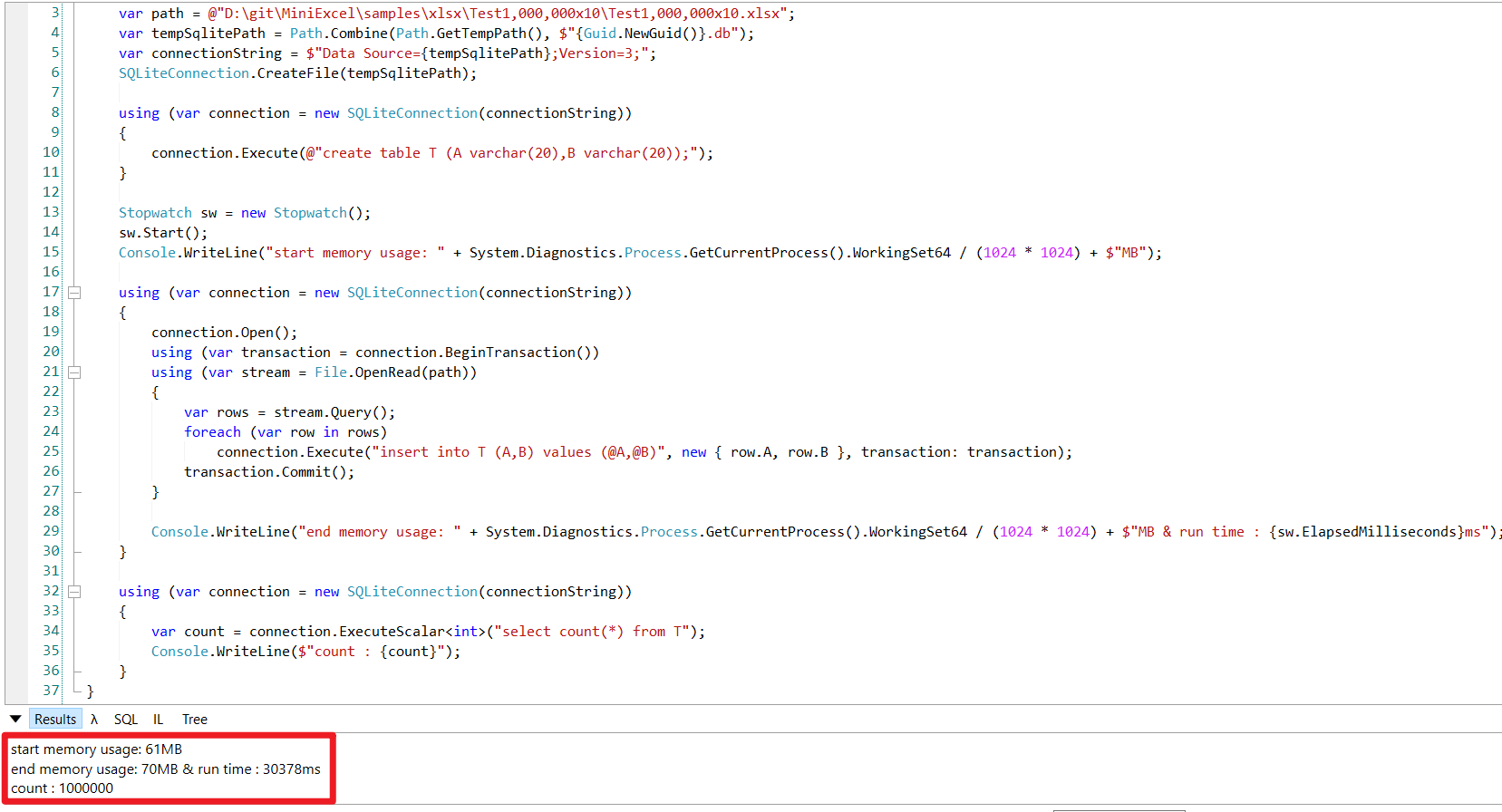
2. ASP.NET Core 3.1 下载/上传 Excel Xlsx API Demo Try it
public class ApiController : Controller
{
    public IActionResult Index()
    {
        return new ContentResult
        {
            ContentType = "text/html",
            StatusCode = (int)HttpStatusCode.OK,
            Content = @"<html><body>
<a href='api/DownloadExcel'>DownloadExcel</a><br>
<a href='api/DownloadExcelFromTemplatePath'>DownloadExcelFromTemplatePath</a><br>
<a href='api/DownloadExcelFromTemplateBytes'>DownloadExcelFromTemplateBytes</a><br>
<p>Upload Excel</p>
<form method='post' enctype='multipart/form-data' action='/api/uploadexcel'>
    <input type='file' name='excel'> <br>
    <input type='submit' >
</form>
</body></html>"
        };
    }

    public IActionResult DownloadExcel()
    {
        var values = new[] {
            new { Column1 = "MiniExcel", Column2 = 1 },
            new { Column1 = "Github", Column2 = 2}
        };
        var memoryStream = new MemoryStream();
        memoryStream.SaveAs(values);
        memoryStream.Seek(0, SeekOrigin.Begin);
        return new FileStreamResult(memoryStream, "application/vnd.openxmlformats-officedocument.spreadsheetml.sheet")
        {
            FileDownloadName = "demo.xlsx"
        };
    }

    public IActionResult DownloadExcelFromTemplatePath()
    {
        string templatePath = "TestTemplateComplex.xlsx";

        Dictionary<string, object> value = new Dictionary<string, object>()
        {
            ["title"] = "FooCompany",
            ["managers"] = new[] {
                new {name="Jack",department="HR"},
                new {name="Loan",department="IT"}
            },
            ["employees"] = new[] {
                new {name="Wade",department="HR"},
                new {name="Felix",department="HR"},
                new {name="Eric",department="IT"},
                new {name="Keaton",department="IT"}
            }
        };

        MemoryStream memoryStream = new MemoryStream();
        memoryStream.SaveAsByTemplate(templatePath, value);
        memoryStream.Seek(0, SeekOrigin.Begin);
        return new FileStreamResult(memoryStream, "application/vnd.openxmlformats-officedocument.spreadsheetml.sheet")
        {
            FileDownloadName = "demo.xlsx"
        };
    }

    private static Dictionary<string, Byte[]> TemplateBytesCache = new Dictionary<string, byte[]>();

    static ApiController()
    {
        string templatePath = "TestTemplateComplex.xlsx";
        byte[] bytes = System.IO.File.ReadAllBytes(templatePath);
        TemplateBytesCache.Add(templatePath, bytes);
    }

    public IActionResult DownloadExcelFromTemplateBytes()
    {
        byte[] bytes = TemplateBytesCache["TestTemplateComplex.xlsx"];

        Dictionary<string, object> value = new Dictionary<string, object>()
        {
            ["title"] = "FooCompany",
            ["managers"] = new[] {
                new {name="Jack",department="HR"},
                new {name="Loan",department="IT"}
            },
            ["employees"] = new[] {
                new {name="Wade",department="HR"},
                new {name="Felix",department="HR"},
                new {name="Eric",department="IT"},
                new {name="Keaton",department="IT"}
            }
        };

        MemoryStream memoryStream = new MemoryStream();
        memoryStream.SaveAsByTemplate(bytes, value);
        memoryStream.Seek(0, SeekOrigin.Begin);
        return new FileStreamResult(memoryStream, "application/vnd.openxmlformats-officedocument.spreadsheetml.sheet")
        {
            FileDownloadName = "demo.xlsx"
        };
    }

    public IActionResult UploadExcel(IFormFile excel)
    {
        var stream = new MemoryStream();
        excel.CopyTo(stream);

        foreach (var item in stream.Query(true))
        {
            // do your logic etc.
        }

        return Ok("File uploaded successfully");
    }
}
3. 分页查询
void Main()
{
	var rows = MiniExcel.Query(path);

	Console.WriteLine("==== No.1 Page ====");
	Console.WriteLine(Page(rows,pageSize:3,page:1));
	Console.WriteLine("==== No.50 Page ====");
	Console.WriteLine(Page(rows,pageSize:3,page:50));
	Console.WriteLine("==== No.5000 Page ====");
	Console.WriteLine(Page(rows,pageSize:3,page:5000));
}

public static IEnumerable<T> Page<T>(IEnumerable<T> en, int pageSize, int page)
{
	return en.Skip(page * pageSize).Take(pageSize);
}

4. WebForm不落地导出Excel
var fileName = "Demo.xlsx";
var sheetName = "Sheet1";
HttpResponse response = HttpContext.Current.Response;
response.Clear();
response.ContentType = "application/vnd.openxmlformats-officedocument.spreadsheetml.sheet";
response.AddHeader("Content-Disposition", $"attachment;filename=\"{fileName}\"");
var values = new[] {
    new { Column1 = "MiniExcel", Column2 = 1 },
    new { Column1 = "Github", Column2 = 2}
};
var memoryStream = new MemoryStream();
memoryStream.SaveAs(values, sheetName: sheetName);
memoryStream.Seek(0, SeekOrigin.Begin);
memoryStream.CopyTo(Response.OutputStream);
response.End();
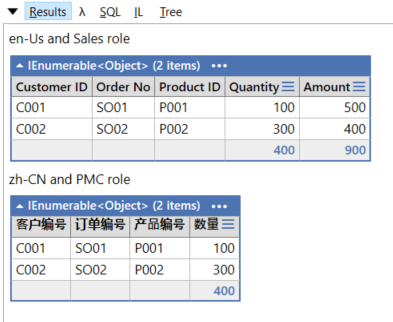
5. 动态 i18n 多国语言跟权限管理
像例子一样,建立一个方法处理 i18n 跟权限管理,并搭配 yield return 返回 IEnumerable<Dictionary<string, object>>,即可达到动态、低内存处理效果
void Main()
{
	var value = new Order[] {
		new Order(){OrderNo = "SO01",CustomerID="C001",ProductID="P001",Qty=100,Amt=500},
		new Order(){OrderNo = "SO02",CustomerID="C002",ProductID="P002",Qty=300,Amt=400},
	};

	Console.WriteLine("en-Us and Sales role");
	{
		var path = Path.GetTempPath() + Guid.NewGuid() + ".xlsx";
		var lang = "en-US";
		var role = "Sales";
		MiniExcel.SaveAs(path, GetOrders(lang, role, value));
		MiniExcel.Query(path, true).Dump();
	}

	Console.WriteLine("zh-CN and PMC role");
	{
		var path = Path.GetTempPath() + Guid.NewGuid() + ".xlsx";
		var lang = "zh-CN";
		var role = "PMC";
		MiniExcel.SaveAs(path, GetOrders(lang, role, value));
		MiniExcel.Query(path, true).Dump();
	}
}

private IEnumerable<Dictionary<string, object>> GetOrders(string lang, string role, Order[] orders)
{
	foreach (var order in orders)
	{
		var newOrder = new Dictionary<string, object>();

		if (lang == "zh-CN")
		{
			newOrder.Add("客户编号", order.CustomerID);
			newOrder.Add("订单编号", order.OrderNo);
			newOrder.Add("产品编号", order.ProductID);
			newOrder.Add("数量", order.Qty);
			if (role == "Sales")
				newOrder.Add("价格", order.Amt);
			yield return newOrder;
		}
		else if (lang == "en-US")
		{
			newOrder.Add("Customer ID", order.CustomerID);
			newOrder.Add("Order No", order.OrderNo);
			newOrder.Add("Product ID", order.ProductID);
			newOrder.Add("Quantity", order.Qty);
			if (role == "Sales")
				newOrder.Add("Amount", order.Amt);
			yield return newOrder;
		}
		else
		{
			throw new InvalidDataException($"lang {lang} wrong");
		}
	}
}

public class Order
{
	public string OrderNo { get; set; }
	public string CustomerID { get; set; }
	public decimal Qty { get; set; }
	public string ProductID { get; set; }
	public decimal Amt { get; set; }
}
FAQ 常见问题
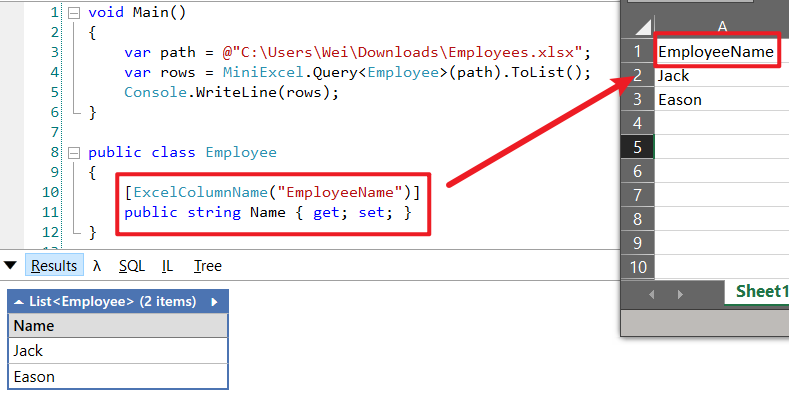
Q: Excel 表头标题名称跟 class 属性名称不一致,如何对应?
A. 请使用 ExcelColumnName 作 mapping
Q. 多工作表(sheet)如何导出/查询数据?
A. 使用 GetSheetNames 方法搭配 Query 的 sheetName 参数
var sheets = MiniExcel.GetSheetNames(path);
foreach (var sheet in sheets)
{
    Console.WriteLine($"sheet name : {sheet} ");
    var rows = MiniExcel.Query(path,useHeaderRow:true,sheetName:sheet);
    Console.WriteLine(rows);
}

Q. 是否使用 Count 会载入全部数据到内存
不会,图片测试一百万行*十列数据,简单测试,内存最大使用 < 60MB,花费13.65秒

Q. Query如何使用整数索引取值?
Query 预设索引为字串Key : A,B,C....,想要改为数字索引,请建立以下方法自行转换
void Main()
{
	var path = @"D:\git\MiniExcel\samples\xlsx\TestTypeMapping.xlsx";
	var rows = MiniExcel.Query(path,true);
	foreach (var r in ConvertToIntIndexRows(rows))
	{
		Console.Write($"column 0 : {r[0]} ,column 1 : {r[1]}");
		Console.WriteLine();
	}
}

private IEnumerable<Dictionary<int, object>> ConvertToIntIndexRows(IEnumerable<object> rows)
{
	ICollection<string> keys = null;
	var isFirst = true;
	foreach (IDictionary<string,object> r in rows)
	{
		if(isFirst)
		{
			keys = r.Keys;
			isFirst = false;
		}

		var dic = new Dictionary<int, object>();
		var index = 0;
		foreach (var key in keys)
			dic[index++] = r[key];
		yield return dic;
	}
}
Q. 导出时数组为空时生成没有标题空 Excel
因为 MiniExcel 使用类似 JSON.NET 动态从值获取类别机制简化 API 操作,没有数据就无法获取类别。可以查看 issue #133 了解。
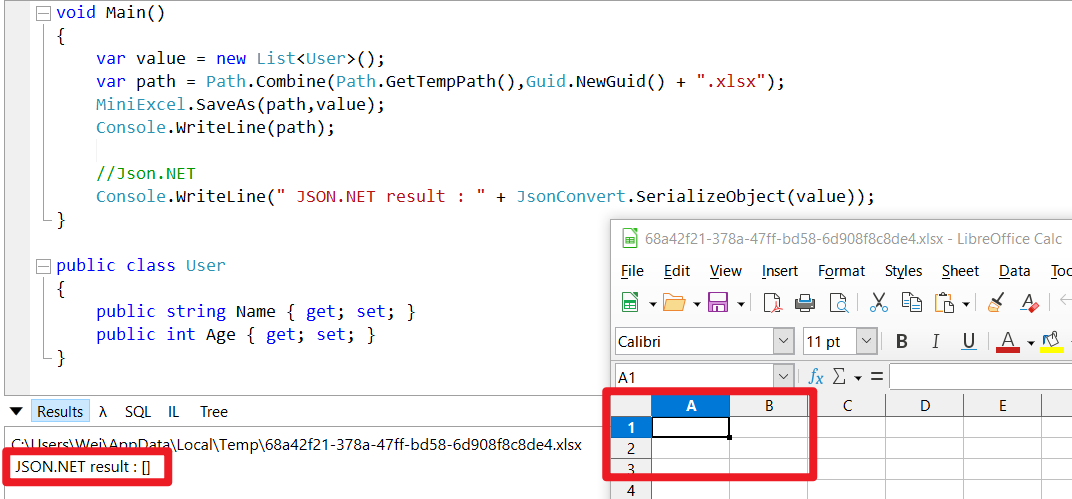
强型别和 DataTable 会生成表头,但 Dicionary 依旧是空 Excel
Q. 如何人为空白行中止遍历?
常发生人为不小心在最后几行留下空白行情况,MiniExcel可以搭配 LINQ TakeWhile实现空白行中断遍历。

Q. 不想要空白行如何去除?

IEnumerable版本
public static IEnumerable<dynamic> QueryWithoutEmptyRow(Stream stream, bool useHeaderRow, string sheetName, ExcelType excelType, string startCell, IConfiguration configuration)
{
	var rows = stream.Query(useHeaderRow,sheetName,excelType,startCell,configuration);
	foreach (IDictionary<string,object> row in rows)
	{
		if(row.Keys.Any(key=>row[key]!=null))
			yield return row;
	}
}
DataTable版本
public static DataTable QueryAsDataTableWithoutEmptyRow(Stream stream, bool useHeaderRow, string sheetName, ExcelType excelType, string startCell, IConfiguration configuration)
{
	if (sheetName == null && excelType != ExcelType.CSV) /*Issue #279*/
		sheetName = stream.GetSheetNames().First();

	var dt = new DataTable(sheetName);
	var first = true;
	var rows = stream.Query(useHeaderRow,sheetName,excelType,startCell,configuration);
	foreach (IDictionary<string, object> row in rows)
	{
		if (first)
		{

			foreach (var key in row.Keys)
			{
				var column = new DataColumn(key, typeof(object)) { Caption = key };
				dt.Columns.Add(column);
			}

			dt.BeginLoadData();
			first = false;
		}

		var newRow = dt.NewRow();
		var isNull=true;
		foreach (var key in row.Keys)
		{
			var _v = row[key];
			if(_v!=null)
				isNull = false;
			newRow[key] = _v;
		}

		if(!isNull)
			dt.Rows.Add(newRow);
	}

	dt.EndLoadData();
	return dt;
}
Q. 保存如何取代MiniExcel.SaveAs(path, value),文件存在系统会报已存在错误?
请改以Stream自行管控Stream行为,如
	using (var stream = File.Create("Demo.xlsx"))
		MiniExcel.SaveAs(stream,value);
从V1.25.0版本开始,支持 overwriteFile 參數,方便調整是否要覆蓋已存在文件
MiniExcel.SaveAs(path, value, overwriteFile: true);
- 目前不支援 xls (97-2003) 或是加密文件
- xlsm 只支持查询

 浙公网安备 33010602011771号