
部署自托管langfuse并集成strands agent实现代理可观测性
参考资料
- https://langfuse.com/self-hosting/deployment/kubernetes-helm
- https://langfuse.com/handbook/product-engineering/architecture
- https://langfuse.com/self-hosting/configuration
- https://blog.bitipcman.com/post/strands-agents-part-2
部署自托管langfuse配置
在EKS集群部署场景下除了修改镜像使其可获取外,还需要修改如下配置values配置
# https://artifacthub.io/packages/search?repo=langfuse-k8s
helm show values langfuse/langfuse > values.yaml
langfuse涉及到的大量组件都需要额外的存储卷支持,可以通过在全局存储类中指定
global:
  defaultStorageClass: "ebs-sc"
为了避免用户名密码登录可以集成GitHub OAuth
langfuse:
  auth:
    disableUsernamePassword: true
    providers:
      github:
        clientId: "Ov23lifclq3GFzMZc3OD"
        clientSecret: "9b489df5ab7fc81a05aacc6c3d5d3c44643d10a5"
此外,开启oauth之后还需要设置NextAuth URL 配置,主要用于SSO登录后重定向。否则在登录后被重定向到 localhost:3000 ,例如我挂载在ALB上使用ALB的域名跳转
nextauth:
  url: http://xxxx-18b493b28db5ed26.elb.cn-northwest-1.amazonaws.com.cn:3000
加密配置如下,可以用openssl生成随机字符
- langfuse.salt.value:API 密钥哈希盐值
- langfuse.encryptionKey.value:敏感数据加密密钥 (256 bits)
- langfuse.nextauth.secret.value:NextAuth JWT 加密密钥
数据库配置,需要指定username和password,也可以用openssl生成随机字符。这些组件的作用为
- PostgreSQL:存储事务性数据(用户、组织、项目、API 密钥、提示、数据集、作为裁判的 LLM 设置)
- Redis:存储高频访问的数据,减轻 PostgreSQL 的压力,以及作为事件队列
- ClickHouse:存储跟踪数据(跟踪记录、观察结果、评分)。负责大规模日志和指标分析。需要查询过去一个月的 token 消耗趋势、响应时间分布图、或者进行复杂的聚合查询时
- MinIO:存储大型的非结构化数据,通常是 Prompt 或 LLM 的完整响应内容,以及多模态附件(图像、音频)
postgresql:
  deploy: true
  auth:
    username: postgres
    password: "6de00804e0671f56b76b5da6fc50d7b5"
    database: postgres_langfuse
  migration:
    autoMigrate: true
redis:
  deploy: true
  auth:
    username: "default"
    password: "97556be00e7c93918c791420e2e28de6"
    database: 0
clickhouse:
  deploy: true
  shards: 1
  replicaCount: 3
  resourcesPreset: 2xlarge
  clusterEnabled: true
  auth:
    username: default
    password: "31yx5qnjfjofRBjFxteGJju5x9nhZRbo"
s3:
  deploy: true
  storageProvider: "s3"
  forcePathStyle: true
  auth:
    accessKeyId:
      value: "minio"
    secretAccessKey:
      value: "minio123"
部署命令
# 添加 Helm 仓库
helm repo add langfuse https://langfuse.github.io/langfuse-k8s
helm repo update

# 部署应用
helm upgrade -i langfuse langfuse/langfuse -f values.yaml
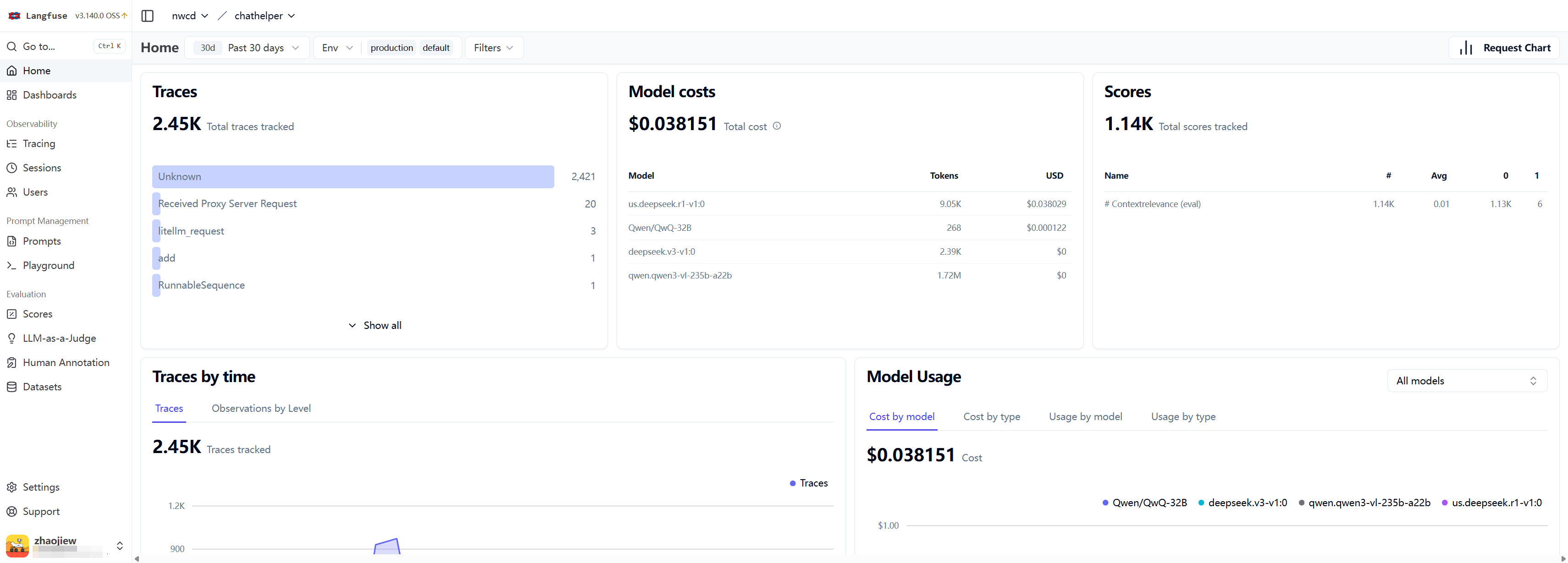
访问控制台结果如下
通过@observe注入函数调用
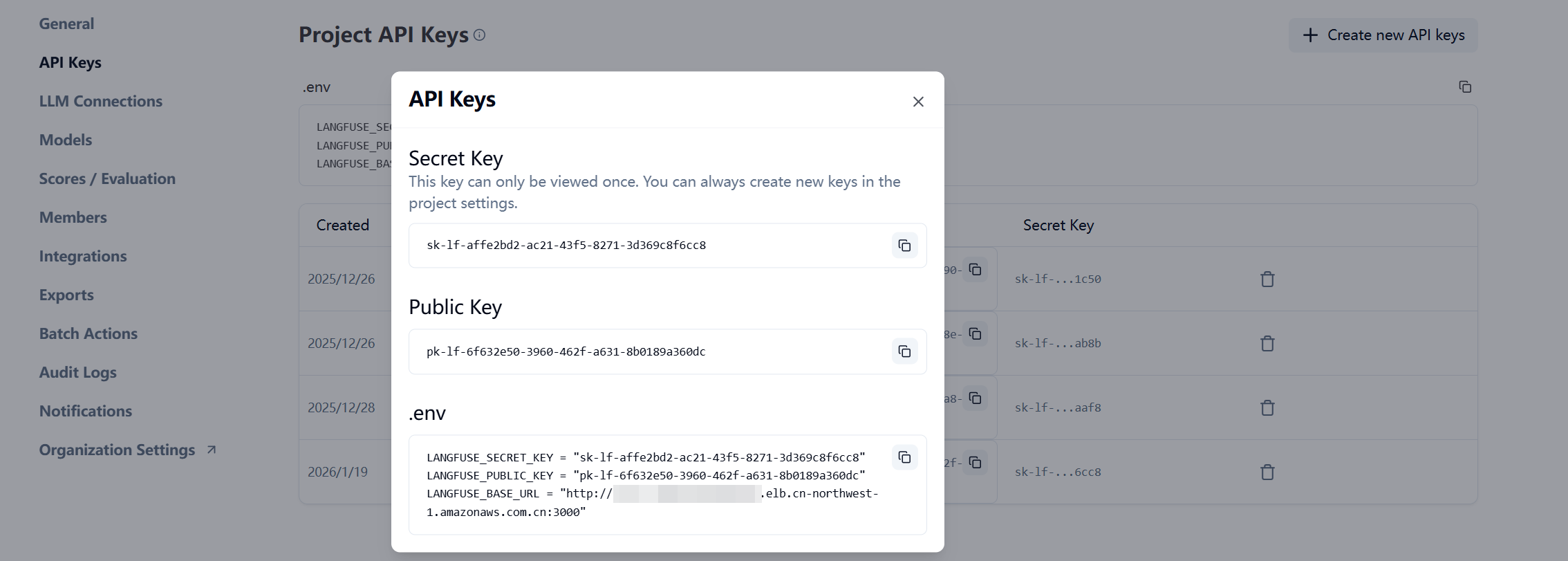
在langfuse申请apikey
LANGFUSE_SECRET_KEY = "sk-lf-862d03b4-17cd-4ac7-a5d6-b66acdf50340"
LANGFUSE_PUBLIC_KEY = "pk-lf-0ea7a9b4-7ed6-4b34-8364-e3a0b3576e37"
LANGFUSE_BASE_URL = "http://langfuse-web.aitao.group:3000"
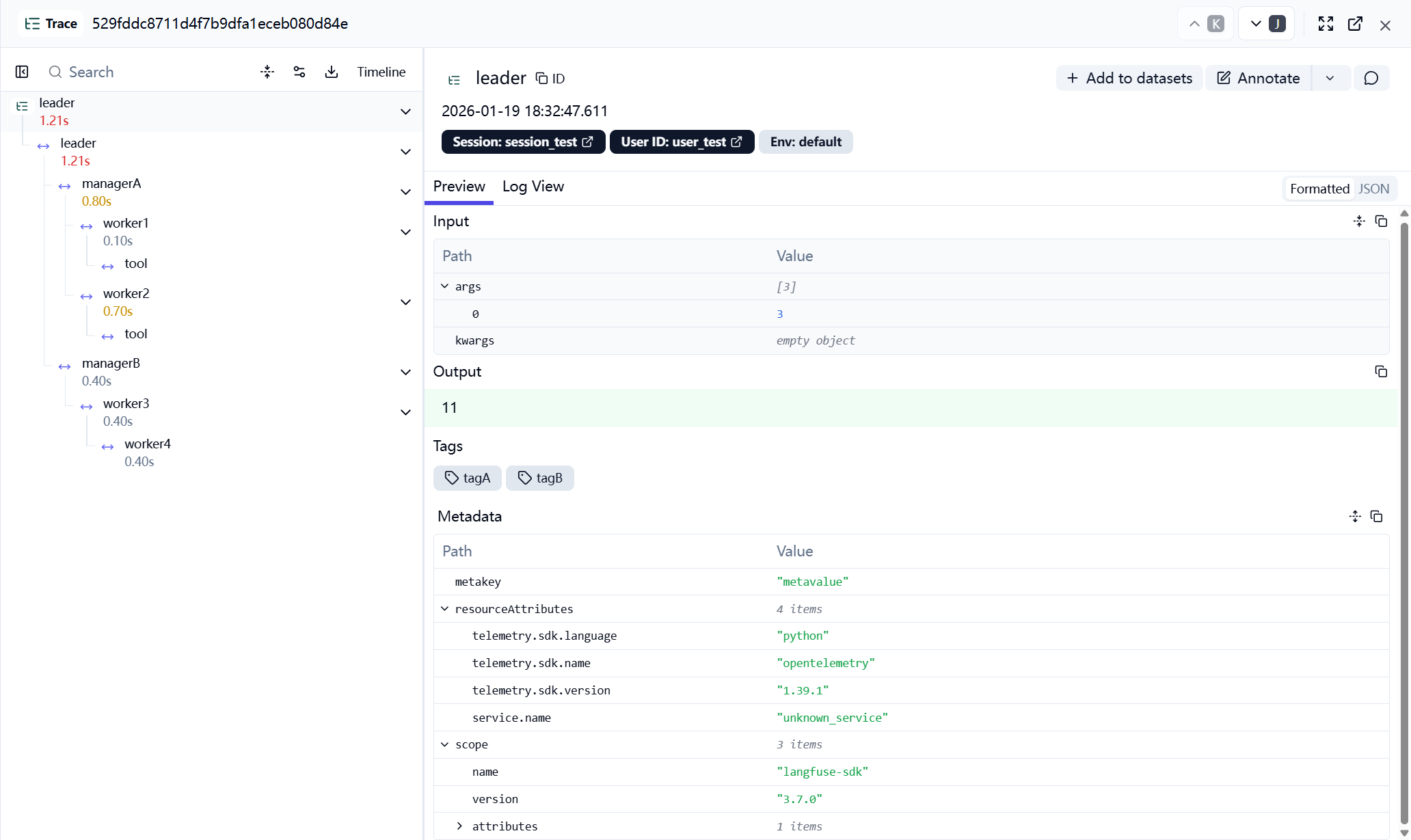
使用如下测试代码了解trace的逻辑
- 在代码中使用@observe自动注入,Langfuse 会在后台维护一个 调用栈上下文。
- 用户信息 (
user_id)、会话信息(session_id) 和 标签 (tags) 会被上传到 Langfuse 服务器,方便你后续根据用户或特定标签进行搜索和分析成本。 @observe装饰器会在函数进入时记录时间戳,并在函数返回时再次记录。两者相减就得到了每个环节的耗时(Latency)
import uuid
import time
from langfuse import Langfuse, observe


trace_id = uuid.uuid4().hex

lf = Langfuse(
    secret_key="sk-lf-862d03b4-17cd-4ac7-a5d6-b66acdf50340",
    public_key="pk-lf-0ea7a9b4-7ed6-4b34-8364-e3a0b3576e37",
    host="http://langfuse-web.aitao.group:3000",
)

@observe
def tool(name: str) -> str:
    return f"{name} says hi!"

@observe
def worker1(x: int) -> int:
    time.sleep(0.1)
    tool("work1tool")
    return x + 1

@observe
def worker2(x: int) -> int:
    time.sleep(0.7)
    tool("work2tool")
    return x + 2

@observe
def worker3(x: int) -> int:
    worker4(x)
    return x + 2

@observe
def worker4(x: int) -> int:
    time.sleep(0.4)
    return x + 2

@observe
def managerA(x: int) -> int:
    y = worker1(x)
    z = worker2(y)
    return z

@observe
def managerB(x: int) -> int:
    y = worker3(x)
    return y

@observe
def leader(x: int) -> int:
    lf.update_current_trace(
        user_id="user_test",
        session_id="session_test",
        metadata={"metakey": "metavalue"},
        tags=["tagA", "tagB"]
    )
    y = managerA(x)
    z = managerB(x)
    return y + z

if __name__ == "__main__":
    leader(3, langfuse_trace_id=trace_id)
trace的具体内容如下
strands agent集成langfuse
来源参考 https://blog.bitipcman.com/post/strands-agents-part-2 ,应用的架构说明如下
flowchart LR
HR["HR Agent<br/>(Client)<br>Port: 8000"]
EA["Employee Agent<br/>(Remote)<br>Port: 8001"]
MCP["MCP Server<br/>(Data)<br>Port: 8002"]
HR -.A2A.-> EA
EA -.MCP.-> MCP
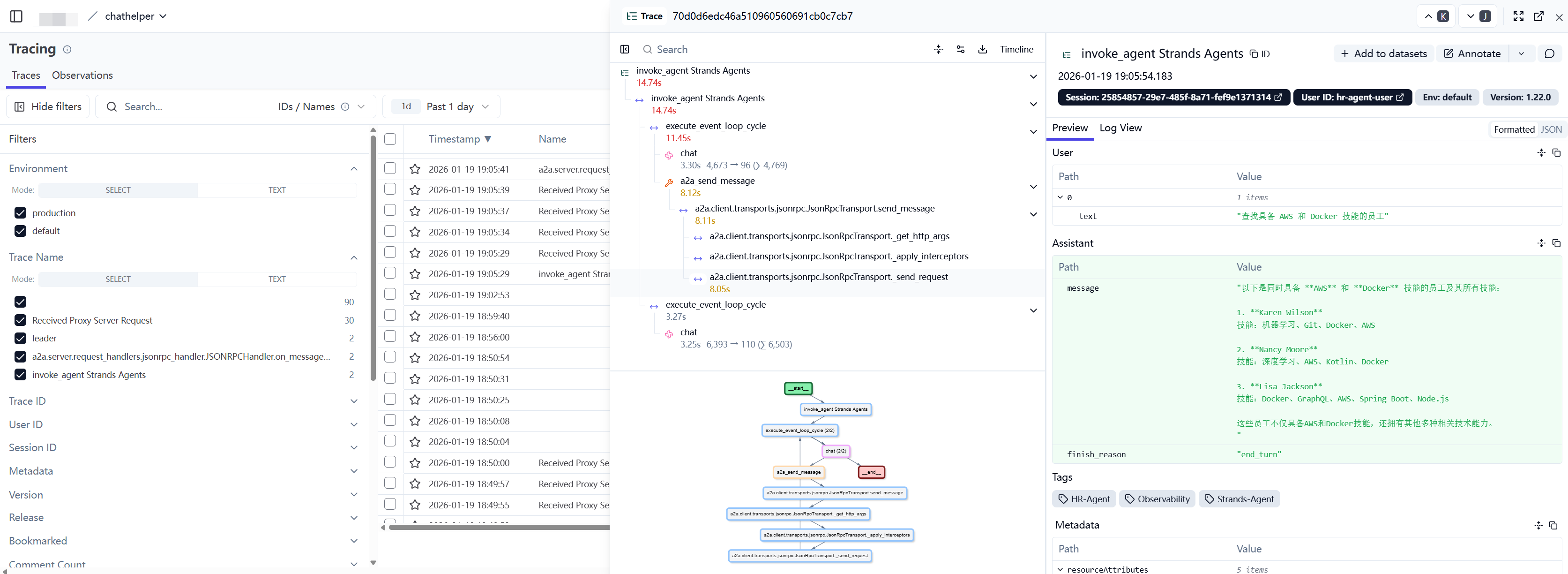
观测效果如下
实现hr_agent
# /home/ec2-user/strandsagent/hr-agent/hr_agent.py
"""HR Agent - Client Agent,通过 A2A 协议访问 Employee Agent"""
import os
import uuid
import base64
import uvicorn
from strands import Agent
from strands.models.openai import OpenAIModel
from strands_tools.a2a_client import A2AClientToolProvider
from strands.telemetry import StrandsTelemetry
from fastapi import FastAPI
from fastapi.responses import StreamingResponse
from pydantic import BaseModel

# 配置环境变量
APIKEY = "sk-uzpq0u0n5FN14HorW45hUw"
EMPLOYEE_AGENT_URL = os.environ.get("EMPLOYEE_AGENT_URL", "http://localhost:8001/")

# 配置 Langfuse
os.environ["LANGFUSE_PUBLIC_KEY"] = "pk-lf-0ea7a9b4-7ed6-4b34-8364-e3a0b3576e37"
os.environ["LANGFUSE_SECRET_KEY"] = "sk-lf-862d03b4-17cd-4ac7-a5d6-b66acdf50340"
os.environ["LANGFUSE_BASE_URL"] = "http://langfuse-web.aitao.group:3000"

# 构建 Basic Auth 头
LANGFUSE_AUTH = base64.b64encode(
    f"{os.environ.get('LANGFUSE_PUBLIC_KEY')}:{os.environ.get('LANGFUSE_SECRET_KEY')}".encode()
).decode()

# 配置 OpenTelemetry 端点和头部
os.environ["OTEL_EXPORTER_OTLP_ENDPOINT"] = os.environ.get("LANGFUSE_BASE_URL") + "/api/public/otel"
os.environ["OTEL_EXPORTER_OTLP_HEADERS"] = f"Authorization=Basic {LANGFUSE_AUTH}"

# 配置遥测
strands_telemetry = StrandsTelemetry().setup_otlp_exporter()

app = FastAPI(title="HR Agent API")


class QuestionRequest(BaseModel):
    question: str


@app.get("/health")
def health_check():
    return {"status": "healthy"}


# 配置 DeepSeek 模型
deepseek_model = OpenAIModel(
    model_id="qwen.qwen3-vl-235b-a22b",
    client_args={
        "api_key": 'sk-MSX0wjXwPSOL5dA3VZPKFg',
        "base_url": "http://litellm.aitao.group:4000",
    },
)

# 创建 A2A 工具提供者
provider = A2AClientToolProvider(known_agent_urls=[EMPLOYEE_AGENT_URL])

# 创建 HR Agent
agent = Agent(
    model=deepseek_model,
    tools=provider.tools,
    system_prompt="Use a2a agents to access employee information you don't otherwise have access to. 请用中文回答用户的问题。",
    trace_attributes={
        "session.id": str(uuid.uuid4()),
        "user.id": "hr-agent-user",
        "langfuse.tags": ["HR-Agent", "Strands-Agent", "Observability"],
        "agent.name": "HR-Agent"
    }
)


@app.post("/inquire")
async def ask_agent(request: QuestionRequest):
    """处理用户咨询请求"""
    async def generate():
        stream_response = agent.stream_async(request.question)
        async for event in stream_response:
            if "data" in event:
                yield event["data"]

    return StreamingResponse(generate(), media_type="text/plain")


@app.get("/")
async def root():
    """API 根路径"""
    return {
        "message": "HR Agent API",
        "endpoints": {
            "health": "/health",
            "inquire": "/inquire (POST)",
        }
    }


if __name__ == "__main__":
    uvicorn.run(app, host="0.0.0.0", port=8000)
实现employee_agent
# /home/ec2-user/strandsagent/hr-agent/employee_agent.py
import os
import base64
import uuid
from mcp.client.streamable_http import streamablehttp_client
from strands import Agent
from strands.models.openai import OpenAIModel
from strands.tools.mcp.mcp_client import MCPClient
from strands.multiagent.a2a import A2AServer
from strands.telemetry import StrandsTelemetry
from urllib.parse import urlparse

# 配置环境变量
APIKEY = "sk-uzpq0u0n5FN14HorW45hUw"
EMPLOYEE_INFO_URL = os.environ.get("EMPLOYEE_INFO_URL", "http://localhost:8002/mcp/")
EMPLOYEE_AGENT_URL = os.environ.get("EMPLOYEE_AGENT_URL", "http://localhost:8001/")

# 配置 Langfuse
os.environ["LANGFUSE_PUBLIC_KEY"] = "pk-lf-0ea7a9b4-7ed6-4b34-8364-e3a0b3576e37"
os.environ["LANGFUSE_SECRET_KEY"] = "sk-lf-862d03b4-17cd-4ac7-a5d6-b66acdf50340"
os.environ["LANGFUSE_BASE_URL"] = "http://langfuse-web.aitao.group:3000"

# 构建 Basic Auth 头
LANGFUSE_AUTH = base64.b64encode(
    f"{os.environ.get('LANGFUSE_PUBLIC_KEY')}:{os.environ.get('LANGFUSE_SECRET_KEY')}".encode()
).decode()

# 配置 OpenTelemetry 端点和头部
os.environ["OTEL_EXPORTER_OTLP_ENDPOINT"] = os.environ.get("LANGFUSE_BASE_URL") + "/api/public/otel"
os.environ["OTEL_EXPORTER_OTLP_HEADERS"] = f"Authorization=Basic {LANGFUSE_AUTH}"

# 配置遥测
strands_telemetry = StrandsTelemetry().setup_otlp_exporter()

# 配置 DeepSeek 模型
deepseek_model = OpenAIModel(
    model_id="qwen.qwen3-vl-235b-a22b",
    client_args={
        "api_key": 'sk-MSX0wjXwPSOL5dA3VZPKFg',
        "base_url": "http://litellm.aitao.group:4000",
    },
)
# 创建 MCP 客户端
employee_mcp_client = MCPClient(
    lambda: streamablehttp_client(EMPLOYEE_INFO_URL)
)

with employee_mcp_client:
    # 获取 MCP 工具
    tools = employee_mcp_client.list_tools_sync()

    # 创建 Employee Agent
    employee_agent = Agent(
        model=deepseek_model,
        name="Employee Agent",
        description="Answers questions about employees and their skills",
        tools=tools,
        system_prompt="When listing employees, show their full names and list all their skills. 请用中文回答问题。",
        trace_attributes={
            "session.id": str(uuid.uuid4()),
            "user.id": "employee-agent-user",
            "langfuse.tags": ["Employee-Agent", "Strands-Agent", "Observability"],
            "agent.name": "Employee-Agent"
        }
    )

    # 创建 A2A 服务器
    a2a_server = A2AServer(
        agent=employee_agent,
        host=urlparse(EMPLOYEE_AGENT_URL).hostname,
        port=urlparse(EMPLOYEE_AGENT_URL).port,
        http_url=EMPLOYEE_AGENT_URL
    )

    if __name__ == "__main__":
        a2a_server.serve(host="0.0.0.0", port=8001)
实现mcp server如下
# /home/ec2-user/strandsagent/hr-agent/mcp_server.py
from mcp.server.fastmcp import FastMCP
from employee_data import SKILLS, EMPLOYEES

mcp = FastMCP("employee-server", stateless_http=True, host="0.0.0.0", port=8002)


@mcp.tool()
def get_skills() -> set[str]:
    """获取员工可能拥有的所有技能 - 使用此列表找出相关技能"""
    print("get_skills")
    return SKILLS


@mcp.tool()
def get_employees_with_skill(skill: str) -> list[dict]:
    """获取具有指定技能的员工 - 输出包括全名(名姓)和他们的技能"""
    print(f"get_employees_with_skill({skill})")
    skill_lower = skill.lower()
    employees_with_skill = [
        employee for employee in EMPLOYEES
        if any(s.lower() == skill_lower for s in employee["skills"])
    ]
    if not employees_with_skill:
        raise ValueError(f"No employees have {skill} skill")
    return employees_with_skill


if __name__ == "__main__":
    mcp.run(transport="streamable-http")
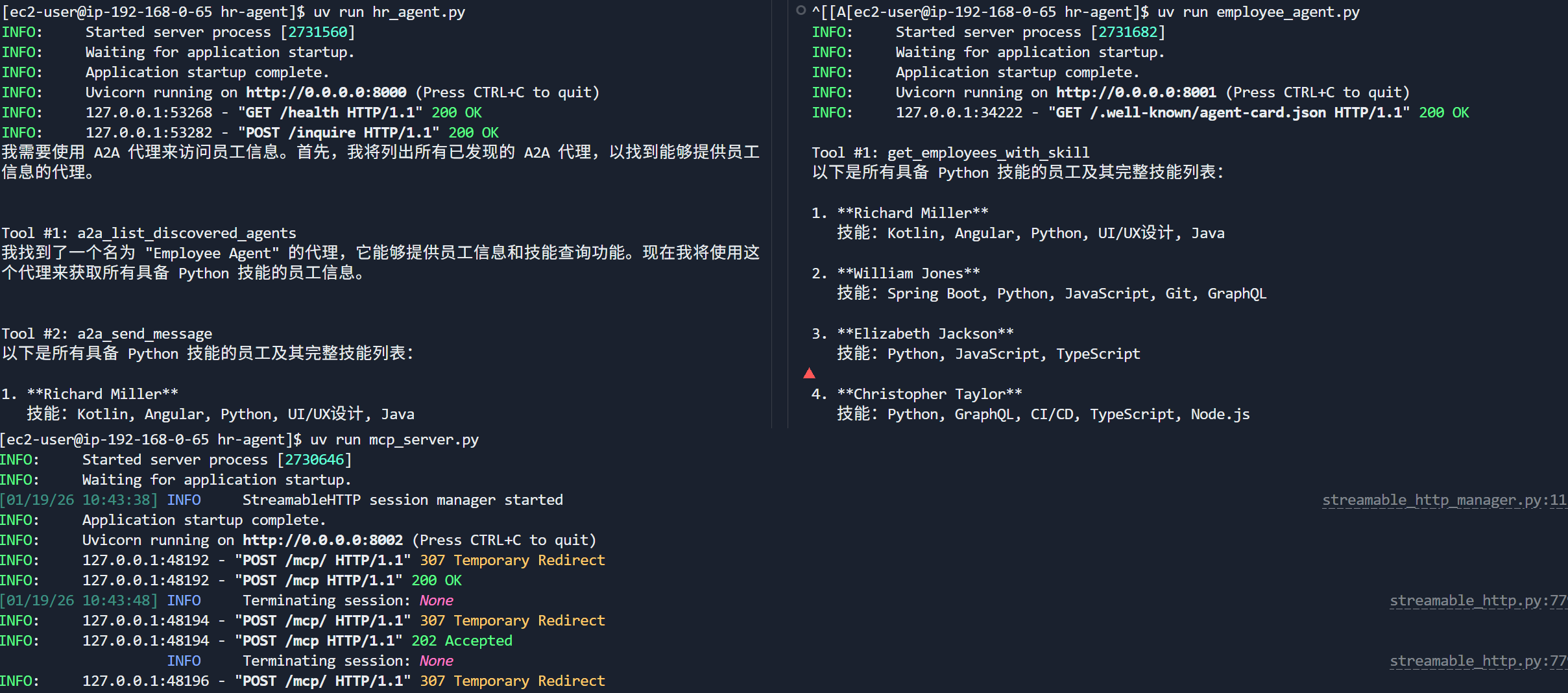
调用日志如下,可见
- hr_agent通过a2a card了解到可以通过employee_agent获取员工信息
- employee_agent了解到可以使用employee_mcp_client访问mcp服务器
- mcp则暴露了get_employees_with_skill供外部访问
当然以上的agent和mcp服务都可以通过通过网关(例如litellm)暴露出来,或者注册在nacos供外部使用

 浙公网安备 33010602011771号