

使用modctl构建符合ModelPack规范的模型OCI并部署在EKS集群工作负载中
参考资料
- https://d7y.io/docs/next/
- https://github.com/modelpack/model-spec/blob/main/docs/getting-started.md
- https://github.com/modelpack/model-spec/blob/main/docs/spec.md
- Using modctl with ModelPack,https://github.com/modelpack/model-spec/blob/main/docs/modctl.md
- Getting started with modctl,https://github.com/modelpack/modctl/blob/main/docs/getting-started.md#installation
- https://github.com/modelpack/model-csi-driver/blob/main/docs/getting-started.md
关于ModelPack规范
CNCF 模型规范是一个用于在云原生环境中打包、分发和运行 AI 模型的开放标准。它基于经过验证的 OCI(开放容器倡议)镜像规范,将容器为应用部署带来的标准化和互操作性优势带到 AI 模型领域。借助ModelPack规范,OCI 注册表可以存储和管理 AI/ML 模型工件,使得模型版本、元数据和参数均可检索且易于显示。模型格式规范基于 OCI 图像格式规范
模型工件 OCI 镜像规范如下:
mediaType:application/vnd.oci.image.manifest.v1+jsonartifactType:application/vnd.cncf.model.manifest.v1+jsonconfig.mediaType:application/vnd.cncf.model.config.v1+jsonlayers.mediaType:模型权重文件的类型格式,例如application/vnd.cncf.model.weight.config.v1.raw 表示未解压、未压缩的模型权重配置文件annotations:可选属性包含层中任意属性
示例模型构建清单
{
    "schemaVersion": 2,
    "mediaType": "application/vnd.oci.image.manifest.v1+json",
    "artifactType": "application/vnd.cncf.model.manifest.v1+json",
    "config": {
        "mediaType": "application/vnd.cncf.model.config.v1+json",
        "digest": "sha256:d5815835051dd97d800a03f641ed8162877920e734d3d705b698912602b8c763",
        "size": 301
    },
    "layers": [
        {
            "mediaType": "application/vnd.cncf.model.weight.v1.tar",
            "digest": "sha256:3f907c1a03bf20f20355fe449e18ff3f9de2e49570ffb536f1a32f20c7179808",
            "size": 30327160
        },
		...
        {
            "mediaType": "application/vnd.cncf.model.weight.config.v1.tar",
            "digest": "sha256:a5378e569c625f7643952fcab30c74f2a84ece52335c292e630f740ac4694146",
            "size": 106
        },
        {
            "mediaType": "application/vnd.cncf.model.doc.v1.tar",
            "digest": "sha256:5e236ec37438b02c01c83d134203a646cb354766ac294e533a308dd8caa3a11e",
            "size": 23040
        }
    ]
}
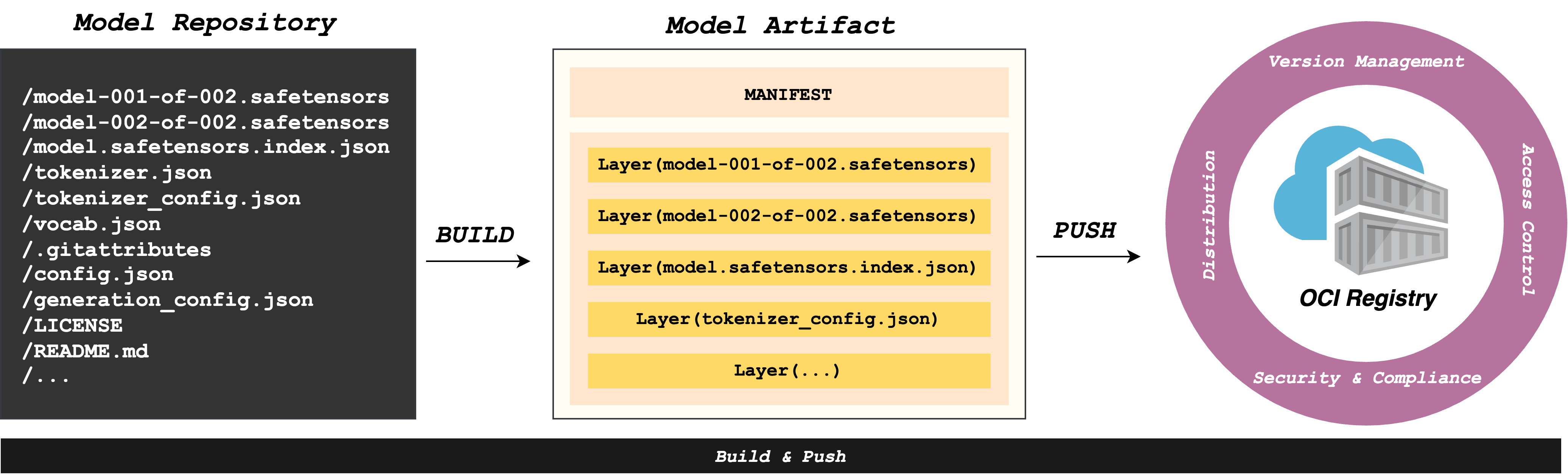
构建工具可以将所需资源打包成符合模型格式规范的标准 OCI 工件
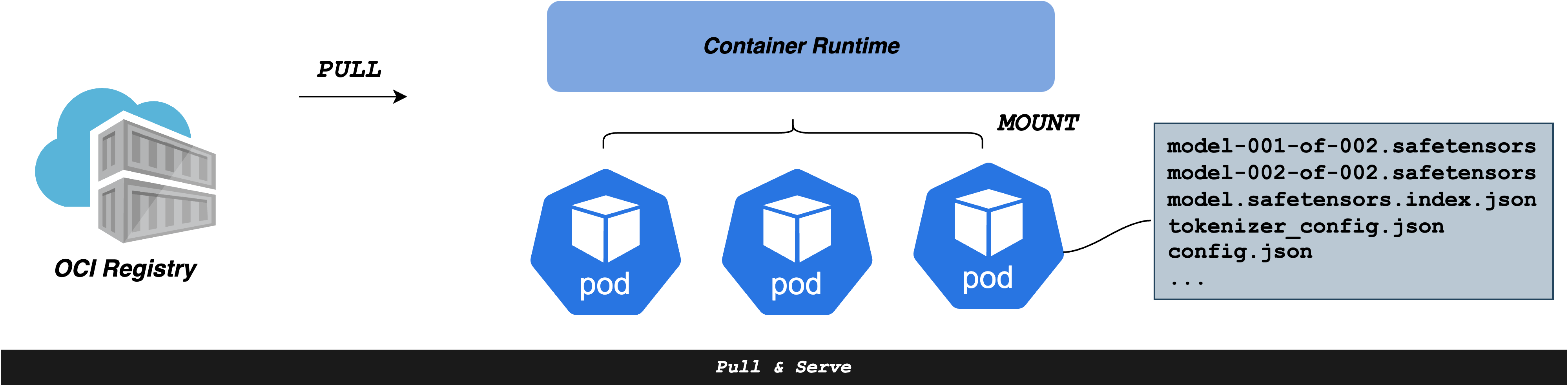
模型工件存储在 OCI 注册表中,容器运行时(例如 containerd、CRI-O)就可以从 OCI 注册表中拉取它,并在需要时将其挂载为只读卷,用于模型服务过程。
打包模型并推送到ECR仓库
将 Qwen3-0.6B 模型从 ModelScope 下载,打包为 OCI 镜像并推送到 ECR
安装 modctl 命令行工具:
go install github.com/modelpack/modctl@main
使用 uv 安装 modelscope Python 库:
uv pip install modelscope
从 ModelScope 下载模型到指定目录:
uv run python -c "
from modelscope import snapshot_download
model_dir = snapshot_download(Qwen/Qwen3-0.6B, cache_dir=/home/ec2-user/testpython/dragonfly/modelpack/qwen3-0.6b)
下载内容包括:
model.safetensors(1.40GB) - 模型权重文件config.json- 模型配置tokenizer.json- 分词器配置vocab.json,merges.txt- 词汇表LICENSE,README.md- 文档
为目录中的模型生成一个 Modelfile,需要进入模型工件所在的目录并运行以下命令。可以使用 --exclude 选项来指定文件路径的 glob 模式
modctl modelfile generate
生成的 Modelfile 内容如下
# Model name
NAME Qwen3-0___6B

# Model architecture
ARCH transformer

# Model family
FAMILY qwen3

# Model precision
PRECISION bfloat16

# Config files
CONFIG config.json
CONFIG configuration.json
CONFIG generation_config.json
CONFIG tokenizer.json
CONFIG tokenizer_config.json
CONFIG vocab.json

# Model files
MODEL model.safetensors

# Documentation files
DOC LICENSE
DOC README.md
DOC merges.txt
使用 modctl 构建模型 OCI 镜像:
modctl build -t 000000000000.dkr.ecr.cn-north-1.amazonaws.com.cn/qwen3-0.6b:latest -f Modelfile xxx/modelpack/qwen3-0.6b/Qwen/Qwen3-0___6B
检查构建结果
$ modctl ls
REPOSITORY    TAG       DIGEST         CREATED           SIZE
0000000000.dkr.ecr.cn-north-1.amazonaws.com.cn/qwen3-0.6b    latest    sha256:4c16cd402037c84f0b43ae4bc1e3053649c25b5da87ccc57e19e7614f3a22578    27 minutes ago    1.4 GiB
推送镜像到ECR
modctl push 000000000000.dkr.ecr.cn-north-1.amazonaws.com.cn/qwen3-0.6b:latest
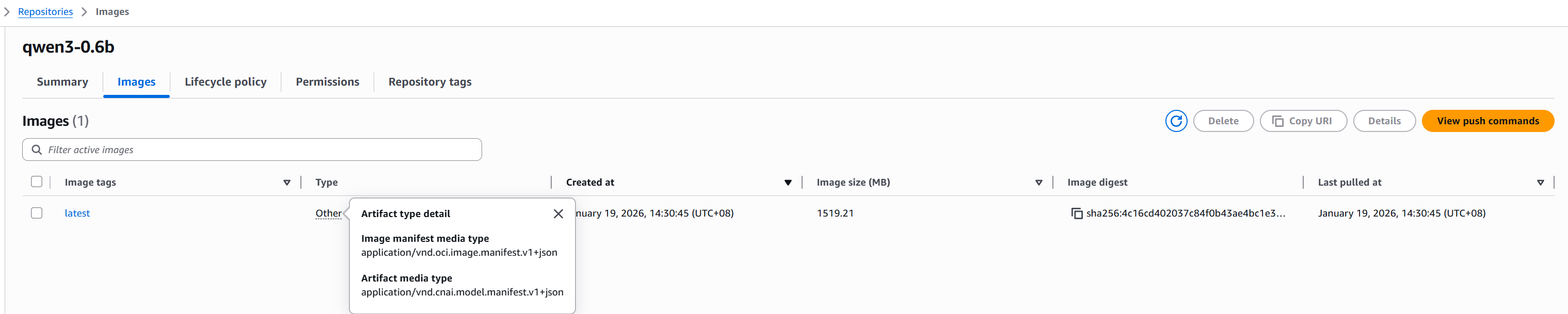
推送结果如下
在负载中挂载模型OCI
实际上k8s已经具备ImageVolume特性,允许将镜像作为 Volume 进行挂载,但是实际测试的结果EKS默认并不开启此特性。可以考虑使用model-csi-driver来实现模型挂载。
model-csi-driver是一个用于提供 OCI 模型_artifacts_的 Kubernetes CSI 驱动,这些 artifacts 基于模型规范进行打包
- values配置参考,https://github.com/modelpack/model-csi-driver/blob/main/charts/model-csi-driver/values.yaml
获取values并修改
config:
  rootDir: /var/lib/model-csi
  # Configuration for private registry auth
  registryAuths:
    registry.example.com:
      # Based64 encoded username:password
      auth: dXNlcm5hbWU6cGFzc3dvcmQ=
      serverscheme: https
image:
  repository: 000000000000.dkr.ecr.cn-north-1.amazonaws.com.cn/model-csi-driver
  pullPolicy: IfNotPresent
  tag: latest
registrar:
  image:
    repository: 000000000000.dkr.ecr.cn-north-1.amazonaws.com.cn/csi-node-driver-registrar
    pullPolicy: IfNotPresent
    tag: v2.5.0
使用helm部署
- registryAuths最终存储在名为docker-config的configmap中
helm upgrade --install model-csi-driver \
    oci://ghcr.io/modelpack/charts/model-csi-driver \
    --namespace model-csi \
    --create-namespace \
    -f values.yaml
这里会出现model-csi-driver镜像找不到的问题,可以通过clone仓库并自行编译打包的方式构建
创建测试pod
apiVersion: v1
kind: Pod
metadata:
  name: model-inference-pod
spec:
  containers:
  - name: inference-server
    image: 000000000000.dkr.ecr.cn-north-1.amazonaws.com.cn/debian:latest
    command: ["sleep", "infinity"]
    volumeMounts:
    - name: model-volume
      mountPath: /model
      readOnly: true
  volumes:
  - name: model-volume
    csi:
      driver: model.csi.modelpack.org
      volumeAttributes:
        model.csi.modelpack.org/reference: "000000000000.dkr.ecr.cn-north-1.amazonaws.com.cn/qwen3-0.6b:latest"
报错如下
Warning FailedMount 0s (x4 over 4s) kubelet MountVolume.SetUp failed for volume "model-volume" : rpc error: code = Internal desc = pull model: pull model image: 000000000000.dkr.ecr.cn-north-1.amazonaws.com.cn/qwen3-0.6b:latest, shared: false: pull model failed: get auth for model: 000000000000.dkr.ecr.cn-north-1.amazonaws.com.cn/qwen3-0.6b:latest: load docker config file: illegal base64 data at input byte 3
可见目前registryAuths不支持自动集成ECR,打印宿主机上的docker配置
$ cat ~/.docker/config.json
{
        "auths": {
                "000000000000.dkr.ecr.cn-north-1.amazonaws.com.cn": {
                        "auth": "QVdTOmV5SndZWGxzYjJGa0lqb2liMnRtTVRxxxxN3V2xKQ....
并手动修改这部分
config:
  rootDir: /var/lib/model-csi
  # Configuration for private registry auth
  registryAuths:
    000000000000.dkr.ecr.cn-north-1.amazonaws.com.cn:
      # Based64 encoded username:password
      auth: bnR4cENyYSt6T1loxxxxxxxxxxY1hicnh1Nk1sxNzY4ODU1MjMyfQ==
      serverscheme: https
image:
  repository: 000000000000.dkr.ecr.cn-north-1.amazonaws.com.cn/model-csi-driver
  pullPolicy: IfNotPresent
  tag: latest
registrar:
  image:
    repository: 000000000000.dkr.ecr.cn-north-1.amazonaws.com.cn/csi-node-driver-registrar
    pullPolicy: IfNotPresent
    tag: v2.5.0
再次运行pod挂载成功
root@model-inference-pod:/# ls /model/
LICENSE  README.md  config.json  configuration.json  generation_config.json  merges.txt  model.safetensors  tokenizer.json  tokenizer_config.json  vocab.json
model-csi日志如下
$ kubectl logs model-csi-driver-46jct -n model-csi -c model-csi-driver
time="2026-01-19T08:43:49.762281847Z" level=info msg="serving csi plugin on unix:///csi/csi.sock" op="<nil>" request="<nil>" volumeName="<nil>"
time="2026-01-19T08:43:49Z" level=info msg="identity service registered"
time="2026-01-19T08:43:49Z" level=info msg="node service registered"
time="2026-01-19T08:43:49Z" level=info msg=serving endpoint="unix:///csi/csi.sock"
time="2026-01-19T08:44:24.617330511Z" level=info msg="publishing node volume" op=NodePublishVolume request=99193210-0ee1-4d9c-aeee-df11385bb15c targetPath="/var/lib/kubelet/pods/849b053c-a119-4592-94a1-53c407eec3a2/volumes/kubernetes.io~csi/model-volume/mount" volumeName=csi-24cee0a8acef190f3a15c432cbfed2847eedc30bd2784ebe7129fc6cb33cf6f3
time="2026-01-19T08:44:24.617432598Z" level=info msg="publishing static inline volume: 000000000000.dkr.ecr.cn-north-1.amazonaws.com.cn/qwen3-0.6b:latest" op=NodePublishVolume request=99193210-0ee1-4d9c-aeee-df11385bb15c targetPath="/var/lib/kubelet/pods/849b053c-a119-4592-94a1-53c407eec3a2/volumes/kubernetes.io~csi/model-volume/mount" volumeName=csi-24cee0a8acef190f3a15c432cbfed2847eedc30bd2784ebe7129fc6cb33cf6f3
time="2026-01-19T08:44:24Z" level=info msg="pull: starting pull operation for target 000000000000.dkr.ecr.cn-north-1.amazonaws.com.cn/qwen3-0.6b:latest [config: &{Concurrency:5 PlainHTTP:false Proxy: Insecure:true ExtractDir:/var/lib/model-csi/volumes/csi-24cee0a8acef190f3a15c432cbfed2847eedc30bd2784ebe7129fc6cb33cf6f3/model ExtractFromRemote:true Hooks:0xc00078aa40 ProgressWriter:{} DisableProgress:true DragonflyEndpoint:}]"

 浙公网安备 33010602011771号