
Vue.watch的使用详解
watch是一个对象,这个对象的键是需要观察的表达式,值可以是直接方法、方法名、包含选项的对象等等,Vue实例会在实例化时调用$watch(), 遍历watch对象的每一个属性,并且观察。
1)简单监听,直接用方法作为回调(或者说作为值)
<div>
  <p>{{msg}}</p>
  <input v-model="msg">
</div>

watch :{
    // msg 为表达式, function(oldVal, newVal)为匿名函数,作为回调函数
    // 监听msg属性的数据变化,
// 作用:只要msg发生变化,这个方法就会被调用
    msg: function (newVal, oldVal) {
        console.log("oldVal is: " + oldVal + " newVal is: " + newVal);
    }
}
注意,回调函数的第一个参数是新的值,第二个是旧的值。
2)用函数名作为值
watch:{
    msg: "methodway"
}

methods: {
    methodway (newVal, oldVal) {
      console.log("oldVal is: " + oldVal + " newVal is: " + newVal);
    }
}
3)深度监听(deep:true)
当我们监听对象或数组的值变化时,需要加deep;因为改变了对象内部属性的值,用通常的watch方式是捕捉不到的。对于数组、对象本身来说,它并没有改变。这个时候需要加上选项deep:true
监听对象的变化:
<p> {{ msg5.attr}}</p>
    <input v-model="msg5.attr">
watch:{
        msg5: {
        function (newVal,oldVal) {
            console.log("method"+oldVal.attr +'---'+newVal.attr);
         },
         deep:true
        }
}
观察控制台,watch并没有监听到对象属性的变化:
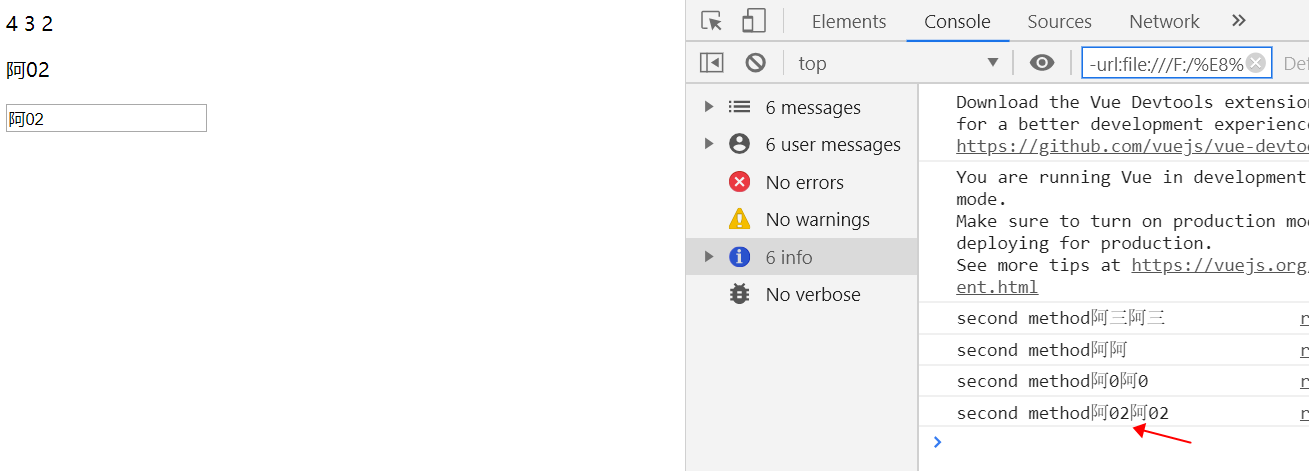
解决1:此时需要computed来做中间层进行观察
<p> {{ msg5attr }}</p>
    <input v-model="msg5.attr">

computed: {
        msg5attr() {
            return this.msg5.attr;
          },
    },
watch:{
        msg5attr:
        function (newVal,oldVal) {
            console.log("second method"+oldVal+newVal); //
        },
},
解决2:可以直接监听对象中属性的变化,这里监听msg5.attr
<p> {{ msg5.attr }}</p>
    <input v-model="msg5.attr">

watch:{
        'msg5.attr':{
        handler:function (newVal,oldVal) {
            console.log("second method"+oldVal+newVal);
          },
          deep:true
        }
},
对于数组:
watch 不能检测以下变动的数组:
当你利用索引直接设置一个项时,例如:msg5.[1] = 5
当你修改数组的长度时,例如:msg5.length = 2
这时候你可以删除原有键,再 $set 一个新的,这样就可以触发watch
myVue.$set(msg5,0,8) // [8,2,3]
4)立即监听 immediate(立即处理,进入页面就触发一次)
<p> {{ msg5 }}</p>
    <input v-model="msg5">

watch:{
          msg5: {
            handler:function(newVal, oldVal) {
              console.log("this should be called immediately.");
            },
            // 加上immediate选项后,实例化后立刻回调一次
            immediate: true
          }
},
5)回调函数为数组
<p> {{ msg5 }}</p>
<input v-model="msg5">
watch:{
msg5: [
          "method1",
          function method2(newVal,oldVal) {
            console.log("second method"+oldVal+'---'+newVal);
          },
          {
            handler(newVal, oldVal) {
            console.log("third method"+oldVal+'---'+newVal)
          },
          deep:true
          }
        ],
},
methods:{
    method1(newVal, oldVal) {
          console.log("first method");
        }
}
对路由的监听
// 监听,当路由发生变化的时候执行
watch:{
  $route(to,from){
    console.log(to.path);
  }
},
加油!

 浙公网安备 33010602011771号