
electron 窗口拖拽问题
1 BrowserWindow 自定义窗口(无标题)后拖拽问题
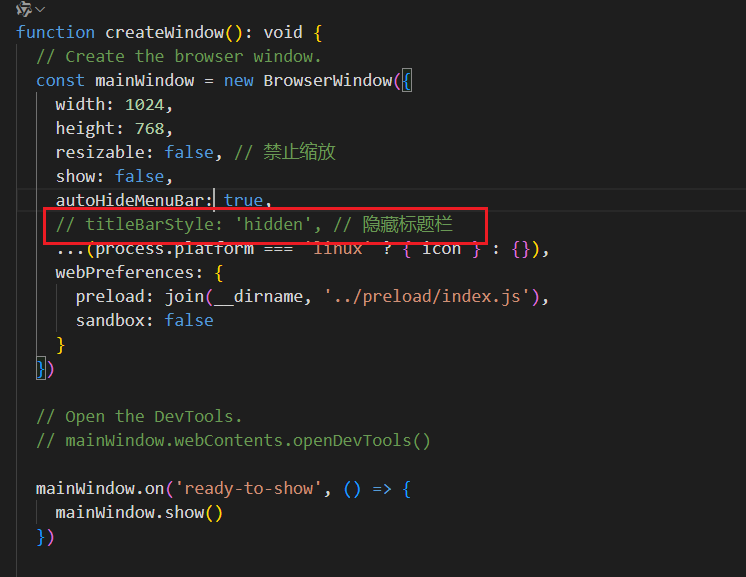
解决办法:
第一种
- 在需要拖拽的元素上添加css
.main-box {
  -webkit-app-region: drag;
}
/**这样整个 .main-box 区域都可以用来拖动窗口。**/
2.处理可点击元素
- 如果在可拖拽区域内有按钮或其他交互控件(如关闭、最小化按钮),这些元素将无法正常响应点击事件。
- 为了解决这个问题,你需要对这些特定元素取消拖拽行为:
.main-box button,
.main-box input,
.main-box a {
  -webkit-app-region: no-drag;
}
- 避免影响文本选择和其他默认行为
- 拖拽区域可能会干扰用户的其他操作,例如文本选择。你可以通过 JavaScript 或者更具体的 CSS 来管理这种行为。
- 完整示例 假设你想让顶部标题栏可以拖拽,而其中的按钮不能影响拖拽功能,可以这样设置:
<template>
  <div class="main-box">
    <div class="title-bar">
      <button @click="minimize">-</button>
      <button @click="close">x</button>
    </div>
  </div>
</template>

<style scoped>
.main-box {
  -webkit-app-region: drag;
  background-color: aqua;
}

.title-bar button {
  -webkit-app-region: no-drag;
}
</style>
第二种
在 Electron 中解决窗口拖拽问题而不使用 CSS 方法,可以通过以下方式实现:
- 使用 Electron API 实现窗口拖拽
// 在主进程文件中 (如 main.ts)
import { BrowserWindow, ipcMain } from 'electron'

let mainWindow: BrowserWindow

function createWindow() {
  mainWindow = new BrowserWindow({
    // ... 其他配置
    frame: false, // 隐藏默认窗口框架
    webPreferences: {
      nodeIntegration: true,
      contextIsolation: false
    }
  })
}

// 监听渲染进程发送的窗口控制消息
ipcMain.on('window-drag-start', (event, { x, y }) => {
  if (mainWindow) {
    const [currentX, currentY] = mainWindow.getPosition()
    mainWindow.setPosition(currentX + x, currentY + y)
  }
})
- 在 Vue 组件中实现拖拽逻辑
<script setup>
import { ref, onMounted, onBeforeUnmount } from 'vue'
import { ipcRenderer } from 'electron'

const isDragging = ref(false)
const dragOffset = ref({ x: 0, y: 0 })

// 开始拖拽
function startDrag(event) {
  isDragging.value = true
  dragOffset.value = {
    x: event.clientX,
    y: event.clientY
  }

  document.addEventListener('mousemove', handleDrag)
  document.addEventListener('mouseup', stopDrag)
}

// 处理拖拽过程
function handleDrag(event) {
  if (!isDragging.value) return

  const deltaX = event.clientX - dragOffset.value.x
  const deltaY = event.clientY - dragOffset.value.y

  // 发送消息到主进程移动窗口
  ipcRenderer.send('window-move', { x: deltaX, y: deltaY })

  dragOffset.value = {
    x: event.clientX,
    y: event.clientY
  }
}

// 停止拖拽
function stopDrag() {
  isDragging.value = false
  document.removeEventListener('mousemove', handleDrag)
  document.removeEventListener('mouseup', stopDrag)
}

onMounted(() => {
  // 监听主进程返回的窗口位置
  ipcRenderer.on('window-moved', (event, position) => {
    // 处理窗口位置更新
  })
})

onBeforeUnmount(() => {
  ipcRenderer.removeAllListeners('window-moved')
})
</script>

<template>
  <div class="draggable-area" @mousedown="startDrag">
    <!-- 可拖拽区域内容 -->
  </div>
</template>
- 完整的窗口控制实现
// 主进程中的完整窗口控制
import { app, BrowserWindow, ipcMain } from 'electron'

ipcMain.on('window-control', (event, action) => {
  const window = BrowserWindow.fromWebContents(event.sender)

  switch (action.type) {
    case 'drag':
      // 处理拖拽逻辑
      if (window && action.position) {
        const [x, y] = window.getPosition()
        window.setPosition(
          x + action.position.deltaX,
          y + action.position.deltaY
        )
      }
      break

    case 'minimize':
      window?.minimize()
      break

    case 'maximize':
      if (window?.isMaximized()) {
        window.restore()
      } else {
        window?.maximize()
      }
      break

    case 'close':
      window?.close()
      break
  }
})
第三种(抽取代码)
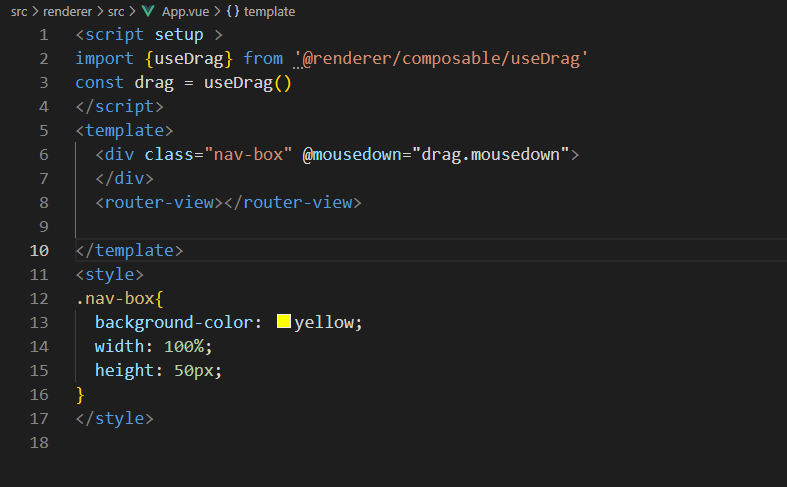
useDrag.js
import {ref} from 'vue'
export const useDrag = () => {
    let isKeyDown = ref(false)
    let dinatesX = ref(0)
    let dinatesY = ref(0)

    const mousedown = (e) => {
      isKeyDown.value = true
      dinatesX.value = e.x
      dinatesY.value = e.y
      document.onmousemove = (ev)=>{
        if(isKeyDown.value){
          const x = ev.screenX-dinatesX.value
          const y = ev.screenY-dinatesY.value
          let data = {
            x,y
          }
          electron.ipcRenderer.invoke('moveWin',data)
        }
      }
      document.onmouseup = ()=>{
        isKeyDown.value = false
      }
    }
    return {mousedown}
}
主线程代码以及使用
  ipcMain.handle('openWin', (_, data) => {
    openWindow(data)
  })
本文来自博客园,作者:一个小笨蛋,转载请注明原文链接:https://www.cnblogs.com/paylove/p/19273752

 浙公网安备 33010602011771号