
vue3中使用pinia
包管理器安装
yarn add pinia
# 或者使用 npm
npm install pinia
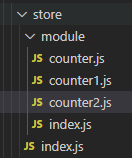
在目录下创建store文件夹,并创建index.js文件
import { createPinia } from 'pinia'
const pinia = createPinia()
export default pinia
export * from './module'
模块化的话,就在store文件夹下再建一个module文件夹,创建一个index.js文件,用export * from './xxx'来引用
export * from './counter'
export * from './counter1'
export * from './counter2'
...
在引用的文件里创建Store就行了,比如counter
import { defineStore } from 'pinia'
export const useCounterStore = defineStore('counter', {
  state: () => ({ count: 0 }),
  getters: {
    double: (state) => state.count * 2,
  },
  actions: {
    increment() {
      this.count++
    },
  },
})
在main.js里引用
import pinia from './store'
app.use(pinia)
在组件中使用
import { useCounterStore } from '@/store'
const store = useCounterStore ()
console.log(store)
console.log(store.count)

 浙公网安备 33010602011771号