


淘宝商品数据解析并保存
上一篇记录用selenium模拟登录淘宝,这一篇就接着上一篇记录一下之后如何解析数据并保存,其中数据提取用beautifulsoup,数据保存用mongodb。
具体步骤如下:
首先定位搜索框并输入要搜索的商品名称并点击搜索
input_query = self.wait.until(EC.presence_of_element_located((By.ID, 'q')))
search_button = self.wait.until(EC.presence_of_element_located((By.CLASS_NAME, 'search-button')))
input_query.send_keys(goods)
search_button.click()
然后用beautifulsoup提取如下图中的信息
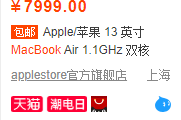
soup = BeautifulSoup(browser.page_source, 'html.parser')
soup = soup.find_all(class_='J_MouserOnverReq')
for item in soup:
    goods_info = {}
    goods_info['price'] = item.select('.ctx-box > .row-1 > .price > strong')[0].get_text()
    goods_info['deal-cnt'] = item.select('.ctx-box > .row-1 > .deal-cnt')[0].get_text()
    goods_info['title'] = item.select('.ctx-box > .row-2 > a')[0].get_text().strip()
    goods_info['shop'] = item.select('.ctx-box > .row-3 > .shop > a')[0].get_text().strip()
    goods_info['location'] = item.select('.ctx-box > .row-3 > .location')[0].get_text()
接着将解析到的数据插入mongodb,结果如图所示
client = MongoClient(host='localhost', port=27017)
db = client['goods']
collection = db['macbook']
collection.insert_one(goods_info)

以下为登录并提取数据的全部代码:
from selenium import webdriver
from selenium.webdriver.common.by import By
from selenium.webdriver.support.ui import WebDriverWait
from selenium.webdriver.support import expected_conditions as EC
from selenium.webdriver.common.action_chains import ActionChains
import time
from bs4 import BeautifulSoup
from pymongo import MongoClient


driver_path = 'D:\\Program Files (x86)\\chromedriver.exe'


class TaoSearch:
    def __init__(self):
        self.url_login = 'https://login.taobao.com/member/login.jhtml'
        self.url_home = 'https://www.taobao.com'
        self.db = MongoClient(host='localhost', port=27017)['goods']
        self.cookies = {}
        options = webdriver.ChromeOptions()
        options.add_experimental_option('excludeSwitches', ['enable-automation'])
        self.browser = webdriver.Chrome(options=options, executable_path=driver_path)
        self.browser.maximize_window()
        self.wait = WebDriverWait(self.browser, 10)

    def login(self, username, password):
        self.browser.get(self.url_login)
        self.wait.until(EC.presence_of_element_located((By.ID, 'fm-login-id'))).send_keys(username)
        self.wait.until(EC.presence_of_element_located((By.ID, 'fm-login-password'))).send_keys(password)
        self.verify()
        time.sleep(3)
        home_page = self.wait.until(EC.presence_of_element_located((By.CSS_SELECTOR, '.site-nav-bd > ul.site-nav-bd-r > li.site-nav-home > div > a > span')))
        home_page.click()
        time.sleep(3)

    def search(self, goods):
        input_query = self.wait.until(EC.presence_of_element_located((By.ID, 'q')))
        input_query.send_keys(goods)
        search_button = self.wait.until(EC.presence_of_element_located((By.CLASS_NAME, 'search-button')))
        search_button.click()
        time.sleep(5)
        return goods, self.browser.page_source

    def parse_and_save(self, goods, source):
        collection = self.db[goods]
        soup = BeautifulSoup(source, 'html.parser')
        soup = soup.find_all(class_='J_MouserOnverReq')
        for item in soup:
            goods_info = {}
            goods_info['price'] = item.select('.ctx-box > .row-1 > .price > strong')[0].get_text()
            goods_info['deal-cnt'] = item.select('.ctx-box > .row-1 > .deal-cnt')[0].get_text()
            goods_info['title'] = item.select('.ctx-box > .row-2 > a')[0].get_text().strip()
            goods_info['shop'] = item.select('.ctx-box > .row-3 > .shop > a')[0].get_text().strip()
            goods_info['location'] = item.select('.ctx-box > .row-3 > .location')[0].get_text()
            collection.insert_one(goods_info)
            print(goods_info)

    def verify(self):
        button = self.browser.find_element_by_class_name('fm-btn')
        button.click()
        slider = self.wait.until(EC.presence_of_element_located((By.ID, 'nc_1_n1z')))
        ActionChains(self.browser).click_and_hold(on_element=slider).perform()
        ActionChains(self.browser).move_by_offset(xoffset=280, yoffset=0).perform()
        ActionChains(self.browser).release().perform()
        time.sleep(1)
        button.click()
        time.sleep(4)
        if self.browser.current_url == self.url_login:
            self.verify()

    def main(self,username, password, goods):
        self.login(username, password)
        goods_, source = self.search(goods)
        self.parse_and_save(goods_, source)


if __name__ == '__main__':
    t = TaoSearch()
    t.main('username', 'password', 'macbook')

 浙公网安备 33010602011771号