
Redis(五)Redis配置解析
Redis配置文件解剖
网络
bind 127.0.0.1 绑定IP
port 6379 端口
daemonize no 以守护进程的方式运行,默认是no,需要手动开启
通用
日志级别
# Specify the server verbosity level.
# This can be one of:
# debug (a lot of information, useful for development/testing)
# verbose (many rarely useful info, but not a mess like the debug level)
# notice (moderately verbose, what you want in production probably)
# warning (only very important / critical messages are logged)
loglevel notice
logfile "" 日志文件
databases 16 默认16个数据库
pidfile /var/run/redis_6379.pid (Linux)以后台方式运行,需要指定保存一个pid文件
快照
在规定的时间内,执行了多少次操作则会持久化到文件 .rdb .aof。Redis是内存数据库,如果没有持久化,就会断电即失。
save 900 1  如果900秒内至少有一个key进行修改,将进行持久化操作
save 300 10  如果300秒内至少有十个key进行修改,将进行持久化操作
save 60 10000  如果60秒内至少有10000,将进行持久化操作
stop-writes-on-bgsave-error yes 如果持久化出错,是否需要继续工作
rdbcompression yes 是否压缩rdb文件,但需要消耗CPU
rdbchecksum yes 保存rdb文件的时候,进行错误校验
dir ./ rdb文件保存的目录
安全
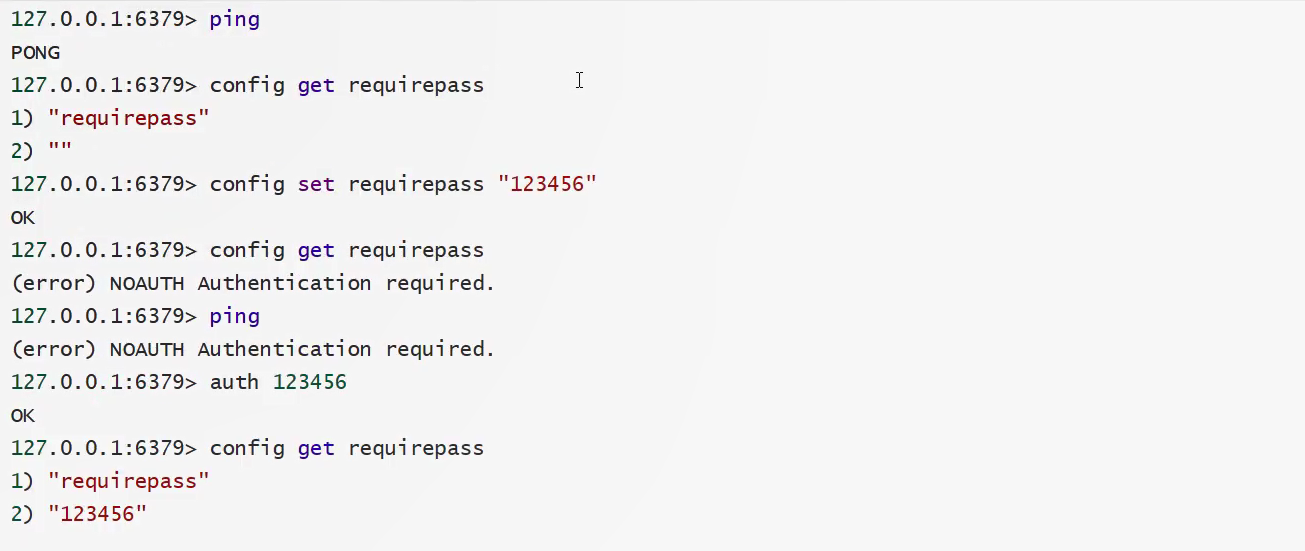
# requirepass foobared 设置密码,例如requirepass 123456 命令方式获取/设置密码(config get requirepass/config set requirepass "123456")
此时无法进行操作,需要先验证:auth 123456
客户端
maxclients 10000 设置允许连接Redis的最大客户端数量
maxheap <bytes> 配置Redis最大内存容量
maxmemory-policy volatile-lru 设置内存达到上限之后的处理策略:
1、volatile-lru:只对设置了过期时间的key进行LRU(默认值)
2、allkeys-lru : 删除lru算法的key
3、volatile-random:随机删除即将过期key
4、allkeys-random:随机删除
5、volatile-ttl : 删除即将过期的
6、noeviction : 永不过期,返回错误
APPEND ONLY 模式 aof配置
appendonly no 默认不开启aof模式,使用rdb进行持久化。大部分情况下,rdb完全够用。
appendfilename "appendonly.aof" 持久化的文件名
# appendfsync always 每次修改都会同步,但会消耗性能
appendfsync everysec 每秒进行一次同步,但可能会丢失这一秒的数据
# appendfsync no 不执行同步,速度最快
完

 浙公网安备 33010602011771号