
composer引入本地自己开发的php扩展包
开发自己的php扩展包
一、创建扩展包目录结构
1. 创建目录hoo-tool,在目录下创建目录 src
2. 在hoo-tool 目录下 运行命令:composer init
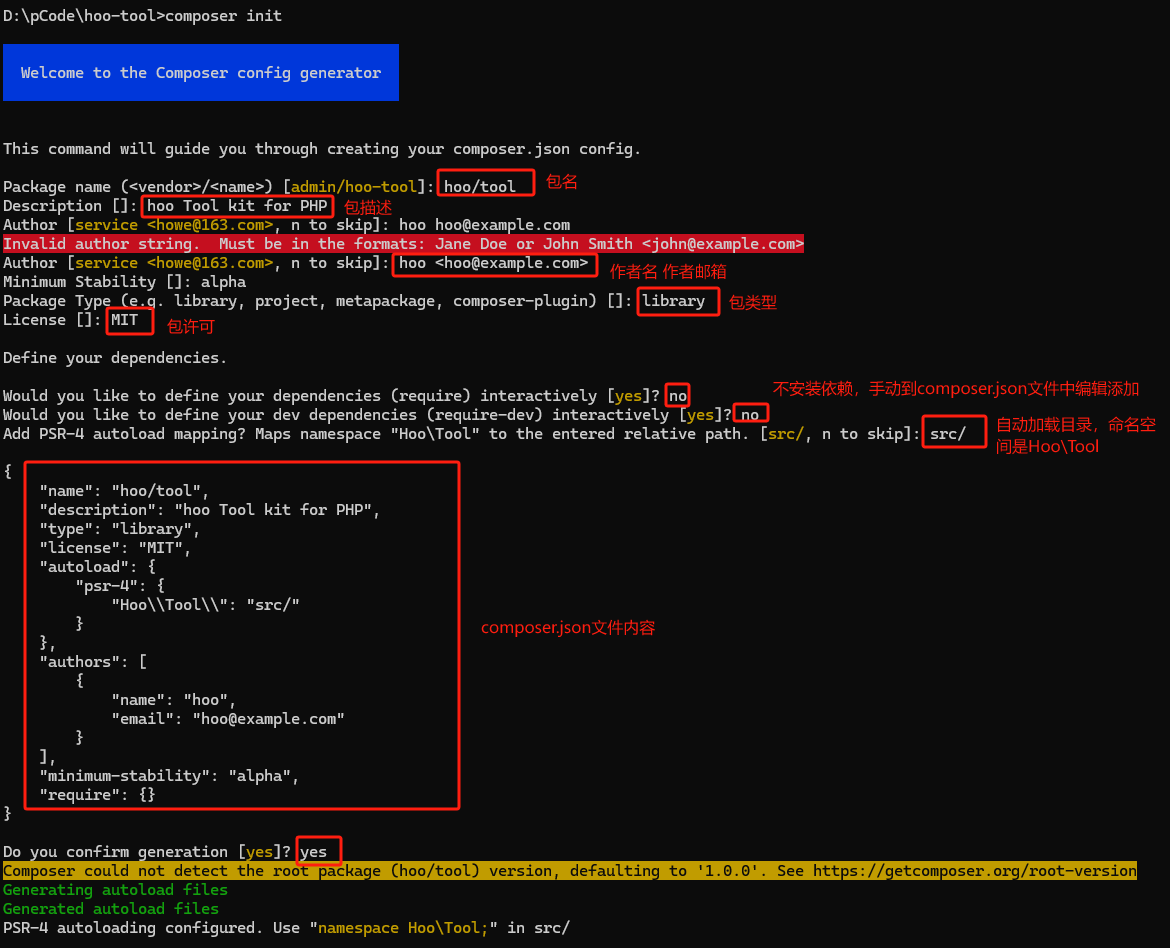
3. 运行完命令的效果

{
    "name": "hoo/tool",
    "description": "hoo Tool kit for PHP",
    "type": "library",
    "license": "MIT",
    "autoload": {
        "psr-4": {
            "Hoo\\Tool\\": "src/"
        }
    },
    "authors": [
        {
            "name": "hoo",
            "email": "hoo@example.com"
        }
    ],
    "minimum-stability": "alpha",
    "require": {}
}
二、编写composer.json文件
本文PHP版本是使用8.2
所以在composer.json 中编写,指定require的PHP版本:
"require": {
        "php": ">=8.0"
    }
三、编写扩展包的PHP代码
1. 编写一个响应工具,Hoo\Tool这个命名空间对应src目录
在src目录下创建 ResultTool.class类
<?php

namespace Hoo\Tool;


use Hoo\Tool\Constants\ErrorCode;

class ResultTool
{
    /**
     * @param array $data
     * @return array
     */
    public static function success(array $data = []): array
    {
        return static::end(ErrorCode::SUCCESS, ErrorCode::getMessage(ErrorCode::SUCCESS), $data);
    }

    /**
     * @param int $code
     * @param string $message
     * @param array $data
     * @return array
     */
    public static function error(string $message = '', int $code = ErrorCode::ERROR, array $data = []): array
    {
        if (empty($message)) {
            return static::end($code, ErrorCode::getMessage($code), $data);
        } else {
            return static::end($code, $message, $data);
        }
    }

    /**
     * @param $code
     * @param $message
     * @param $data
     * @return array
     */
    protected static function end($code, $message, $data): array
    {
        return [
            'code' => $code,
            'message' => $message,
            'data' => $data,
        ];
    }
}
2. 编写一个响应工具的状态码类
src目录下创建Constants目录
创建ErrorCode.class
<?php

namespace Hoo\Tool\Constants;

class ErrorCode
{

    public const SUCCESS = 200;
    public const ERROR = 0;

    public static function getMessage(int $code): string
    {
        $errors = [
            0 => 'Server Error!',
            200 => 'success',
            // Add more as needed
        ];

        return $errors[$code] ?? 'Unknown error';
    }
}
3. 再编写一个日志工具
在src目录创建 LoggerUtil.class类
<?php

namespace Hoo\Tool;


class LoggerUtil
{
    private string $filePath;
    private string $dirName = './runtime/logs/'; // 日志文件目录
    private float|int $maxFileSize = 2 * 1024 * 1024; // 2MB 文件大小限制
    private string $datePattern = 'Y-m-d'; // 日志文件命名中的日期格式
    private bool $rollingType = true; // true按文件大小滚动,false按日期滚动

    /**
     * 检查并执行日志文件的滚动
     */
    private function checkAndRollFile()
    {
        $dir_path = dirname($this->filePath);
        if (!file_exists($dir_path)) {
            mkdir($dir_path, 0755, true); // 0755 表示权限,true 表示递归创建
        }

        // 检查是否需要按日期滚动
        if (!$this->rollingType && file_exists($this->filePath) && date($this->datePattern) !== date($this->datePattern, filemtime($this->filePath))) {
            $this->rollByDate();
        }

        // 检查文件大小
        clearstatcache(true, $this->filePath);
        if ($this->rollingType && file_exists($this->filePath) && filesize($this->filePath) >= $this->maxFileSize) {
            $this->rollBySize();
        }
    }

    /**
     * 按日期滚动日志文件
     */
    private function rollByDate()
    {
        $newPath = $this->getNewFilePath(true);
        rename($this->filePath, $newPath);
    }

    /**
     * 按大小滚动日志文件
     */
    private function rollBySize()
    {
        $newPath = $this->getNewFilePath(false, true);
        rename($this->filePath, $newPath);
    }

    /**
     * 获取新日志文件的路径
     *
     * @param bool $byDate 是否按日期滚动
     * @param bool $forcedBySize 是否因文件大小强制滚动
     * @return string 新的日志文件路径
     */
    private function getNewFilePath($byDate = false, $forcedBySize = false)
    {
        $baseName = pathinfo($this->filePath, PATHINFO_FILENAME);
        $extension = pathinfo($this->filePath, PATHINFO_EXTENSION);
        $dirName = pathinfo($this->filePath, PATHINFO_DIRNAME);

        $suffix = '';
        if ($byDate) {
            $suffix = '_' . date($this->datePattern);
        } elseif ($forcedBySize) {
            $suffix = '_size_' . date('Hi');
        }

        return "{$dirName}/{$baseName}{$suffix}.{$extension}";
    }

    /**
     * 写入日志内容
     *
     * @param string $fileName
     * @param mixed $content
     * @param string $label
     * @return bool
     */
    public static function write(string $fileName, mixed $content, string $label = ''): bool
    {
        $instance = new self();
        $instance->filePath = $instance->dirName . date('Ymd') . '/' . $fileName . '.log';
        $instance->checkAndRollFile();
        if (is_string($content)) {
            $content = "[" . date("Y-m-d H:i:s") . "] " . $label . ' ' . $content . PHP_EOL;
        } else {
            $content = "[" . date("Y-m-d H:i:s") . "] " . $label . PHP_EOL . var_export($content, true) . PHP_EOL;
        }

        // 写入日志
        $result = file_put_contents($instance->filePath, $content, FILE_APPEND);

        return $result !== false;
    }


}
引入自己开发的包
1. 编辑composer.json文件
在项目中引入未提交的包
"repositories": [
    {
      "type": "path",
      "url": "包的觉得路径"
    }
  ]
url的配置示例:
- windows "D:\docker-code\code\hoo-tool"
- linux:"/code/hoo-tool"
2. 引入包
composer require hoo/tool
3. 使用包
<?php

declare(strict_types=1);

namespace App\Controller;

use HooTool\LoggerUtil;
use HooTool\ResultTool;

class IndexController extends AbstractController
{
    public function index()
    {
        LoggerUtil::write('test',' Check If The Application Is Under Maintenance','test');
		return ResultTool::success('获取成功',[
            'method' => 'post',
            'message' => "Hello hoo-tool",
        ]);
        return ResultTool::error('服务器错误',500,[
            'method' => 'post',
            'message' => "Hello hoo-tool",
        ]);
    }
}

 浙公网安备 33010602011771号