
iOS - 位置处理
简介
在 iOS 系统中,我们可以很容易地找到用户的当前位置,用户允许应用程序访问的核心位置框架的帮助信息。
涉及的步骤
1. 创建一个简单的 View based application.
2. 选择项目文件,然后选择目标,然后添加如下所示 CoreLocation.framework。
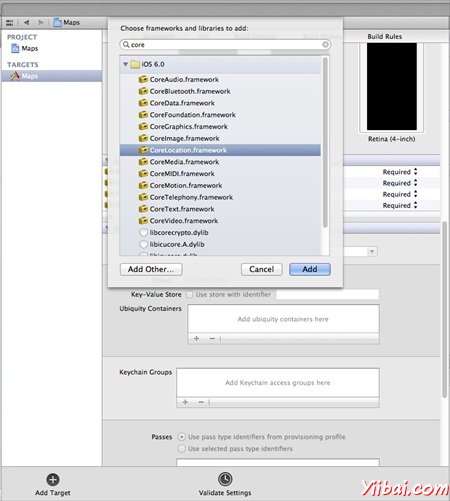
3. 添加两个标签在ViewController.xib并创建 ibOutlets 命名标签分别为 latitudeLabel 和 longitudeLabel。
4. 现在创建一个新的文件,通过选择 File-> New -> File... -> select Objective-C类并点击 next
5. 命名类为 LocationHandler ,并设置为 NSObject 的子类.
6. 选择创建
7. 更新 LocationHandler.h 如下
#import <Foundation/Foundation.h>#import <CoreLocation/CoreLocation.h>@protocolLocationHandlerDelegate<NSObject>@required-(void) didUpdateToLocation:(CLLocation*)newLocation
 fromLocation:(CLLocation*)oldLocation;@end@interfaceLocationHandler:NSObject<CLLocationManagerDelegate>{CLLocationManager*locationManager;}@property(nonatomic,strong) id<LocationHandlerDelegate>delegate;+(id)getSharedInstance;-(void)startUpdating;-(void) stopUpdating;@end
8. 现在更新LocationHandler.m如下:
#import "LocationHandler.h"staticLocationHandler*DefaultManager=nil;@interfaceLocationHandler()-(void)initiate;@end@implementationLocationHandler+(id)getSharedInstance{if(!DefaultManager){DefaultManager=[[self allocWithZone:NULL]init];[DefaultManager initiate];}returnDefaultManager;}-(void)initiate{
    locationManager =[[CLLocationManager alloc]init];
    locationManager.delegate=self;}-(void)startUpdating{[locationManager startUpdatingLocation];}-(void) stopUpdating{[locationManager stopUpdatingLocation];}-(void)locationManager:(CLLocationManager*)manager didUpdateToLocation:(CLLocation*)newLocation fromLocation:(CLLocation*)oldLocation{if([self.delegate respondsToSelector:@selector(didUpdateToLocation:fromLocation:)]){[self.delegate didUpdateToLocation:oldLocation
        fromLocation:newLocation];}}@end
9. 如下更新 ViewController.h 我们实现了 LocationHandler 委托并创建两个 ibOutlets。
#import <UIKit/UIKit.h>#import "LocationHandler.h"@interfaceViewController:UIViewController<LocationHandlerDelegate>{IBOutletUILabel*latitudeLabel;IBOutletUILabel*longitudeLabel;}@end
10. 更新 ViewController.m 如下:
#import "ViewController.h"@interfaceViewController()@end@implementationViewController-(void)viewDidLoad
{[super viewDidLoad];[[LocationHandler getSharedInstance]setDelegate:self];[[LocationHandler getSharedInstance]startUpdating];}-(void)didReceiveMemoryWarning
{[super didReceiveMemoryWarning];// Dispose of any resources that can be recreated.}-(void)didUpdateToLocation:(CLLocation*)newLocation
 fromLocation:(CLLocation*)oldLocation{[latitudeLabel setText:[NSString stringWithFormat:@"Latitude: %f",newLocation.coordinate.latitude]];[longitudeLabel setText:[NSString stringWithFormat:@"Longitude: %f",newLocation.coordinate.longitude]];}@end
输出
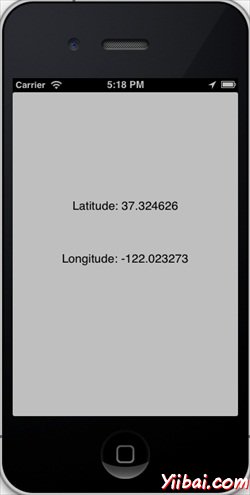
现在,当我们运行程序时,我们会得到下面的输出。
本站文章除注明转载外,均为本站原创或编译
欢迎任何形式的转载,但请务必注明出处,尊重他人劳动,传播学习教程;
转载请注明:文章转载自:易百教程 [http://www.yiibai.com]
本文标题:iOS - 位置处理
转载请保留原文链接:http://www.yiibai.com/html/ios/2013/0902232.html
欢迎任何形式的转载,但请务必注明出处,尊重他人劳动,传播学习教程;
转载请注明:文章转载自:易百教程 [http://www.yiibai.com]
本文标题:iOS - 位置处理
转载请保留原文链接:http://www.yiibai.com/html/ios/2013/0902232.html

 浙公网安备 33010602011771号