
self-RAG部署
参考文献:https://arxiv.org/abs/2310.11511
代码:https://github.com/AkariAsai/self-rag
self-RAG是11月发布的比较新的模型,我看国内暂时还没有人细讲其部署步骤,由于我部署过程中踩了很多坑,所以想记录下来给大家参考。
声明:这篇文章中提到的所有打不开的链接,就说明需要go out才能看。
1.环境部署
首先你要有部署大语言模型的硬件环境,可以看看实验室有没有或者Google的Colaboratory(一种云GPU服务器,有免费的使用额度)也可以用(注册方法略,网上有很多)。还有需要将cuda版本调到12.1或者11.8,就这两种版本,其他都不行。(下面会提到原因)
然后进入jupyterlab进行环境配置:
1 pip install -r requirements.txt
这里需要注意的是,github里面直接给出的requirements.txt,里面的一些库存在版本互相矛盾的情况,通过搜集资料,我找到了不矛盾的requirements.txt
vllm
torch
transformers
tokenizer
datasets
peft
bitsandbytes
accelerate>=0.21.0,<0.23.0
evaluate>=0.4.0
tiktoken
cohere
openai
把上面这些粘到新的txt文件里面,代替上面的requirements.txt,再pip install就行,中间执行可能会有一两行红色的报错,但是不用管,亲测没有影响。
但是还没有结束,因为vllm这个库很特殊,它只能与12.1或者11.8的cuda兼容,12.1的cuda直接下最新版的vllm就行,11.8的cuda请下载下面链接的vllm,我下的第一行的,可以根据自己的python版本自己选。
Release v0.2.2 · WoosukKwon/vllm · GitHub
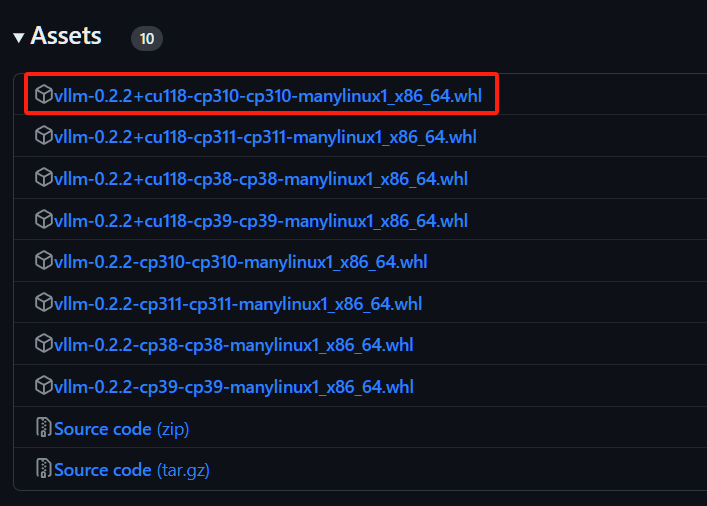
然后把whl拖到当前目录下
pip install vllm-0.2.2+cu118-cp310-cp310-manylinux1_x86_64.whl
下载的文件不一样的话,上述代码中的文件名字也要改
2.运行代码
 1  from vllm import LLM, SamplingParams
 2  #下面这段是llama2模型的下载和一些参数配置
 3  model = LLM("selfrag/selfrag_llama2_7b", download_dir="/gscratch/h2lab/akari/model_cache", dtype="half") #这个download_dir请改成自己想要把大模型下载到的位置,要求至少12G以上的剩余空间
 4  sampling_params = SamplingParams(temperature=0.0, top_p=1.0, max_tokens=100, skip_special_tokens=False)
 5  #在下面这段代码增加外部知识
 6 def format_prompt(input, paragraph=None):
 7  prompt = "### Instruction:\n{0}\n\n### Response:\n".format(input)
 8  if paragraph is not None:
 9  prompt += "[Retrieval]<paragraph>{0}</paragraph>".format(paragraph)
10  return prompt
11  query_1 = "Leave odd one out: twitter, Instagram, whatsapp."
12  query_2 = "Can you tell me the difference between llamas and alpacas?"
13  queries = [query_1, query_2]
14  # for a query that doesn't require retrieval
15 preds = model. Generate([format_prompt(query) for query in queries], sampling_params)
16 for pred in preds:
17 print("Model prediction: {0}".format(pred.outputs[0].text))
这一段主要是用Critic模型判断这个问题是否需要搜集外部知识,不需要,就直接生成答案;需要的话,输出需要的tokens,然后不会输出答案。
1 from vllm import LLM, SamplingParams
2 model = LLM("selfrag/selfrag_llama2_7b", download_dir="/gscratch/h2lab/akari/model_cache", dtype="half")
3 sampling_params = SamplingParams(temperature=0.0, top_p=1.0, max_tokens=100, skip_special_tokens=False)
4
5 # for a query that needs factual grounding
6 prompt = format_prompt("Can you tell me the difference between llamas and alpacas?", "The alpaca (Lama pacos) is a species of South American camelid mammal. It is similar to, and often confused with, the llama. Alpacas are considerably smaller than llamas, and unlike llamas, they were not bred to be working animals, but were bred specifically for their fiber.")
7 preds = model.generate([prompt], sampling_params)
8 print([pred.outputs[0].text for pred in preds])
9 # ['[Relevant]Alpacas are considerably smaller than llamas, and unlike llamas, they were not bred to be working animals, but were bred specifically for their fiber.[Fully supported][Utility:5]</s>']
这段代码第2行是人为增加的外部知识和问题(一种直接的插入方法,后面会有成体系的知识增加方法),借助插入的外部知识生成对应问题的答案。
3.运行代码过程中的坑
需要注意的是,这个代码会从hugging face网站上下载llama2模型,所以需要go out,如果搭了还是报错,显示无法连接到hugging face网站,那就先把这个模型的所有文件下载到本地(大概12个G),然后改一下上面代码中的这一行:
model = LLM("selfrag/selfrag_llama2_7b", download_dir="/gscratch/h2lab/akari/model_cache", dtype="half")
把第一个参数改成本地模型的路径,第二个参数删掉,再运行试试(这个我没有自己做过,查的资料说可以)
然后如果有幸go out就能不报错了的话,第一次运行成功之后,把下面这行代码注释掉,否则会报错说已经有这个模型了,不需要再下载了。然后再运行第2,3,…,n次。
model = LLM("selfrag/selfrag_llama2_7b", download_dir="/gscratch/h2lab/akari/model_cache", dtype="half")
如果遇到下面的报错:
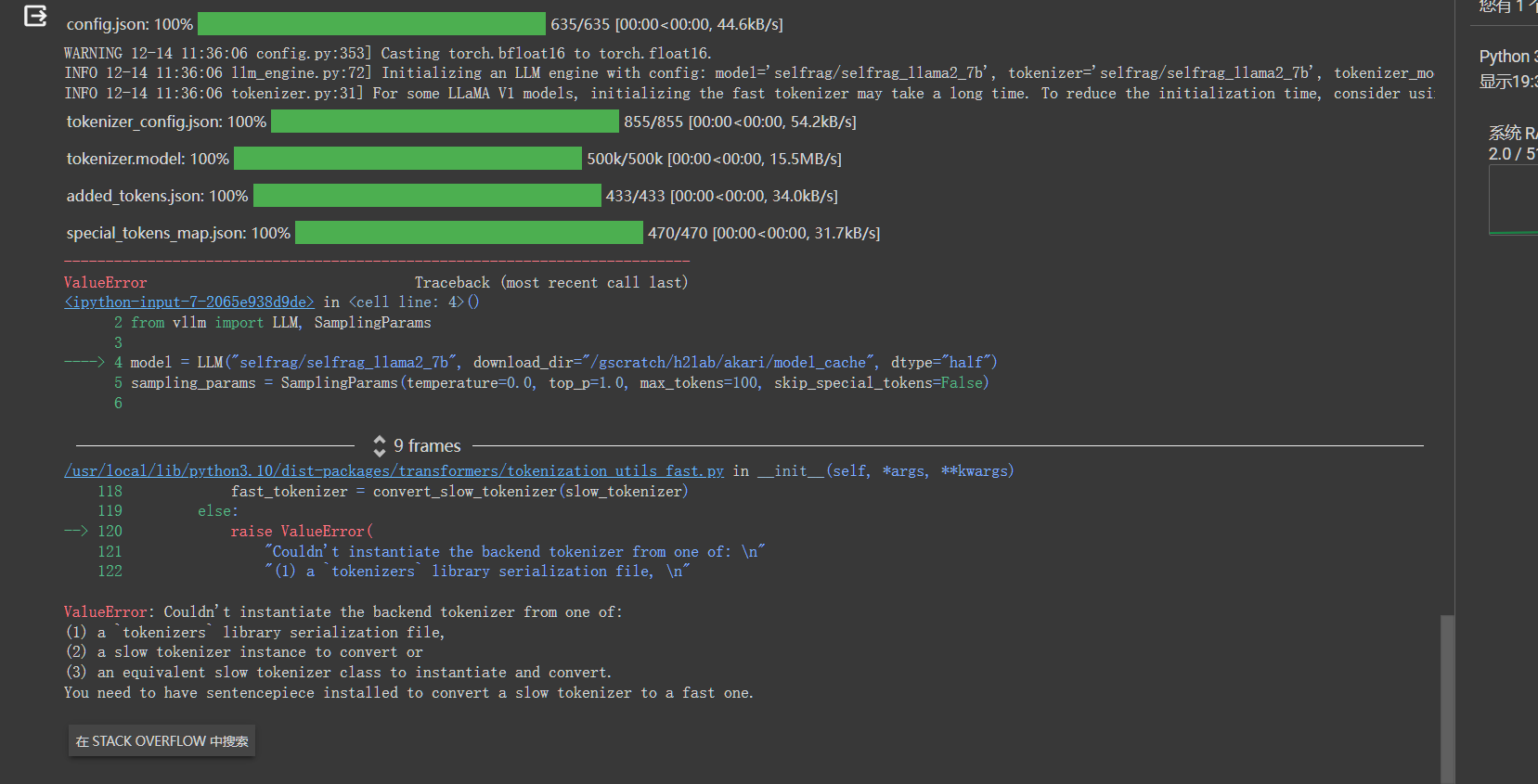
执行:
pip install --upgrade pip
pip install transformers[sentencepiece]
然后重启,再运行就好了。
4.直接加入自己的外部数据
要问别的问题,直接修改第二步代码第一段里面的query问题就行,如果是想根据自己提供的外部知识问问题,那就改第二步代码第二段代码的第6行内容。

 浙公网安备 33010602011771号