<template>
    <view>
        <!-- 选择相机拍照 -->
        <view class="container">
                <!-- 相机 -->
                <!-- 初始showcamera == true显示相机,拍照后showcamera == false -->
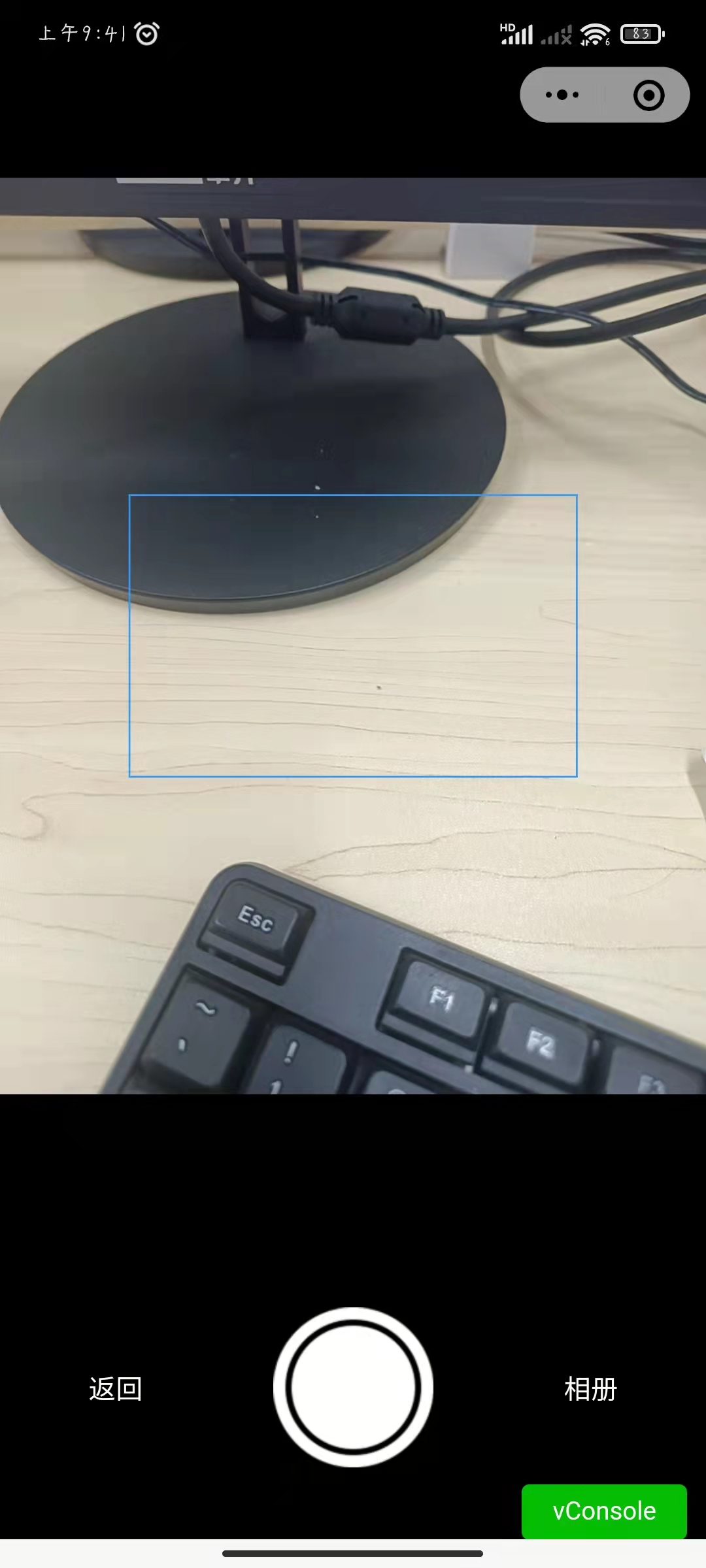
                <view class="camerabox" v-if="showCamera">
                    <camera
                        mode="normal"
                        device-position="back"
                        flash="off"
                    >
                        <!-- 视图容器 铺满相机 -->
                        <cover-view class="coverView" style="width: 100%;height: 100%;">
                            <!-- 头像框 与相机中央显示-->
                                <cover-view ref="coverImg" class="coverImg"></cover-view>
                        </cover-view>
                    </camera>
                </view>
                <!-- 照片 -->
                <!-- 点击拍照后,在画布上显示截取后的照片照片 -->
                <view class="photobox" v-if="!showCamera">
                    <canvas
                    id="photo"
                    canvas-id="photo"
                    ref="photo"
                    v-if="!showCamera"
                    style="width: 250px;height: 158px;"
                    ></canvas>
                    <!-- 显示完整照片 -->
                    <!-- :style="'width: ' + canvasWidth + 'px; height:' + canvasWidth + 'px;'" -->

        <!--             <image
                    :src="imgurl"
                    mode=""
                    id="image"
                    ref="image"
                    ></image> -->

                </view>


<!--                 <view v-if="!showCamera" class="photobox" ref="photobox">
                    <image
                    :src="imgurl"
                    mode=""
                    id="image"
                    ref="image"
                    ></image>
                </view> -->

                <!-- 底部按钮 -->
                <!-- 相机模式 -->
                <view class="bottom" v-if="showCamera">
                    <!-- 返回上级页面 -->
                    <view class="button" @click="back">返回</view>
                    <!-- 拍照按钮 -->
                    <image src="@/static/take_camera_btn_icon.png" @click="takePhoto"></image>
                    <!-- 打开相册选择图片 -->
                    <view class="button" @click="chooseImage">相册</view>
                </view>
                <!-- 照片模式 -->
                <view class="bottom" v-else>
                    <!-- 清除当前照片,返回相机模式 -->
                    <view class="button" @click="clearPhoto">取消</view>
                    <!-- 保存当前照片,传出上一级 -->
                    <view class="button" @click="back">确定</view>
                </view>
            </view>

    </view>
</template>
<script>
    import { mapMutations, mapState, mapActions } from 'vuex';
    export default {
        components: {
        },
        data() {
            return {
                cameraContext: {},
                idcardFrontSide: 'front', // 标识当前拍摄的是身份证哪一面
                showCamera: true, // 控制拍照还是显示拍照后的照片
                isCamera: true, // 无用
                imgurl: '', // 照片截取后地址
                src: '',  // 原照片地址
                flag: true, // 拍照按钮防抖动
                D: {}, // coverView盒子信息
                d: {}, // coverImage盒子信息
                imgW: 0, // 原图片宽
                imgH: 0, // 原图片高
                W: 0,
                H: 0,
                w: 0,
                h: 0,
                rx: 0,
                ry: 0
            }
        },
        computed:{
            ...mapState({
                storeData: store => store.businessJoin.fromData
            }),
        },
        methods: {
            ...mapMutations({
                setItem: 'businessJoin/setItem'
            }),
            // 返回上级
            back() {
                // 若存在截取的照片 将图片数据保存至vuex中
                if(this.imgurl) {
                    // 拍照或相册选择成功后,将临时图片地址存在vuex
                    if(this.idcardFrontSide == 'front') {
                        console.log('保存了front')
                        this.setItem({item: 'cardFontImgUrl', data: this.imgurl})
                    } else {
                        console.log('保存了back')
                        this.setItem({item: 'cardBackImgUrl', data: this.imgurl})
                    }
                }

                // 返回上级页面
                uni.navigateBack({
                    delta: 1
                });
            },
            // 点击拍照按钮照相
             takePhoto() {
                 // 若上次拍照已完成
                if (this.flag == true) {
                    var _this = this;

                    uni.createCameraContext().takePhoto({
                        quality: 'high',
                        success: (res) => {
                            // this.showCamera = !this.showCamera
                            // 开始拍照 开启防抖动
                            this.flag = false

                            // 拍照后的完整照片
                            this.src = res.tempImagePath

                            // 获取照片信息
                            uni.getImageInfo({
                                src: this.src,
                                success: data => {
                                    // console.log('图片信息', data)
                                    // console.log('图片长', this.imgW)
                                    // console.log('图片宽', this.imgH)
                                    // 图片长宽
                                    this.imgW = data.width
                                    this.imgH = data.height
                                }
                            })

                        },
                        fail(err) {
                            console.log('拍照失败', err)
                        }
                    });
                }
            },

            // 获得完整照片后,截取只保留中央身份证框部分
            async cutphoto() {
                // // 截取
                // console.log('拍照了')

                const that = this

                console.log('节点外部')

                 // 定时器保证获取到节点信息不为空
                await setTimeout(()=>{

                    // 获取.coverView节点信息
                    uni.createSelectorQuery().in(this).select('.coverView').fields({
                        dataset: true, //返回节点 dataset
                        size: true, // 返回节点尺寸
                        rect:  true // 返回节点布局位置
                    }, data => {
                        // 显示照片
                        // console.log('this.R', this.R)
                        // console.log('#coverView节点信息')
                        // console.log('#coverView节点信息', data)

                        // coverView长宽
                        this.W = data.width
                        this.H = data.height

                        // 实际图片与盒子长宽的比例
                        this.rx = this.imgW / this.W
                        this.ry = this.imgH / this.H
                        // console.log('比例rx', this.rx)
                        // console.log('比例ry', this.ry)

                        this.D = data

                    }).exec()

                    // 获取.coverImg节点信息
                    uni.createSelectorQuery().in(this).select('.coverImg').fields({
                        dataset: true,
                        size: true,
                        rect:  true
                    }, data => {

                        // 显示照片
                        this.showCamera = !this.showCamera

                        // console.log('#coverImg节点信息')
                        // console.log('#coverImg节点信息', data)

                        // coverImg宽高
                        this.w = data.width
                        this.h = data.height
                        const w = this.w
                        const h = this.h

                        // 中央矩形区域左上角坐标
                        const _w = (this.W - this.w) / 2
                        const _h = (this.H - this.h) / 2

                        // 获取画布
                        const ctx = uni.createCanvasContext("photo", this);

                        // 开始截取
                        ctx.drawImage(
                        this.src,        // 截取的原图片
                        _w*this.rx, _h*this.ry, // 源图像的矩形选择框的左上角 X 坐标
                        this.w*this.rx, this.h*this.ry, // 图像的左上角在目标canvas上 X、Y 轴的位置
                        0,0, // 图像的左上角在目标canvas上 X、Y 轴的位置
                        this.w, this.h // 在目标画布上绘制图像的宽度 高度
                        )

                        // 保存截取的内容
                        ctx.save()

                        // 绘制截取后的图片
                        ctx.draw(true, () => {
                            // 输出绘制后的图片
                            uni.canvasToTempFilePath({
                              canvasId: 'photo',
                              success: function(res) {
                                // 在H5平台下,tempFilePath 为 base64
                                // console.log('进入canvasToTempFilePath的success')
                                // console.log('base64', res.tempFilePath)
                                // 处理后的图片
                                that.imgurl = res.tempFilePath
                                // 完成拍照的过程
                                that.flag = true
                              }
                            })
                        })
                    }).exec()
                },500)
            },
            // // 拍摄后清除上一张照片
            clearPhoto() {
                // console.log('清除')
                // const { windowWidth, windowHeight } = uni.getSystemInfoSync();
                // const ctx = uni.createCanvasContext("photo", this);
                // ctx.clearRect(this.src, (windowWidth - 569)/2, (windowHeight - 899)/2, 569, 899);
                this.showCamera = !this.showCamera
            },

            // 从相册选择图片
            chooseImage() {
                uni.chooseImage({
                    count: 1,
                    sizeType: ['original', 'compressed'],
                    sourceType: ['album'],
                    success: (res) =>  {
                        console.log(res.tempFilePaths[0])
                        this.imgurl = res.tempFilePaths[0]
                        this.back()
                    },
                    fail: (err) => {}
                });
            }
        },
        watch: {
            // 拍摄照片后,调用方法截取图片
            src: {
                handler() {
                    this.cutphoto()
                }
            }
        },
        onLoad(options) {

            // #ifdef MP
                if(uni.createCameraContext) {
                    this.cameraContext = uni.createCameraContext()
                }else {
                    // 如果希望用户在最新版本的客户端上体验您的小程序,可以这样子提示
                    uni.showModal({
                        title: '提示',
                        content: '当前微信版本过低,无法使用该功能,请升级到最新微信版本后重试。'
                    })
                }

                this.idcardFrontSide = options.idcardFrontSide
                console.log('当前的类型', this.idcardFrontSide)
            // #endif
        }
    }
</script>
<style scoped lang="scss">
    .container {
        height: 100vh;
        /*#ifdef H5 */
        height: calc(100vh - var(--window-top));
        /* #endif */

        display: flex;
        flex-direction: column;
        background-color: #000;

        .camerabox {
            flex: 3;
            display: flex;
            justify-content: center;
            align-items: center;
            // margin-top: 40rpx;
            padding: 190rpx 0 150rpx;
            camera {
                display: flex;
                align-items: center;
                justify-content: center;
                width: 100%;
                height: 100%;
                // width: 80vw;
                // height: calc(80vw / 1.58);
            }
        }

        .coverView {
            display: flex;
            align-items: center;
            justify-content: center;
            text-align: center;
        }

        .coverImg {
            // transform: rotate(-90deg);
            // height: 80vw;
            // width: calc(80vw / 1.58);
            // height: 500rpx;
            // width: 316rpx;
            width: 250px;
            height: 158px;
            border: 1px solid #3798F1;
            box-sizing: border-box;
        }

        .photobox {
            flex: 3;
            display: flex;
            justify-content: center;
            align-items: center;
            margin-top: 40rpx;
            padding: 150rpx 0;
            background-color: #000;
            #photo {
                // width: 100vw;
                // height: calc(100vh - 200rpx);
                // width: 100%;
                // height: 100%;
                // height: 80vw;
                // width: calc(80vw / 1.58);
                // width: 500rpx;
                // height: 316rpx;
                align-items: center;
                justify-content: center;
                background-color:#000;
            }
            #image {
                width: 100%;
                height: 100%;
            }
            // image {
            //     width: 80vw;
            //     height: calc(80vw / 1.58);
            //     background-color: #808080;
            // }
            // .emtyImg {
            //     display: flex;
            //     align-items: center;
            //     justify-content: center;
            //     width: 80vw;
            //     height: calc(80vw / 1.58);
            //     background-color: #808080;
            //     text {
            //         color: #fff;
            //     }
            // }
        }

        .bottom {
            flex: 1;
            display: flex;
            justify-content: space-around;
            align-items: center;
            width: 100%;
            height: 200rpx;
            background-color: #000;

            image {
                width: 170rpx;
                height: 170rpx;
            }
            .button {
                font-size: 30rpx;
                color: #fff;
                padding: 50rpx;
            }
        }
    }

    // 用于操作
    .canvsborder{
      border: 1rpx solid #333;
      position: fixed;
      top: 0;
      left: 10000rpx;
    }

</style>



 浙公网安备 33010602011771号