
EBGP MULTIHOP实验
简单说明
ebgp邻居默认是直连的,因为在邻居之间交互的信息报文默认使用的ttl值为1,如果不是直连的将会被中间的路由器丢弃。如果需要在非直连的设备之间建立路由就需要开启multihop功能,支持多跳。
实验TOPO
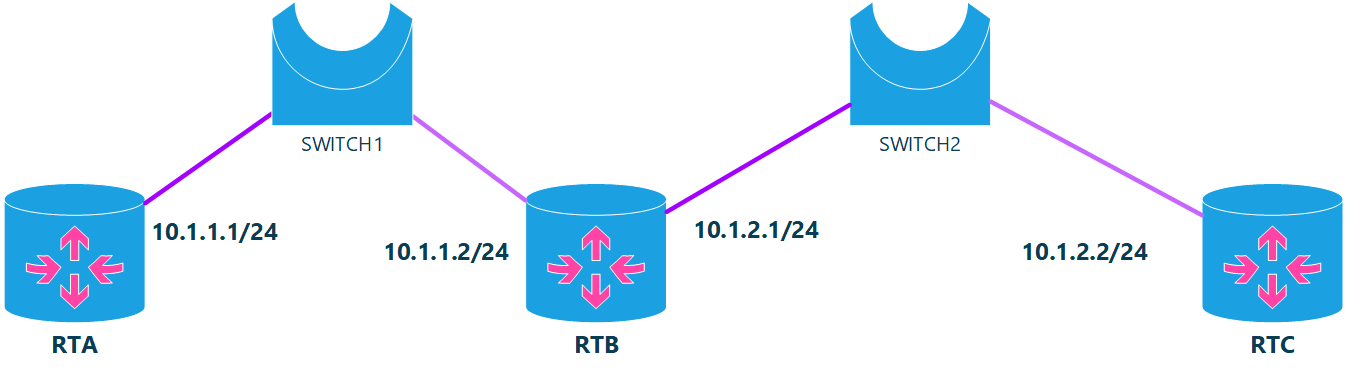
如上图所示,RTA和RTC不在同一个网段,通过路由器RTB进行连接,让RTA和RTC建立邻居
实验一:不开启multihop选项在RTA和RTB之间建立邻居
RTA
RTA# show running-config
Building configuration...

Current configuration:
!
frr version 7.1
frr defaults traditional
hostname d639bd4958bb
log syslog informational
no ipv6 forwarding
hostname RTA
service integrated-vtysh-config
!
ip route 10.1.2.0/24 10.1.1.2 eth1  #配置静态路由,使得可以与RTC通信
!
router bgp 65001
 neighbor 10.1.2.2 remote-as external
 neighbor 10.1.2.2 disable-connected-check #禁止直连检查,不禁止的话,不会发送报文。
 neighbor 10.1.2.2 timers connect 10       #设置重连定时器为10秒
!
line vty
!
end
RTA#
RTB
#不做任何配置
RTB# show running-config
Building configuration...

Current configuration:
!
frr version 7.1
frr defaults traditional
hostname 232f0e5ef636
log syslog informational
no ipv6 forwarding
hostname RTB
service integrated-vtysh-config
!
line vty
!
end
RTC
RTC# show running-config
Building configuration...

Current configuration:
!
frr version 7.1
frr defaults traditional
hostname 8d9daa768461
log syslog informational
no ipv6 forwarding
hostname RTC
service integrated-vtysh-config
!
ip route 10.1.1.0/24 10.1.2.1 eth1   #配置静态路由,让RTA与RTC能够通信
!
router bgp 65003
 neighbor 10.1.1.1 remote-as external
 neighbor 10.1.1.1 disable-connected-check  #禁止直连检查,如果不禁止,不会向邻居发送报文
 neighbor 10.1.1.1 timers connect 10        #设置重连定时器为10秒
!
line vty
!
end
RTC#
测试RTA与RTC的连通性
RTC@8d9daa768461:/# ping 10.1.1.1 -c 1
PING 10.1.1.1 (10.1.1.1): 56 data bytes
64 bytes from 10.1.1.1: icmp_seq=0 ttl=63 time=0.134 ms
--- 10.1.1.1 ping statistics ---
1 packets transmitted, 1 packets received, 0% packet loss
round-trip min/avg/max/stddev = 0.134/0.134/0.134/0.000 ms
RTC@8d9daa768461:/#
从上面可以看出,RTC与RTA之间可以正常通信了。
查看RTA与RTC之间的邻居关系
RTC# show bgp neighbors
BGP neighbor is 10.1.1.1, remote AS 0, local AS 65003, external link
  BGP version 4, remote router ID 0.0.0.0, local router ID 172.17.0.4
  BGP state = Active
  Last read 00:41:45, Last write never
  Hold time is 180, keepalive interval is 60 seconds
  Message statistics:
    Inq depth is 0
    Outq depth is 0
                         Sent       Rcvd
    Opens:                  0          0
    Notifications:          0          0
    Updates:                0          0
    Keepalives:             0          0
    Route Refresh:          0          0
    Capability:             0          0
    Total:                  0          0
  Minimum time between advertisement runs is 0 seconds
从上面可以看出RTA与RTC之间没有建立邻居关系,并且没有交互任何bgp 报文。
抓包分析

从上面可以看出RTC给RTA发送了一个SYN包,其内容如下:

可以看出报文的ttl值为1,RTB收到该报文后给RTC回了一个ICMP差错报文,显示TTL超时,并丢弃了SYN包。
设置multihop选项
给RTC和RTA分别添加如下配置
RTC
RTC(config-router)# neighbor 10.1.1.1 ebgp-multihop 2
RTC(config-router)#
RTA
RTA(config-router)# neighbor 10.1.2.2 ebgp-multihop 2
RTA(config-router)#
查看邻居
RTC# show bgp neighbors
BGP neighbor is 10.1.1.1, remote AS 65001, local AS 65003, external link
Hostname: d639bd4958bb
  BGP version 4, remote router ID 172.17.0.2, local router ID 172.17.0.4
  BGP state = Established, up for 00:01:34
  Last read 00:00:34, Last write 00:00:34
  Hold time is 180, keepalive interval is 60 seconds
  Neighbor capabilities:
可以看到邻居成功建立!
抓包分析

从上面可以看出,RTA与RTC之间的报文的TTL变成了2!
注意
下面两个命令是等价的:
neighbor <A.B.C.D|X:X::X:X|WORD> disable-connected-check
neighbor <A.B.C.D|X:X::X:X|WORD> enforce-multihop
#它们都是如下命令配置的
/* disable-connected-check */
DEFUN (neighbor_disable_connected_check,
       neighbor_disable_connected_check_cmd,
       "neighbor <A.B.C.D|X:X::X:X|WORD> <disable-connected-check|enforce-multihop>",
       NEIGHBOR_STR
       NEIGHBOR_ADDR_STR2
       "one-hop away EBGP peer using loopback address\n"
       "Enforce EBGP neighbors perform multihop\n")
{
	int idx_peer = 1;
	return peer_flag_set_vty(vty, argv[idx_peer]->arg,
				 PEER_FLAG_DISABLE_CONNECTED_CHECK);
}

 浙公网安备 33010602011771号