【开源】okhttp
okhttp
- https://github.com/square/okhttp
介绍:
okhttp 是square公司开源的一个HTTP通信类。HttpClient和HttpURLConnection的替代品。运行效果:
![]()
使用说明:
OkHttp使用教程
http://jcodecraeer.com/a/anzhuokaifa/androidkaifa/2015/0106/2275.html
okhttp在git上的主页
http://square.github.io/okhttp/
------------------------
Android系统提供了两种HTTP通信类,HttpURLConnection和HttpClient。
关于HttpURLConnection和HttpClient的选择>>官方博客
尽管Google在大部分安卓版本中推荐使用HttpURLConnection,但是这个类相比HttpClient实在是太难用,太弱爆了。
OkHttp是一个相对成熟的解决方案,据说Android4.4的源码中可以看到HttpURLConnection已经替换成OkHttp实现了。所以我们更有理由相信OkHttp的强大。OkHttp 处理了很多网络疑难杂症:会从很多常用的连接问题中自动恢复。如果您的服务器配置了多个IP地址,当第一个IP连接失败的时候,OkHttp会自动尝试下一个IP。OkHttp还处理了代理服务器问题和SSL握手失败问题。
使用 OkHttp 无需重写您程序中的网络代码。OkHttp实现了几乎和java.net.HttpURLConnection一样的API。如果你用了 Apache HttpClient,则OkHttp也提供了一个对应的okhttp-apache 模块。
注:在国内使用OkHttp会因为这个问题导致部分酷派手机用户无法联网,所以对于大众app来说,需要等待这个bug修复后再使用。或者尝试使用OkHttp的老版本。
截止到目前,OkHttp一直没有修复,并把修复计划延迟到了OkHttp2.3中。不是所有设备都能重现,仅少量设备会出现这个问题。(如果问题这么明显,OkHttp早就修复了)入门
官方资料
使用范围
OkHttp支持Android 2.3及其以上版本。
对于Java, JDK1.7以上。jar包准备
官方介绍页面有链接位置。这里把下载链接也写在下面。
OkHttp
Okio基本使用
HTTP GET
12345678OkHttpClient client =newOkHttpClient();String run(String url) throws IOException {Request request =newRequest.Builder().url(url).build();Response response = client.newCall(request).execute();if(response.isSuccessful()) {returnresponse.body().string();}else{thrownewIOException("Unexpected code "+ response);}}Request是OkHttp中访问的请求,Builder是辅助类。Response即OkHttp中的响应。
Response类:
123public boolean isSuccessful()Returnstrueifthe code isin[200..300),which means the request was successfully received, understood, and accepted.response.body()返回ResponseBody类
可以方便的获取string
1234public final String string() throws IOExceptionReturns the response as a string decodedwiththe charset of the Content-Type header. If that header is either absent or lacks a charset,thiswill attempt to decode the response body as UTF-8.Throws:IOException当然也能获取到流的形式:
1public final InputStream byteStream()HTTP POST
POST提交Json数据
123456789101112131415public static final MediaType JSON = MediaType.parse("application/json; charset=utf-8");OkHttpClient client =newOkHttpClient();String post(String url, String json) throws IOException {RequestBody body = RequestBody.create(JSON, json);Request request =newRequest.Builder().url(url).post(body).build();Response response = client.newCall(request).execute();f (response.isSuccessful()) {returnresponse.body().string();}else{thrownewIOException("Unexpected code "+ response);}}使用Request的post方法来提交请求体RequestBody
POST提交键值对
很多时候我们会需要通过POST方式把键值对数据传送到服务器。 OkHttp提供了很方便的方式来做这件事情。
123456789101112131415161718192021OkHttpClient client =newOkHttpClient();String post(String url, String json) throws IOException {RequestBody formBody =newFormEncodingBuilder().add("platform","android").add("name","bug").add("subject","XXXXXXXXXXXXXXX").build();Request request =newRequest.Builder().url(url).post(body).build();Response response = client.newCall(request).execute();if(response.isSuccessful()) {returnresponse.body().string();}else{thrownewIOException("Unexpected code "+ response);}}总结
通过上面的例子我们可以发现,OkHttp在很多时候使用都是很方便的,而且很多代码也有重复,因此特地整理了下面的工具类。
注意:-
OkHttp官方文档并不建议我们创建多个OkHttpClient,因此全局使用一个。 如果有需要,可以使用clone方法,再进行自定义。这点在后面的高级教程里会提到。
-
enqueue为OkHttp提供的异步方法,入门教程中并没有提到,后面的高级教程里会有解释。
123456789101112131415161718192021222324252627282930313233343536373839404142434445464748495051525354555657585960616263646566676869707172737475767778798081828384858687888990import java.io.IOException;import java.util.List;import java.util.concurrent.TimeUnit;import org.apache.http.client.utils.URLEncodedUtils;import org.apache.http.message.BasicNameValuePair;import cn.wiz.sdk.constant.WizConstant;import com.squareup.okhttp.Callback;import com.squareup.okhttp.OkHttpClient;import com.squareup.okhttp.Request;import com.squareup.okhttp.Response;public class OkHttpUtil {private static final OkHttpClient mOkHttpClient =newOkHttpClient();static{mOkHttpClient.setConnectTimeout(30, TimeUnit.SECONDS);}/*** 该不会开启异步线程。* @param request* @return* @throws IOException*/public static Response execute(Request request) throws IOException{returnmOkHttpClient.newCall(request).execute();}/*** 开启异步线程访问网络* @param request* @param responseCallback*/public static void enqueue(Request request, Callback responseCallback){mOkHttpClient.newCall(request).enqueue(responseCallback);}/*** 开启异步线程访问网络, 且不在意返回结果(实现空callback)* @param request*/public static void enqueue(Request request){mOkHttpClient.newCall(request).enqueue(newCallback() {@Overridepublic void onResponse(Response arg0) throws IOException {}@Overridepublic void onFailure(Request arg0, IOException arg1) {}});}public static String getStringFromServer(String url) throws IOException{Request request =newRequest.Builder().url(url).build();Response response = execute(request);if(response.isSuccessful()) {String responseUrl = response.body().string();returnresponseUrl;}else{thrownewIOException("Unexpected code "+ response);}}private static final String CHARSET_NAME ="UTF-8";/*** 这里使用了HttpClinet的API。只是为了方便* @param params* @return*/public static String formatParams(List<BasicNameValuePair> params){returnURLEncodedUtils.format(params, CHARSET_NAME);}/*** 为HttpGet 的 url 方便的添加多个name value 参数。* @param url* @param params* @return*/public static String attachHttpGetParams(String url, List<BasicNameValuePair> params){returnurl +"?"+ formatParams(params);}/*** 为HttpGet 的 url 方便的添加1个name value 参数。* @param url* @param name* @param value* @return*/public static String attachHttpGetParam(String url, String name, String value){returnurl +"?"+ name +"="+ value;}}高级
高级属性其实用的不多,这里主要是对OkHttp github官方教程进行了翻译。
同步get
下载一个文件,打印他的响应头,以string形式打印响应体。
响应体的string()方法对于小文档来说十分方便、高效。但是如果响应体太大(超过1MB),应避免适应string()方法 ,因为他会将把整个文档加载到内存中。
对于超过1MB的响应body,应使用流的方式来处理body。1234567891011121314151617private final OkHttpClient client =newOkHttpClient();public void run() throws Exception {Request request =newRequest.Builder().build();Response response = client.newCall(request).execute();if(!response.isSuccessful())thrownewIOException("Unexpected code "+ response);Headers responseHeaders = response.headers();for(int i = 0; i < responseHeaders.size(); i++) {System.out.println(responseHeaders.name(i) +": "+ responseHeaders.value(i));}System.out.println(response.body().string());}异步get
在一个工作线程中下载文件,当响应可读时回调Callback接口。读取响应时会阻塞当前线程。OkHttp现阶段不提供异步api来接收响应体。
123456789101112131415161718192021222324private final OkHttpClient client =newOkHttpClient();public void run() throws Exception {Request request =newRequest.Builder().build();client.newCall(request).enqueue(newCallback() {@Override public void onFailure(Request request, Throwable throwable) {throwable.printStackTrace();}@Override public void onResponse(Response response) throws IOException {if(!response.isSuccessful())thrownewIOException("Unexpected code "+ response);Headers responseHeaders = response.headers();for(int i = 0; i < responseHeaders.size(); i++) {System.out.println(responseHeaders.name(i) +": "+ responseHeaders.value(i));}System.out.println(response.body().string());}});}提取响应头
典型的HTTP头 像是一个
Map<String, String>:每个字段都有一个或没有值。但是一些头允许多个值,像Guava的Multimap。例如:HTTP响应里面提供的Vary响应头,就是多值的。OkHttp的api试图让这些情况都适用。
当写请求头的时候,使用header(name, value)可以设置唯一的name、value。如果已经有值,旧的将被移除,然后添加新的。使用addHeader(name, value)可以添加多值(添加,不移除已有的)。
当读取响应头时,使用header(name)返回最后出现的name、value。通常情况这也是唯一的name、value。如果没有值,那么header(name)将返回null。如果想读取字段对应的所有值,使用headers(name)会返回一个list。
为了获取所有的Header,Headers类支持按index访问。1234567891011121314151617private final OkHttpClient client =newOkHttpClient();public void run() throws Exception {Request request =newRequest.Builder().header("User-Agent","OkHttp Headers.java").addHeader("Accept","application/json; q=0.5").addHeader("Accept","application/vnd.github.v3+json").build();Response response = client.newCall(request).execute();if(!response.isSuccessful())thrownewIOException("Unexpected code "+ response);System.out.println("Server: "+ response.header("Server"));System.out.println("Date: "+ response.header("Date"));System.out.println("Vary: "+ response.headers("Vary"));}Post方式提交String
使用HTTP POST提交请求到服务。这个例子提交了一个markdown文档到web服务,以HTML方式渲染markdown。因为整个请求体都在内存中,因此避免使用此api提交大文档(大于1MB)。
123456789101112131415161718192021222324public static final MediaType MEDIA_TYPE_MARKDOWN= MediaType.parse("text/x-markdown; charset=utf-8");private final OkHttpClient client =newOkHttpClient();public void run() throws Exception {String postBody =""+"Releases\n"+"--------\n"+"\n"+" * _1.0_ May 6, 2013\n"+" * _1.1_ June 15, 2013\n"+" * _1.2_ August 11, 2013\n";Request request =newRequest.Builder().post(RequestBody.create(MEDIA_TYPE_MARKDOWN, postBody)).build();Response response = client.newCall(request).execute();if(!response.isSuccessful())thrownewIOException("Unexpected code "+ response);System.out.println(response.body().string());}Post方式提交流
以流的方式POST提交请求体。请求体的内容由流写入产生。这个例子是流直接写入Okio的BufferedSink。你的程序可能会使用
OutputStream,你可以使用BufferedSink.outputStream()来获取。1234567891011121314151617181920212223242526272829303132333435363738public static final MediaType MEDIA_TYPE_MARKDOWN= MediaType.parse("text/x-markdown; charset=utf-8");private final OkHttpClient client =newOkHttpClient();public void run() throws Exception {RequestBody requestBody =newRequestBody() {@Override public MediaType contentType() {returnMEDIA_TYPE_MARKDOWN;}@Override public void writeTo(BufferedSink sink) throws IOException {sink.writeUtf8("Numbers\n");sink.writeUtf8("-------\n");for(int i = 2; i <= 997; i++) {sink.writeUtf8(String.format(" * %s = %s\n", i, factor(i)));}}private String factor(int n) {for(int i = 2; i < n; i++) {int x = n / i;if(x * i == n)returnfactor(x) +" × "+ i;}returnInteger.toString(n);}};Request request =newRequest.Builder().post(requestBody).build();Response response = client.newCall(request).execute();if(!response.isSuccessful())thrownewIOException("Unexpected code "+ response);System.out.println(response.body().string());}Post方式提交文件
以文件作为请求体是十分简单的。
123456789101112131415161718public static final MediaType MEDIA_TYPE_MARKDOWN= MediaType.parse("text/x-markdown; charset=utf-8");private final OkHttpClient client =newOkHttpClient();public void run() throws Exception {File file =newFile("README.md");Request request =newRequest.Builder().post(RequestBody.create(MEDIA_TYPE_MARKDOWN, file)).build();Response response = client.newCall(request).execute();if(!response.isSuccessful())thrownewIOException("Unexpected code "+ response);System.out.println(response.body().string());}Post方式提交表单
使用
FormEncodingBuilder来构建和HTML<form>标签相同效果的请求体。键值对将使用一种HTML兼容形式的URL编码来进行编码。12345678910111213141516private final OkHttpClient client =newOkHttpClient();public void run() throws Exception {RequestBody formBody =newFormEncodingBuilder().add("search","Jurassic Park").build();Request request =newRequest.Builder().post(formBody).build();Response response = client.newCall(request).execute();if(!response.isSuccessful())thrownewIOException("Unexpected code "+ response);System.out.println(response.body().string());}Post方式提交分块请求
MultipartBuilder可以构建复杂的请求体,与HTML文件上传形式兼容。多块请求体中每块请求都是一个请求体,可以定义自己的请求头。这些请求头可以用来描述这块请求,例如他的Content-Disposition。如果Content-Length和Content-Type可用的话,他们会被自动添加到请求头中。12345678910111213141516171819202122232425262728private static final String IMGUR_CLIENT_ID ="...";private static final MediaType MEDIA_TYPE_PNG = MediaType.parse("image/png");private final OkHttpClient client =newOkHttpClient();public void run() throws Exception {// Use the imgur image upload API as documented at https://api.imgur.com/endpoints/imageRequestBody requestBody =newMultipartBuilder().type(MultipartBuilder.FORM).addPart(Headers.of("Content-Disposition","form-data; name=\"title\""),RequestBody.create(null,"Square Logo")).addPart(Headers.of("Content-Disposition","form-data; name=\"image\""),RequestBody.create(MEDIA_TYPE_PNG,newFile("website/static/logo-square.png"))).build();Request request =newRequest.Builder().header("Authorization","Client-ID "+ IMGUR_CLIENT_ID).post(requestBody).build();Response response = client.newCall(request).execute();if(!response.isSuccessful())thrownewIOException("Unexpected code "+ response);System.out.println(response.body().string());}使用Gson来解析JSON响应
Gson是一个在JSON和Java对象之间转换非常方便的api。这里我们用Gson来解析Github API的JSON响应。
注意:ResponseBody.charStream()使用响应头Content-Type指定的字符集来解析响应体。默认是UTF-8。123456789101112131415161718192021222324private final OkHttpClient client =newOkHttpClient();private final Gson gson =newGson();public void run() throws Exception {Request request =newRequest.Builder().build();Response response = client.newCall(request).execute();if(!response.isSuccessful())thrownewIOException("Unexpected code "+ response);Gist gist = gson.fromJson(response.body().charStream(), Gist.class);for(Map.Entry<String, GistFile> entry : gist.files.entrySet()) {System.out.println(entry.getKey());System.out.println(entry.getValue().content);}}static class Gist {Map<String, GistFile> files;}static class GistFile {String content;}响应缓存
为了缓存响应,你需要一个你可以读写的缓存目录,和缓存大小的限制。这个缓存目录应该是私有的,不信任的程序应不能读取缓存内容。
一个缓存目录同时拥有多个缓存访问是错误的。大多数程序只需要调用一次new OkHttp(),在第一次调用时配置好缓存,然后其他地方只需要调用这个实例就可以了。否则两个缓存示例互相干扰,破坏响应缓存,而且有可能会导致程序崩溃。
响应缓存使用HTTP头作为配置。你可以在请求头中添加Cache-Control: max-stale=3600,OkHttp缓存会支持。你的服务通过响应头确定响应缓存多长时间,例如使用Cache-Control: max-age=9600。123456789101112131415161718192021222324252627282930313233private final OkHttpClient client;public CacheResponse(File cacheDirectory) throws Exception {int cacheSize = 10 * 1024 * 1024;// 10 MiBCache cache =newCache(cacheDirectory, cacheSize);client =newOkHttpClient();client.setCache(cache);}public void run() throws Exception {Request request =newRequest.Builder().build();Response response1 = client.newCall(request).execute();if(!response1.isSuccessful())thrownewIOException("Unexpected code "+ response1);String response1Body = response1.body().string();System.out.println("Response 1 response: "+ response1);System.out.println("Response 1 cache response: "+ response1.cacheResponse());System.out.println("Response 1 network response: "+ response1.networkResponse());Response response2 = client.newCall(request).execute();if(!response2.isSuccessful())thrownewIOException("Unexpected code "+ response2);String response2Body = response2.body().string();System.out.println("Response 2 response: "+ response2);System.out.println("Response 2 cache response: "+ response2.cacheResponse());System.out.println("Response 2 network response: "+ response2.networkResponse());System.out.println("Response 2 equals Response 1? "+ response1Body.equals(response2Body));}扩展
在这一节还提到了下面一句:
There are cache headers to force a cached response, force a network response, or force the network response to be validated with a conditional GET.我不是很懂cache,平时用到的也不多,所以把Google在Android Developers一段相关的解析放到这里吧。
Force a Network Response
In some situations, such as after a user clicks a 'refresh' button, it may be necessary to skip the cache, and fetch data directly from the server. To force a full refresh, add the no-cache directive:
connection.addRequestProperty("Cache-Control", "no-cache");If it is only necessary to force a cached response to be validated by the server, use the more efficient max-age=0 instead:
connection.addRequestProperty("Cache-Control", "max-age=0");Force a Cache Response
Sometimes you'll want to show resources if they are available immediately, but not otherwise. This can be used so your application can show something while waiting for the latest data to be downloaded. To restrict a request to locally-cached resources, add the only-if-cached directive:
12345678try{connection.addRequestProperty("Cache-Control","only-if-cached");InputStream cached = connection.getInputStream();// the resource was cached! show itcatch(FileNotFoundException e) {// the resource was not cached}}This technique works even better in situations where a stale response is better than no response. To permit stale cached responses, use the max-stale directive with the maximum staleness in seconds:
1int maxStale = 60 * 60 * 24 * 28;// tolerate 4-weeks staleconnection.addRequestProperty("Cache-Control", "max-stale=" + maxStale);以上信息来自:HttpResponseCache - Android SDK | Android Developers
取消一个Call
使用
Call.cancel()可以立即停止掉一个正在执行的call。如果一个线程正在写请求或者读响应,将会引发IOException。当call没有必要的时候,使用这个api可以节约网络资源。例如当用户离开一个应用时。不管同步还是异步的call都可以取消。
你可以通过tags来同时取消多个请求。当你构建一请求时,使用RequestBuilder.tag(tag)来分配一个标签。之后你就可以用OkHttpClient.cancel(tag)来取消所有带有这个tag的call。123456789101112131415161718192021222324252627282930private final ScheduledExecutorService executor = Executors.newScheduledThreadPool(1);private final OkHttpClient client =newOkHttpClient();public void run() throws Exception {Request request =newRequest.Builder().build();final long startNanos = System.nanoTime();final Call call = client.newCall(request);// Schedule a job to cancel the call in 1 second.executor.schedule(newRunnable() {@Override public void run() {System.out.printf("%.2f Canceling call.%n", (System.nanoTime() - startNanos) / 1e9f);call.cancel();System.out.printf("%.2f Canceled call.%n", (System.nanoTime() - startNanos) / 1e9f);}}, 1, TimeUnit.SECONDS);try{System.out.printf("%.2f Executing call.%n", (System.nanoTime() - startNanos) / 1e9f);Response response = call.execute();System.out.printf("%.2f Call was expected to fail, but completed: %s%n",(System.nanoTime() - startNanos) / 1e9f, response);}catch(IOException e) {System.out.printf("%.2f Call failed as expected: %s%n",(System.nanoTime() - startNanos) / 1e9f, e);}}超时
没有响应时使用超时结束call。没有响应的原因可能是客户点链接问题、服务器可用性问题或者这之间的其他东西。OkHttp支持连接,读取和写入超时。
1234567891011121314151617private final OkHttpClient client;public ConfigureTimeouts() throws Exception {client =newOkHttpClient();client.setConnectTimeout(10, TimeUnit.SECONDS);client.setWriteTimeout(10, TimeUnit.SECONDS);client.setReadTimeout(30, TimeUnit.SECONDS);}public void run() throws Exception {Request request =newRequest.Builder().build();Response response = client.newCall(request).execute();System.out.println("Response completed: "+ response);}每个call的配置
使用
OkHttpClient,所有的HTTP Client配置包括代理设置、超时设置、缓存设置。当你需要为单个call改变配置的时候,clone 一个OkHttpClient。这个api将会返回一个浅拷贝(shallow copy),你可以用来单独自定义。下面的例子中,我们让一个请求是500ms的超时、另一个是3000ms的超时。123456789101112131415161718192021222324252627private final OkHttpClient client =newOkHttpClient();public void run() throws Exception {Request request =newRequest.Builder().build();try{Response response = client.clone()// Clone to make a customized OkHttp for this request..setReadTimeout(500, TimeUnit.MILLISECONDS).newCall(request).execute();System.out.println("Response 1 succeeded: "+ response);}catch(IOException e) {System.out.println("Response 1 failed: "+ e);}try{Response response = client.clone()// Clone to make a customized OkHttp for this request..setReadTimeout(3000, TimeUnit.MILLISECONDS).newCall(request).execute();System.out.println("Response 2 succeeded: "+ response);}catch(IOException e) {System.out.println("Response 2 failed: "+ e);}}处理验证
这部分和HTTP AUTH有关。
相关资料:HTTP AUTH 那些事 - 王绍全的博客 - 博客频道 - CSDN.NETOkHttp会自动重试未验证的请求。当响应是
401 Not Authorized时,Authenticator会被要求提供证书。Authenticator的实现中需要建立一个新的包含证书的请求。如果没有证书可用,返回null来跳过尝试。123456public List<Challenge> challenges()Returns the authorization challenges appropriateforthisresponse's code.If the response code is 401 unauthorized,thisreturns the"WWW-Authenticate"challenges.If the response code is 407 proxy unauthorized,thisreturns the"Proxy-Authenticate"challenges.Otherwisethisreturns an empty list of challenges.当需要实现一个
Basicchallenge, 使用Credentials.basic(username, password)来编码请求头。123456789101112131415161718192021222324252627private final OkHttpClient client =newOkHttpClient();public void run() throws Exception {client.setAuthenticator(newAuthenticator() {@Override public Request authenticate(Proxy proxy, Response response) {System.out.println("Authenticating for response: "+ response);System.out.println("Challenges: "+ response.challenges());String credential = Credentials.basic("jesse","password1");returnresponse.request().newBuilder().header("Authorization", credential).build();}@Override public Request authenticateProxy(Proxy proxy, Response response) {returnnull;// Null indicates no attempt to authenticate.}});Request request =newRequest.Builder().build();Response response = client.newCall(request).execute();if(!response.isSuccessful())thrownewIOException("Unexpected code "+ response);System.out.println(response.body().string());}转自 OkHttp使用介绍 同时整合了 OkHttp使用进阶 这篇文章以及其中的评论。
-----------------------------
来源 http://frodoking.github.io/2015/03/12/android-okhttp/
Android为我们提供了两种HTTP交互的方式:HttpURLConnection 和 Apache HTTP Client,虽然两者都支持HTTPS,流的上传和下载,配置超时,IPv6和连接池,已足够满足我们各种HTTP请求的需求。但更高效的使用HTTP 可以让您的应用运行更快、更节省流量。而OkHttp库就是为此而生。
OkHttp是一个高效的HTTP库:
-
支持 SPDY ,共享同一个Socket来处理同一个服务器的所有请求
-
如果SPDY不可用,则通过连接池来减少请求延时
-
无缝的支持GZIP来减少数据流量
-
缓存响应数据来减少重复的网络请求
会从很多常用的连接问题中自动恢复。如果您的服务器配置了多个IP地址,当第一个IP连接失败的时候,OkHttp会自动尝试下一个IP。OkHttp还处理了代理服务器问题和SSL握手失败问题。
使用 OkHttp 无需重写您程序中的网络代码。OkHttp实现了几乎和java.net.HttpURLConnection一样的API。如果您用了 Apache HttpClient,则OkHttp也提供了一个对应的okhttp-apache 模块。
OKHttp源码位置https://github.com/square/okhttp
使用
简单使用代码
1234567891011121314private final OkHttpClient client =newOkHttpClient();public void run() throws Exception {Request request =newRequest.Builder().header("User-Agent","OkHttp Headers.java").addHeader("Accept","application/json; q=0.5").addHeader("Accept","application/vnd.github.v3+json").build();Response response = client.newCall(request).execute();if(!response.isSuccessful())thrownewIOException("Unexpected code "+ response);System.out.println("Server: "+ response.header("Server"));System.out.println("Date: "+ response.header("Date"));System.out.println("Vary: "+ response.headers("Vary"));}在这里使用不做详细介绍,推荐一篇关于OKHttp的详细使用教程,下面转入源码的分析。
总体设计

上 面是OKHttp总体设计图,主要是通过Diapatcher不断从RequestQueue中取出请求(Call),根据是否已缓存调用Cache或 Network这两类数据获取接口之一,从内存缓存或是服务器取得请求的数据。该引擎有同步和异步请求,同步请求通过Call.execute()直接返 回当前的Response,而异步请求会把当前的请求Call.enqueue添加(AsyncCall)到请求队列中,并通过回调(Callback) 的方式来获取最后结果。接下来会介绍一些比较重要的类,另外一些基础IO方面的内容主要来之iohttp这个包。这些类的解释大部分来至文档介绍本身,所以在此不会翻译成中文,本人觉得英语原文更能准确表达它自身的作用。
OKHttp中重要的类
1.Route.java
The concrete route used by a connection to reach an abstract origin server.
When creating a connection the client has many options:-
HTTP proxy: a proxy server may be explicitly configured for the client. Otherwise the {@linkplain java.net.ProxySelector proxy selector} is used. It may return multiple proxies to attempt.
-
IP address: whether connecting directly to an origin server or a proxy, opening a socket requires an IP address. The DNS server may return multiple IP addresses to attempt.
-
TLS configuration: which cipher suites and TLS versions to attempt with the HTTPS connection.
Each route is a specific selection of these options.
其实就是对地址的一个封装类,但是很重要。2.Platform.java
Access to platform-specific features.-
Server name indication (SNI): Supported on Android 2.3+.
-
Session Tickets: Supported on Android 2.3+.
-
Android Traffic Stats (Socket Tagging): Supported on Android 4.0+.
-
ALPN (Application Layer Protocol Negotiation): Supported on Android 5.0+. The APIs were present in Android 4.4, but that implementation was unstable.
Supported on OpenJDK 7 and 8 (via the JettyALPN-boot library).
这个类主要是做平台适应性,针对Android2.3到5.0后的网络请求的适配支持。同时,在这个类中能看到针对不同平台,通过java反射不同的class是不一样的。3.Connnection.java
The sockets and streams of an HTTP, HTTPS, or HTTPS+SPDY connection. May be used for multiple HTTP request/response exchanges. Connections may be direct to the origin server or via a proxy.
Typically instances of this class are created, connected and exercised automatically by the HTTP client. Applications may use this class to monitor HTTP connections as members of a ConnectionPool.
Do not confuse this class with the misnamed HttpURLConnection, which isn’t so much a connection as a single request/response exchange.
Modern TLS
There are tradeoffs when selecting which options to include when negotiating a secure connection to a remote host. Newer TLS options are quite useful:-
Server Name Indication (SNI) enables one IP address to negotiate secure connections for multiple domain names.
-
Application Layer Protocol Negotiation (ALPN) enables the HTTPS port (443) to be used for different HTTP and SPDY protocols.
Unfortunately, older HTTPS servers refuse to connect when such options are presented. Rather than avoiding these options entirely, this class allows a connection to be attempted with modern options and then retried without them should the attempt fail.
4.ConnnectionPool.java
Manages reuse of HTTP and SPDY connections for reduced network latency. HTTP requests that share the same Address may share a Connection. This class implements the policy of which connections to keep open for future use.
The system-wide default uses system properties for tuning parameters:-
http.keepAlive true if HTTP and SPDY connections should be pooled at all. Default is true.
-
http.maxConnections maximum number of idle connections to each to keep in the pool. Default is 5.
-
http.keepAliveDuration Time in milliseconds to keep the connection alive in the pool before closing it. Default is 5 minutes. This property isn’t used by HttpURLConnection.
The default instance doesn’t adjust its configuration as system properties are changed. This assumes that the applications that set these parameters do so before making HTTP connections, and that this class is initialized lazily.
5.Request.java
An HTTP request. Instances of this class are immutable if their body is null or itself immutable.(Builder模式)6.Response.java
An HTTP response. Instances of this class are not immutable: the response body is a one-shot value that may be consumedonly once. All other properties are immutable.7.Call.java
A call is a request that has been prepared for execution. A call can be canceled. As this object represents a single request/response pair (stream), it cannot be executed twice.8.Dispatcher.java
Policy on when async requests are executed.Each dispatcher uses an ExecutorService to run calls internally. If you supply your own executor, it should be able to run configured maximum number of calls concurrently.
9.HttpEngine.java
Handles a single HTTP request/response pair. Each HTTP engine follows this
lifecycle:-
It is created.
-
The HTTP request message is sent with sendRequest(). Once the request is sent it is an error to modify the request headers. After sendRequest() has been called the request body can be written to if it exists.
-
The HTTP response message is read with readResponse(). After the response has been read the response headers and body can be read. All responses have a response body input stream, though in some instances this stream is empty.
The request and response may be served by the HTTP response cache, by the network, or by both in the event of a conditional GET.
10.Internal.java
Escalate internal APIs in {@code com.squareup.okhttp} so they can be used from OkHttp’s implementation packages. The only implementation of this interface is in {@link com.squareup.okhttp.OkHttpClient}.11.Cache.java
Caches HTTP and HTTPS responses to the filesystem so they may be reused, saving time and bandwidth.Cache Optimization
To measure cache effectiveness, this class tracks three statistics:-
Request Count: the number of HTTP requests issued since this cache was created.
-
Network Count: the number of those requests that required network use.
-
Hit Count: the number of those requests whose responses were served by the cache.
Sometimes a request will result in a conditional cache hit. If the cache contains a stale copy of the response, the client will issue a conditional GET. The server will then send either the updated response if it has changed, or a short ‘not modified’ response if the client’s copy is still valid. Such responses increment both the network count and hit count.
The best way to improve the cache hit rate is by configuring the web server to return cacheable responses. Although this client honors all HTTP/1.1 (RFC 2068) cache headers, it doesn’t cache partial responses.Force a Network Response
In some situations, such as after a user clicks a ‘refresh’ button, it may be necessary to skip the cache, and fetch data directly from the server. To force a full refresh, add the {@code no-cache} directive:1connection.addRequestProperty("Cache-Control","no-cache")If it is only necessary to force a cached response to be validated by the server, use the more efficient {@code max-age=0} instead:
1connection.addRequestProperty("Cache-Control","max-age=0");Force a Cache Response
Sometimes you’ll want to show resources if they are available immediately, but not otherwise. This can be used so your application can show something while waiting for the latest data to be downloaded. To restrict a request to locally-cached resources, add the {@code only-if-cached} directive:1234567try{connection.addRequestProperty("Cache-Control","only-if-cached");InputStream cached = connection.getInputStream();// the resource was cached! show it}catch(FileNotFoundException e) {// the resource was not cached}This technique works even better in situations where a stale response is better than no response. To permit stale cached responses, use the {@code max-stale} directive with the maximum staleness in seconds:
12int maxStale = 60 * 60 * 24 * 28;// tolerate 4-weeks staleconnection.addRequestProperty("Cache-Control","max-stale="+ maxStale);12.OkHttpClient.java
Configures and creates HTTP connections. Most applications can use a single OkHttpClient for all of their HTTP requests - benefiting from a shared response cache, thread pool, connection re-use, etc.Instances of OkHttpClient are intended to be fully configured before they’re shared - once shared they should be treated as immutable and can safely be used to concurrently open new connections. If required, threads can call clone to make a shallow copy of the OkHttpClient that can be safely modified with further configuration changes.
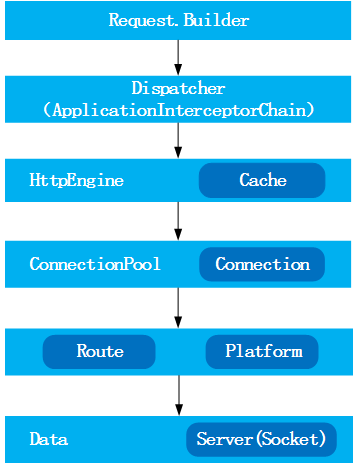
请求流程图
下面是关于OKHttp的请求流程图

详细类关系图
由于整个设计类图比较大,所以本人将从核心入口client、cache、interceptor、网络配置、连接池、平台适配性…这些方面来逐一进行分析源代码的设计。
下面是核心入口OkHttpClient的类设计图
从OkHttpClient类的整体设计来看,它采用门面模式来。client知晓子模块的所有配置以及提供需要的参数。client会将所有从客户端发来的请求委派到相应的子系统去。
在 该系统中,有多个子系统、类或者类的集合。例如上面的cache、连接以及连接池相关类的集合、网络配置相关类集合等等。每个子系统都可以被客户端直接调 用,或者被门面角色调用。子系统并不知道门面的存在,对于子系统而言,门面仅仅是另外一个客户端而已。同时,OkHttpClient可以看作是整个框架 的上下文。
通过类图,其实很明显反应了该框架的几大核心子系统;路由、连接协议、拦截器、代理、安全性认证、连接池以及网络适配。从client大大降低了开发者使用难度。同时非常明了的展示了该框架在所有需要的配置以及获取结果的方式。在接下来的几个Section中将会结合子模块核心类的设计,从该框架的整体特性上来分析这些模块是如何实现各自功能。以及各个模块之间是如何相互配合来完成客户端各种复杂请求。
同步与异步的实现
在发起请求时,整个框架主要通过Call来封装每一次的请求。同时Call持有OkHttpClient和一份HttpEngine。而每一次的同步或者异步请求都会有Dispatcher的参与,不同的是:
-
同步
Dispatcher会在同步执行任务队列中记录当前被执行过得任务Call,同时在当前线程中去执行Call的getResponseWithInterceptorChain()方法,直接获取当前的返回数据Response; -
异步
首先来说一下Dispatcher,Dispatcher内部实现了懒加载无边界限制的线程池方式,同时该线程池采用了 SynchronousQueue这种阻塞队列。SynchronousQueue每个插入操作必须等待另一个线程的移除操作,同样任何一个移除操作都等 待另一个线程的插入操作。因此此队列内部其 实没有任何一个元素,或者说容量是0,严格说并不是一种容器。由于队列没有容量,因此不能调用peek操作,因为只有移除元素时才有元素。显然这是一种快 速传递元素的方式,也就是说在这种情况下元素总是以最快的方式从插入者(生产者)传递给移除者(消费者),这在多任务队列中是最快处理任务的方式。对于高 频繁请求的场景,无疑是最适合的。
异步执行是通过Call.enqueue(Callback responseCallback)来执行,在Dispatcher中添加一个封装了Callback的Call的匿名内部类Runnable来执行当前 的Call。这里一定要注意的地方这个AsyncCall是Call的匿名内部类。AsyncCall的execute方法仍然会回调到Call的 getResponseWithInterceptorChain方法来完成请求,同时将返回数据或者状态通过Callback来完成。
接下来继续讲讲Call的getResponseWithInterceptorChain()方法,这里边重点说一下拦截器链条的实现以及作用。
拦截器有什么作用
先来看看Interceptor本身的文档解释:观察,修改以及可能短路的请求输出和响应请求的回来。通常情况下拦截器用来添加,移除或者转换请求或者回应的头部信息。
拦截器接口中有intercept(Chain chain)方法,同时返回Response。所谓拦截器更像是AOP设计的一种实现。下面来看一个okhttp源码中的一个引导例子来说明拦截器的作用。1234567891011121314151617181920212223242526272829public final class LoggingInterceptors {private static final Logger logger = Logger.getLogger(LoggingInterceptors.class.getName());private final OkHttpClient client =newOkHttpClient();public LoggingInterceptors() {client.networkInterceptors().add(newInterceptor() {@Override public Response intercept(Chain chain) throws IOException {long t1 = System.nanoTime();Request request = chain.request();logger.info(String.format("Sending request %s on %s%n%s",request.url(), chain.connection(), request.headers()));Response response = chain.proceed(request);long t2 = System.nanoTime();logger.info(String.format("Received response for %s in %.1fms%n%s",request.url(), (t2 - t1) / 1e6d, response.headers()));returnresponse;}});}public void run() throws Exception {Request request =newRequest.Builder().build();Response response = client.newCall(request).execute();response.body().close();}public static void main(String... args) throws Exception {newLoggingInterceptors().run();}}返回信息
12345678910111213141516171819三月 19, 2015 2:11:29 下午 com.squareup.okhttp.recipes.LoggingInterceptors$1 intercept信息: Sending request https://publicobject.com/helloworld.txt on Connection{publicobject.com:443, proxy=DIRECT hostAddress=54.187.32.157 cipherSuite=TLS_ECDHE_RSA_WITH_AES_128_CBC_SHA protocol=http/1.1}Host: publicobject.comConnection: Keep-AliveAccept-Encoding: gzipUser-Agent:三月 19, 2015 2:11:30 下午 com.squareup.okhttp.recipes.LoggingInterceptors$1 intercept信息: Received responseforhttps://publicobject.com/helloworld.txt in 275.9msServer: nginx/1.4.6 (Ubuntu)Date: Thu, 19 Mar 2015 06:08:50 GMTContent-Type: text/plainContent-Length: 1759Last-Modified: Tue, 27 May 2014 02:35:47 GMTConnection: keep-aliveETag:"5383fa03-6df"Accept-Ranges: bytesOkHttp-Selected-Protocol: http/1.1OkHttp-Sent-Millis: 1426745489953OkHttp-Received-Millis: 1426745490198从这里的执行来看,拦截器主要是针对Request和Response的切面处理。
那再来看看源码到底在什么位置做的这个处理呢?为了更加直观的反应执行流程,本人截图了一下执行堆栈
另外如果还有同学对Interceptor比较敢兴趣的可以去源码的simples模块看看GzipRequestInterceptor.java针对HTTP request body的一个zip压缩。
在这里再多说一下关于Call这个类的作用,在Call中持有一个HttpEngine。每一个不同的Call都有自己独立的HttpEngine。在HttpEngine中主要是各种链路和地址的选择,还有一个Transport比较重要
缓存策略
在OkHttpClient内部暴露了有Cache和InternalCache。而InternalCache不应该手动去创建,所以作为开发使用者来说,一般用法如下:
1234567891011121314151617181920212223242526272829303132public final class CacheResponse {private static final Logger logger = Logger.getLogger(LoggingInterceptors.class.getName());private final OkHttpClient client;public CacheResponse(File cacheDirectory) throws Exception {logger.info(String.format("Cache file path %s",cacheDirectory.getAbsoluteFile()));int cacheSize = 10 * 1024 * 1024;// 10 MiBCache cache =newCache(cacheDirectory, cacheSize);client =newOkHttpClient();client.setCache(cache);}public void run() throws Exception {Request request =newRequest.Builder().build();Response response1 = client.newCall(request).execute();if(!response1.isSuccessful())thrownewIOException("Unexpected code "+ response1);String response1Body = response1.body().string();System.out.println("Response 1 response: "+ response1);System.out.println("Response 1 cache response: "+ response1.cacheResponse());System.out.println("Response 1 network response: "+ response1.networkResponse());Response response2 = client.newCall(request).execute();if(!response2.isSuccessful())thrownewIOException("Unexpected code "+ response2);String response2Body = response2.body().string();System.out.println("Response 2 response: "+ response2);System.out.println("Response 2 cache response: "+ response2.cacheResponse());System.out.println("Response 2 network response: "+ response2.networkResponse());System.out.println("Response 2 equals Response 1? "+ response1Body.equals(response2Body));}public static void main(String... args) throws Exception {newCacheResponse(newFile("CacheResponse.tmp")).run();}}返回信息
123456789信息: Cache file path D:\work\workspaces\workspaces_intellij\workspace_opensource\okhttp\CacheResponse.tmpResponse 1 response: Response{protocol=http/1.1, code=200, message=OK, url=https://publicobject.com/helloworld.txt}Response 1 cache response:nullResponse 1 network response: Response{protocol=http/1.1, code=200, message=OK, url=https://publicobject.com/helloworld.txt}Response 2 response: Response{protocol=http/1.1, code=200, message=OK, url=https://publicobject.com/helloworld.txt}Response 2 cache response: Response{protocol=http/1.1, code=200, message=OK, url=https://publicobject.com/helloworld.txt}Response 2 network response:nullResponse 2 equals Response 1?trueProcess finishedwithexit code 0上边这一段代码同样来之于simple代码CacheResponse.java,反馈回来的数据重点看一下缓存日志。第一次是来至网络数据,第二次来至缓存。
那在这一节重点说一下整个框架的缓存策略如何实现的。
在这里继续使用上一节中讲到的运行堆栈图。从Call.getResponse(Request request, boolean forWebSocket)执行Engine.sendRequest()和Engine.readResponse()来详细说明一下。
sendRequest()
此方法是对可能的Response资源进行一个预判,如果需要就会开启一个socket来获取资源。如果请求存在那么就会为当前request添加请求头部并且准备开始写入request body。12345678910111213141516171819202122232425262728293031323334353637public void sendRequest() throws IOException {if(cacheStrategy !=null) {return;// Already sent.}if(transport !=null) {thrownewIllegalStateException();}//填充默认的请求头部和事务。Request request = networkRequest(userRequest);//下面一行很重要,这个方法会去获取client中的Cache。同时Cache在初始化的时候会去读取缓存目录中关于曾经请求过的所有信息。InternalCache responseCache = Internal.instance.internalCache(client);Response cacheCandidate = responseCache !=null? responseCache.get(request):null;long now = System.currentTimeMillis();//缓存策略中的各种配置的封装cacheStrategy =newCacheStrategy.Factory(now, request, cacheCandidate).get();networkRequest = cacheStrategy.networkRequest;cacheResponse = cacheStrategy.cacheResponse;if(responseCache !=null) {//记录当前请求是来至网络还是命中了缓存responseCache.trackResponse(cacheStrategy);}if(cacheCandidate !=null&& cacheResponse ==null) {closeQuietly(cacheCandidate.body());// The cache candidate wasn't applicable. Close it.}if(networkRequest !=null) {// Open a connection unless we inherited one from a redirect.if(connection ==null) {//连接到服务器、重定向服务器或者通过一个代理Connect to the origin server either directly or via a proxy.connect();}//通过Connection创建一个SpdyTransport或者HttpTransporttransport = Internal.instance.newTransport(connection,this);...}else{...}}readResponse()
此方法发起刷新请求头部和请求体,解析HTTP回应头部,并且如果HTTP回应体存在的话就开始读取当前回应头。在这里有发起返回存入缓存系统,也有返回和缓存系统进行一个对比的过程。1234567891011121314151617181920212223242526272829303132333435363738394041424344454647484950515253public void readResponse() throws IOException {...Response networkResponse;if(forWebSocket) {...}elseif(!callerWritesRequestBody) {// 这里主要是看当前的请求body,其实真正请求是在这里发生的。// 在readNetworkResponse()方法中执行transport.finishRequest()// 这里可以看一下该方法内部会调用到HttpConnection.flush()方法networkResponse =newNetworkInterceptorChain(0, networkRequest).proceed(networkRequest);}else{...}//对Response头部事务存入事务管理中receiveHeaders(networkResponse.headers());// If we have a cache response too, then we're doing a conditional get.if(cacheResponse !=null) {//检查缓存是否可用,如果可用。那么就用当前缓存的Response,关闭网络连接,释放连接。if(validate(cacheResponse, networkResponse)) {userResponse = cacheResponse.newBuilder().request(userRequest).priorResponse(stripBody(priorResponse)).headers(combine(cacheResponse.headers(), networkResponse.headers())).cacheResponse(stripBody(cacheResponse)).networkResponse(stripBody(networkResponse)).build();networkResponse.body().close();releaseConnection();// Update the cache after combining headers but before stripping the// Content-Encoding header (as performed by initContentStream()).// 更新缓存以及缓存命中情况InternalCache responseCache = Internal.instance.internalCache(client);responseCache.trackConditionalCacheHit();responseCache.update(cacheResponse, stripBody(userResponse));// unzip解压缩responseuserResponse = unzip(userResponse);return;}else{closeQuietly(cacheResponse.body());}}userResponse = networkResponse.newBuilder().request(userRequest).priorResponse(stripBody(priorResponse)).cacheResponse(stripBody(cacheResponse)).networkResponse(stripBody(networkResponse)).build();//发起缓存的地方if(hasBody(userResponse)) {maybeCache();userResponse = unzip(cacheWritingResponse(storeRequest, userResponse));}}HTTP连接的实现方式(说说连接池)
外部网络请求的入口都是通过Transport接口来完成。该类采用了桥接模式将HttpEngine和HttpConnection来连接起来。 因为HttpEngine只是一个逻辑处理器,同时它也充当了请求配置的提供引擎,而HttpConnection是对底层处理Connection的封 装。
OK现在重点转移到HttpConnection(一个用于发送HTTP/1.1信息的socket连接)这里。主要有如下的生命周期:
1、发送请求头;
2、打开一个sink(io中有固定长度的或者块结构chunked方式的)去写入请求body;
3、写入并且关闭sink;
4、读取Response头部;
5、打开一个source(对应到第2步的sink方式)去读取Response的body;
6、读取并关闭source;下边看一张关于连接执行的时序图:

这张图画得比较简单,详细的过程以及连接池的使用下面大致说明一下:1、连接池是暴露在client下的,它贯穿了Transport、HttpEngine、Connection、HttpConnection和SpdyConnection;在这里目前默认讨论HttpConnection;
2、 ConnectionPool有两个构建参数是maxIdleConnections(最大空闲连接数)和keepAliveDurationNs(存活 时间),另外连接池默认的线程池采用了Single的模式(源码解释是:一个用于清理过期的多个连接的后台线程,最多一个单线程去运行每一个连接池);
3、发起请求是在Connection.connect()这里,实际执行是在HttpConnection.flush()这里进行一个刷入。这里重点应该关注一下sink和source,他们创建的默认方式都是依托于同一个socket:
this.source = Okio.buffer(Okio.source(socket));
this.sink = Okio.buffer(Okio.sink(socket));
如果再进一步看一下io的源码就能看到:
Source source = source((InputStream)socket.getInputStream(), (Timeout)timeout);
Sink sink = sink((OutputStream)socket.getOutputStream(), (Timeout)timeout);
这下我想大家都应该明白这里到底是真么回事儿了吧?
相关的sink和source还有相应的细分,如果有兴趣的朋友可以继续深入看一下,这里就不再深入了。不然真的说不完了。。。其实连接池这里还是有很多值得细看的地方,由于时间有限,到这里已经花了很多时间搞这事儿了。。。
重连机制
这里重点说说连接链路的相关事情。说说自动重连到底是如何实现的。
照样先来看看下面的这个自动重连机制的实现方式时序图
同时回到Call.getResponse()方法说起
12345678910111213141516171819202122232425Response getResponse(Request request, boolean forWebSocket) throws IOException {...while(true) {// 自动重连机制的循环处理if(canceled) {engine.releaseConnection();returnnull;}try{engine.sendRequest();engine.readResponse();}catch(IOException e) {//如果上一次连接异常,那么当前连接进行一个恢复。HttpEngine retryEngine = engine.recover(e,null);if(retryEngine !=null) {engine = retryEngine;continue;//如果恢复成功,那么继续重新请求}// Give up; recovery is not possible.如果不行,那么就中断了throwe;}Response response = engine.getResponse();Request followUp = engine.followUpRequest();...}}相信这一段代码能让同学们清晰的看到自动重连机制的实现方式,那么我们来看看详细的步骤:
1、HttpEngine.recover()的实现方式是通过检测RouteSelector是否还有更多的routes可以尝试连接,同时会去 检查是否可以恢复等等的一系列判断。如果可以会为重新连接重新创建一份新的HttpEngine,同时把相应的链路信息传递过去;
2、当恢复后的HttpEngine不为空,那么替换当前Call中的当前HttpEngine,执行while的continue,发起下一次的请求;
3、 再重点强调一点HttpEngine.sendRequest()。这里之前分析过会触发connect()方法,在该方法中会通过 RouteSelector.next()再去找当前适合的Route。多说一点,next()方法会传递到 nextInetSocketAddress()方法,而此处一段重要的执行代码就是 network.resolveInetAddresses(socketHost)。这个地方最重要的是在Network这个接口中有一个对该接口的 DEFAULT的实现域,而该方法通过工具类InetAddress.getAllByName(host)来完成对数组类的地址解析。
所以,多地址可以采用[“http://aaaaa","https://bbbbbb"]的方式来配置。Gzip的使用方式
在源码引导RequestBodyCompression.java中我们可以看到gzip的使用身影。通过拦截器对Request 的body进行gzip的压缩,来减少流量的传输。
Gzip实现的方式主要是通过GzipSink对普通sink的封装压缩。在这个地方就不再贴相关代码的实现。有兴趣同学对照源码看一下就ok。强大的Interceptor设计应该也算是这个框架的一个亮点。
安全性
连接安全性主要是在HttpEngine.connect()方法。上一节油讲到地址相关的选择,在HttpEngine中有一个静态方法 createAddress(client, networkRequest),在这里通过获取到OkHttpClient中关于SSLSocketFactory、HostnameVerifier 和CertificatePinner的配置信息。而这些信息大部分采用默认情况。这些信息都会在后面的重连中作为对比参考项。
同时在Connection.upgradeToTls()方法中,有对SSLSocket、SSLSocketFactory的创建活动。这些创 建都会被记录到ConnectionSpec中,当发起ConnectionSpec.apply()会发起一些列的配置以及验证。
建议有兴趣的同学先了解java的SSLSocket相关的开发再来了解本框架中的安全性,会更能理解一些。
平台适应性
讲了很多,终于来到了平台适应性了。Platform是整个平台适应的核心类。同时它封装了针对不同平台的三个平台类Android和JdkWithJettyBootPlatform。
代码实现在Platform.findPlatform中1234567891011121314151617181920212223242526272829303132333435363738394041424344454647484950private static Platform findPlatform() {// Attempt to find Android 2.3+ APIs.try{try{Class.forName("com.android.org.conscrypt.OpenSSLSocketImpl");}catch(ClassNotFoundException e) {// Older platform before being unbundled.Class.forName("org.apache.harmony.xnet.provider.jsse.OpenSSLSocketImpl");}OptionalMethod<Socket> setUseSessionTickets =newOptionalMethod<>(null,"setUseSessionTickets", boolean.class);OptionalMethod<Socket> setHostname =newOptionalMethod<>(null,"setHostname", String.class);Method trafficStatsTagSocket =null;Method trafficStatsUntagSocket =null;OptionalMethod<Socket> getAlpnSelectedProtocol =null;OptionalMethod<Socket> setAlpnProtocols =null;// Attempt to find Android 4.0+ APIs.try{//流浪统计类Class<?> trafficStats = Class.forName("android.net.TrafficStats");trafficStatsTagSocket = trafficStats.getMethod("tagSocket", Socket.class);trafficStatsUntagSocket = trafficStats.getMethod("untagSocket", Socket.class);// Attempt to find Android 5.0+ APIs.try{Class.forName("android.net.Network");// Arbitrary class added in Android 5.0.getAlpnSelectedProtocol =newOptionalMethod<>(byte[].class,"getAlpnSelectedProtocol");setAlpnProtocols =newOptionalMethod<>(null,"setAlpnProtocols", byte[].class);}catch(ClassNotFoundException ignored) {}}catch(ClassNotFoundException | NoSuchMethodException ignored) {}returnnewAndroid(setUseSessionTickets, setHostname, trafficStatsTagSocket,trafficStatsUntagSocket, getAlpnSelectedProtocol, setAlpnProtocols);}catch(ClassNotFoundException ignored) {// This isn't an Android runtime.}// Find Jetty's ALPN extension for OpenJDK.try{String negoClassName ="org.eclipse.jetty.alpn.ALPN";Class<?> negoClass = Class.forName(negoClassName);Class<?> providerClass = Class.forName(negoClassName +"$Provider");Class<?> clientProviderClass = Class.forName(negoClassName +"$ClientProvider");Class<?> serverProviderClass = Class.forName(negoClassName +"$ServerProvider");Method putMethod = negoClass.getMethod("put", SSLSocket.class, providerClass);Method getMethod = negoClass.getMethod("get", SSLSocket.class);Method removeMethod = negoClass.getMethod("remove", SSLSocket.class);returnnewJdkWithJettyBootPlatform(putMethod, getMethod, removeMethod, clientProviderClass, serverProviderClass);}catch(ClassNotFoundException | NoSuchMethodException ignored) {}returnnewPlatform();}这里采用了JAVA的反射原理调用到class的method。最后在各自的平台调用下发起invoke来执行相应方法。详情请参看继承了Platform的Android类。
当然要做这两种的平台适应,必须要知道当前平台在内存中相关的class地址以及相关方法。总结
1、从整体结构和类内部域中都可以看到OkHttpClient,有点类似与安卓的ApplicationContext。看起来更像一个单例的 类,这样使用好处是统一。但是如果你不是高手,建议别这么用,原因很简单:逻辑牵连太深,如果出现问题要去追踪你会有深深地罪恶感的;
2、框架中的一些动态方法、静态方法、匿名内部类以及Internal的这些代码相当规整,每个不同类的不同功能能划分在不同的地方。很值得开发者学习的地方;
3、从平台的兼容性来讲,也是很不错的典范(如果你以后要从事API相关编码,那更得好好注意对兼容性的处理);
4、由于时间不是很富裕,所以本人对细节的把我还是不够,这方面还得多多努力;
5、对于初学网络编程的同学来说,可能一开始学习都是从简单的socket的发起然后获取响应开始的。因为没有很好的场景能让自己知道网络编程到底有多么的重要,当然估计也没感受到网络编程有多么的难受。我想这是很多刚入行的同学们的一种内心痛苦之处;
6、不足的地方是没有对SPDY的方式最详细跟进剖析(手头还有工作的事情,后面如果有时间再补起来吧)。结束语
很早前都打算花点时间好好来看一个值得学习的框架,今天终于算是弄得差不多了。我相信从框架的前期使用、到代码的介入、再到源码分模块的剖析、最后到整理成文章。我想这都是一个很好的学习和成长的过程。
希望看到这篇文章的同学能做出评价,并且给出一些好的剖析点。
我也是一个普普通通的编码人,只是内心多了一点点不“安分” ^.^。
-



posted on 2015-04-29 10:01 wasdchenhao 阅读(351) 评论(0) 收藏 举报


 浙公网安备 33010602011771号