SyntaxError: Error parsing JavaScript expression: Unexpected token, expected "," (3:16)
摘要:## 项目环境 ```bash C:\Users\19139>node -v v18.16.0 C:\Users\19139>pnpm -v 8.2.0 ``` vue3+vite4打包报错 ```text "vue": "3.3.4", "vite": "4.0.4", "rollup": "^3
阅读全文
posted @
2023-08-09 21:25
optre
阅读(2514)
推荐(0)
【element-plus】Table表格横向滚动条显示不正确解决办法
摘要:## 滚动条bug展示如下: 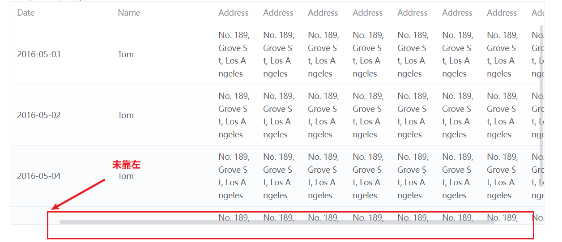 ## 造成bug原因排查: 由于对`Table`表格进行了二次封装,传递
阅读全文
posted @
2023-05-22 19:43
optre
阅读(1809)
推荐(0)
vue3 封装组件中使用 pinia 报错
摘要:报错信息: Uncaught Error: [🍍]: getActivePinia was called with no active Pinia. Did you forget to install pinia? const pinia = createPinia() app.use(pinia
阅读全文
posted @
2023-04-10 15:46
optre
阅读(2373)
推荐(0)
Vue3 如何查看挂载在 vue 上的 全局组件
摘要:使用app.component 查看 [1]你可以通过全局 API app.component 注册全局组件并查看。在 Vue 3 中,你可以通过以下方式来查看挂载在 app 上的全局组件: const app = createApp({}); // 全局注册组件 app.component('my
阅读全文
posted @
2023-04-08 20:12
optre
阅读(3447)
推荐(0)
Stylelint
摘要:Stylelint 是一个强大的样式检查工具,它可以帮助开发者避免在 CSS/SCSS/LESS 样式表中出现错误和低效的代码。下面是一些学习 Stylelint 的建议。 1. 安装和配置 首先,你需要安装 Stylelint。可以通过 npm 或 yarn 来进行安装: npm install
阅读全文
posted @
2023-04-04 21:34
optre
阅读(230)
推荐(0)
vue3+vite4+TypeScript 插件用法说明
摘要:vite-plugin-purge-icons vite-plugin-purge-icons 是一个 Vite 插件,用于按需加载 SVG 图标。类似于 TailwindCSS + PurgeCSS,但作用于图标。它会分析你的源代码或打包后的文件,提取出你使用的图标名称,然后将这些需要的图标数据(
阅读全文
posted @
2023-04-04 20:55
optre
阅读(1782)
推荐(0)
类型“Pinia”的参数不能赋给类型“Plugin_2”的参数。
摘要:背景 vue3+ts+pinia,引入pinia之后报错 类型“Pinia”的参数不能赋给类型“Plugin_2”的参数。 不能将类型“Pinia”分配给类型“{ install: PluginInstallFunction; }”。 属性“install”的类型不兼容。 不能将类型“(app: A
阅读全文
posted @
2022-07-25 15:50
optre
阅读(2646)
推荐(0)
使用this.$options.data()重置数据
摘要:当重置表单时,我们可以使用下面2种重置表单数据 Object.assign(this.$data, this.$options.data.call(this)) this.form= this.$options.data().form 当我们需要重置校验时 this.$refs.form.clear
阅读全文
posted @
2022-07-18 14:40
optre
阅读(421)
推荐(0)
 管理
管理
 浙公网安备 33010602011771号