
Scrapy框架介绍与入门
1、爬虫框架基本介绍
1.1、 框架介绍
本框架主要由五部分组成:
- Spiders
- Item Pipeline
- Scheduler
- Scrapy Engine
- Downloader
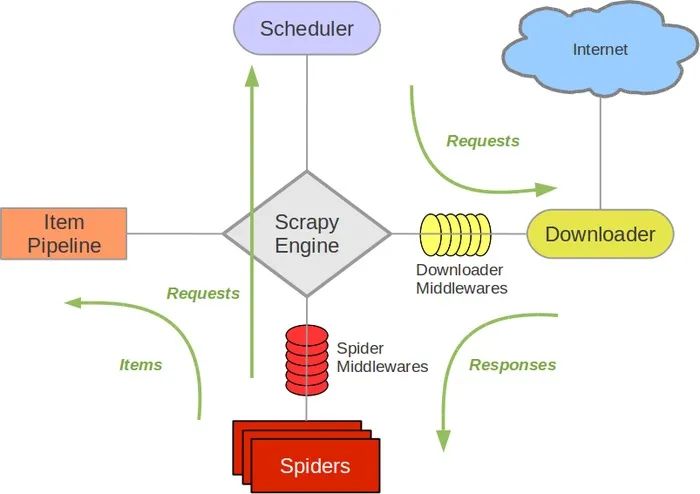
其中Scrapy Engine为爬虫引擎,所有爬虫其他组件之间数据的交流都是通过此组件进行统筹;Spiders主要用于发起Requests、接收Response、将Response 中数据经过处理之后确定是将数据作为新的Request传递给引擎还是将数据传递给Item Pipeline进行存储;Item Pipline主要进行数据的持久化存储;Scheduler用于对Request进行调度,从而保证任务的有序进行,排队到的Request经过引擎发送给Downloader进行网页爬取。
其中两个中间件:
- Spider Middlewares用于预处理response对象
- 如:对非200响应的处理
- Downloader Middlewares 预处理request对象
- 如:对UA和Cookie进行处理和更换、使用代理ip
1.2、 爬虫任务流程
一般任务的流程:
- Spiders发起Request请求,该请求经过Scrapy Engine 传递给Scheduler进行调度。
- Scheduler 收到引擎发送来的Request后对它们进行排序,将排序后的Request有序经Scrapy Engine 发送给Downloader。
- Downloader 获得Request后进行网页爬取,返回的Response。
- Spiders对Response进行初始化提取。
- 提取后的数据如果是需要的URL传递给Scheduler继续进行爬虫操作。
- 如果是目标数据则传递给Item PipeLine进行持久化存储。
2、基础入门
2.1、安装与基础命令行
安装Scrapy库
pip install scrapy
新建Scrapy项目
scrapy startproject FirstScrapy
#基本格式
scrapy startproject <project_name> [project_dir]
Scrapy命令行
  bench         Run quick benchmark test #测试网速
  check         Check spider contracts
  commands
  crawl         Run a spider  #运行爬虫
  edit          Edit spider
  fetch         Fetch a URL using the Scrapy downloader  #使用Scrapy下载器下载指定的URL,并将获得的内容输出,通俗的来说就是打印出网站的HTML源码。
  genspider     Generate new spider using pre-defined templates #生成爬虫文件
  list          List available spiders  #列出项目所有的爬虫
  parse         Parse URL (using its spider) and print the results
    #输出格式化内容
  runspider     Run a self-contained spider (without creating a project)
  settings      Get settings values
  shell         Interactive scraping console
  startproject  Create new project
  version       Print Scrapy version
  view          Open URL in browser, as seen by Scrapy
2.2、 Scrapy目录说明
- scrapy.cfg:项目配置文件
- MyScrapy
- Spiders:所有的爬虫文件都在这个目录下
- _init_.py
- Items.py:项目获取目标数据对象(设置目标对象结构的文件)
- pipelines.py:项目的管道文件(持久化存储数据的管道)
- settings.py:项目的设置文件,包括
- Spiders:所有的爬虫文件都在这个目录下
3、 入门小爬虫
爬虫框架的具体使用步骤:
- 选择目标网站
- 定义需要抓取的数据
- 编写提取数据的spider
- 执行spider,获取数据
- 数据存储
3.1、 本次爬虫目标
本次目标为爬取百度首页中的导航栏中内容

准备阶段
scrapy startproject FirstScrapy
cd FirstScrapy/FirstScrapy/spiders
scrapy gensipder baidu 'www.baidu.com'
3.2、 定义数据
items.py文件
import scrapy


class FirstscrapyItem(scrapy.Item):
    # define the fields for your item here like:
    title = scrapy.Field()
    pass
3.3、编写提取数据的spider
spiders/baidu.py文件
import scrapy
from FirstScrapy.items import FirstscrapyItem

class BaiduSpider(scrapy.Spider):

    name = 'baidu'
    allowed_domains = ['www.baidu.com']
    start_urls = ['http://www.baidu.com/']

    def parse(self, response):

        titleList = response.xpath('//*[@id="u1"]/a/text()').extract()
        print(len(titleList))
        for title in titleList:
            yield FirstscrapyItem(title = title)
3.4、编写持久化存储管道
在编写管道之前,需要先在settings.py中将管道打开
setting.py
# Configure item pipelines
# See https://docs.scrapy.org/en/latest/topics/item-pipeline.html
ITEM_PIPELINES = {
   'FirstScrapy.pipelines.FirstscrapyPipeline': 300,
}
编写管道
pipelines.py
class FirstscrapyPipeline:

    # 在爬虫开始之前打开文件
    def open_spider(self,spider):
        self.fp = open("title.json" , "w",encoding='utf-8')


    def process_item(self, item, spider):
        self.fp.write(str(item))
        return item

    # 在爬虫结束后关闭文件
    def close_spider(self,spider):
        self.fp.close()
3.5、 执行爬虫
scrapy crawl baidu
结果为
title.json
{'title': '新闻'},
{'title': 'hao123'},
{'title': '地图'},
{'title': '视频'},
{'title': '贴吧'},
{'title': '更多产品'}
4、 总结
本次完成的目标:
- 介绍Scrapy框架
- 介绍Scrapy目录结构
- 编写入门小爬虫
补充:
这一小节内容主要用以补充编写程序过程中遇到的问题。
1、 在baidu.py中使用yeild时
- 报错: Spider must return request, item, or None, got 'str'
- 问题:在spider中yeild返回到pipeline中或者根据数据再次进行request,所以不能直接yeild str类型数据,需要将str封装成item 才行。

 浙公网安备 33010602011771号