
Flink行走江湖Operators:底层API-Process Function
我们知道,Flink把API分成了好几层,每一层所能够看到的都各不相同。
最底层的就是Process Function,它能够
- 访问events
- 访问状态State(容错,一致性,但是仅仅是在keyed流上)
- 计时器,也仅仅在keyed流上。
KeyedProcessFunction
下面做一个案例,每经过一段时间,发出最新的keyvalue状态
onTimer是基于ProcessTime时
package flinkscala.ProcessFunction

import org.apache.flink.api.common.state.{ValueState, ValueStateDescriptor}
import org.apache.flink.api.java.tuple.Tuple
import org.apache.flink.streaming.api.TimeCharacteristic
import org.apache.flink.streaming.api.functions.KeyedProcessFunction
import org.apache.flink.streaming.api.functions.timestamps.BoundedOutOfOrdernessTimestampExtractor
import org.apache.flink.streaming.api.scala._
import org.apache.flink.streaming.api.windowing.time.Time
import org.apache.flink.util.Collector

case class CountwithTimestamp(key:String,count:Long,lastModified:Long)
object processfunctionTest1 {
  def main(args: Array[String]): Unit = {
    val env = StreamExecutionEnvironment.getExecutionEnvironment
    env.setParallelism(1)
//    env.setStreamTimeCharacteristic(TimeCharacteristic.EventTime)

    val datastream = env.socketTextStream("127.0.0.1",9000)
        .map(data => {
            val dataArray = data.split(",")
          (dataArray(0),dataArray(1))
          }
        )
//      .assignTimestampsAndWatermarks(new BoundedOutOfOrdernessTimestampExtractor[(String, String)](Time.seconds(3)) {
//        override def extractTimestamp(element: (String, String)): Long = element._2.toLong * 1000
//      })
      .keyBy(_._1)
      .process(new CountWithTimeoutFunction()).print()
    env.execute()
  }
}

class CountWithTimeoutFunction extends KeyedProcessFunction[String,(String,String),(String,Long)]{

    //状态,保存CountWithTimeStamp
  lazy val state: ValueState[CountwithTimestamp] = getRuntimeContext
    .getState(new ValueStateDescriptor[CountwithTimestamp]("mystate",classOf[CountwithTimestamp]))


  override def processElement(value: (_root_.scala.Predef.String, _root_.scala.Predef.String), ctx: _root_.org.apache.flink.streaming.api.functions.KeyedProcessFunction[_root_.scala.Predef.String, (_root_.scala.Predef.String, _root_.scala.Predef.String), (_root_.scala.Predef.String, Long)]#Context, out: _root_.org.apache.flink.util.Collector[(_root_.scala.Predef.String, Long)]): Unit = {
//    System.out.println(value)
    val currentprocesstime = ctx.timerService().currentProcessingTime()
    val current= state.value() match {
      case null =>
        CountwithTimestamp(value._1, 1, currentprocesstime)
      case CountwithTimestamp(key, count, lastModified) =>
        CountwithTimestamp(key, count + 1, currentprocesstime)
    }
    state.update(current)
//    ctx.timerService().registerEventTimeTimer(current.lastModified+6000)
    System.out.println("currentProcessingTime:>>>>>"+currentprocesstime)
    System.out.println("currentWaterMark>>>>>>"+ctx.timerService().currentWatermark())
    System.out.println("ctx.timestamp>>>>>>"+ctx.timestamp())
    //注册定时器
    ctx.timerService().registerProcessingTimeTimer(currentprocesstime+1000)
  }
  override def onTimer(timestamp: Long, ctx: _root_.org.apache.flink.streaming.api.functions.KeyedProcessFunction[_root_.scala.Predef.String, (_root_.scala.Predef.String, _root_.scala.Predef.String), (_root_.scala.Predef.String, Long)]#OnTimerContext, out: _root_.org.apache.flink.util.Collector[(_root_.scala.Predef.String, Long)]): Unit = {
    System.out.println("计时器到期了")
    state.value() match {
      case CountwithTimestamp(key,count,lastModified)
        if(timestamp == lastModified + 1000) => out.collect((timestamp.toString,lastModified))
      case _ =>
    }
  }
}
输入:
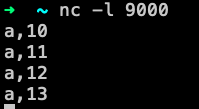
运行结果:

可以看到,一共只有两个计时器到期了,因为我们可以看到上面输出的currentPrcessingTimer是只有两种,第一个是一种,而后面三个是相同的,一个计时器只针对时间戳决定,多个一样的时间戳只会出现一个计时器。
-
第一个计时器
处理时间:1583331466746
计时器到期时间:1583331466746+1000 -
第二个计时器
处理时间:1583331466761
计时器到期时间:1583331466761+1000
**上面都是基于ProcessingTime的那么如果将其换成EventTime呢
EventTime
package flinkscala.ProcessFunction

import org.apache.flink.api.common.state.{ValueState, ValueStateDescriptor}
import org.apache.flink.streaming.api.TimeCharacteristic
import org.apache.flink.streaming.api.functions.KeyedProcessFunction
import org.apache.flink.streaming.api.functions.timestamps.BoundedOutOfOrdernessTimestampExtractor
import org.apache.flink.streaming.api.scala._
import org.apache.flink.streaming.api.windowing.time.Time

object processfunctionTest2 {
  def main(args: Array[String]): Unit = {
    val env = StreamExecutionEnvironment.getExecutionEnvironment
    env.setParallelism(1)
        env.setStreamTimeCharacteristic(TimeCharacteristic.EventTime)

    val datastream = env.socketTextStream("127.0.0.1",9000)
      .map(data => {
        val dataArray = data.split(",")
        (dataArray(0),dataArray(1))
      }
      )
            .assignTimestampsAndWatermarks(new BoundedOutOfOrdernessTimestampExtractor[(String, String)](Time.seconds(3)) {
              override def extractTimestamp(element: (String, String)): Long = element._2.toLong * 1000
            })
      .keyBy(_._1)
      .process(new CountWithTimeoutFunction2()).print()
    env.execute()
  }
}

class CountWithTimeoutFunction2 extends KeyedProcessFunction[String,(String,String),(String,Long)]{

  //状态,保存CountWithTimeStamp
  lazy val state: ValueState[CountwithTimestamp] = getRuntimeContext
    .getState(new ValueStateDescriptor[CountwithTimestamp]("mystate",classOf[CountwithTimestamp]))


  override def processElement(value: (_root_.scala.Predef.String, _root_.scala.Predef.String), ctx: _root_.org.apache.flink.streaming.api.functions.KeyedProcessFunction[_root_.scala.Predef.String, (_root_.scala.Predef.String, _root_.scala.Predef.String), (_root_.scala.Predef.String, Long)]#Context, out: _root_.org.apache.flink.util.Collector[(_root_.scala.Predef.String, Long)]): Unit = {
    //    System.out.println(value)
    val currentEventtime = ctx.timestamp()
    val current= state.value() match {
      case null =>
        CountwithTimestamp(value._1, 1, currentEventtime)
      case CountwithTimestamp(key, count, lastModified) =>
        CountwithTimestamp(key, count + 1, currentEventtime)
    }
    state.update(current)
    //    ctx.timerService().registerEventTimeTimer(current.lastModified+6000)
    System.out.println("currentEventTime:>>>>>"+currentEventtime)
    System.out.println("currentWaterMark>>>>>>"+ctx.timerService().currentWatermark())
    System.out.println("ctx.timestamp>>>>>>"+ctx.timestamp())
    //注册定时器
    ctx.timerService().registerEventTimeTimer(currentEventtime+1000)
  }
  override def onTimer(timestamp: Long, ctx: _root_.org.apache.flink.streaming.api.functions.KeyedProcessFunction[_root_.scala.Predef.String, (_root_.scala.Predef.String, _root_.scala.Predef.String), (_root_.scala.Predef.String, Long)]#OnTimerContext, out: _root_.org.apache.flink.util.Collector[(_root_.scala.Predef.String, Long)]): Unit = {
    System.out.println(timestamp+":计时器到期了"+state.value())
    state.value() match {
      case CountwithTimestamp(key,count,lastModified)
        if(timestamp >= lastModified) => out.collect((timestamp.toString,lastModified))
      case _ => System.out.println("什么都没有!!!!")
    }
  }
}
运行一下:

这里用了watermark,是对于EventTime*1000并且延迟了3秒钟,所以我们看到的watermark都会比实际EventTime小3000毫秒。
在输入a,14后,这时候的watermark应该是11000毫秒,但是输出的是10000毫秒
这是因为,watermark夹在中间了,比如我们输入11的时候,它前面携带的watermark却是7000,这个7000是因为processElement还没有执行完,对应的watermark还没有更新,所以在这个方法里看还是上次的watermark,但是一旦执行完,它就会更新到最新的,比如在14000的时候,我们看到的还是10000,但是一旦执行完了processElement方法,就会更新watermark为11000,这时候就认为11000之前的数据都到了,那么就会触发第一个定时器,因为它是11000的时候到期,所以被计时器生效了。NICE!!!

 浙公网安备 33010602011771号