
Git初识-常用命令
overview
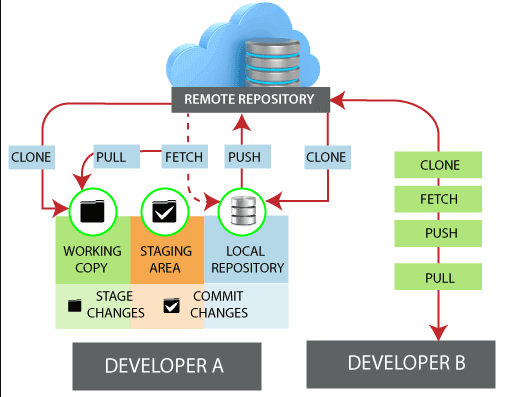
commands
config
git config --local user.name "<user-name>"
# 配置本地(当前项目)的用户名

git config --local user.email "<user-email>"
# 配置本地(当前项目)的用户邮箱

git config --global user.name "<user-name>"
# 配置全局的用户名

git config --global user.email "<user-email>"
# 配置全局的用户邮箱
basic
git init
# 初始化git文件夹

git add ./<file-name>
# 提交全部到暂存区(staged),添加file-name则指定提交文件

git commit -m <message>
# 提交

git branch
# 查看本地分支情况

git branch -r
# 查看远端分支情况

git branch -a
# 查看所有分支,包括本地和远端

git branch <branch-name>
# 创建<branch-name>分支

git switch <branch-name>
# 切换分支

git switch -c <branch-name>
# 创建分支并切换到该分支

git checkout <branch-name>
# 切换分支

git checkout -b <branch-name>
# 创建分支并切换到该分支
delete
git branch -d <branch-name>
# 删除分支

git push <remote-name> --delete <branch-name>
# 删除远端分支

git push <remote-name> :<remote-branch-name>
# 删除远端分支
remote
git clone <remote-url>
# 克隆远端git仓库,clone后搜有分支都回被clone下来

git remote add <remote-name> <remote-url>
# 本地添加远端仓库

git fetch <origin-name> <remote-branch-name>:<local-branch-name>
# 抓取远端仓库的分支到本地

git pull <origin-name> <remote-branch-name>:<local-branch-name>
# 拉取远端仓库的分支到本地,并与本地进行合并

git push <origin-name> <local-branch-name>:<remote-branch-name>
# 推送本地分支至远端仓库分支

git remote -v
# 查看远端仓库信息,v:verbose

git remote rm <remote-name>
# 删除远端仓库配置信息
merge
git merge <branch-name>
# 合并分支

git merge --no-ff <branch-name>
# 合并分支,不用默认的fast-forward模式
restore
git restore <file-name>
# 从暂存区导出覆盖工作区内容

git checkout -- <file-name>
# 从暂存区导出覆盖工作区内容

git restore --staged <file-name>
# 从当前的暂存区撤销暂存,如果提交到暂存区以后工作区又有修改,那撤回后,上次提交的暂存区内容会丢失

git reset HEAD
# 从当前分支的HEAD导出覆盖暂存区内容

git reset --hard <commit-id>
# 当前分支回滚至<commit-id>版本,并覆盖工作区和暂存区

git reset --soft <commit-id>
# 当前分支回滚至<commit-id>版本,但不覆盖工作区和暂存区
tag
# Git两种标签
- 轻量级的(lightweight)
- 含附注的(annotated)

git tag
# 查看本地tag

git tag -l
# 查看标签,可以用通配符去筛选,比如git tag -l "v1.8.5*".-l 可换为--list

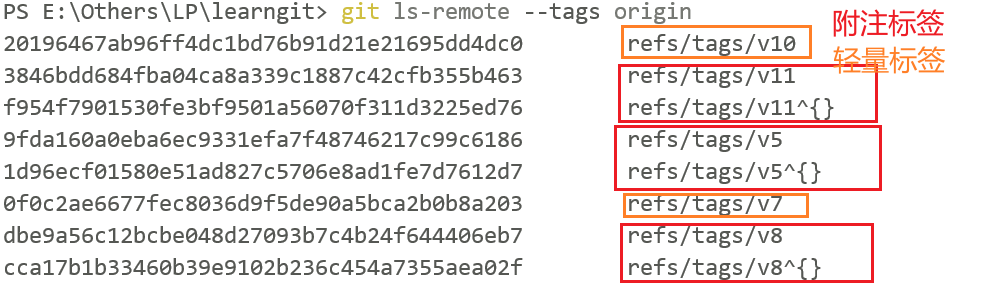
git ls-remote --tags <remote-name>
# 查看远端仓库的标签信息

git tag <tag-name>
# 打标签,不带备注信息

git tag -a <tag-name> -m <message>
# 给当前分支的HEAD打上标签

git tag -a <tag-name> -m <message> <commit-id>
# 给当前分支的指定commit-id打上标签

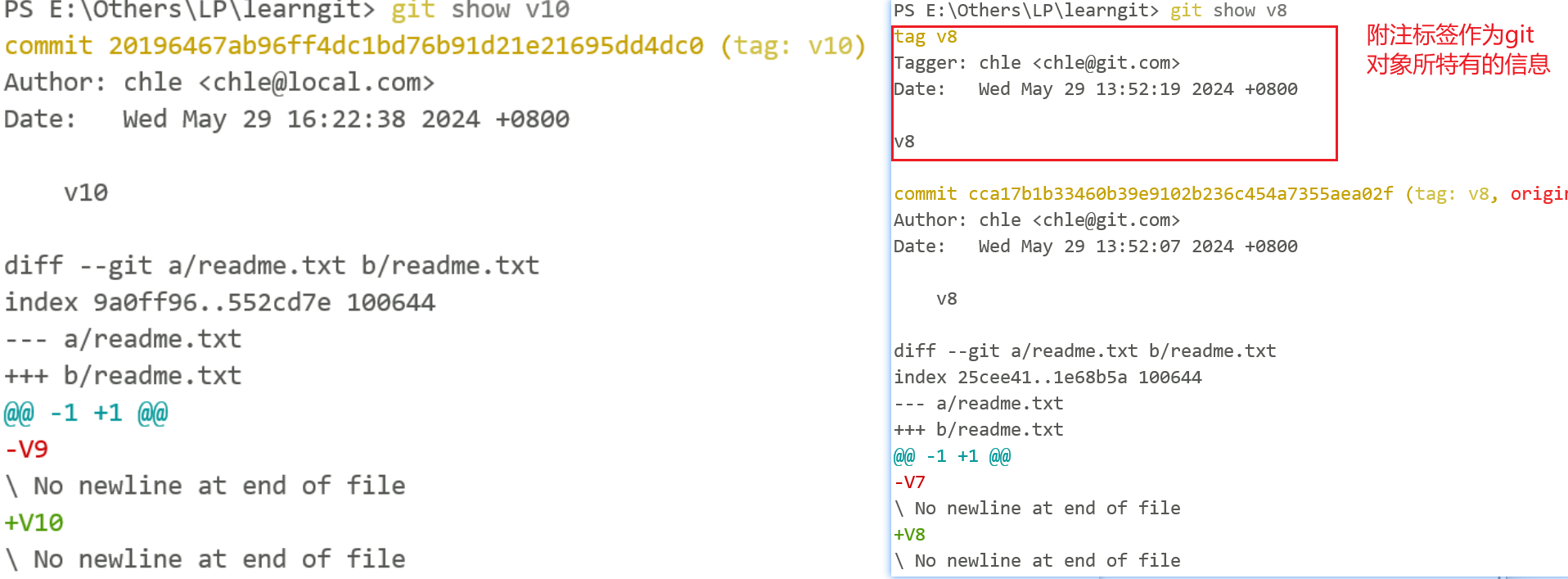
git show <tag-name>
# 查看tag信息,含附注的标签是独立的对象,查看时可以看到标签的提交者、创建人等信息,比如如下信息,而轻量标签则不具备这些信息
#tag v5
#Tagger: chle <chle@local.com>
#Date:   Wed May 29 14:35:35 2024 +0800
#v5

git tag -d <tag-name>
# 删除tag

git push <remote-name> <tag-name>
# 推送指定标签至远端

git push <remote-name> --tags
# 推送全部标签至远端,注意是推送那些没有推送到远端去过的标签

git push <remote-name> --detele tag <tag-name>
# 删除远端指定标签

git push <remote-name> :refs/tags/<tag-name>
# 删除远端指定标签

git fetch --tags
# 从远端获取全部标签
-
查看远端标签时,可以看到的附注标签和轻量标签之间的区别
![]()
-
查看标签时,附注标签和轻量标签的区别
![]()
log
git log
# 查看提交历史

git log -n
# 查看最近n条提交记录

git reflog
# 查看命令记录

git log --graph --pretty=oneline --abbrev-commit
# abbrev-commit缩略提交展示

git log --pretty=format:"%h %s"
# 个人log配置个性化输出命令
%H 提交对象(commit)的完整哈希字串
%h 提交对象的简短哈希字串
%T 树对象(tree)的完整哈希字串
%t 树对象的简短哈希字串
%P 父对象(parent)的完整哈希字串
%p 父对象的简短哈希字串
%an 作者(author)的名字
%ae 作者的电子邮件地址
%ad 作者修订日期(可以用 -date= 选项定制格式)
%ar 作者修订日期,按多久以前的方式显示
%cn 提交者(committer)的名字
%ce 提交者的电子邮件地址
%cd 提交日期
%cr 提交日期,按多久以前的方式显示
%s 提交说明
diff
git diff
# 比较暂存区和工作区的区别,a是暂存区,b是工作区,可指定文件 git diff <file-name>

git diff HEAD
# 比较的是当前分支的HEAD和工作区的区别,a是HEAD,b是工作区

git diff HEAD~
# 比较的是当前分支的最新一次的上一次提交和工作区的区别,a是HEAD~,b是工作区

git diff --cached
# 比较当前分支上的最新的提交与暂存区的差异,a是分支最新的提交,b是工作区,可指定文件 git diff --cached <file-name>

git diff --staged
# 比较当前分支上的最新的提交与暂存区的差异,a是分支最新的提交,b是工作区,可指定文件 git diff --staged <file-name>

git diff --staged HEAD
# 比较当前分支上的最新的提交与暂存区的差异,a是HEAD,b是工作区
reference
subject
points
本文来自博客园,作者:一平米,转载请注明原文链接:https://www.cnblogs.com/onesqm/p/18220747

 浙公网安备 33010602011771号