

图形查询利用的是查询图形与被查询图形的拓扑关系,因而点查询点的方式是利用点与点之间的拓扑关系的,而点与点之间的只有重合(点的坐标完全一致)、相离两种,当我点击地图上某点时坐标不可能与要查询的点要素完全一致,因此重合的方式是不可取的,再看ArcGIS api for Silverlight中提供的查询拓扑关系如下:
SpatialRelationship.esriSpatialRelContains:Part or all of a feature from feature class 1 is contained within a feature from feature class 2,要素一局部或全部包含在要素二中(包含、局部包含);
esriSpatialRelEnvelopeIntersects:The feature from feature class 1 crosses a feature from feature class 2,要素一穿过要素二(线线、线面、面面相交);
esriSpatialRelEnvelopeIntersects:The envelope of feature class 1 intersects with the envelope of feature class 2,要素一的外接矩形与要素二的外接矩形相交;
esriSpatialRelIndexIntersects:The envelope of the query feature class intersects the index entry for the target feature class,查询图形的外接矩形与目标要素相交;
esriSpatialRelIntersects:Part of a feature from feature class 1 is contained in a feature from feature class 2,要素一的一部分包含在要素二中(包含、相交);
esriSpatialRelOverlaps:Features from feature class 1 overlap features in feature class 2,要素一与要素二重叠(重叠关系);
esriSpatialRelRelation:Indicates that a spatial relationship function will be used,用于特殊的空间关系,即可用于自定义上述几种空间关系的组合;
esriSpatialRelTouches:The feature from feature class 1 touches the border of a feature from feature class 2,要素一与要素二的边缘相接(相邻);
esriSpatialRelWithin:The feature from feature class 1 is completely enclosed by the feature from feature class 2,要素一完全在要素二内(包含)
由上可得,Api提供的空间关系不适用于点查询点,那么可以通过其他方式实现,比如说,将查询点扩散成面,这样即成为查询点周围一定区域内的要素了,点化面代码如下:
 1         /// <summary>
 2         /// 以当前点作为中心点获取一定方框范围
 3         /// </summary>
 4         /// <param name="mapExtent"></param>当前地图范围
 5         /// <param name="point"></param>地图中心点
 6         /// <param name="pct"></param>获取方框范围的比例系数
 7         /// <returns></returns>
 8         private Envelope Expand(Envelope mapExtent, MapPoint point, double pct)
 9         {
10             return new Envelope(
11                     point.X - mapExtent.Width * (pct / 2), point.Y - mapExtent.Height * (pct / 2),
12                     point.X + mapExtent.Width * (pct / 2), point.Y + mapExtent.Height * (pct / 2))
13             {
14                 SpatialReference = mapExtent.SpatialReference
15             };
16         }
查询的完整代码如下
 private QueryTask task;
 private Query query;
private void Window_Loaded(object sender, RoutedEventArgs e)
        {

            task = new QueryTask();
            task.ExecuteCompleted += new EventHandler<QueryEventArgs>(task_ExecuteCompleted);
            task.Failed += new EventHandler<TaskFailedEventArgs>(task_Failed);
            task.Url =“http://***/arcgis/rest/services/***/FeatureServer/0”;
            query = new Query();
            query.SpatialRelationship = SpatialRelationship.esriSpatialRelIntersects;
            query.ReturnGeometry = true;
            query.OutFields.Add("*");//默认输出字段为全部
            query.OutSpatialReference = map1.SpatialReference;
        }
         void task_Failed(object sender, TaskFailedEventArgs e)
        {
            MessageBox.Show("查询失败");
            map1.Cursor = System.Windows.Input.Cursors.Help;
        }

        void task_ExecuteCompleted(object sender, QueryEventArgs e)
        {

            String content = "";
            if (e.IdentifyResults==null ||e.IdentifyResults.Count<=0)
            {
               map1.Cursor = System.Windows.Input.Cursors.Help;
                return;
            }
            Graphic g = e.IdentifyResults[0].Feature;

                foreach (var item in g.Attributes)
                {
                    content += item.Key + ":";
                    content += item.Value+"\n";
                }
                infoWindow1.IsOpen = false;
                if (e.IdentifyResults != null && e.IdentifyResults .Count > 0)
                {
                    lblContent.Content = content;//显示内容
                    //  infoWindow1.Anchor = set.Features[0].Geometry.Extent.GetCenter();
                    infoWindow1.Anchor = selPoint;//显示位置
                    infoWindow1.IsOpen = true;
                }
               map1.Cursor = System.Windows.Input.Cursors.Help;
        }

 private void map1_MouseClick(object sender, Map.MouseEventArgs e)
        {
                   query.MaxAllowableOffset = 5;


                    query.Geometry = this.Expand(map1.Extent,e. MapPoint,0.03);
                   // query.Geometry = e.Geometry;
                    task.ExecuteAsync(query);
                    map1.Cursor = System.Windows.Input.Cursors.Wait;
                    break;
        }
效果入下:
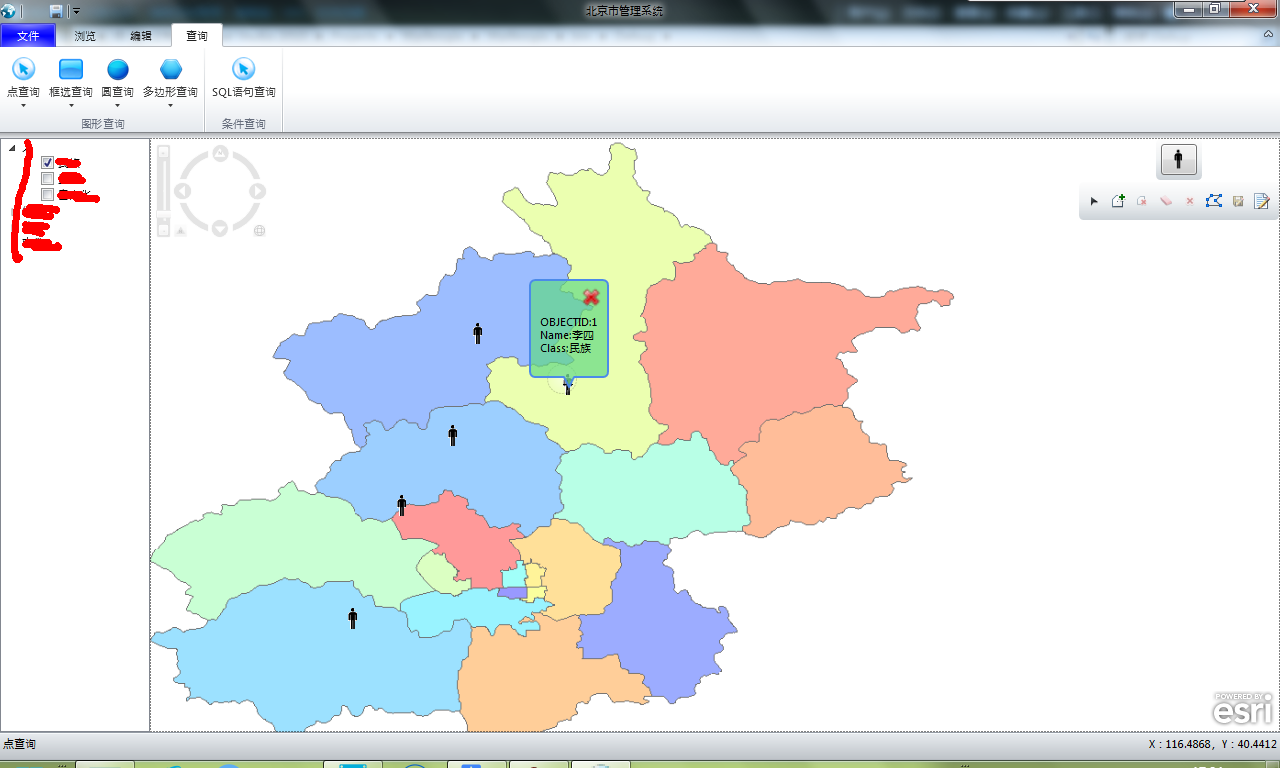
事实上在具体实现中,要控制查询的精度,可以根据不同的比例尺,更改点扩散为面的距离范围。


 浙公网安备 33010602011771号