
结对2
一、题目要求
(1)我们在刚开始上课的时候介绍过一个小学四则运算自动生成程序的例子,请实现它,要求:
(2)能够自动生成四则运算练习题
(3)可以定制题目数量
(4)用户可以选择运算符
(5)用户设置最大数(如十以内、百以内等)
(6)用户选择是否有括号、是否有小数
(7)用户选择输出方式(如输出到文件、打印机等)
(8)最好能提供图形用户界面(根据自己能力选做,以完成上述功能为主)
二、角色分工
驾驶员:王泰华
领航员:汤飞杨
三、源代码
···
1)可用字符生成
package yunsuan;
import java.util.ArrayList;
import java.util.Collection;
public class kyfh {
static int yjia,yjian,ycheng,ychu,yxs,ykh;
static Object[] str;
public static Object[] kyzfc(){
yjia=yjian=ycheng=ychu=yxs=ykh=0;
yjia=yjian=ycheng=1;
String jia="+",jian="-",cheng="*",chu="/";
Collection
if(yjia1){
list.add(jia);
}
if(yjian1){
list.add(jian);
}
if(ycheng1){
list.add(cheng);
}
if(ychu1){
list.add(chu);
}
str=list.toArray();
return str;
}
public static void main(String[] args) {
Object[] s=kyzfc();
for(int i=0;i<s.length;i++){
System.out.println(s[i]);
}
}
}
2)生成四则表达式
package yunsuan;
import java.util.Scanner;
public class shengcheng {
static String str;
public static int scsz(int max){
int scds=(int)(Math.random()*max);
return scds;
}
public static String sczfc(){
Scanner input=new Scanner(System.in);
int max = input.nextInt();
int s=scsz(max)+2;//最少生成两个数字
System.out.println(s);
int scds[]=new int[s];
for(int i=0;i<s;i++){
scds[i]=scsz(max);
if(scds[i]==0){
scds[i]=1;
}
System.out.println(scds[i]);
}
Object[] kyf=kyfh.kyzfc();
for(int i=0;i<kyfh.str.length;i++){
kyf[i]=kyfh.str[i];
System.out.println(kyf[i]);
}
String scdzfc = "";
for(int i=0;i<s;i++){
if(i!=0){
int j=kyf.length;
scdzfc+=kyf[(int)(Math.random()*j)];
}
scdzfc=scdzfc+String.valueOf(scds[i]);
}
scdzfc+='#';
str=scdzfc;
System.out.println(str);
return str;
}
public static void main(String[] args) {
String s=sczfc();
}
}
3)计算,输出到文件
package yunsuan;
import java.io.File;
import java.io.FileNotFoundException;
import java.io.FileWriter;
import java.io.IOException;
import java.io.PrintWriter;
import java.util.Scanner;
import java.util.Stack;
public class Operate {
private Stack
private Stack
public int caculate(String str) {
String temp;
StringBuffer tempNum = new StringBuffer();
StringBuffer string = new StringBuffer().append(str);
while (string.length() != 0) {
temp = string.substring(0, 1);
string.delete(0, 1);
if (!isNum(temp)) {
if (!"".equals(tempNum.toString())) {
int num = Integer.parseInt(tempNum.toString());
numStack.push(num);
tempNum.delete(0, tempNum.length());
}
while (!compare(temp.charAt(0)) && (!priStack.empty())) {
int a = (int) numStack.pop();
int b = (int) numStack.pop();
char ope = priStack.pop();
int result = 0;
switch (ope) {
case '+':
result = b + a;
numStack.push(result);
break;
case '-':
result = b - a;
numStack.push(result);
break;
case '*':
result = b * a;
numStack.push(result);
break;
case '/':
result = b / a;
numStack.push(result);
break;
}
}
if (temp.charAt(0) != '#') {
priStack.push(new Character(temp.charAt(0)));
if (temp.charAt(0) == ')') {
priStack.pop();
priStack.pop();
}
}
} else
tempNum = tempNum.append(temp);
}
return numStack.pop();
}
private boolean isNum(String temp) {
return temp.matches("[0-9]");
}
private boolean compare(char str) {
if (priStack.empty()) {
return true;
}
char last = (char) priStack.lastElement();
if (last == '(') {
return true;
}
switch (str) {
case '#':
return false;
case '(':
return true;
case ')':
return false;
case '*': {
if (last == '+' || last == '-')
return true;
else
return false;
}
case '/': {
if (last == '+' || last == '-')
return true;
else
return false;
}
case '+':
return false;
case '-':
return false;
}
return true;
}
public static void xieru(String fileName,String nr) throws IOException{
FileWriter file=new FileWriter(fileName,true);
nr=nr+"\r\n";
file.write(nr);
System.out.println("xie ru ");
file.flush();
file.close();
}
public static void main(String args[]) throws IOException {
int count=2;
for(int i=0;i<count;i++){
Operate operate = new Operate();
String s=shengcheng.sczfc();
String filename="test.txt";
xieru(filename,s);
int t = operate.caculate(s);
System.out.println(t);
}
}
}
4)界面
package yunsuan;
import java.awt.Color;
mport java.awt.Container;
import java.awt.Dimension;
import java.awt.FlowLayout;
import javax.swing.JButton;
import javax.swing.JCheckBox;
import javax.swing.JDialog;
import javax.swing.JFrame;
import javax.swing.JLabel;
import javax.swing.JRadioButton;
import javax.swing.JTextField;
import javax.swing.SwingConstants;
import javax.swing.WindowConstants;
public class test extends JFrame{
public void CreateJFrame(String title){
JFrame jf=new JFrame(title);
Container container=jf.getContentPane();
JLabel jl=new JLabel("");
jl.setHorizontalAlignment(SwingConstants.CENTER);
container.add(jl);
container.setBackground(Color.white);
jf.setVisible(true);
jf.setSize(1500, 1500);
jf.setDefaultCloseOperation(WindowConstants.EXIT_ON_CLOSE);
FlowLayout f1=new FlowLayout(FlowLayout.LEFT);
jf.setLayout(f1);
JLabel label1=new JLabel("题目数量:");
jf.add(label1);
JTextField name1text=new JTextField();//文本框
name1text.setPreferredSize(new Dimension(50, 30));
jf.add(name1text);
JLabel name=new JLabel();//空
name.setPreferredSize(new Dimension(110,30));
jf.add(name);
JLabel label2=new JLabel("最大值:");
label2.setPreferredSize(new Dimension(110,30));
jf.add(label2);
JTextField name2text=new JTextField();//文本框
name2text.setPreferredSize(new Dimension(50, 30));
jf.add(name2text);
JCheckBox checkBox1=new JCheckBox("加");
checkBox1.setBounds(31,60,73,23);
jf.add(checkBox1);
JCheckBox checkBox2=new JCheckBox("减");
checkBox1.setBounds(61,60,73,23);
jf.add(checkBox2);
JCheckBox checkBox3=new JCheckBox("乘");
checkBox1.setBounds(91,60,73,23);
jf.add(checkBox3);
JCheckBox checkBox4=new JCheckBox("除");
checkBox1.setBounds(121,60,73,23);
jf.add(checkBox4);
JLabel name4=new JLabel("是否输出到文件:");
jf.add(name4);
JRadioButton jrb1, jrb2;
jrb1 = new JRadioButton("是");
jrb2 = new JRadioButton("否");
jf.add(jrb1);
jf.add(jrb2);
JLabel name5=new JLabel();//空
name5.setPreferredSize(new Dimension(110,30));
jf.add(name5);
JButton bu=new JButton("生成");
bu.setPreferredSize(new Dimension(80,30));
jf.add(bu);
JLabel name3=new JLabel();//空
name3.setPreferredSize(new Dimension(50,30));
jf.add(name3);
JLabel name7=new JLabel("题目:");
jf.add(name7);
JLabel name6=new JLabel();//空
name6.setPreferredSize(new Dimension(250,30));
jf.add(name6);
JTextField Titletext=new JTextField();//文本框
Titletext.setPreferredSize(new Dimension(450, 300));
jf.add(Titletext);
}
public static void main(String[] args) {
new test().CreateJFrame("四则运算生成器");
}
}
···
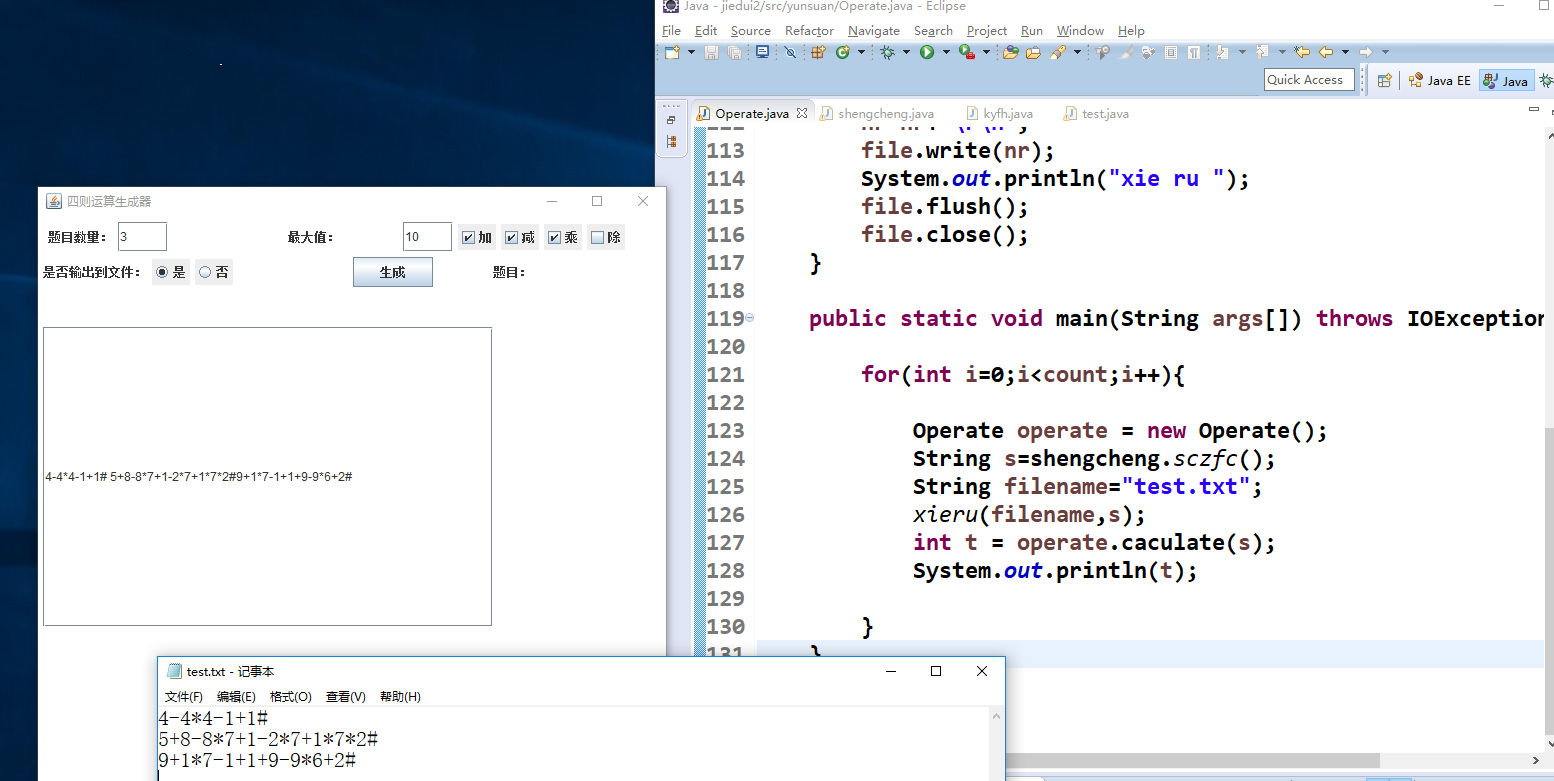
四、样例
总结
学习了Java如何使用swing做窗体,虽然做的很丑。题目要求没看清,前期光 顾着做咋计算四则表达式了,下次应该理解好要求再做作业。领航员给了我很大的帮助,我们一起学了好多东西,很开心。

 浙公网安备 33010602011771号