

路由跳转
HMRouter中使用HMRouterMgr的静态方法push()和replace()来实现路由跳转。使用pop()方法来实现页面返回
- push :目标页面不会替换当前页,而是插入页面栈。可以使用pop实现页面的返回操作。
- replace:目标页面会替换当前页,并销毁当前页。这样可以释放当前页的资源,并且无法返回到当前页。
- pop:返回页面栈的上一个页面,skipedLayerNumber 页面返回的层级数量,默认为0,表示返回上一级,1表示跳过一级页面返回
跳转示例代码
push
replace
携带参数跳转
PageModel
HomePage
import { HMDefaultGlobalAnimator, HMNavigation, HMRouter, HMRouterMgr } from '@hadss/hmrouter';
import { AttributeUpdater } from '@kit.ArkUI';
import { PageModel } from '../../Models/PageModel'
@Entry
@Component
struct HomePage {
modifier: NavModifier = new NavModifier();
build() {
// @Entry中需要再套一层容器组件,Column或者Stack
Column() {
// 使用HMNavigation容器
HMNavigation({
navigationId: 'mainNavigation', options: {
standardAnimator: HMDefaultGlobalAnimator.STANDARD_ANIMATOR,
dialogAnimator: HMDefaultGlobalAnimator.DIALOG_ANIMATOR,
modifier: this.modifier
}
}) {
Column({ space: 20 }) {
Button("TwoPage")
.width("80%")
.onClick(() => {
HMRouterMgr.push({
                navigationId: "mainNavigation",
                pageUrl: "TwoPage"
              })
})
Button("TwoPageParam")
.width("80%")
.onClick(() => {
HMRouterMgr.push({
navigationId: "mainNavigation",
pageUrl: "TwoPage",
param: new PageModel("张三", "12")
})
})
}
.width('100%')
.height('100%')
}
}
.height('100%')
.width('100%')
}
}
class NavModifier extends AttributeUpdater<NavigationAttribute> {
initializeModifier(instance: NavigationAttribute): void {
instance.mode(NavigationMode.Stack);
instance.navBarWidth('100%');
instance.hideTitleBar(true);
instance.hideToolBar(true);
}
}- 1.
- 2.
- 3.
- 4.
- 5.
- 6.
- 7.
- 8.
- 9.
- 10.
- 11.
- 12.
- 13.
- 14.
- 15.
- 16.
- 17.
- 18.
- 19.
- 20.
- 21.
- 22.
- 23.
- 24.
- 25.
- 26.
- 27.
- 28.
- 29.
- 30.
- 31.
- 32.
- 33.
- 34.
- 35.
- 36.
- 37.
- 38.
- 39.
- 40.
- 41.
- 42.
- 43.
- 44.
- 45.
- 46.
- 47.
- 48.
- 49.
- 50.
- 51.
- 52.
- 53.
- 54.
- 55.
- 56.
TwoPage
import { HMRouter, HMRouterMgr } from '@hadss/hmrouter'
import { PageModel } from '../../Models/PageModel'
@HMRouter({ pageUrl: "TwoPage" })
@Component
export struct TwoPage {
aboutToAppear(): void {
let currentParam: PageModel = HMRouterMgr.getCurrentParam() as PageModel;
if (currentParam == undefined) {
return;
}
console.debug("param", 'name:' + currentParam.Name);
console.debug("param", 'age:' + currentParam.Age);
}
build() {
Column({ space: 20 }) {
Button("ThreePage")
.width("80%")
.onClick(() => {
HMRouterMgr.push({
navigationId: "mainNavigation",
pageUrl: "ThreePage"
})
})
Button("ThreeReplacePage")
.width("80%")
.onClick(() => {
HMRouterMgr.replace({
            navigationId: "mainNavigation",
            pageUrl: "ThreePage"
          })
})
Button("HomePage")
.width("80%")
.onClick(() => {
HMRouterMgr.pop({
navigationId: "mainNavigation"
})
})
}
.height("100%")
.width("100%")
}
}- 1.
- 2.
- 3.
- 4.
- 5.
- 6.
- 7.
- 8.
- 9.
- 10.
- 11.
- 12.
- 13.
- 14.
- 15.
- 16.
- 17.
- 18.
- 19.
- 20.
- 21.
- 22.
- 23.
- 24.
- 25.
- 26.
- 27.
- 28.
- 29.
- 30.
- 31.
- 32.
- 33.
- 34.
- 35.
- 36.
- 37.
- 38.
- 39.
- 40.
- 41.
- 42.
- 43.
- 44.
- 45.
ThreePage
import { HMRouter, HMRouterMgr } from '@hadss/hmrouter'

@HMRouter({ pageUrl: "ThreePage" })
@Component
export struct ThreePage {
  build() {
    Column() {
      Button("ThreePage")
        .width("80%")
        .onClick(() => {
          HMRouterMgr.pop({
            navigationId: "mainNavigation"
          })
        })
    }
    .height("100%")
    .width("100%")
  }
}- 1.
- 2.
- 3.
- 4.
- 5.
- 6.
- 7.
- 8.
- 9.
- 10.
- 11.
- 12.
- 13.
- 14.
- 15.
- 16.
- 17.
- 18.
- 19.
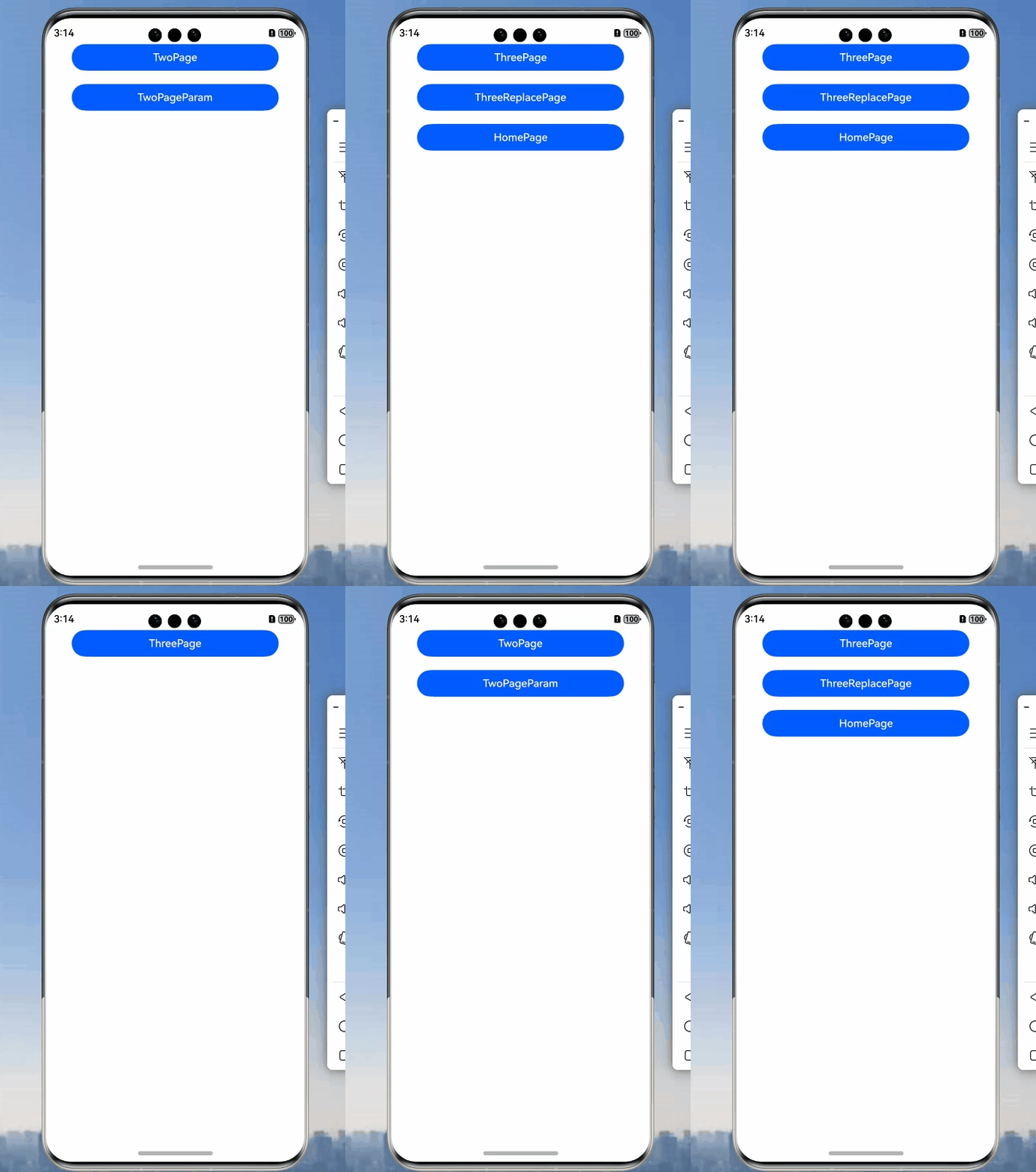
实现页面跳转结果如下:
HMRouterPathInfo
路由跳转接口参数类,属性如下:
属性 | 类型 | 简介 |
navigationId | string | 操作页面栈,为空时表示对最近一次操作的navigation进行路由跳转 |
pageUrl | string | 需要跳转的目标页面 |
param | ESObject | 跳转页面携带的参数 |
interceptors | IHMInterceptor[] | 自定义拦截器,最高优先级执行 |
animator | IHMAnimator | boolean |
skipAllInterceptor | boolean | 是否跳过所有拦截器执行,但是不会跳过interceptors中的拦截器 |
获取路由的参数
通过HMRouterMgr.getCurrentParam()方法来获取页面传递的数据。通过push和replace的callback参数来实现页面返回的命令触发。
修改上一章代码
TwoPage
import { HMPopInfo, HMRouter, HMRouterMgr } from '@hadss/hmrouter'
import { PageModel } from '../../Models/PageModel'

@HMRouter({ pageUrl: "TwoPage" })
@Component
export struct TwoPage {
  aboutToAppear(): void {
    let currentParam: PageModel = HMRouterMgr.getCurrentParam() as PageModel;
    if (currentParam == undefined) {
      return;
    }
    console.debug("router", 'name:' + currentParam.Name);
    console.debug("router", 'age:' + currentParam.Age);
  }

  build() {
    Column({ space: 20 }) {
      Button("ThreePage")
        .width("80%")
        .onClick(() => {
          HMRouterMgr.push({
            navigationId: "mainNavigation",
            pageUrl: "ThreePage"
          }, {
            onResult: (popInfo: HMPopInfo) => {
              let popResult: PageModel = popInfo.result as PageModel;
              if (popResult == null || popResult == undefined) {
                return;
              }
              console.debug("router", 'name:' + popResult.Name);
              console.debug("router", 'age:' + popResult.Age);
            }
          })
        })
      Button("ThreeReplacePage")
        .width("80%")
        .onClick(() => {
          HMRouterMgr.replace({
            navigationId: "mainNavigation",
            pageUrl: "ThreePage"
          })
        })
      Button("HomePage")
        .width("80%")
        .onClick(() => {
          HMRouterMgr.pop({
            navigationId: "mainNavigation"
          })
        })
    }
    .height("100%")
    .width("100%")
  }
}- 1.
- 2.
- 3.
- 4.
- 5.
- 6.
- 7.
- 8.
- 9.
- 10.
- 11.
- 12.
- 13.
- 14.
- 15.
- 16.
- 17.
- 18.
- 19.
- 20.
- 21.
- 22.
- 23.
- 24.
- 25.
- 26.
- 27.
- 28.
- 29.
- 30.
- 31.
- 32.
- 33.
- 34.
- 35.
- 36.
- 37.
- 38.
- 39.
- 40.
- 41.
- 42.
- 43.
- 44.
- 45.
- 46.
- 47.
- 48.
- 49.
- 50.
- 51.
- 52.
- 53.
- 54.
ThreePage
import { HMRouter, HMRouterMgr } from '@hadss/hmrouter'
import { PageModel } from '../../Models/PageModel'

@HMRouter({ pageUrl: "ThreePage" })
@Component
export struct ThreePage {
  build() {
    Column() {
      Button("ThreePage")
        .width("80%")
        .onClick(() => {
          HMRouterMgr.pop({
            navigationId: "mainNavigation",
            param: new PageModel("李四", "18")
          })
        })
    }
    .height("100%")
    .width("100%")
  }
}- 1.
- 2.
- 3.
- 4.
- 5.
- 6.
- 7.
- 8.
- 9.
- 10.
- 11.
- 12.
- 13.
- 14.
- 15.
- 16.
- 17.
- 18.
- 19.
- 20.
- 21.
实现以下效果
把传递的参数打印出来。
push和replace切换路由传递

pop回传

总结
这篇文章主要讲了路由切换相关的内容。同时需要注意,即使是Replace切换到下一个页面,页面返回时也是调用Replace的回调函数。

 浙公网安备 33010602011771号