
vuex实现计算器
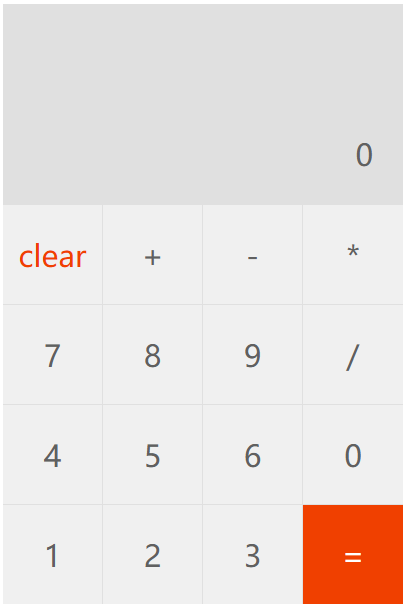
dom
<div id="app">
<div class="keys">
<div class="result">
<!--绑定计算属性result-->
{{ result }}
</div>
<div class="enter">
<!--绑定计算属性enter-->
{{ enter === ""?0:enter}}
</div>
<div class="list">
<!--键盘区域-->
<keyboard
v-for="item in keys"
:value="item">
</keyboard>
</div>
</div>
</div>
js
//创建仓库store
const store = new Vuex.Store({
state:{
result:"",//运算结果
enter:"" //输入的值
},
mutations:{
calculate(state,value){
if(value === '='){
//按键的值为=,进行结果计算
state.result = eval(state.enter);
// state.enter += value;
state.enter = state.result;
}else if(value === 'clear'){
//按键的值为clear,清空数据
state.result = state.enter = "";
}else{
//输入结果enter进行拼接
state.enter += value;
}
}
}
});
//自定义组件
Vue.component('keyboard',{
//接受的参数value,代表键盘的值
props:['value'],
//模板
template:`<div
@click="getKeyboardValue"
:data-value="value">
{{value}}
</div>`,
methods:{
//点击事件处理函数
getKeyboardValue(event){
//获取当前的按键的值
let value=event.target.dataset.value;
//通过commit提交mutation
this.$store.commit('calculate',value)
}
}
});
//创建Vue实例
const app = new Vue({
//挂载元素
el:"#app",
store,
data:{
//16个按键的值
keys:[
'clear', '+', '-', '*',
'7', '8', '9', '/',
'4', '5', '6', '0',
'1', '2', '3', '='
]
},
//增加计算属性
computed:{
result(){
//通过this.$store获取仓库的数据result
return this.$store.state.result;
},
enter(){
//通过this.$store获取仓库的数据result
return this.$store.state.enter;
}
}
});
css
.keys{
width: 400px;
margin: 0 auto;
background-color: #e0e0e0;
}
.keys .result{
height: 100px;
line-height: 100px;
font-size: 50px;
text-align: right;
padding-right: 0.5em;
color: #f04000;
}
.keys .enter{
line-height: 100px;
font-size: 30px;
text-align: right;
padding-right: 1em;
color: #606060;
}
.keys .list>div{
float: left;
width: 100px;
height: 100px;
line-height: 100px;
text-align: center;
font-size: 30px;
background-color: #f0f0f0;
color: #606060;
border-right: 1px solid #e0e0e0;
border-top: 1px solid #e0e0e0;
box-sizing: border-box;
}
.keys .list>div:nth-of-type(4n) {
border-right: none;
}
.keys .list div[data-value="="]{
background-color: #f04000;
color: #fff;
}
.keys .list div[data-value="clear"]{
color: #f04000;
}

 浙公网安备 33010602011771号