


Thymeleaf模板
关于Thymeleaf的优点,我只说一条:它就是html页面。
相关pom依赖:
<dependency>
            <groupId>org.springframework.boot</groupId>
            <artifactId>spring-boot-starter-thymeleaf</artifactId>
        </dependency>
Spring Boot官方文档建议在开发时将缓存关闭,那就在application.properties文件中加入下面这行
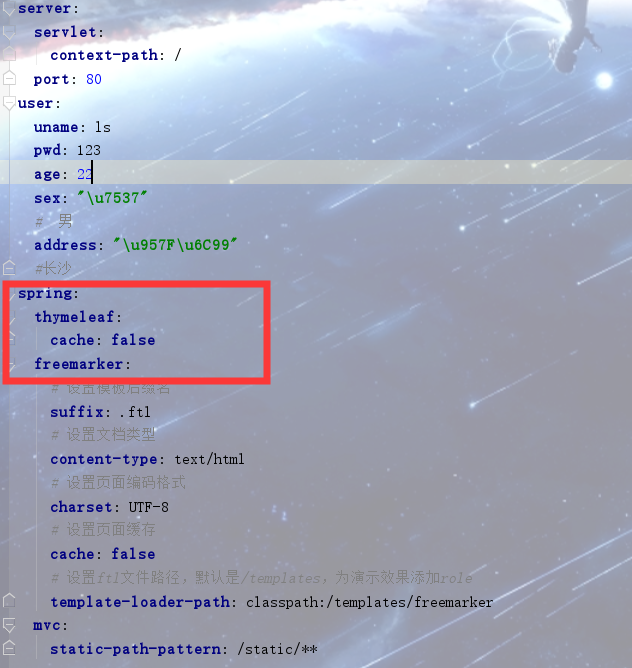
正式环境还是要将缓存开启的
对应的后台代码
package com.ssm.springboot.entity;

import lombok.Data;

/**
 * @author xyls
 * @blog name & blog address 027@0030
 * @create  2019-11-26 15:33
 */
@Data
public class User {
    private Integer uid;
    private String userName;
    private String password;


    public User(Integer uid, String userName, String password) {
        this.uid = uid;
        this.userName = userName;
        this.password = password;
    }


    public User() {
    }
}
package com.ssm.springboot.controller;

import com.ssm.springboot.entity.User;
import org.springframework.stereotype.Controller;
import org.springframework.web.bind.annotation.RequestMapping;

import javax.servlet.http.HttpServletRequest;
import java.util.ArrayList;
import java.util.List;

/**
 * @author xyls
 * @blog name & blog address 027@0030
 * @create  2019-11-26 15:34
 */
@Controller
@RequestMapping("/thymeleaf")
public class UserController {

    @RequestMapping("/by1")

    public String by1(HttpServletRequest request) {
        request.setAttribute("msg", "传递单个字符串");
        List<User> userList = new ArrayList<>();
        userList.add(new User(1, "连斩", "117649"));
        userList.add(new User(2, "连战", "117649"));
        userList.add(new User(3, "恋栈", "117649"));
        request.setAttribute("userList", userList);
        request.setAttribute("htmlStr", "<span style='color:red'>转义HTML代码块</span>");

        return "list";
    }
}
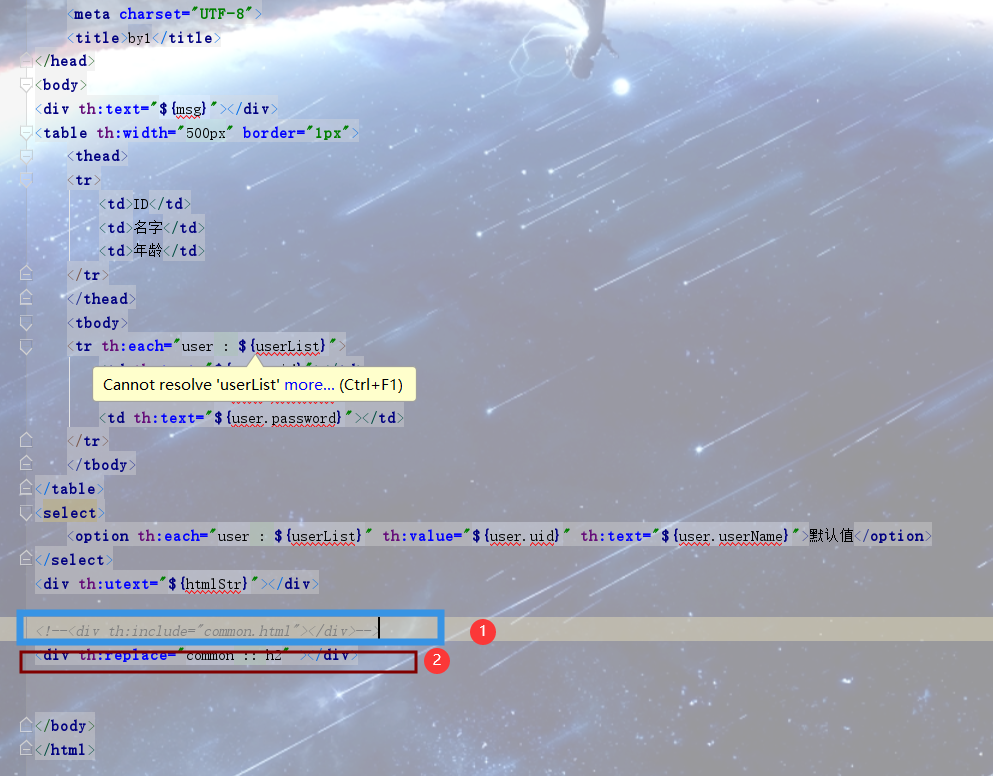
前台HTML页面
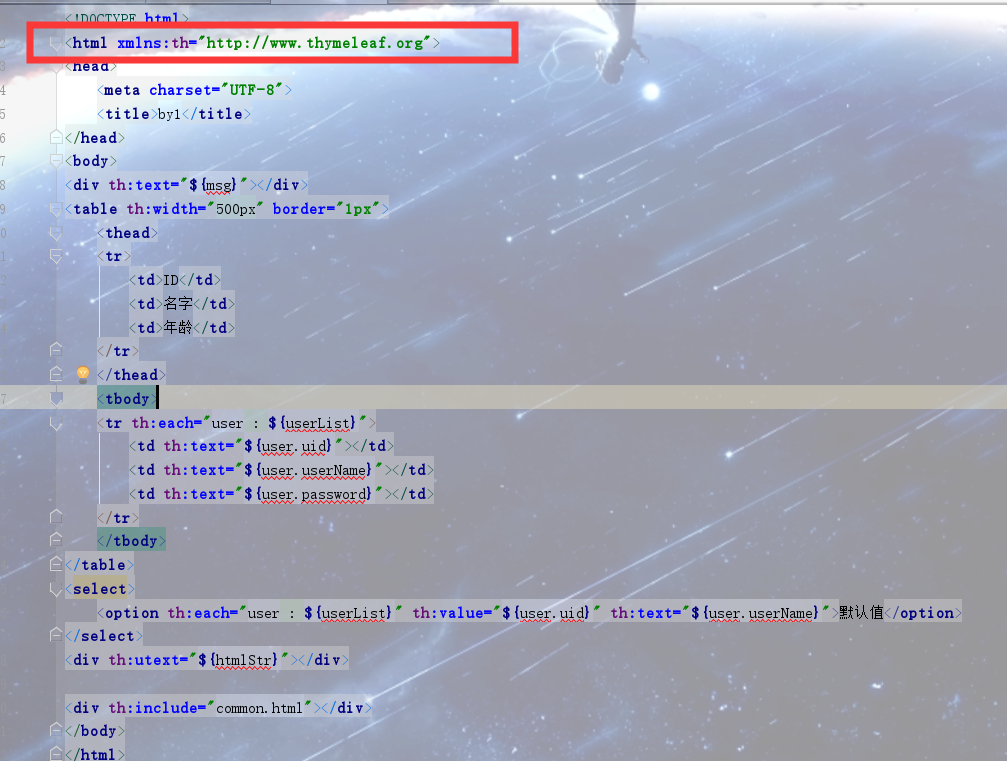
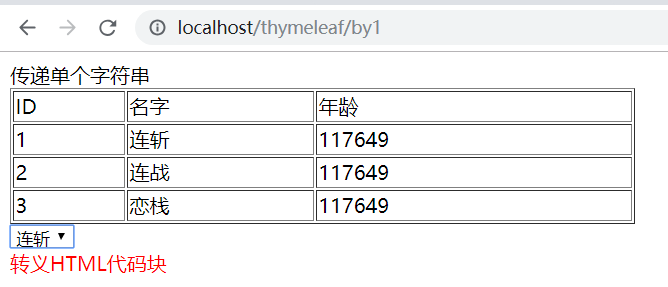
注意:
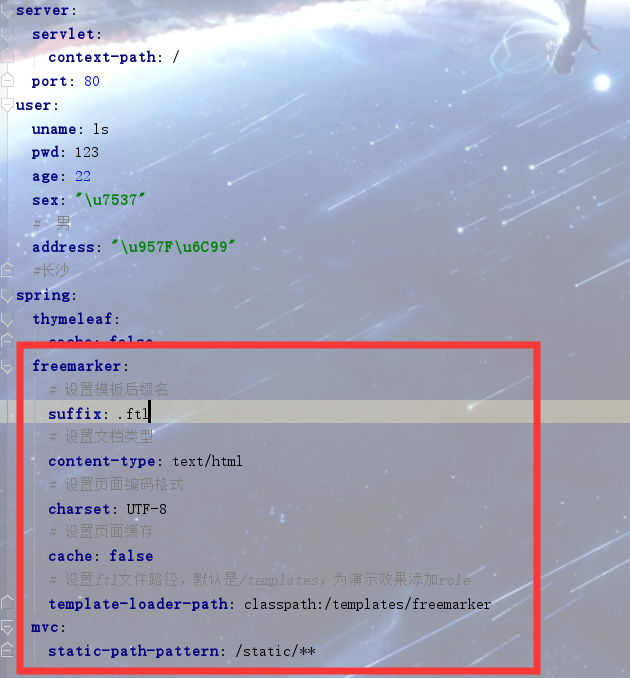
在演示thymeleaf时,如果写了freemarker,先把application中的free marker部分先注释,不然没效果
Freemarker模板
学习网站:http://freemarker.foofun.cn/
pom依赖
<dependency>
	<groupId>org.springframework.boot</groupId>
	<artifactId>spring-boot-starter-freemarker</artifactId>
   </dependency>
<resources>
            <!--解决mybatis-generator-maven-plugin运行时没有将XxxMapper.xml文件放入target文件夹的问题-->
            <resource>
                <directory>src/main/java</directory>
                <includes>
                    <include>**/*.xml</include>
                </includes>
            </resource>
            <!--freemarker模板也读取需要注释标红地方-->
            <resource>
                <directory>src/main/resources</directory>
                <includes>
                    <!--<include>*.properties</include>-->
                    <!--<include>*.xml</include>-->
                    <!--<include>*.yml</include>-->
                </includes>
            </resource>
        </resources>
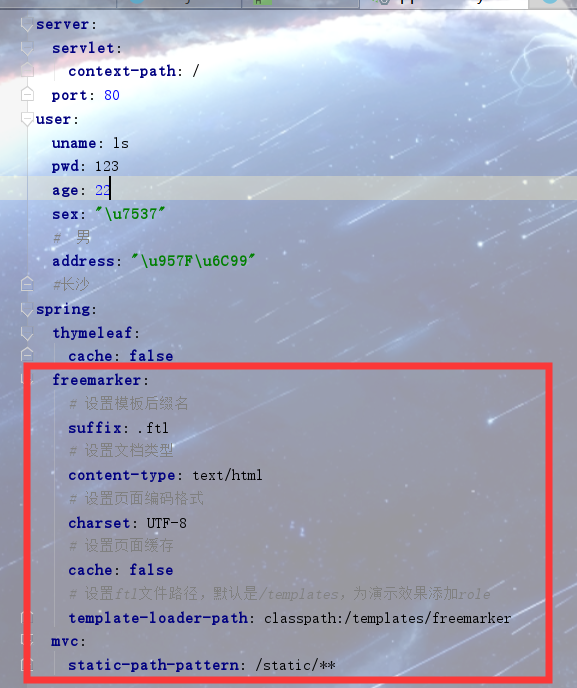
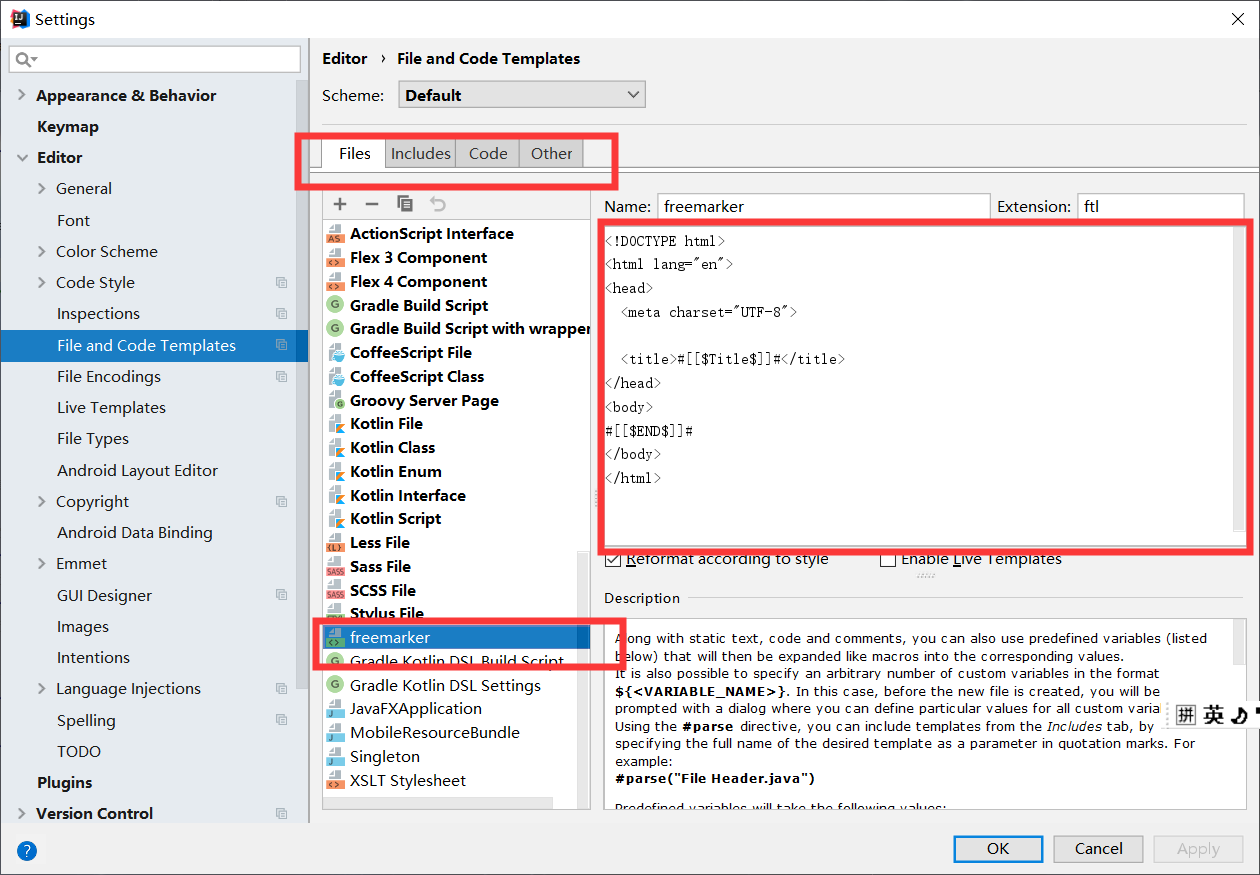
没配置的情况下是不能.ftl文件的,现在改下
list.ftl
<!DOCTYPE html>
<html lang="en">
<head>
    <meta charset="UTF-8">

    <title>Title</title>
</head>
<body>
<h2>取值</h2>
<h3>提供默认值</h3>
welcome 【${name!'未知'}】 to freemarker!

<h3>exists用在逻辑判断</h3>
<#if name?exists>
    ${name}
</#if>

<h2>条件</h2>
<#if sex=='girl'>
		女
<#elseif sex=='boy'>
		男
<#else>
		保密
</#if>

<h2>循环</h2>
<table border="1px" width="600px">
    <thead>
    <tr>
        <td>ID</td>
        <td>角色名</td>
        <td>描述</td>
    </tr>
    </thead>
    <tbody>
    <#list roles as role>
    <tr>
        <td>${role.rid}</td>
        <td>${role.roleName}</td>
        <td>${role.desc}</td>
    </tr>
    </#list>
    </tbody>
</table>

<h2>include</h2>
<#include 'foot.ftl'>

<h2>局部变量(assign)/全局变量(global)</h2>
 <#assign ctx1>
     ${springMacroRequestContext.contextPath}
 </#assign>
sys
<#global ctx2>
    ${springMacroRequestContext.contextPath}
</#global>
${ctx1}和${ctx2}
sqs


</body>
</html>
foot.ftl
底部页面
<a href="login.ftl">返回登录1</a>
<a href="${ctx}/toLogin">返回登录2</a>
common.ftl
<#assign ctx>
    ${springMacroRequestContext.contextPath}
</#assign>
<base href="${ctx}/">
相关controler层的Java代码
package com.ssm.springboot.controller;

import com.ssm.springboot.entity.Role;
import org.springframework.stereotype.Controller;
import org.springframework.web.bind.annotation.RequestMapping;
import org.springframework.web.servlet.ModelAndView;

import java.util.ArrayList;
import java.util.List;

/**
 * @author xyls
 * @blog name & blog address 027@0030
 * @create  2019-11-26 16:36
 */
@Controller
@RequestMapping("/freemarker")
public class RoleController {
    @RequestMapping("/role/list")
    public ModelAndView roleList(){
        ModelAndView mav = new ModelAndView();
        mav.setViewName("/list");

        mav.addObject("name",null);
        mav.addObject("sex","gay");
        List list = new ArrayList();
        list.add(new Role(1,"老师","教书育人"));
        list.add(new Role(2,"学生","知识改变命运"));
        mav.addObject("roles",list);

        return mav;
    }

    @RequestMapping("toLogin")
    public String toLogin(){
        return "login";
    }
}
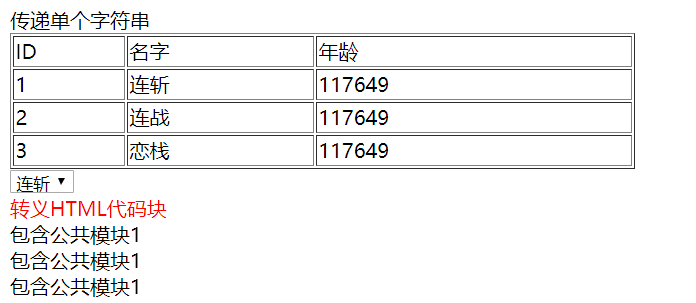
浏览器显示结果
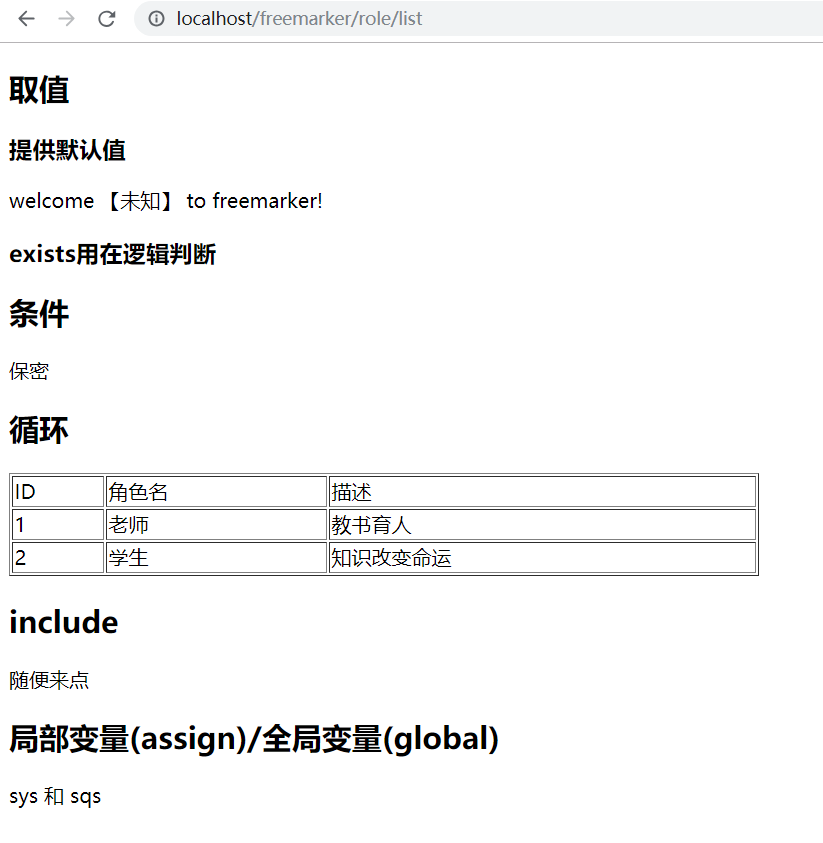
注意:
1、application.yml中可以配置模板存放位置的根路径、以及静态资源文件存放位置的根路径
2、${springMacroRequestContext.contextPath}:SpringBoot中获取项目名
3、不推荐使用全局变量。即便它们属于不同的命名空间, 全局变量也被所有模板共享,因为它们是被 import进来的。
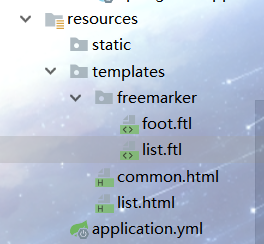
4、freemarker模板也可以像jsp那样设置根路径
<#include 'common.ftl'>
<script src="js/xxx.js" type="text/javascript"></script>
thymeleaf中替代jsp:include的写法
一种是应用一段html代码
在需要应用的地方添加(2)
一种是包含整个html页面(1)

注意:
1、这里的th:replace里的路径是相对于templetes文件夹的。
2、冒号冒号前后都有空格
freemarker:
# 设置模板后缀名
suffix: .ftl
# 设置文档类型
content-type: text/html
# 设置页面编码格式
charset: UTF-8
# 设置页面缓存
cache: false
# 设置ftl文件路径,默认是/templates,为演示效果添加role
template-loader-path: classpath:/templates/role
mvc:
static-path-pattern: /static/**


 浙公网安备 33010602011771号