
Qt实现气泡弹窗(PyQt5/C++)
效果预览
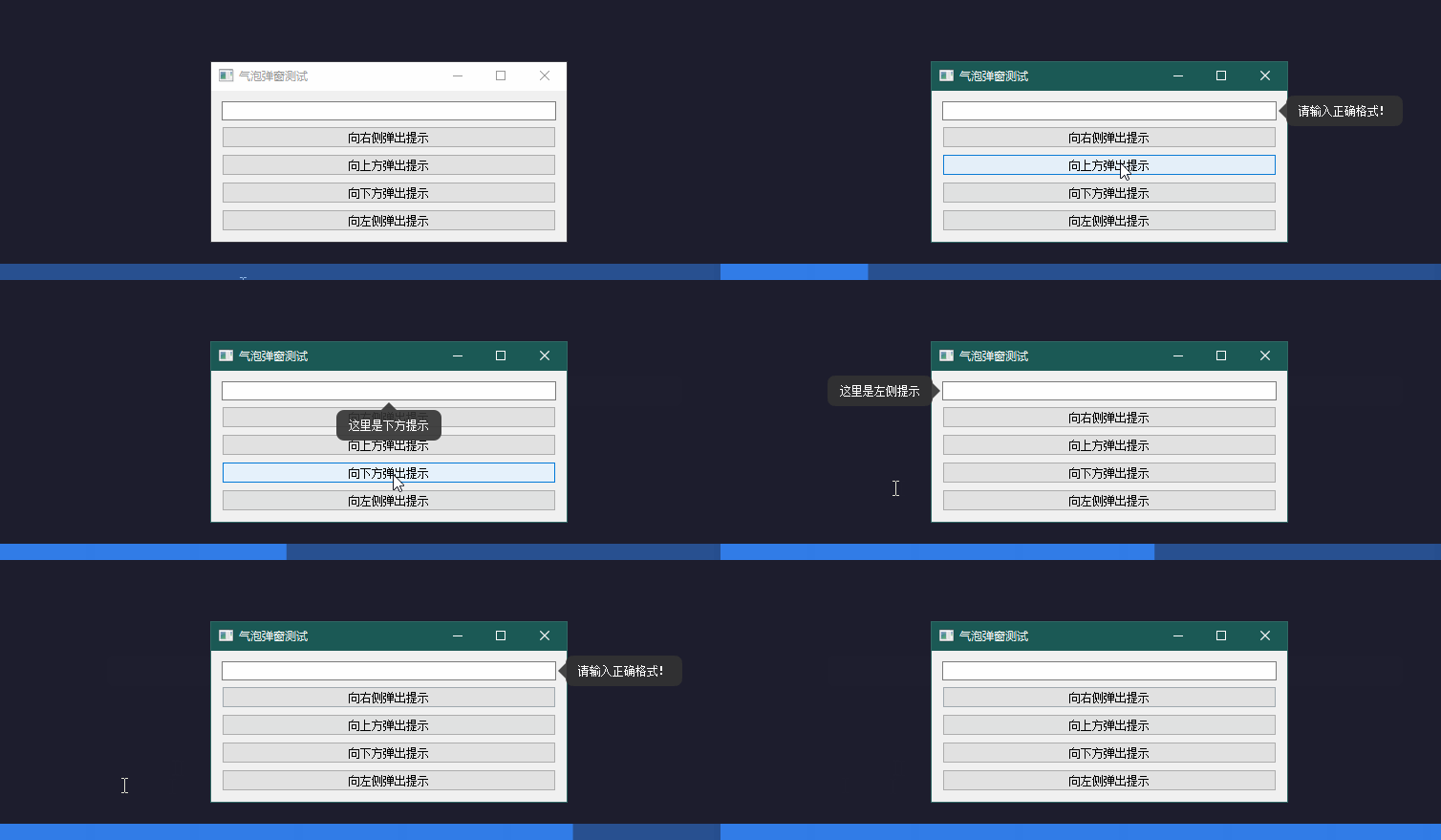
代码
PyQt5版本
import sys
from PyQt5.QtWidgets import QWidget, QLabel, QVBoxLayout, QPushButton, QLineEdit, QApplication
from PyQt5.QtCore import Qt, QTimer, QPointF, QPoint, QRectF
from PyQt5.QtGui import QColor, QPainter, QPainterPath, QPolygonF


class BubblePopup(QWidget):
    def __init__(self, text, parent=None, direction="bottom"):
        super().__init__(parent)
        self.direction = direction  # top, bottom, left, right
        self.arrow_size = 8         # 箭头大小
        self.margin = 5             # 间距

        # 1. 窗口属性
        self.setWindowFlags(Qt.ToolTip | Qt.FramelessWindowHint)
        self.setAttribute(Qt.WA_TranslucentBackground)
        self.setAttribute(Qt.WA_DeleteOnClose)

        # 2. 布局
        layout = QVBoxLayout(self)
        self.label = QLabel(text)
        self.label.setStyleSheet("color: white; padding: 5px; font-size: 12px;")

        # 根据方向给 Label 留出箭头的边距
        p = self.arrow_size + 5
        if direction == "bottom":
            layout.setContentsMargins(5, p, 5, 5)
        elif direction == "top":
            layout.setContentsMargins(5, 5, 5, p)
        elif direction == "left":
            layout.setContentsMargins(5, 5, p, 5)
        elif direction == "right":
            layout.setContentsMargins(p, 5, 5, 5)

        layout.addWidget(self.label)

        # 3. 自动关闭
        self.close_timer = QTimer(self)
        self.close_timer.timeout.connect(self.close)
        self.close_timer.start(3000)

    def closeEvent(self, event):
        self.close_timer.stop()
        self._follow_timer.stop()
        if self._follow:
            self._follow.removeEventFilter(self)
            self._follow = None
        super().closeEvent(event)

    def paintEvent(self, event):
        painter = QPainter(self)
        painter.setRenderHint(QPainter.Antialiasing)
        painter.setPen(Qt.NoPen)
        painter.setBrush(QColor(50, 50, 50, 230))  # 深灰色背景

        rect = QRectF(self.rect())
        path = QPainterPath()

        # 根据方向调整主体矩形范围,给箭头留位
        if self.direction == "bottom":
            rect.setTop(rect.top() + self.arrow_size)
        elif self.direction == "top":
            rect.setBottom(rect.bottom() - self.arrow_size)
        elif self.direction == "left":
            rect.setRight(rect.right() - self.arrow_size)
        elif self.direction == "right":
            rect.setLeft(rect.left() + self.arrow_size)

        # 绘制圆角矩形主体
        path.addRoundedRect(rect, 8, 8)

        # 绘制三角形箭头
        arrow = QPolygonF()
        center_h = rect.width() / 2
        center_v = rect.height() / 2

        if self.direction == "bottom":
            arrow.append(QPointF(center_h - self.arrow_size, rect.top()))
            arrow.append(QPointF(center_h, 0))
            arrow.append(QPointF(center_h + self.arrow_size, rect.top()))
        elif self.direction == "top":
            arrow.append(QPointF(center_h - self.arrow_size, rect.bottom()))
            arrow.append(QPointF(center_h, self.height()))
            arrow.append(QPointF(center_h + self.arrow_size, rect.bottom()))
        elif self.direction == "left":
            arrow.append(QPointF(rect.right(), center_v - self.arrow_size))
            arrow.append(QPointF(self.width(), center_v))
            arrow.append(QPointF(rect.right(), center_v + self.arrow_size))
        elif self.direction == "right":
            arrow.append(QPointF(rect.left(), center_v - self.arrow_size))
            arrow.append(QPointF(0, center_v))
            arrow.append(QPointF(rect.left(), center_v + self.arrow_size))

        path.addPolygon(arrow)
        painter.drawPath(path)

    def enterEvent(self, event): self.close_timer.stop()
    def leaveEvent(self, event): self.close_timer.start(3000)

    def updatePos(self, widget):
        # 计算全局坐标
        w_p = widget.mapToGlobal(QPoint(0, 0))
        w_w = widget.width()
        w_h = widget.height()
        p_w = self.width()
        p_h = self.height()

        if self.direction == "bottom":
            pos = w_p + QPoint((w_w - p_w)//2, w_h + 2)
        elif self.direction == "top":
            pos = w_p + QPoint((w_w - p_w)//2, -p_h - 2)
        elif self.direction == "left":
            pos = w_p + QPoint(-p_w - 2, (w_h - p_h)//2)
        elif self.direction == "right":
            pos = w_p + QPoint(w_w + 2, (w_h - p_h)//2)
        self.move(pos)

    def setUpFollow(self, widget: QWidget):
        """
        设置跟随窗口

        :param widget: QWidget
        """
        self._follow = widget
        self._follow_timer = QTimer(self)
        self._follow_timer.timeout.connect(lambda: self.updatePos(widget))
        self._follow_timer.start(100)

    @staticmethod
    def show_message(widget: QWidget, text: str, direction="bottom"):
        popup = BubblePopup(text, direction=direction)
        popup.adjustSize()  # 先根据文字调整大小再计算位置
        popup.updatePos(widget)
        popup.setUpFollow(widget)
        popup.show()
        widget._b = popup

# --- Demo 示例 ---


class Demo(QWidget):
    def __init__(self):
        super().__init__()
        self.setWindowTitle("气泡弹窗测试")
        layout = QVBoxLayout(self)

        self.edit = QLineEdit()
        btn_right = QPushButton("向右侧弹出提示")
        btn_right.clicked.connect(lambda: BubblePopup.show_message(self.edit, "请输入正确格式!", "right"))

        btn_top = QPushButton("向上方弹出提示")
        btn_top.clicked.connect(lambda: BubblePopup.show_message(self.edit, "这里是上方提示", "top"))

        btn_bottom = QPushButton("向下方弹出提示")
        btn_bottom.clicked.connect(lambda: BubblePopup.show_message(self.edit, "这里是下方提示", "bottom"))

        btn_left = QPushButton("向左侧弹出提示")
        btn_left.clicked.connect(lambda: BubblePopup.show_message(self.edit, "这里是左侧提示", "left"))

        layout.addWidget(self.edit)
        layout.addWidget(btn_right)
        layout.addWidget(btn_top)
        layout.addWidget(btn_bottom)
        layout.addWidget(btn_left)


if __name__ == "__main__":
    app = QApplication(sys.argv)
    window = Demo()
    window.show()
    sys.exit(app.exec_())
C++版本
BublePopup.h
#ifndef BUBBLEPOPUP_H
#define BUBBLEPOPUP_H

#include <QLabel>
#include <QRect>
#include <QTimer>
#include <Qt>
#include <QWidget>


class BubblePopup : public QWidget
{
    Q_OBJECT

public:
    explicit BubblePopup(const QString& text, QWidget* parent = nullptr,
                         Qt::Alignment direction = Qt::AlignBottom);

    ~BubblePopup() override = default;

    // 设置跟随窗口
    void setUpFollow(QWidget* widget, QRect rect = QRect());

    // 更新位置
    void updatePos(QWidget* widget);

    // 静态方法:显示消息
    static void showMessage(QWidget* widget, const QString& text,
                            Qt::Alignment direction = Qt::AlignBottom,
                            QRect rect = QRect());

protected:
    void paintEvent(QPaintEvent* event) override;
    void enterEvent(QEvent* event) override;
    void leaveEvent(QEvent* event) override;
    void closeEvent(QCloseEvent* event) override;
    bool eventFilter(QObject* watched, QEvent* event) override;

private:
    Qt::Alignment m_direction;   // 箭头方向:Qt::AlignTop, Qt::AlignBottom, Qt::AlignLeft, Qt::AlignRight
    int           m_arrowSize;   // 箭头大小
    int           m_margin;      // 间距
    QRect         m_rect;        // 相对于 widget 的局部坐标区域,用于限制弹窗位置
    QLabel*       m_label;       // 显示文本的标签
    QTimer*       m_closeTimer;  // 自动关闭定时器
    QTimer*       m_followTimer; // 跟随更新定时器
    QWidget*      m_follow;      // 跟随的窗口
};

#endif   // BUBBLEPOPUP_H
BubblePopup.cpp
#include "BubblePopup.h"

#include <QApplication>
#include <QDebug>
#include <QHBoxLayout>
#include <QPainter>
#include <QPainterPath>
#include <QPolygonF>
#include <QRectF>


BubblePopup::BubblePopup(const QString& text, QWidget* parent, Qt::Alignment direction)
    : QWidget(parent)
    , m_direction(direction)
    , m_arrowSize(8)
    , m_margin(5)
    , m_rect()
    , m_label(nullptr)
    , m_closeTimer(nullptr)
    , m_followTimer(nullptr)
    , m_follow(nullptr)
{
    // 1. 窗口属性
    setWindowFlags(Qt::ToolTip | Qt::FramelessWindowHint);
    setAttribute(Qt::WA_TranslucentBackground);
    setAttribute(Qt::WA_DeleteOnClose);

    // 2. 布局
    auto* layout = new QVBoxLayout(this);

    m_label = new QLabel(text, this);
    m_label->setStyleSheet("color: white; padding: 5px; font-size: 12px;");
    m_label->setWordWrap(true);

    // 根据方向给 Label 留出箭头的边距
    int p = m_arrowSize + 5;
    if (m_direction & Qt::AlignBottom) {
        layout->setContentsMargins(5, p, 5, 5);
    }
    else if (m_direction & Qt::AlignTop) {
        layout->setContentsMargins(5, 5, 5, p);
    }
    else if (m_direction & Qt::AlignLeft) {
        layout->setContentsMargins(5, 5, p, 5);
    }
    else if (m_direction & Qt::AlignRight) {
        layout->setContentsMargins(p, 5, 5, 5);
    }

    layout->addWidget(m_label);

    // 3. 自动关闭
    m_closeTimer = new QTimer(this);
    connect(m_closeTimer, &QTimer::timeout, this, &BubblePopup::close);
    m_closeTimer->start(3000);
}

void BubblePopup::paintEvent(QPaintEvent* event)
{
    Q_UNUSED(event);

    QPainter painter(this);
    painter.setRenderHint(QPainter::Antialiasing);
    painter.setPen(Qt::NoPen);
    painter.setBrush(QColor(250, 50, 50, 230));   // 深红色背景

    QRectF       rect = this->rect();
    QPainterPath path;

    // 根据方向调整主体矩形范围,给箭头留位
    if (m_direction & Qt::AlignBottom) {
        rect.setTop(rect.top() + m_arrowSize);
    }
    else if (m_direction & Qt::AlignTop) {
        rect.setBottom(rect.bottom() - m_arrowSize);
    }
    else if (m_direction & Qt::AlignLeft) {
        rect.setRight(rect.right() - m_arrowSize);
    }
    else if (m_direction & Qt::AlignRight) {
        rect.setLeft(rect.left() + m_arrowSize);
    }

    // 绘制圆角矩形主体
    path.addRoundedRect(rect, 8, 8);

    // 绘制三角形箭头
    QPolygonF arrow;
    qreal     center_h = rect.width() / 2;
    qreal     center_v = rect.height() / 2;

    if (m_direction & Qt::AlignBottom) {
        arrow.append(QPointF(center_h - m_arrowSize, rect.top()));
        arrow.append(QPointF(center_h, 0));
        arrow.append(QPointF(center_h + m_arrowSize, rect.top()));
    }
    else if (m_direction & Qt::AlignTop) {
        arrow.append(QPointF(center_h - m_arrowSize, rect.bottom()));
        arrow.append(QPointF(center_h, height()));
        arrow.append(QPointF(center_h + m_arrowSize, rect.bottom()));
    }
    else if (m_direction & Qt::AlignLeft) {
        arrow.append(QPointF(rect.right(), center_v - m_arrowSize));
        arrow.append(QPointF(width(), center_v));
        arrow.append(QPointF(rect.right(), center_v + m_arrowSize));
    }
    else if (m_direction & Qt::AlignRight) {
        arrow.append(QPointF(rect.left(), center_v - m_arrowSize));
        arrow.append(QPointF(0, center_v));
        arrow.append(QPointF(rect.left(), center_v + m_arrowSize));
    }

    path.addPolygon(arrow);
    painter.drawPath(path);
}

void BubblePopup::enterEvent(QEvent* event)
{
    QWidget::enterEvent(event);
    m_closeTimer->stop();
}

void BubblePopup::leaveEvent(QEvent* event)
{
    QWidget::leaveEvent(event);
    m_closeTimer->start(3000);
}

void BubblePopup::closeEvent(QCloseEvent* event)
{
    m_closeTimer->stop();
    if (m_followTimer) {
        m_followTimer->stop();
    }
    if (m_follow) {
        m_follow->removeEventFilter(this);
        m_follow = nullptr;
    }
    QWidget::closeEvent(event);
}

void BubblePopup::updatePos(QWidget* widget)
{
    if (!widget) {
        return;
    }

    // 计算全局坐标
    QPoint origin = m_rect.isNull() ? QPoint(0, 0) : m_rect.topLeft();
    QSize  sz     = m_rect.isNull() ? widget->size() : m_rect.size();

    QPoint w_p = widget->mapToGlobal(origin);
    int    w_w = sz.width();
    int    w_h = sz.height();
    int    p_w = width();
    int    p_h = height();

    qDebug() << m_rect << origin << sz << w_p << "  p_w = " << p_w << "   p_h = " << p_h;

    QPoint pos;
    if (m_direction & Qt::AlignBottom) {
        pos = w_p + QPoint((w_w - p_w) / 2, w_h + 2);
    }
    else if (m_direction & Qt::AlignTop) {
        pos = w_p + QPoint((w_w - p_w) / 2, -p_h - 2);
    }
    else if (m_direction & Qt::AlignLeft) {
        pos = w_p + QPoint(-p_w - 2, (w_h - p_h) / 2);
    }
    else if (m_direction & Qt::AlignRight) {
        pos = w_p + QPoint(w_w + 2, (w_h - p_h) / 2);
    }

    move(pos);
}

void BubblePopup::setUpFollow(QWidget* widget, QRect rect)
{
    m_rect   = rect;
    m_follow = widget;
    m_follow->installEventFilter(this);
    updatePos(m_follow);   // 立即更新一次位置

    if (!m_followTimer) {
        m_followTimer = new QTimer(this);
        connect(m_followTimer, &QTimer::timeout, this, [this]() { updatePos(m_follow); });
    }
    m_followTimer->start(100);
}

bool BubblePopup::eventFilter(QObject* watched, QEvent* event)
{
    if (watched == m_follow) {
        if (event->type() == QEvent::Move || event->type() == QEvent::Resize) {
            updatePos(m_follow);
        }
    }
    return QWidget::eventFilter(watched, event);
}

void BubblePopup::showMessage(QWidget* widget, const QString& text, Qt::Alignment direction,
                              QRect rect)
{
    auto* popup = new BubblePopup(text, nullptr, direction);
    popup->adjustSize();   // 先根据文字调整大小再计算位置
    popup->setUpFollow(widget, rect);
    popup->show();
}

 浙公网安备 33010602011771号