


http://www.cnblogs.com/kay/archive/2007/01/27/632226.html
DropDownList数据绑定第一项为空
我们在进行数据绑定时通常把一个表的某个字段绑定到DropDownList中,我们以pubs库的jobs表为例子,我们在显示时显示job_desc字段,values值绑定job_id字段。
方法一:
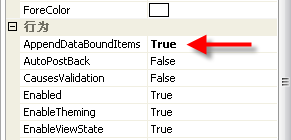
使用属性设置,我们在DropDownList的items的属性中添加一列为空行,然后更改AppandBataBoundItems属性为ture.
绑定代码:

1 SqlConnection conn = new SqlConnection("server=.;uid=sa;database=pubs");
2 SqlDataAdapter dap = new SqlDataAdapter("select * from jobs", conn);
3 DataTable dt = new DataTable();
4 dap.Fill(dt);
5 DropDownList1.Items.Clear();
6 DropDownList1.DataSource = dt;
7 DropDownList1.DataTextField = "job_desc";
8 DropDownList1.DataValueField = "job_id";
9 DropDownList1.DataBind();
方法一:
使用属性设置,我们在DropDownList的items的属性中添加一列为空行,然后更改AppandBataBoundItems属性为ture.
绑定代码:

1
SqlConnection conn = new SqlConnection("server=.;uid=sa;database=pubs");2
SqlDataAdapter dap = new SqlDataAdapter("select * from jobs", conn);3
DataTable dt = new DataTable();4
dap.Fill(dt);5
DropDownList1.Items.Clear();6
DropDownList1.DataSource = dt;7
DropDownList1.DataTextField = "job_desc";8
DropDownList1.DataValueField = "job_id";9
DropDownList1.DataBind();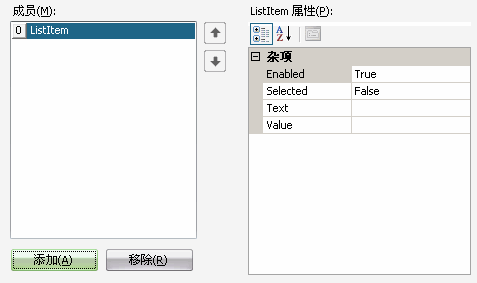
这样就可以了。
方法二:
使用代码:
方法二:
使用代码:
1
2 SqlConnection conn = new SqlConnection("server=.;uid=sa;database=pubs");
3 SqlDataAdapter dap = new SqlDataAdapter("select * from jobs", conn);
4 DataTable dt = new DataTable();
5 dap.Fill(dt);
6 DropDownList1.Items.Clear();
7 DropDownList1.DataSource = dt;
8 DropDownList1.DataTextField = "job_desc";
9 DropDownList1.DataValueField = "job_id";
10 DropDownList1.DataBind();
11 DropDownList1.Items.Insert(0, new ListItem("", ""));//插入空项,此举必须放到数据绑定之后
2
SqlConnection conn = new SqlConnection("server=.;uid=sa;database=pubs");3
SqlDataAdapter dap = new SqlDataAdapter("select * from jobs", conn);4
DataTable dt = new DataTable();5
dap.Fill(dt);6
DropDownList1.Items.Clear();7
DropDownList1.DataSource = dt;8
DropDownList1.DataTextField = "job_desc";9
DropDownList1.DataValueField = "job_id";10
DropDownList1.DataBind();11
DropDownList1.Items.Insert(0, new ListItem("", ""));//插入空项,此举必须放到数据绑定之后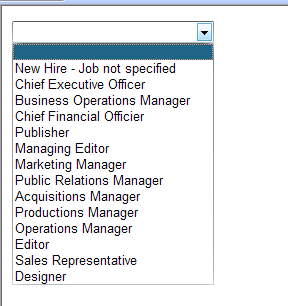
_____________________________________________________________________________________________________
两种绑定DropDownList数据源的方式
第一种: (更快)
…………………………………………
DataSet ds= new DataSet();
ds = cls2.SelectOle();
DropDownList1.DataSource = ds.Tables["My"].DefaultView;
DropDownList1.DataTextField = "dep_Name";
DropDownList1.DataValueField = "dep_Id";
DropDownList1.DataBind();
第二种: (更灵活)
DataSet set1= new DataSet();
set1 = cls2.SelectOle();
for (int num1 = 0; num1 < set1.Tables["My"].Rows.Count; num1++)
{
DropDownList1.Items.Add(set1.Tables["My"].Rows[num1][1].ToString());
}
<asp:DropDownList id="DropDownList1" DataValueField="dep_Id" DataTextField="dep_Name" runat="server"></asp:DropDownList>
…………………………………………
DataSet ds= new DataSet();
ds = cls2.SelectOle();
DropDownList1.DataSource = ds.Tables["My"].DefaultView;
DropDownList1.DataTextField = "dep_Name";
DropDownList1.DataValueField = "dep_Id";
DropDownList1.DataBind();
第二种: (更灵活)
DataSet set1= new DataSet();
set1 = cls2.SelectOle();
for (int num1 = 0; num1 < set1.Tables["My"].Rows.Count; num1++)
{
DropDownList1.Items.Add(set1.Tables["My"].Rows[num1][1].ToString());
}
<asp:DropDownList id="DropDownList1" DataValueField="dep_Id" DataTextField="dep_Name" runat="server"></asp:DropDownList>
------------------------------------------------------------------------------------------------------------------------------------
1.连接数据库
2.命令
3.分配数据源
4.填写,绑定!

 浙公网安备 33010602011771号