
XNA Billboard(公告板技术)
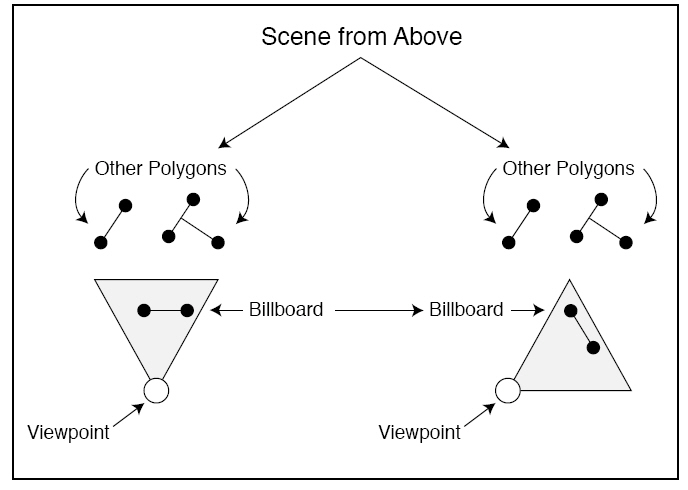
公告板技术是3D游戏中用的非常多的一种技术,主要是用于控制场景中的Texture的方向,让他始终以一定的角度对着我们的镜头(一般是垂直于镜头)。
如我们在3D游戏中看到的怪物的蓝、红和怪物名字、一些花草树木等,无论我们在哪个方向看它总是对着我们。
如下图所示:
|
1
2
3
4
5
6
7
8
9
10
11
12
13
14
15
16
17
18
19
20
21
22
23
24
25
26
27
28
29
30
31
32
33
34
35
36
37
38
39
40
41
42
43
44
45
46
47
48
49
50
51
52
53
54
55
56
57
58
59
60
61
62
63
64
65
66
67
68
69
70
71
72
73
74
75
76
77
78
79
80
81
82
|
GraphicsDeviceManager graphics;Texture2D texRedPanda;//镜头信息参数Vector3 pos, lookat, up;//World,View,Project矩阵Matrix world,view, project;BasicEffect basicEffect;//顶点结构VertexPositionTexture[] vpt;VertexDeclaration vertexDec;public GameMain(){ graphics = new GraphicsDeviceManager(this); Content.RootDirectory = "Content";}protected override void Initialize(){ //初始化镜头信息 pos = new Vector3(0, 0,200); lookat = Vector3.Zero; up = Vector3.Up; //初始化变换矩阵 world = Matrix.Identity; bbWorld = Matrix.Identity; view = Matrix.CreateLookAt(pos, lookat, up); project = Matrix.CreatePerspectiveFieldOfView(MathHelper.PiOver4, 800f/600f, 1, 1000); vpt = new VertexPositionTexture[6]; GraphicsDevice.RenderState.CullMode = CullMode.None; base.Initialize();}protected override void LoadContent(){ texRedPanda = Content.Load<Texture2D>("RedPanda"); basicEffect = new BasicEffect(GraphicsDevice, null); vertexDec = new VertexDeclaration(GraphicsDevice, VertexPositionTexture.VertexElements); //定义三角形的各顶点坐标和纹理坐标 vpt[0] = new VertexPositionTexture(new Vector3(-25,-25, 0), new Vector2(0, 1)); vpt[1] = new VertexPositionTexture(new Vector3(-25, 25, 0), new Vector2(0, 0)); vpt[2] = new VertexPositionTexture(new Vector3(25,-25, 0), new Vector2(1, 1)); vpt[3] = new VertexPositionTexture(new Vector3(-25, 25, 0), new Vector2(0, 0)); vpt[4] = new VertexPositionTexture(new Vector3(25, 25, 0), new Vector2(1, 0)); vpt[5] = new VertexPositionTexture(new Vector3(25,-25, 0), new Vector2(1, 1));}protected override void Update(GameTime gameTime){ // Allows the game to exit if (GamePad.GetState(PlayerIndex.One).Buttons.Back == ButtonState.Pressed) this.Exit(); base.Update(gameTime);}protected override void Draw(GameTime gameTime){ GraphicsDevice.Clear(Color.Black); //设置变换矩阵参数 basicEffect.World = world; basicEffect.View = view; basicEffect.Projection = project; //设置绘制纹理 basicEffect.TextureEnabled = true; basicEffect.Texture = texRedPanda; basicEffect.Begin(); foreach (var pass in basicEffect.CurrentTechnique.Passes) { pass.Begin(); GraphicsDevice.VertexDeclaration = vertexDec; GraphicsDevice.DrawUserPrimitives<VertexPositionTexture>(PrimitiveType.TriangleList, vpt,0, 2); pass.End(); } basicEffect.End(); base.Draw(gameTime);} |
texRedPanda的位置大概是在坐标原点,为了等会便于观察,将在Update加些内容。让镜头的位置通过键盘控制绕原点旋转(这里不是用World变换)。这里是在网上找的公式:
x1 = x0 * cosB + y0 * sinB
y1 = -x0 * sinB + y0 * cosB
x0,y0表示镜头现在的位置,y1,y2表示绕原点旋转B弧度后的坐标。
现在我们就呆以看到没有使用公告板技术时的效果了。把下面的代码加到Update方法的里:
|
1
2
3
4
5
6
7
8
9
10
11
12
13
14
15
16
17
|
float x0, z0;x0=pos.X;z0=pos.Z;if (Keyboard.GetState().IsKeyDown(Keys.Left)){ pos.X = x0 * (float)Math.Cos(0.1d) + z0 * (float)Math.Sin(0.1d); pos.Z = (-x0) * (float)Math.Sin(0.1d) + z0 * (float)Math.Cos(0.1d);}if (Keyboard.GetState().IsKeyDown(Keys.Right)){ pos.X = x0 * (float)Math.Cos(-0.1d) + z0 * (float)Math.Sin(-0.1d); pos.Z = (-x0) * (float)Math.Sin(-0.1d) + z0 * (float)Math.Cos(-0.1d);}view = Matrix.CreateLookAt(pos, Vector3.Zero, Vector3.Up);//将视点 位置显示在标题栏Window.Title = pos.ToString(); |
下面我们加一个用了公告板的World变换。主要代码如下,
bbWorld = Matrix.CreateBillboard(Vector3.Zero, -pos, Vector3.Up, null);
现在再来对比下 效果,发现无论我们控制镜头在哪个位置,小熊猫图片的下面始终对着我们。
这里已经实现了一个初级的公告板。当然也可以不用XNA的现有方法,我们可以把代码放到HLSL里面去,这里有个实现,但我帮他是数学原理没有推算过。所以只有套着用了。
|
1
2
3
4
5
6
7
8
9
10
11
12
13
14
15
16
17
18
19
20
21
22
23
24
25
26
27
28
29
30
31
32
33
34
35
36
37
38
39
40
41
42
43
44
45
46
47
48
49
50
51
52
53
|
float4x4 World;float4x4 View;float4x4 Projection;texture Texture;sampler textureSampler=sampler_state{ texture=<Texture>; magfilter = LINEAR; minfilter = LINEAR; mipfilter=LINEAR; AddressU = CLAMP; AddressV = CLAMP;};struct VertexShaderInput{ float3 Pos:POSITION0; float2 TexCoord:TEXCOORD0;};struct VertexShaderOutput{ float4 Position : POSITION0; float2 TexCoord:TEXCOORD0;};VertexShaderOutput VertexShaderFunction(VertexShaderInput input){ VertexShaderOutput output; float4x4 worldViewMatrix = mul(World, View); float3 positionVS = input.Pos + float3(worldViewMatrix._41, worldViewMatrix._42, worldViewMatrix._43); output.Position = mul(float4(positionVS, 1.0f), Projection); output.TexCoord=input.TexCoord; return output;}float4 PixelShaderFunction(VertexShaderOutput input) : COLOR0{ return tex2D(textureSampler,input.TexCoord);}technique BillBoard{ pass BillBoard { VertexShader = compile vs_1_0 VertexShaderFunction(); PixelShader = compile ps_1_0 PixelShaderFunction(); }} |
这里就实现了比较常用的公告板技术。到底是用XNA现有方法,还是HLSL,自己视情况面定吧。

 浙公网安备 33010602011771号