
动静分离
动静分离
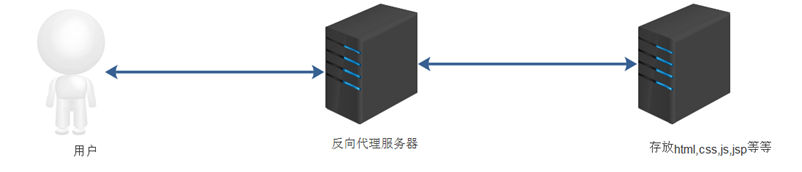
为了加快网站的解析速度,可以把动态页面交给不同的服务器来解析,加快解析的速度,降低单个服务器的压力。
分离前
分离后
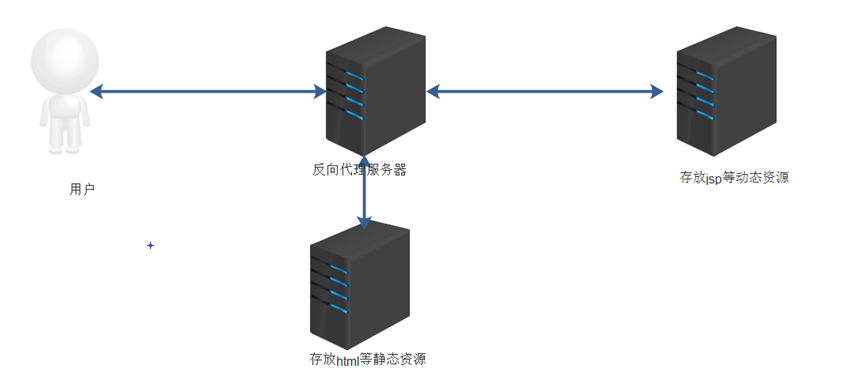
1)可以实现访问不同集群节点 实现动静分离
访问静态uri /.html --- static 集群名称
访问动态uri /.php --- dynamic 集群名称
访问上传数据 /upload/ --- upload 集群名称
环境配置:
static 集群 web01
dynamic 集群 web02 php代码文件 test.php
upload 集群 web03 站点目录
第一个里程:编写负载均衡反向代理配置文件
upstream static {
server 10.0.0.7:80 max_fails=10 fail_timeout=10s;
}
upstream dynamic {
server 10.0.0.8:80;
}
upstream upload {
server 10.0.0.9:80;
}
server {
listen 80;
server_name localhost;
include proxy_conf;
proxy_next_upstream error timeout invalid_header http_500 http_502 http_503 http_504 http_403 http_404 http_429;
location / {
proxy_pass http://static;
}
location ~*\.html$ {
proxy_pass http://static;
}
location ~*\.php {
proxy_pass http://dynamic;
}
location /upload/ {
proxy_pass http://upload;
}
}
第二个里程:创建好测试访问环境
web01 需要静态资源文件信息
web02 需要有动态配置信息
web03 需要有上传目录信息
可以实现根据不同客户端显示不同页面 PC端 vs 手机端
环境规划:
iphone 集群 web01 index.html mobile-info
PC 集群 web02 index.html PC-info
第一个里程:编写负载均衡配置文件
upstream iphone {
server 10.0.0.7:80 max_fails=10 fail_timeout=10s;
}
upstream PC {
server 10.0.0.8:80;
}
server {
listen 80;
server_name localhost;
include proxy_conf;
proxy_next_upstream error timeout invalid_header http_500 http_502 http_503 http_504 http_403 http_404 http_429;
location / {
if ($http_user_agent ~* iphone|android) {
proxy_pass http://iphone;
}
proxy_pass http://PC;
}

 浙公网安备 33010602011771号