
Myeclipse使用常见报错
问题一:
Could not resolve archetype org.apache.maven.archetypes:maven-archetype-webapp:1.0 from any of the configured repositories. Could not resolve artifact org.apache.maven.archetypes:maven-archetype-webapp:jar:1.0

解决方案:
1)先到:http://maven.ibiblio.org/maven2/org/apache/maven/archetypes/maven-archetype-webapp/1.0/ 下载 maven-archetype-webapp-1.0.jar 包;
2)到下载目录,Ctrl + Shift +右键 ——>在此处打开命令窗口,输入mvn install:install-file -DgroupId=org.apache.maven.archetypes -DartifactId=maven-archetype-webapp -Dversion=1.0 -Dpackaging=jar -Dfile=maven-archetype-webapp-1.0.jar 执行,下载一些依赖,等待几秒钟,问题解决。
问题二:
Could not calculate build plan: Plugin org.apache.maven.plugins:maven-war-plugin:2.2 or one of its dependencies could not be resolved: Failed to read artifact descriptor for org.apache.maven.plugins:maven-war-plugin:jar:2.2 Plugin org.apache.maven.plugins
解决方案:
1.清除你的仓库
(默认为:C:\Users\用户名\.m2\repository\org\apache\maven\plugins\maven-war-plugin\2.3)
目录下的m2e-lastUpdated.properties文件
2.项目右键,Run As-->Maven clean
3.项目右键,Run As-->Maven install
4.项目右键,Maven-->Update Project..
问题三:
The superclass "javax.servlet.http.HttpServlet" was not found on the Java Build Path
解决方案:
1.右击项目——properties——libraries——add library-——myeclipse Server Library——选择Tomcat即可
问题四:
Failed to execute goal org.apache.maven.plugins:maven-help-plugin:3.1.0:system (default-cli) on project standalone-pom: Execution default-cli of goal org.apache.maven.plugins:maven-help-plugin:3.1.0:system failed: Plugin org.apache.maven.plugins:
解决方案:
- Window > Preferences > Java > Installed JREs > 页面安装正确的jre 如:D:\Java\jre1.8.0_45::注意是jre,不是jdk
-
然后在maven菜单中使用 “update project ...”.
问题五:
Could not resolve archetype org.apache.maven.archetypes:maven-archetype-quickstart:1.1 from any of the configured repositories. Could not resolve artifact org.apache.maven.archetypes:maven-archetype-quickstart:pom:1.1 Could not transfer artifact org.apach
解决方案
1)到仓库目录下~\repository\org\apache\maven\plugins下的东西全部删除,然后update项目。让他重新下载,等待几秒钟即可。
問題六:
No plugin found for prefix 'tomact7' in the current project and in the plugin groups [org.apache.maven.plugins, org.codehaus.mojo]
方法一:只需:到 http://mvnrepository.com/ 寻找所需的依赖即可,搜索tomact7 maven plugins,复制粘贴到pom.xml文件。
方法二:或者添加如下代码道pom.xml中


 1  <repositories>
 2 <repository>
 3 <id>people.apache.snapshots</id>
 4 <url>http://repository.apache.org/content/groups/snapshots-group/  </url>
 5 <releases>
 6 <enabled>false</enabled>
 7 </releases>
 8 <snapshots>
 9 <enabled>true</enabled>
10 </snapshots>
11 </repository>
12 </repositories>
13 <pluginRepositories>
14 <pluginRepository>
15 <id>apache.snapshots</id>
16 <name>Apache Snapshots</name>
17 <url>http://repository.apache.org/content/groups/snapshots-group/</url>
18 <releases>
19 <enabled>false</enabled>
20 </releases>
21 <snapshots>
22 <enabled>true</enabled>
23 </snapshots>
24 </pluginRepository>
25 </pluginRepositories>
方法三:按照仓库中那个文件的坐标位置,在中央仓库的url后边输入该坐标地址,跳转到该页面,下载jar包,然后使用下列cmd指令安装到本地仓库(指令根据情况做修改)
mvn install:install-file -Dfile="C:\Users\Administrator\Downloads\tomcat7-maven-plugin-2.2.jar" -DgroupId=org.apache.tomcat.maven -DartifactId=tomcat7-maven-plugin -Dversion=2.2 -Dpackaging=jar
问题七:
The word 'factorysale' is not correctly spelled,拼写错误,Myeclipse自动检查造成的
解决方案:在MyEclipse下的Window--Preference输入spell,然后把第一个复选框“Enable spell checking“给去掉就可以了,如图:
问题八:
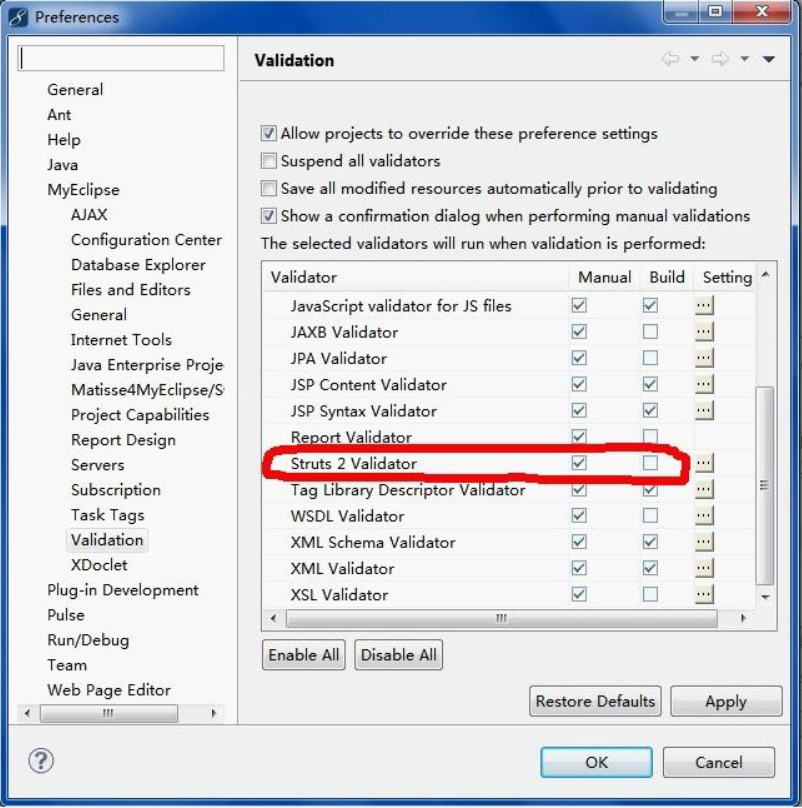
Invalid result location value/parameter 关于Myeclipse对Struts2配置文件校检异常
解决方法:window->Preferences->Validation,将Struts2勾选掉即可
问题九:
Invalid byte 1 of 1-byte UTF-8 sequence,是因为你的队友在保存时没有保存为utf-8的支付编码格式,但是你解析是用UTF-8解析的
解决方案:最简单就是把<?xml version="1.0" encoding="UTF-8"?>改成<?xml version="1.0" encoding="gbk"?>保存后错误消失,再更改为UTF-8
问题10:
在导入一些js框架时:'with' is not allowed in strict mode 意思是在严格模式下不能用
解决办法:1)不使用严格模式
2)不让Myeclipse进行校检:window——>>Preferences->Validation,将js的Build勾掉就行,同问题八。
问题11:
No plugin found for prefix 'tomact' in the current project and in the plugin groups
解决方案:找到你用户目录下的/.m2/setting.xml文件,在文件中加入如下内容,然后重新启动Myeclipse即可。
1 <pluginGroups>
2   <pluginGroup>org.apache.tomcat.maven</pluginGroup>
3 </pluginGroups>
问题12:
Failed to execute goal org.apache.maven.plugins:maven-clean-plugin:2.5:clean:
这是因为你上次启动的没有关闭,将上次启动的在控制台那个电脑图标关闭即可。
问题13:
Error creating bean with name 'sessionFactory' defined in class path ·······这是版本问题
解决方案:添加如下内容带pom.xml文件
1 <dependency>
2       <groupId>javax.transaction</groupId>
3       <artifactId>jta</artifactId>
4       <version>1.1</version>
5 </dependency>
问题14:
控制台输出:编码GBK的不可映射字符
这是因为系统默认中文字符集是GBK。安装的软件一般默认继承系统编码,在maven编译时我们必须告诉其采用UTF-8进行编译(你的项目采用的是UTF-8保存的)
解决方法:在pom.xml文件中添加如下内容:
1  <!-- 指明编译源代码时使用的字符编码,maven编译的时候默认使用的GBK编码, 通过project.build.sourceEncoding属性设置字符编码,告诉maven这个项目使用UTF-8来编译 -->
2      <properties>
3          <project.build.sourceEncoding>UTF-8</project.build.sourceEncoding>
4      </properties>
问题15:
Access restriction: The type 'RepaintArea' is not API (restriction on requir
解决办法:Project -> Properties -> libraries,
先remove掉JRE System Library,然后再Add Library重新加入。
如果这种方法还不能解决(其实是java1.7无法使用import sun.misc.BASE64Encoder;报的这个错)那么就:

点击Access····——>Edit——>Add 如图即可

问题16:
Failed to read candidate component class: file [D:\Tomact\apache-tomcat-8.0.
Spring3.2只能支持到1.7,不支持1.8,要不就升级spring,要不就更改jdk
问题17:
The JSP specification requires that an attribute name is preceded by whitespace这是JSP页面的pageEncoding=“UTF-8”前要求空一格
解决办法:<%@ page language="java" contentType="text/html; charset=GBK"pageEncoding="UTF-8"%>加个空格,完成。
问题18:
项目前红色感叹号,是因为jar包有问题,build path重新即可。
项目没有报错仍然有红色的叉叉:这是java编译器的版本不匹配的原因
解决方法:右键项目
右键项目“Properties”,在弹出的“Properties”窗口左侧,单击“Project Facets”,打开“Project Facets”页面。

在页面中的“Java”下拉列表中,选择相应版本就OK了

问题19:
Referenced file contains errors (http://www.springframework.org/schema/beans这个是指向源码的文件问题,
解决办法:将 Preferences > XML > XML Files > Validation中"Honour all XML schema locations"前的对号去掉。它将禁用指向不同schema位置相同命名空间引用的验证,仅以第一次找到的可验证的XML文件为结果。
问题20:
WARN No appenders could be found for logger (org.springframework.core.env.StandardEnvironment).这是因为忘记拷日志文件了!!!

111

 浙公网安备 33010602011771号