Java - 字节 & 字符
1、byte转换为16进制字符串:
1) 通过Integer.toHexString()方法
	public static String bytesToHexString(byte[] src){
		StringBuilder hexResult=new StringBuilder("");
		if(src==null||src.length==0)
			return null;

		for(int i=0;i<src.length;i++){
			String hex=Integer.toHexString(src[i]&0xFF);
			if(hex.length()<2){
				hexResult.append("0");
			}
			hexResult.append(hex);
		}
		return hexResult.toString();
	}
注意这里 b[i] & 0xFF 将一个byte与0xFF进行了与运算,其运算结果仍然是个int,那么为何要和 0xFF 进行运算?
直接 Integer.toHexString(b[i]),将 byte 强转为 int 不行吗? 答案是不行的。
原因在于:java中负整数的二进制采用补码形式,byte的大小为8bit,int大小为32bit,byte转化为int时会进行补位
如:byte类型 -1 的补码为 11111111,转化为int时补位成 11111111,11111111,11111111,11111111 即0xFFFFFFFF
0xFF 默认为int类型,byte & 0xFF 会先将byte转化为int类型,这样结果中的高24bit就会被清0,结果为0xFF
另:补码 = 反码 + 1 ,补码的思想为溢出最高位,如: 1+(-1)= 0 ,00000001 & 11111111 = 1,00000000 即 0
2) 取出字节的高四位与低四位分别转化
	public static String byteToHexString(byte b){
		String map="0123456789ABCDEF";
		return map.charAt((b>>4)&0x0F) +""+ map.charAt(b&0x0F);
	}
2、字节流 & 字符流
Java的字符内存表现形式为Unicode编码, char 类型为16bit
InputStream 和 OutputStream 类处理的是字节流,数据流中的最小单位是字节(8个bit)
Reader 与 Writer处理的是字符流,在处理字符流时涉及了字符编码的转换问题
Reader 类能够将输入流中采用其他编码的字符转换为Unicode编码,并读入内存
Writer 类能够将内存中的Unicode字符转换为其他编码类型,并写到输出流中
import java.io.*;

public class Test {

	private static void readBuff(byte[] buff) throws IOException{
		ByteArrayInputStream in=new ByteArrayInputStream(buff);
		int data;
		while((data=in.read())!=-1){
			System.out.print(byteToHexString((byte)data)+" ");
		}
		System.out.println();
		in.close();
	}

	public static void main(String[] args) throws IOException{
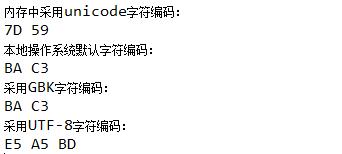
		System.out.println("内存中采用unicode字符编码:");
		char c='好';
		byte lowBit=(byte)(c&0xFF);
		byte highBit=(byte)((c>>8)&0xFF);
		System.out.println(byteToHexString(lowBit)+" "+byteToHexString(highBit));
		String s="好";
		System.out.println("本地操作系统默认字符编码:");
		readBuff(s.getBytes());
		System.out.println("采用GBK字符编码:");
		readBuff(s.getBytes("GBK"));
		System.out.println("采用UTF-8字符编码:");
		readBuff(s.getBytes("UTF-8"));
	}

	private static String byteToHexString(byte b){
		String map="0123456789ABCDEF";
		return map.charAt((0xF0&b)>>4) +""+ map.charAt(0x0F&b);
	}
}
运行结果:
InputStreamReader - Demo :
import java.io.*;

public class Test {

	public static void main(String[] args) throws Exception {

		try {
			createFile("text",null);
			readFile("text",null);

			createFile("text_GBK","GBK");
			readFile("text_GBK","GBK");

			createFile("text_UTF8","UTF-8");
			readFile("text_UTF8","UTF-8");

		} catch (FileNotFoundException e1) {

		} catch (IOException e2) {

		}
	}

	private static String byteToHexString(byte b) {
		String map = "0123456789ABCDEF";
		return map.charAt((0xF0 & b) >> 4) + "" + map.charAt(0x0F & b);
	}

	private static void readFile(String fileName,String encoding) throws Exception {
		InputStreamReader reader = null;

		// 使用InputStreamReader记得指定字符编码,不指定字符编码都是危险的做法,因为不同机器不同系统上的默认编码可能不同

		reader = new InputStreamReader(new FileInputStream(new File(fileName)),encoding==null?"GBK":encoding);

		System.out.println("file encoding:" + reader.getEncoding());

		int data = -1;
		while ((data = reader.read()) != -1) {
			System.out.println(Integer.toHexString(data));
		}
		System.out.println();

		if (reader != null)
			reader.close();
	}

	private static void createFile(String fileName,String type) throws Exception {
		File file = new File(fileName);
		FileOutputStream out = null;

		if (!file.exists()) {
			file.createNewFile();
		}

		out = new FileOutputStream(file);

		String s = "你好";

		if(type==null){
			 for(int i=0;i<s.length();i++){
				 char c=s.charAt(i);
				 out.write((byte)((c>>8)&0xFF));
				 out.write((byte)(c&0xFF));
			 }
		}else if(type.equals("GBK")){
			out.write(s.getBytes(type));
		}else if(type.equals("UTF-8")){
			out.write(s.getBytes(type));
		}

		if (out != null)
			out.close();
	}
}
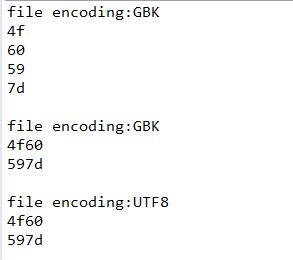
运行结果:
使用BZ小工具查看各文件内容:
text : 4F 60 59 7D
text_GBK : C4 E3 BA C3
text_UTF8 : E4 BD A0 E5 A5 BD
使用nodepad++ 将text_UTF8转为UTF-8编码格式,文件内容为:EF BB BF E4 BD A0 E5 A5 BD , 读取为 feff 4f60 597d
如果 text_UTF8 以 GBK 编码格式进行读取,获取到字符序列为:6d63 72b2 30bd (即乱码)
使用 InputStreamReader/OutputStreamWriter 记得指定字符编码,因为不同机器不同系统上的默认编码可能不同,即使你非常肯定就是要用默认编码,也要显式地指定使用默认编码
字节流是最基本的,所有的InputStream和OutputStream的子类主要用在处理二进制数据,它是按字节来处理的
但实际中很多的数据是文本,又提出了字符流的概念,它是按虚拟机的encode来处理,也就是要进行字符集的转化
这两个之间通过 InputStreamReader,OutputStreamWriter来关联,实际上是通过byte[]和String来关联
在实际开发中出现的汉字问题实际上都是在字符流和字节流之间转化不统一而造成的
在从字节流转化为字符流时,实际上就是byte[]转化为String时, public String(byte bytes[], String charsetName)
在从字符流转化为字节流时,实际上是String转化为byte[]时, byte[] String.getBytes(String charsetName)
默认字符集编码为操作系统字符编码
3、参考链接:

 浙公网安备 33010602011771号