Android - 自定义ScrollLayout
View
scrollTo:相对于初始位置
scrollBy:相对于当前位置
1.滚动对象是View内部的内容
2.X轴 负值:向右,正值:向左 (左正右负)
Y轴 负值:向下,正值:向上
3.滚动效果为跳跃式,没有平滑滚动效果
Scroller使用步骤:
1.创建Scroller实例
2.调用Scroller.startScoll()方法,传入起始位置与滑动偏移量
3.调用View.invalidate()
4.Scroller不负责滑动View, 只负责计算滑动值(数学引擎), View的invalidate()中将回调onComputeScroll(), 可以在该方法中利用Scroller执行滚动逻辑
<?xml version="1.0" encoding="utf-8"?>
<LinearLayout xmlns:android="http://schemas.android.com/apk/res/android"
    android:id="@+id/container"
    android:layout_width="match_parent"
    android:layout_height="match_parent"
    android:paddingBottom="@dimen/activity_vertical_margin"
    android:paddingLeft="@dimen/activity_horizontal_margin"
    android:paddingRight="@dimen/activity_horizontal_margin"
    android:paddingTop="@dimen/activity_vertical_margin">


    <com.yizhui.customviewdemo.ScrollLayout
        android:layout_width="match_parent"
        android:layout_height="200dp"
        android:padding="2dp"
        android:background="#515151">

        <TextView
            android:layout_width="match_parent"
            android:layout_height="match_parent"
            android:gravity="center"
            android:text="First Button"
            android:background="#ff0000"/>
        <TextView
            android:layout_width="match_parent"
            android:layout_height="match_parent"
            android:gravity="center"
            android:text="Second Button"
            android:background="#ff00ff"/>
        <TextView
            android:layout_width="match_parent"
            android:layout_height="match_parent"
            android:gravity="center"
            android:text="Third Button"
            android:background="#eeee00"/>

    </com.yizhui.customviewdemo.ScrollLayout>

</LinearLayout>
package com.yizhui.customviewdemo;

import android.content.Context;
import android.util.AttributeSet;
import android.view.MotionEvent;
import android.view.View;
import android.view.ViewConfiguration;
import android.view.animation.AccelerateInterpolator;
import android.widget.FrameLayout;
import android.widget.Scroller;

/**
 * Created by Yizhui on 2016/6/9.
 */
public class ScrollLayout extends FrameLayout {

    /**
     * 用于计算滚动数值的实例
     */
    private Scroller mScroller;

    /**
     * 可滚动内容的左右边界
     */
    private int mLeftBound, mRightBound;

    /**
     * 判定为拖动的最小移动像素数
     */
    private int mTouchSlop;

    /**
     * 手指移动时所处屏幕的X坐标
     */
    private int mLastX;

    /**
     * 手指按下时所处屏幕的X坐标
     */
    private int mDownX;

    public ScrollLayout(Context context) {
        this(context, null);
    }

    public ScrollLayout(Context context, AttributeSet attrs) {
        this(context, attrs, 0);
    }

    public ScrollLayout(Context context, AttributeSet attrs, int defStyleAttr) {
        super(context, attrs, defStyleAttr);

        mScroller = new Scroller(context,new AccelerateInterpolator());
        mTouchSlop = ViewConfiguration.get(context).getScaledPagingTouchSlop();
    }

    @Override
    protected void onMeasure(int widthMeasureSpec, int heightMeasureSpec) {
        super.onMeasure(widthMeasureSpec, heightMeasureSpec);
    }

    @Override
    protected void onLayout(boolean changed, int left, int top, int right, int bottom) {
        if (changed) {
            int childCount = getChildCount();
            for (int i = 0; i < childCount; i++) {
                View child = getChildAt(i);
                //为每个子控件进行水平方法的布局
                child.layout(getMeasuredWidth() * i, 0, (i + 1) * getMeasuredWidth(), getMeasuredHeight());
            }
        }

        mLeftBound = getChildAt(0).getLeft();
        mRightBound = getChildAt(getChildCount() - 1).getRight();
    }


    @Override
    public boolean onInterceptTouchEvent(MotionEvent ev) {

        switch (ev.getAction()) {
            case MotionEvent.ACTION_DOWN:
                mDownX = (int) ev.getRawX();
                mLastX = mDownX;
                break;
            case MotionEvent.ACTION_MOVE:
                if (Math.abs(ev.getRawX() - mDownX) > mTouchSlop) {
                    return true;
                }
        }
        return super.onInterceptTouchEvent(ev);
    }

    @Override
    public boolean onTouchEvent(MotionEvent event) {

        int curX, deltaX;

        switch (event.getAction()) {
            case MotionEvent.ACTION_MOVE:
                curX = (int) event.getRawX();
                deltaX = mLastX - curX; //左滑为正,右滑为负
                mLastX = curX;

                //Log.d("Scroll", deltaX + ", "+curX+", " + getScrollX() + ", ");

                //不能继续左滑
                if (getScrollX() + deltaX > mRightBound - getWidth()) {
                    scrollTo(mRightBound - getWidth(), 0);
                    return true;
                }

                //不能继续右滑
                if (getScrollX() + deltaX < mLeftBound) {
                    scrollTo(0, 0);
                    return true;
                }

                scrollBy(deltaX, 0);

                return true;
            case MotionEvent.ACTION_UP:

                boolean isScrollToLeft=mDownX-event.getRawX()>0?true:false;

                //滑动1/4
                //int targetIndex=(getScrollX()+getWidth()*3/4)/getWidth();

                /*
                 * 滑动1/4视为滑动上下块,若当前index=1
                 * 左滑: ((1+x)+3/4) 取整 , x=[0,1] -> f=[1,2] 1/4处为临界点
                 * 右滑: ((1-x)+1/4) 取整 , x=[0,1] -> f=[1,0] 1/4处为临界点
                 */
                int targetIndex=(int)((getScrollX()+(isScrollToLeft?(3.0/4):(1.0/4))*getWidth())/getWidth());
                mScroller.startScroll(getScrollX(), 0, targetIndex * getWidth() - getScrollX(), 0);
                invalidate();
                break;
        }
        return true;
    }


    @Override
    public void computeScroll() {
        if(mScroller.computeScrollOffset()){
            scrollTo(mScroller.getCurrX(), mScroller.getCurrY());
            invalidate();
        }
    }
}
代码说明:
1、ScrollLayout 重载onInterceptTouchEvent,拦截ACTION_MOVE事件
2、ScrollLayout 需要消费ACTION_DOWN事件,因为子View可能不会消费ACTION_DOWN(如:TextView并且没有设置clickable为true)
3、startScroll()中关于滑动偏移量的计算公式为:targetIndex * getWidth() - getScrollX() ,可分为如下四种情况分析:
左滑:满足条件,继续左滑进入下一个,offset= targetX-curX
不满足条件,右滑进行还原,offset=targetX-curX
右滑:同上
结果演示:

另附:
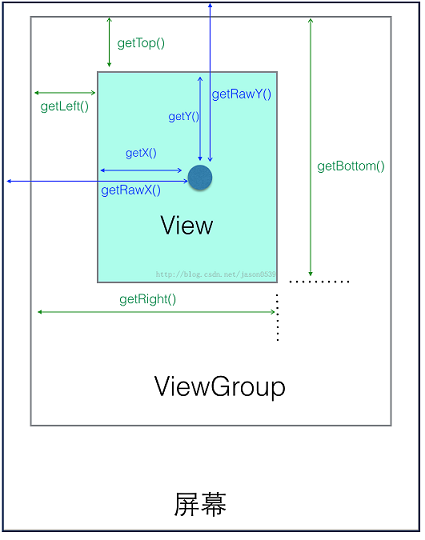
参考文章:
Android Scroller完全解析,关于Scroller你所需知道的一切

 浙公网安备 33010602011771号