
CS61B srping 2018 project00-NBody https://sp18.datastructur.es/
Getting the Skeleton Files ,网站上应该有仓库地址,这个也行, https://gitee.com/heqilaoge/skeleton-sp18 。
拉下来找到proj0 ,就能开始作业。可以不使用IDE。这个作业是个 快速学习java基本语法和知识的教程,也可以快速重温java基础知识和语法。。。
后面内容变多,又有点语焉不详,为的就是让你自己摸索。。。
The Planet Class and Its Constructor
创建Planet类
public class Planet {
    public double xxPos;
    public double yyPos;
    public double xxVel;
    public double yyVel;
    public double mass;
    public String imgFileName;

    public Planet(double xP, double yP, double xV,
            double yV, double m, String img) {
        xxPos = xP;
        yyPos = yP;
        xxVel = xV;
        yyVel = yV;
        mass = m;
        imgFileName = img;
    }

    public Planet(Planet p) {
        xxPos = p.xxPos;
        yyPos = p.yyPos;
        xxVel = p.xxVel;
        yyVel = p.yyVel;
        mass = p.mass;
        imgFileName = p.imgFileName;
    }
}
通过 javac Planet.java TestPlanetConstructor.java 和 java TestPlanetConstructor来测试。(这些文件在 proj0的skeleton里边都有)
规则介绍
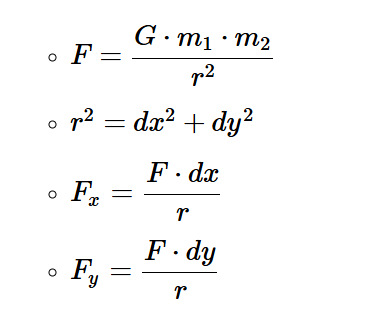
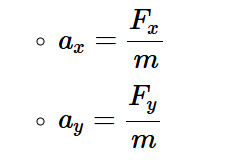
继续写 Planet 类
calcDistance 方法 计算两个 星体之间的距离
    public double calcDistance(Planet p) {
        double dx = p.xxPos - xxPos;
        double dy = p.yyPos - yyPos;
        return Math.sqrt(dx * dx + dy * dy);
    }
用javac Planet.java TestCalcDistance.java 和java TestCalcDistance测试
calcForceExertedBy 计算星体之间的力
   public double calcForceExertedBy (Planet p){
        double G= 6.67*Math.pow(10, -11);
        double r = this.calcDistance(p);
        double force =(G*this.mass*p.mass)/(r*r);
        return force;

   }
用plaintext javac Planet.java TestCalcForceExertedBy.java java TestCalcForceExertedBy 测试
calcForceExertedByX and calcForceExertedByY 测试x和y方向上的分力
   public double calcForceExertedByX (Planet p){
        double r = this.calcDistance(p);
        double force =this.calcForceExertedBy(p);
        double dx=p.xxPos-this.xxPos;
        double fx=force*dx/r;
        return fx;
   }

   public double calcForceExertedByY(Planet p){
    double r = this.calcDistance(p);
    double force =this.calcForceExertedBy(p);
    double dy=p.yyPos-this.yyPos;
    double fx=force*dy/r;
    return fx;
   }
用plaintext javac Planet.java TestCalcForceExertedByXY.java java TestCalcForceExertedByXY 测试
calcNetForceExertedByX and calcNetForceExertedByY 计算某一方向上的合力;
Planet[] allPlanets = {samh, rocinante, aegir};
samh.calcNetForceExertedByX(allPlanets);
samh.calcNetForceExertedByY(allPlanets);
接收一个数组,计算数组内部(除了本身)所有星体对他的合力
  public double calcNetForceExertedByX(Planet[] allPlanets) {
        double fx = 0;
        for (Planet p : allPlanets) {
            if (this.equals(p)) {
                continue;

            }
            fx += this.calcForceExertedByX(p);
        }
        return fx;
    }

    public double calcNetForceExertedByY(Planet[] allPlanets) {
        double fy = 0;
        for (Planet p : allPlanets) {
            if (this.equals(p)) {
                continue;

            }
            fy += this.calcForceExertedByY(p);
        }
        return fy;
    }
用javac Planet.java TestCalcNetForceExertedByXY.java java TestCalcNetForceExertedByXY测试
update方法,
比如samh.update(0.005, 10, 3) ,给samh施加一个x方向10牛,y方向3牛,0.005秒的力,计算其加速度,计算速度,计算位置。
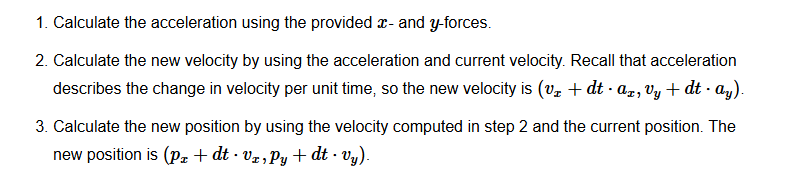
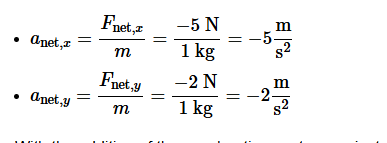
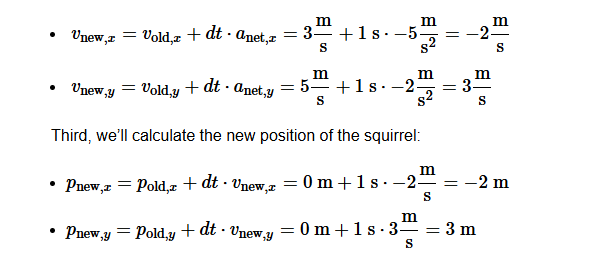
   public void update(double dt, double fX, double fY) {
        double ax = fX / this.mass;
        double ay = fY / this.mass;
        double vx = this.xxVel + ax * dt;
        double vy = this.yyVel + ay * dt;
        double px = this.xxPos + vx * dt;
        double py = this.yyPos + vy * dt;
        this.xxVel = vx;
        this.yyVel = vy;
        this.xxPos = px;
        this.yyPos = py;
    }
用javac Planet.java TestUpdate.java java TestUpdate测试
NBody.java
这个类没有构造函数,就是用来模拟运行 星球运行的,
readRadius方法,用来读取data/planets中的半径数据。examples/BasicInDemo有对In的介绍
public class NBody {
    public static double readRadius(String planetsTxtPath) {
        In in = new In(planetsTxtPath);
        int count = in.readInt();
        double radius = in.readDouble();
        return radius;
    }

    public static void main(String[] args) {

    }
}
ReadPlanets方法 就是用In方法把planets里边的 星球数据读出来,然后放到一个数组里。
  public static Planet[] readPlanets(String planetsTxtPath) {

        int countOfPlanets = 5;

        Planet[] planets = new Planet[5];
        In in = new In(planetsTxtPath);
        in.readInt();
        in.readDouble();

        while (countOfPlanets != 0) {
            double xxPos = in.readDouble();
            double yyPos = in.readDouble();
            double xxVel = in.readDouble();
            double yyVel = in.readDouble();
            double mass = in.readDouble();
            String planetName = in.readString();
            Planet newP = new Planet(xxPos, yyPos, xxVel, yyVel, mass, planetName);
            countOfPlanets -= 1;
            planets[countOfPlanets] = newP;
        }
        return planets;

    }
用javac Planet.java NBody.java TestReadPlanets.java java TestReadPlanets测试
Drawing the Initial Universe State 分四步骤把初始“宇宙”状态画出来,因为都在main中进行,所以不会有对应测试。
        StdDraw.picture(xxPos, yyPos, "images/" + imgFileName);
    }

 public static void main(String[] args) {
        double T = Double.parseDouble(args[0]);
        double dt = Double.parseDouble(args[1]);
        String filename = args[2];
        double radius = NBody.readRadius(filename);
        Planet[] planets = NBody.readPlanets(filename);

        // draw bg
        StdDraw.setScale(-radius , radius);
        StdDraw.clear();
        StdDraw.picture(0, 0, "images/starfield.jpg");
        for (Planet p : planets) {
            p.draw();
        }
    }
把这四步做完,输入`javac NBody.java
java NBody 157788000.0 25000.0 data/planets.txt` 就应该能看见5个静止的星球的画面。到这里已经,注意!不一定准确
让星球动起来 Creating an Animation
要把时间打撒成单位时间,然后一段时间位移一点,大概就是这意思。
public class NBody {
    public static double readRadius(String planetsTxtPath) {
        In in = new In(planetsTxtPath);
        int count = in.readInt();
        double radius = in.readDouble();
        return radius;
    }

    public static Planet[] readPlanets(String planetsTxtPath) {

        int countOfPlanets = 5;

        Planet[] planets = new Planet[5];
        In in = new In(planetsTxtPath);
        in.readInt();
        in.readDouble();

        while (countOfPlanets != 0) {
            double xxPos = in.readDouble();
            double yyPos = in.readDouble();
            double xxVel = in.readDouble();
            double yyVel = in.readDouble();
            double mass = in.readDouble();
            String planetName = in.readString();
            Planet newP = new Planet(xxPos, yyPos, xxVel, yyVel, mass, planetName);
            countOfPlanets -= 1;
            planets[countOfPlanets] = newP;
        }
        return planets;

    }

    public static void main(String[] args) {
        StdDraw.enableDoubleBuffering();

        double T = Double.parseDouble(args[0]);
        double dt = Double.parseDouble(args[1]);
        String filename = args[2];
        double radius = NBody.readRadius(filename);
        Planet[] planets = NBody.readPlanets(filename);

        // draw bg
        StdDraw.setScale(-radius, radius);
        StdDraw.clear();
        StdDraw.picture(0, 0, "images/starfield.jpg");
        for (Planet p : planets) {
            p.draw();
        }

        double timeVariable = 0;

        while (timeVariable < T) {

            timeVariable += dt;
            double[] xForces = new double[5];
            double[] yForces = new double[5];
            for (int i = 0; i < 5; i++) {
                xForces[i] = planets[i].calcNetForceExertedByX(planets);
                yForces[i] = planets[i].calcNetForceExertedByY(planets);

            }
            StdDraw.picture(0, 0, "images/starfield.jpg");
            for (int i = 0; i < 5; i++) {
                planets[i].update(dt, xForces[i], yForces[i]);

                planets[i].draw();

            }
            StdDraw.show();
            StdDraw.pause(10);

        }
        StdOut.printf("%d\n", planets.length);
        StdOut.printf("%.2e\n", radius);
        for (int i = 0; i < planets.length; i++) {
            StdOut.printf("%11.4e %11.4e %11.4e %11.4e %11.4e %12s\n",
                    planets[i].xxPos, planets[i].yyPos, planets[i].xxVel,
                    planets[i].yyVel, planets[i].mass, planets[i].imgFileName);
        }
    }

}
提醒,不合适的绘制背景和 show 、pause方法的调用会导致画面闪烁,动画并不如预期般顺滑。
最后要 打印出更新后的planets数据,网站已经提供了解决
用javac NBody.java java NBody 157788000.0 25000.0 data/planets.txt来测试
后面的内容,难度很大,我不再尝试了。

 浙公网安备 33010602011771号