
IBatis.net——日志配置大全
iBATIS DataMapper框架通过有一套跟Apache Log4Net一样的内部日志机制,记录了与数据库的交互情况。可以使用框架内置的三个记录器(NoOpLogger, ConsoleOutLogger, TraceLogger) ,或者使用像Apache Log4Net一样的外置记录包。要让 iBATIS 记录器工作, 必须在配置文件里 (App.Config or Web.Config)配置一些节点:
方式一:使用外部记录机制(log4net)
要使用log4net,有两个组件必不可少,“IBatisNet.Common.Logging.Log4Net.dll”和“log4net.dll“。如何引用这两个组件,有几种操作方式,切记
1,直接把这两组件拷贝到项目bin目录下(项目编译后存放引用外部组件的目录)。
2,在项目里通过添加两个组件的引用,编译后自动输出到bin目录下。如果”IBatisNet.Common.Logging.Log4Net.dll”和“log4net.dll“是放在同一目录下,那只需要引用”IBatisNet.Common.Logging.Log4Net.dll”,编译后”log4net.dll“同时输出到bin目录下。
注意:在控制台项目中,当按Ctrl + F5直接运行时,这两个组件是不输出的。这两个文件缺一不可。都将不记录日志,且无异常抛出。
以上工作准备完毕后,接下来就是配置工作了,以下配置以控制台程序配置文件配置App.config为示例。下图为App.config 折叠后的节点
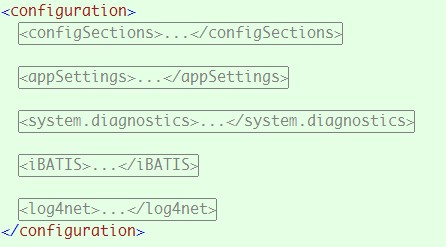
下面展开每个节点,并说明其用途
第一步:注册IBatis日志处理节点
2 <sectionGroup name="iBATIS">
3 <section name="logging" type="IBatisNet.Common.Logging.ConfigurationSectionHandler, IBatisNet.Common" />
4 </sectionGroup>
5 </configSections>
以上配置不管是用内置的记录器,还是用外部的Log4net记录组件,都必须要配的。如果要用log4net。再注册log4net节点。配置如下
2 <sectionGroup name="iBATIS">
3 <section name="logging" type="IBatisNet.Common.Logging.ConfigurationSectionHandler, IBatisNet.Common" />
4 </sectionGroup>
5 <section name="log4net" type="log4net.Config.Log4NetConfigurationSectionHandler, log4net" />
6 </configSections>
第二步:配置IBatis节点,如下
2 <logging>
3 <logFactoryAdapter type="IBatisNet.Common.Logging.Impl.Log4NetLoggerFA, IBatisNet.Common.Logging.Log4Net">
4 <arg key="configType" value="inline" />
5 <!--<arg key="configFile" value="F:\\My Dropbox\\mycode\\IBatisDotNetMapperTest\\ConsoleDisplay\\Log4Net.config"/>-->
6 </logFactoryAdapter>
7 </logging>
8 </iBATIS>
注意“<arg key="configType" value="inline" />”,其Value值有以下几个可选项
inline :log4net 节点在App.Config/Web.Config 文件中配置
file:使用外置配置文件 (需要configFile参数配合使用,<arg key="configFile" value="外部配置文件")
file-watch: 与"file"一样,只是多了一个监视外部配置文件的变动功能,如果有变动则重新加载配置。
external:IBatis将不会尝试配置Log4Net。
使用外部配置文件,稍后说明
第三步:在App.config中配置log4net节点,如下
2 <appender name="FileAppender" type="log4net.Appender.FileAppender">
3 <file value="log.txt" />
4 <appendToFile value="true" />
5 <layout type="log4net.Layout.SimpleLayout" />
6 </appender>
7 <root>
8 <level value="ALL" />
9 <appender-ref ref="FileAppender" />
10 </root>
11 </log4net>
log4net具体配置,请参考官网。图中其它几个节点是可选的。完整的App.config如下:
 代码
代码

2 <configSections>
3 <sectionGroup name="iBATIS">
4 <section name="logging" type="IBatisNet.Common.Logging.ConfigurationSectionHandler, IBatisNet.Common" />
5 </sectionGroup>
6 <section name="log4net" type="log4net.Config.Log4NetConfigurationSectionHandler, log4net" />
7 </configSections>
8
9 <!--<appSettings>
10 <add key="log4net.Internal.Debug" value="true"/>
11 </appSettings>
12
13 <system.diagnostics>
14 <trace autoflush="true">
15 <listeners>
16 <add name="textWriterTraceListener"
17 type="System.Diagnostics.TextWriterTraceListener"
18 initializeData="F:\\My Dropbox\\log4net.txt" />
19 </listeners>
20 </trace>
21 </system.diagnostics>-->
22
23 <iBATIS>
24 <logging>
25 <logFactoryAdapter type="IBatisNet.Common.Logging.Impl.Log4NetLoggerFA, IBatisNet.Common.Logging.Log4Net">
26 <arg key="configType" value="inline" />
27 <!--<arg key="configFile" value="F:\\My Dropbox\\mycode\\IBatisDotNetMapperTest\\ConsoleDisplay\\Log4Net.config"/>-->
28 </logFactoryAdapter>
29 </logging>
30 </iBATIS>
31
32 <log4net>
33 <appender name="FileAppender" type="log4net.Appender.FileAppender">
34 <file value="log.txt" />
35 <appendToFile value="true" />
36 <layout type="log4net.Layout.SimpleLayout" />
37 </appender>
38 <root>
39 <level value="ALL" />
40 <appender-ref ref="FileAppender" />
41 </root>
42 </log4net>
43 </configuration>
Ok,一切就绪,启动调试,你将在bin \debug\下找到一个log.txt文件。如果没有,请确认组件是否在该目录,如果有,请检查你的配置。
使用外部配置文件Log4Net.config
第一步:更改ibatis节点
2 <logging>
3 <logFactoryAdapter type="IBatisNet.Common.Logging.Impl.Log4NetLoggerFA, IBatisNet.Common.Logging.Log4Net">
4 <arg key="configType" value="file-watch" />
5 <arg key="configFile" value="F:\\My Dropbox\\mycode\\IBatisDotNetMapperTest\\ConsoleDisplay\\Log4Net.config"/>
6 </logFactoryAdapter>
7 </logging>
8 </iBATIS>
把configType的value值设置为“file”或者“file-watch",configFile 的value值指向外部配置文件。 最好把Log4Net.config文件放置在App.config/web.config同目录下. 如果是这样,只需指定文件名即可。
第二步:新建Log4Net.config配置文件
在项目中根目录下新建文件Log4Net.config。把App.config中的Log4net节点移到该文件,配置如下:
2 <log4net>
3 <appender name="FileAppender" type="log4net.Appender.FileAppender">
4 <file value="log.txt" />
5 <appendToFile value="true" />
6 <layout type="log4net.Layout.SimpleLayout" />
7 </appender>
8 <root>
9 <level value="ALL" />
10 <appender-ref ref="FileAppender" />
11 </root>
12 </log4net>
ok,以上是最简单配置
使用log4net.config文件,App.config中的可以不需要注册log4net节点,即下面配置可去掉
log4net.config文件还可以如下配置:
1 <?xml version="1.0" encoding="utf-8" ?>
3 <configSections>
4 <section name="log4net" type="log4net.Config.Log4NetConfigurationSectionHandler, log4net" />
5 </configSections>
6 <log4net>
7 <appender name="FileAppender" type="log4net.Appender.FileAppender">
8 <file value="log.txt" />
9 <appendToFile value="true" />
10 <layout type="log4net.Layout.SimpleLayout" />
11 </appender>
12 <root>
13 <level value="ALL" />
14 <appender-ref ref="FileAppender" />
15 </root>
16 </log4net>
17 </configuration>
添加 <configuration></configuration>后,则不会提示”未注册的log4net元素“。<section name="log4net" type="log4net.Config.Log4NetConfigurationSectionHandler, log4net" />是可选的,如果要添加,则<configuration></configuration>必须添加。
方式二,内置的三个记录器
内置记录器一:输出到控制台
2 <iBATIS>
3 <logging>
4 <logFactoryAdapter type="IBatisNet.Common.Logging.Impl.ConsoleOutLoggerFA, IBatisNet.Common">
5 <arg key="showLogName" value="true" />
6 <arg key="showDataTime" value="true" />
7 <arg key="level" value="ALL" />
8 <arg key="dateTimeFormat" value="yyyy/MM/dd HH:mm:ss:SSS" />
9 </logFactoryAdapter>
10 </logging>
11 </iBATIS>
内置记录器二
2 <logging>
3 <logFactoryAdapter type="IBatisNet.Common.Logging.Impl.NoOpLoggerFA, IBatisNet.Common" />
4 </logging>
5 </iBATIS>
6
内置记录器三
2 <logging>
3 <logFactoryAdapter type="IBatisNet.Common.Logging.Impl.TraceLoggerFA, IBatisNet.Common" />
4 </logging>
5 </iBATIS>

 浙公网安备 33010602011771号