

Kubeasz自动化部署K8S1.27集群
一、K8S集群节点准备
1.1 机器分配
推荐系统:Ubuntu20.04

10.0.0.119 kubeasz
10.0.0.114 master114
10.0.0.117 work117
10.0.0.118 work118
1.2 配置hosts解析
[root@kubeasz ~]# cat /etc/hosts
10.0.0.114    master114
10.0.0.118    worker118
10.0.0.117    workek117
10.0.0.119    kubeasz
二、K8S节点以及kubeasz控制节点安装python3.10
2.1 安装openssl(优先使用openssl的1.1.1版本)
Ubuntu:20.04(Focal)或 18.04(Bionic)自带openssl1.1.1
centos:
[root@kubeasz ~]# curl -o /etc/yum.repos.d/epel.repo http://mirrors.aliyun.com/repo/epel-7.repo
[root@kubeasz ~]#yum install -y openssl-devel openssl11 openssl11-devel
[root@docker01 ~]# openssl11 version
OpenSSL 1.1.1k  FIPS 25 Mar 2021
2.2 安装python3.10
Ubuntu:
[root@kubeasz ~]# add-apt-repository ppa:deadsnakes/ppa && apt update
[root@kubeasz ~]# apt install python3.10 python3.10-venv python3.10-dev
[root@kubeasz ~]# python3.10 --version
Python 3.10.12
Centos:
[root@kubeasz ~]# yum install -y ncurses-devel gbdm-devel xz-devel sqlite-devel sqlite-devel tk-devel uuid-devel readline-devel bzip2-devel libffi-devel
[root@kubeasz ~]# mkdir -p /opt/3.10 && cd /opt/3.10
[root@kubeasz 3.10]# wget https://www.python.org/ftp/python/3.10.12/Python-3.10.12.tgz
[root@kubeasz 3.10]# export CFLAGS=$(pkg-config  --cflags openssl11)
[root@kubeasz 3.10]# export LDFLAGS=$(pkg-config  --libs openssl11)
[root@kubeasz 3.10]#tar xvf Python-3.10.12.tgz
[root@kubeasz 3.10]#cd Python-3.10.12/
[root@kubeasz Python-3.10.12]# ./configure  --enable-optimizations && make altinstall
[root@kubeasz Python-3.10.12]# ln -s /usr/local/bin/python3.10 /usr/bin/python3
[root@kubeasz Python-3.10.12]# ln -s /usr/local/bin/pip3.10  /usr/bin/pip3
2.3kubeasz安装ansible5.7.1
[root@kubeasz 3.10]# pip3 install --default-timeout=600 -i https://pypi.tuna.tsinghua.edu.cn/simple ansible==5.7.1
2.4 kubeasz节点准备ssh密钥
[root@kubeasz ~]# ssh-keygen
Generating public/private rsa key pair.
Enter file in which to save the key (/root/.ssh/id_rsa):
Enter passphrase (empty for no passphrase):
Enter same passphrase again:
Your identification has been saved in /root/.ssh/id_rsa
Your public key has been saved in /root/.ssh/id_rsa.pub
The key fingerprint is:
SHA256:lbkb3UI46AQ2+F4nrJ4HyRNOLoHvmKVMHlKPXIEgB70 root@kubeasz
The key's randomart image is:
+---[RSA 3072]----+
|++.. .+          |
|..o o. o . +     |
|   o o .o * .    |
|  E o +o+..= .   |
| o = B =Soo o .  |
|. = = X    o .   |
| = B o +  .      |
|  * . o .        |
|       .         |
+----[SHA256]-----+
[root@kubeasz ~]# ssh-copy-id  root@10.0.0.114
[root@kubeasz ~]# ssh-copy-id  root@10.0.0.118
[root@kubeasz ~]# ssh-copy-id  root@10.0.0.117
三、kubeasz部署集群
3.1 下载kubeasz二进制包
链接:https://codeload.github.com/easzlab/kubeasz/tar.gz/refs/tags/3.6.1
[root@kubeasz ~]# tar xvf kubeasz-3.6.1.tar.gz
[root@kubeasz ~]# cd
root@apiserver-lb kubeasz-3.6.1]# ./ezdown -D
2025-06-22 16:00:16 INFO Action begin: download_all
2025-06-22 16:00:16 WARN docker binaries already existed
2025-06-22 16:00:17 WARN docker is already running.
2025-06-22 16:00:17 INFO downloading kubeasz: 3.6.1
3.6.1: Pulling from easzlab/kubeasz
f56be85fc22e: Pull complete
ea5757f4b3f8: Pull complete
bd0557c686d8: Pull complete
37d4153ce1d0: Pull complete
b39eb9b4269d: Pull complete
a3cff94972c7: Pull complete
4f7f893dc9cc: Pull complete
Digest: sha256:27accbe4387b5c18add5a1d3884df56906e7054f46c9436f25ca1a8825dc3c58
Status: Downloaded newer image for easzlab/kubeasz:3.6.1
docker.io/easzlab/kubeasz:3.6.1
2025-06-22 16:00:34 DEBUG  run a temporary container
c339aa3c7fd5bd7c77db9b4cb7c88cfa50b96deb698ac030737ad0353c7cdca7
2025-06-22 16:00:34 DEBUG cp kubeasz code from the temporary container
2025-06-22 16:00:34 DEBUG stop&remove temporary container
temp_easz
2025-06-22 16:00:34 INFO downloading kubernetes: v1.27.2 binaries
v1.27.2: Pulling from easzlab/kubeasz-k8s-bin
1b7ca6aea1dd: Pull complete
0542736e5056: Pull complete
3d9f74ff7a57: Pull complete
Digest: sha256:90cf16968ddce7750e214e44df784dbddd555bfbad9c08be79a43ff7e69a3fe6
........

[root@kubeasz ~]# docker images
REPOSITORY                                           TAG       IMAGE ID       CREATED         SIZE
registry                                             2         26b2eb03618e   20 months ago   25.4MB
easzlab/kubeasz                                      3.6.1     0ae1e2a7c7f0   2 years ago     157MB
easzlab/kubeasz-k8s-bin                              v1.27.2   a9d4ca76c91b   2 years ago     1.12GB
calico/kube-controllers                              v3.24.6   baf4466ddf40   2 years ago     77.5MB
easzlab.io.local:5000/calico/kube-controllers        v3.24.6   baf4466ddf40   2 years ago     77.5MB
calico/cni                                           v3.24.6   ca9fea5e07cb   2 years ago     212MB
easzlab.io.local:5000/calico/cni                     v3.24.6   ca9fea5e07cb   2 years ago     212MB
calico/node                                          v3.24.6   3953a481aa9d   2 years ago     245MB
easzlab.io.local:5000/calico/node                    v3.24.6   3953a481aa9d   2 years ago     245MB
easzlab/kubeasz-ext-bin                              1.7.1     5c1895de99b2   2 years ago     606MB
easzlab.io.local:5000/easzlab/metrics-server         v0.6.3    1da5af8117da   2 years ago     68.9MB
easzlab/metrics-server                               v0.6.3    1da5af8117da   2 years ago     68.9MB
easzlab/k8s-dns-node-cache                           1.22.20   d1157efdd316   2 years ago     67.8MB
easzlab.io.local:5000/easzlab/k8s-dns-node-cache     1.22.20   d1157efdd316   2 years ago     67.8MB
easzlab/pause                                        3.9       78d53e70b442   2 years ago     744kB
easzlab.io.local:5000/easzlab/pause                  3.9       78d53e70b442   2 years ago     744kB
kubernetesui/dashboard                               v2.7.0    07655ddf2eeb   2 years ago     246MB
easzlab.io.local:5000/kubernetesui/dashboard         v2.7.0    07655ddf2eeb   2 years ago     246MB
kubernetesui/metrics-scraper                         v1.0.8    115053965e86   3 years ago     43.8MB
easzlab.io.local:5000/kubernetesui/metrics-scraper   v1.0.8    115053965e86   3 years ago     43.8MB
coredns/coredns                                      1.9.3     5185b96f0bec   3 years ago     48.8MB
easzlab.io.local:5000/coredns/coredns                1.9.3     5185b96f0bec   3 years ago     48.8MB
3.2 使用kubeasz创建k8s集群目录
[root@kubeasz ~]# ./ezctl new k8s-test_cluster
2025-06-22 16:26:51 DEBUG generate custom cluster files in /etc/kubeasz/clusters/k8s-test_cluster
2025-06-22 16:26:51 DEBUG set versions
2025-06-22 16:26:51 DEBUG cluster k8s-test_cluster: files successfully created.
2025-06-22 16:26:51 INFO next steps 1: to config '/etc/kubeasz/clusters/k8s-test_cluster/hosts'
2025-06-22 16:26:51 INFO next steps 2: to config '/etc/kubeasz/clusters/k8s-test_cluster/config.yml'
3.3 进到目录配置K8S集群服务参数
[root@kubeasz ~]# cd /etc/kubeasz/clusters/k8s-test_cluster/
[root@kubeasz ~]# vim config.yml 配置证书  #(可选操作)

配置K8S服务
[root@kubeasz k8s-test_cluster]# grep -v '^\s*#'  hosts  | grep -v '^\s*$'
[etcd]             #etcd节点ip
10.0.0.114
[kube_master]      #master节点ip
10.0.0.114 k8s_nodename='master114'
[kube_node]        #node节点ip
10.0.0.117 k8s_nodename='worker117'
10.0.0.118 k8s_nodename='worker118'
[harbor]
[ex_lb]
[chrony]
[all:vars]
SECURE_PORT="6443"
CONTAINER_RUNTIME="containerd"    #容器运行时为containerd
CLUSTER_NETWORK="calico"          #cni插件使用clico
PROXY_MODE="ipvs"
SERVICE_CIDR="10.68.0.0/16"       #ClusterIP地址范围
CLUSTER_CIDR="10.244.0.0/16"      #PODip地址范围
NODE_PORT_RANGE="30000-32767"
CLUSTER_DNS_DOMAIN="cluster.local"
bin_dir="/opt/kube/bin"
base_dir="/etc/kubeasz"
cluster_dir="{{ base_dir }}/clusters/k8s-test_cluster"
ca_dir="/etc/kubernetes/ssl"
k8s_nodename=''
ansible_python_interpreter=/usr/bin/python3
3.4 eztcl部署K8S集群运行步骤
[root@kubeasz kubeasz]# ./ezctl setup help
Usage: ezctl setup <cluster> <step>
available steps:
    01  prepare            to prepare CA/certs & kubeconfig & other system settings
    02  etcd               to setup the etcd cluster
    03  container-runtime  to setup the container runtime(docker or containerd)
    04  kube-master        to setup the master nodes
    05  kube-node          to setup the worker nodes
    06  network            to setup the network plugin
    07  cluster-addon      to setup other useful plugins
    90  all                to run 01~07 all at once
    10  ex-lb              to install external loadbalance for accessing k8s from outside
    11  harbor             to install a new harbor server or to integrate with an existed one

examples: ./ezctl setup test-k8s 01  (or ./ezctl setup test-k8s prepare)
	  ./ezctl setup test-k8s 02  (or ./ezctl setup test-k8s etcd)
          ./ezctl setup test-k8s all
          ./ezctl setup test-k8s 04 -t restart_master
3.5 执行ezctl命令进行部署
执行到6步
                        ./ezctl   运行       集群名       第几步
[root@kubeasz kubeasz]# ./ezctl  setup  k8s-test_cluster  01
[root@kubeasz kubeasz]# ./ezctl  setup  k8s-test_cluster  02
...
[root@kubeasz kubeasz]# ./ezctl  setup  k8s-test_cluster  05
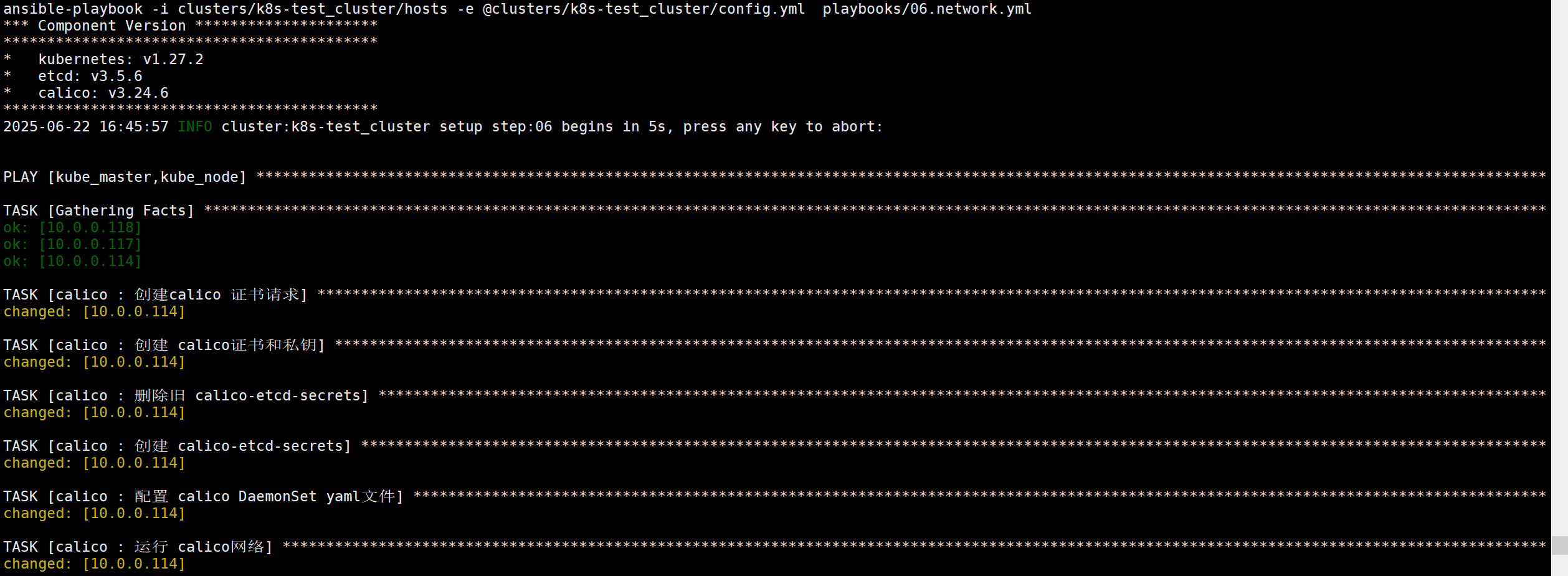
[root@kubeasz kubeasz]# ./ezctl  setup  k8s-test_cluster  06
ezctl 运行ansible剧本进行对K8S进行calico插件部署
3.6 执行命令验证K8S状态 服务部署完成
[root@kubeasz kubeasz]# kubectl get nodes
NAME        STATUS                     ROLES    AGE     VERSION
master114   Ready,SchedulingDisabled   master   6m13s   v1.27.2
worker117   Ready                      node     4m25s   v1.27.2
worker118   Ready                      node     4m25s   v1.27.2
最后需要在master114安装kubectl 并把kubeasz/root/.kube/目录传到master节点**

 浙公网安备 33010602011771号