iOS开发之TextView常用属性
本文介绍iOS开发的TextView控件, swift代码形式.
基本属性:
//textView尺寸和位置 let textViewWidth: CGFloat = 223 let textViewHeight: CGFloat = 198 let textViewTopView: CGFloat = 240 let textViewFrame = CGRect(x: 22, y: textViewTopView, width: textViewWidth, height: textViewHeight)let textView = UITextView(frame: textViewFrame)
textView.text = " 我们的生活几乎离不号码,如电话号码、手机号码、车牌号码、门牌号码等等。号码为什么会影响一个人的运势?其实号码也包含有一定的吉凶数理,这就像姓名会影响运势命运的意义是一样的。"
效果:

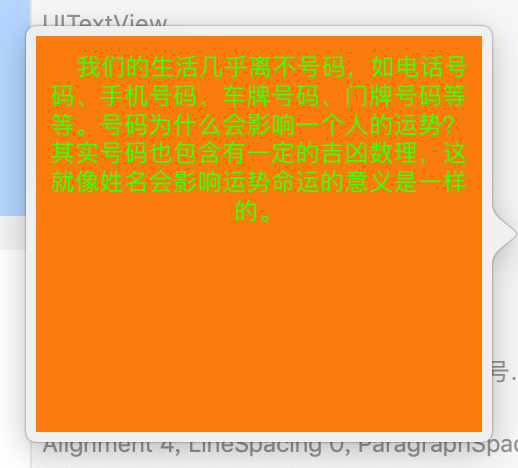
加上几个常用属性
 //textView是否可编辑,是否可选中
        textView.allowsEditingTextAttributes = false
        textView.isSelectable = true
//字体颜色,背景颜色,字体大小,字体对齐方式

textView.textColor = UIColor.green

textView.backgroundColor = UIColor.orange

textView.font = UIFont.systemFont(ofSize: 12.0)

textView.textAlignment = .center
效果:
---~~~~
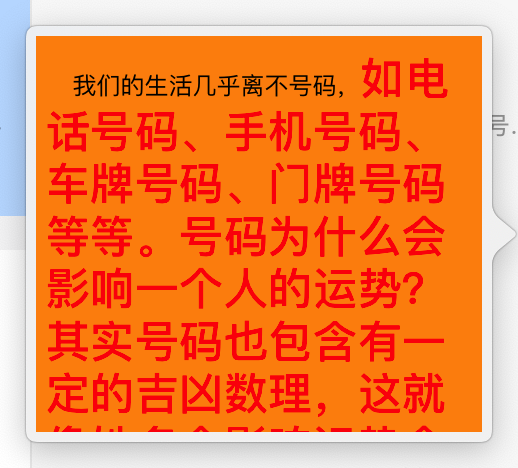
改为富文本
// 创建可变属性字符串
        let attribute = NSMutableAttributedString(string: textView.text)
        // 设置段落样式
        let paragraphStyle = NSMutableParagraphStyle()
        paragraphStyle.alignment = .center
        paragraphStyle.lineSpacing = 10
        // 设置属性字典
        let dic = [NSAttributedString.Key.foregroundColor: UIColor.red,
                   NSAttributedString.Key.font: UIFont.boldSystemFont(ofSize: 22.0),
                   NSAttributedString.Key.paragraphStyle: paragraphStyle]
        // 添加属性字典
        attribute.addAttributes(dic, range: NSMakeRange(16, textView.text.count - 16))
        // 设置textView的attributedText
        textView.attributedText = attribute
效果:
设置文字与边框间距,显示边框
//设置文本内容与边框的间距
        textView.textContainerInset = UIEdgeInsets(top: 20, left: 20, bottom: 20, right: 20)
//显示边框

textView.layer.borderColor = UIColor.cyan.cgColor

textView.layer.borderWidth = 2.0
效果:

完整代码:
//: A UIKit based Playground for presenting user interfaceimport UIKit
import PlaygroundSupportclass MyViewController : UIViewController ,UITextViewDelegate{
override func loadView() {
let view = UIView()
view.backgroundColor = .whiteself.view = view
//textView尺寸和位置
let textViewWidth: CGFloat = 223
let textViewHeight: CGFloat = 198
let textViewTopView: CGFloat = 240
let textViewFrame = CGRect(x: 22, y: textViewTopView, width: textViewWidth, height: textViewHeight)let textView = UITextView(frame: textViewFrame)
textView.text = " 我们的生活几乎离不号码,如电话号码、手机号码、车牌号码、门牌号码等等。号码为什么会影响一个人的运势?其实号码也包含有一定的吉凶数理,这就像姓名会影响运势命运的意义是一样的。"
//textView是否可编辑,是否可选中
textView.allowsEditingTextAttributes = false
textView.isSelectable = true//字体颜色,背景颜色,字体大小,字体对齐方式
textView.textColor = UIColor.green
textView.backgroundColor = UIColor.orange
textView.font = UIFont.systemFont(ofSize: 12.0)
textView.textAlignment = .center// 创建可变属性字符串
let attribute = NSMutableAttributedString(string: textView.text)
// 设置段落样式
let paragraphStyle = NSMutableParagraphStyle()
paragraphStyle.alignment = .center
paragraphStyle.lineSpacing = 10
// 设置属性字典
let dic = [NSAttributedString.Key.foregroundColor: UIColor.red,
NSAttributedString.Key.font: UIFont.boldSystemFont(ofSize: 22.0),
NSAttributedString.Key.paragraphStyle: paragraphStyle]
// 添加属性字典
attribute.addAttributes(dic, range: NSMakeRange(16, textView.text.count - 16))
// 设置textView的attributedText
textView.attributedText = attribute//设置文本内容与边框的间距
textView.textContainerInset = UIEdgeInsets(top: 20, left: 20, bottom: 20, right: 20)//显示边框
textView.layer.borderColor = UIColor.cyan.cgColor
textView.layer.borderWidth = 2.0textView.delegate = self//将ViewController当前对象赋值给TextView控件的delegate委托属性
view.addSubview(textView)}
}
// Present the view controller in the Live View window
PlaygroundPage.current.liveView = MyViewController()


 浙公网安备 33010602011771号