
RabbitMQ
通过官方脚本 - https://www.rabbitmq.com/download.html 安装RabbitMQ
安装完成查看接口只有5672和25672

--- 开启web和远程访问

[16:00:28 root@node1 ~]#rabbitmq-plugins enable rabbitmq_management
[16:00:28 root@node1 ~]#echo "loopback_users = none" > /etc/rabbitmq/rabbitmq.conf
[16:00:28 root@node1 ~]# systemctl restart rabbitmq-server.service

---5672是核心端口,15672是web程序,25672是集群,现在是单机模式

[16:00:28 root@node1 ~]#ss -ntl
State               Recv-Q               Send-Q                               Local Address:Port                                Peer Address:Port
LISTEN              0                    128                                  127.0.0.53%lo:53                                       0.0.0.0:*
LISTEN              0                    128                                        0.0.0.0:22                                       0.0.0.0:*
LISTEN              0                    128                                        0.0.0.0:15672                                    0.0.0.0:*
LISTEN              0                    128                                        0.0.0.0:56217                                    0.0.0.0:*
LISTEN              0                    128                                        0.0.0.0:55161                                    0.0.0.0:*
LISTEN              0                    128                                        0.0.0.0:56603                                    0.0.0.0:*
LISTEN              0                    64                                         0.0.0.0:2049                                     0.0.0.0:*
LISTEN              0                    64                                         0.0.0.0:45027                                    0.0.0.0:*
LISTEN              0                    128                                        0.0.0.0:25672                                    0.0.0.0:*
LISTEN              0                    128                                        0.0.0.0:111                                      0.0.0.0:*
LISTEN              0                    128                                              *:4369                                           *:*
LISTEN              0                    128                                           [::]:22                                          [::]:*
LISTEN              0                    128                                           [::]:44665                                       [::]:*
LISTEN              0                    64                                            [::]:2049                                        [::]:*
LISTEN              0                    64                                            [::]:35269                                       [::]:*
LISTEN              0                    128                                              *:5672                                           *:*

==================================
开启集群模式,在每个机器都要配置域名

[16:00:30 root@node1 ~]#cat /etc/hosts
127.0.0.1    localhost
127.0.1.1    noise

# The following lines are desirable for IPv6 capable hosts
::1     localhost ip6-localhost ip6-loopback
ff02::1 ip6-allnodes
ff02::2 ip6-allrouters


10.0.0.201 node1.noisedu.cn
10.0.0.202 node2.noisedu.cn
10.0.0.203 node3.noisedu.cn

-- copy cookie
[15:39:09 root@node1 ~]#scp /var/lib/rabbitmq/.erlang.cookie 10.0.0.202:/var/lib/rabbitmq/
The authenticity of host '10.0.0.202 (10.0.0.202)' can't be established.
ECDSA key fingerprint is SHA256:iF4xtwhiNyzCNBJdeKAxM0YPAL4b9qDZqHe8LL7s2Cg.
Are you sure you want to continue connecting (yes/no)? yes
Warning: Permanently added '10.0.0.202' (ECDSA) to the list of known hosts.
root@10.0.0.202's password:
.erlang.cookie                                                                                                                100%   20    57.3KB/s   00:00
[15:39:45 root@node1 ~]#scp /var/lib/rabbitmq/.erlang.cookie 10.0.0.203:/var/lib/rabbitmq/
The authenticity of host '10.0.0.203 (10.0.0.203)' can't be established.
ECDSA key fingerprint is SHA256:iF4xtwhiNyzCNBJdeKAxM0YPAL4b9qDZqHe8LL7s2Cg.
Are you sure you want to continue connecting (yes/no)? yes
Warning: Permanently added '10.0.0.203' (ECDSA) to the list of known hosts.
root@10.0.0.203's password:
.erlang.cookie
此时主节点node1完毕
========================
node2,开始配置附属节点
[15:43:09 root@node2 ~]#rabbitmqctl stop_app
Stopping rabbit application on node rabbit@node2 ...
[15:44:15 root@node2 ~]#rabbitmqctl reset
Resetting node rabbit@node2 ...
[15:44:20 root@node2 ~]#rabbitmqctl join_cluster rabbit@node1 --ram
Clustering node rabbit@node2 with rabbit@node1
[15:44:32 root@node2 ~]#rabbitmqctl start_app
Starting node rabbit@node2 ...
========================
node3,开始配置附属节点
[15:45:16 root@node3 ~]#rabbitmqctl stop_app
Stopping rabbit application on node rabbit@node3 ...
[15:45:27 root@node3 ~]#rabbitmqctl reset
Resetting node rabbit@node3 ...
[15:45:32 root@node3 ~]#rabbitmqctl join_cluster rabbit@node1 --ram
Clustering node rabbit@node3 with rabbit@node1
[15:45:35 root@node3 ~]#rabbitmqctl start_app
Starting node rabbit@node3 ...
========================
无论哪个node都可以查看集群
[15:45:39 root@node1 ~]#rabbitmqctl cluster_status
Cluster status of node rabbit@node1 ...
Basics

Cluster name: rabbit@node1.noisedu.cn

Disk Nodes

rabbit@node1

RAM Nodes

rabbit@node2
rabbit@node3

Running Nodes

rabbit@node1
rabbit@node2
rabbit@node3

Versions

rabbit@node1: RabbitMQ 3.8.19 on Erlang 24.1.3
rabbit@node2: RabbitMQ 3.8.19 on Erlang 24.1.3
rabbit@node3: RabbitMQ 3.8.19 on Erlang 24.1.3

Maintenance status

Node: rabbit@node1, status: not under maintenance
Node: rabbit@node2, status: not under maintenance
Node: rabbit@node3, status: not under maintenance

Alarms

(none)

Network Partitions

(none)

Listeners

Node: rabbit@node1, interface: [::], port: 15672, protocol: http, purpose: HTTP API
Node: rabbit@node1, interface: [::], port: 25672, protocol: clustering, purpose: inter-node and CLI tool communication
Node: rabbit@node1, interface: [::], port: 5672, protocol: amqp, purpose: AMQP 0-9-1 and AMQP 1.0
Node: rabbit@node2, interface: [::], port: 15672, protocol: http, purpose: HTTP API
Node: rabbit@node2, interface: [::], port: 25672, protocol: clustering, purpose: inter-node and CLI tool communication
Node: rabbit@node2, interface: [::], port: 5672, protocol: amqp, purpose: AMQP 0-9-1 and AMQP 1.0
Node: rabbit@node3, interface: [::], port: 15672, protocol: http, purpose: HTTP API
Node: rabbit@node3, interface: [::], port: 25672, protocol: clustering, purpose: inter-node and CLI tool communication
Node: rabbit@node3, interface: [::], port: 5672, protocol: amqp, purpose: AMQP 0-9-1 and AMQP 1.0

Feature flags

Flag: drop_unroutable_metric, state: enabled
Flag: empty_basic_get_metric, state: enabled
Flag: implicit_default_bindings, state: enabled
Flag: maintenance_mode_status, state: enabled
Flag: quorum_queue, state: enabled
Flag: user_limits, state: enabled
Flag: virtual_host_metadata, state: enabled
配置镜像集群
[15:46:01 root@node1 ~]#rabbitmqctl set_policy ha-all "^" '{"ha-mode":"all"}'
Setting policy "ha-all" for pattern "^" to "{"ha-mode":"all"}" with priority "0" for vhost "/" ...
[15:48:00 root@node1 ~]#rabbitmqctl list_policies
Listing policies for vhost "/" ...
vhost	name	pattern	apply-to	definition	priority
/	ha-all	^	all	{"ha-mode":"all"}	0
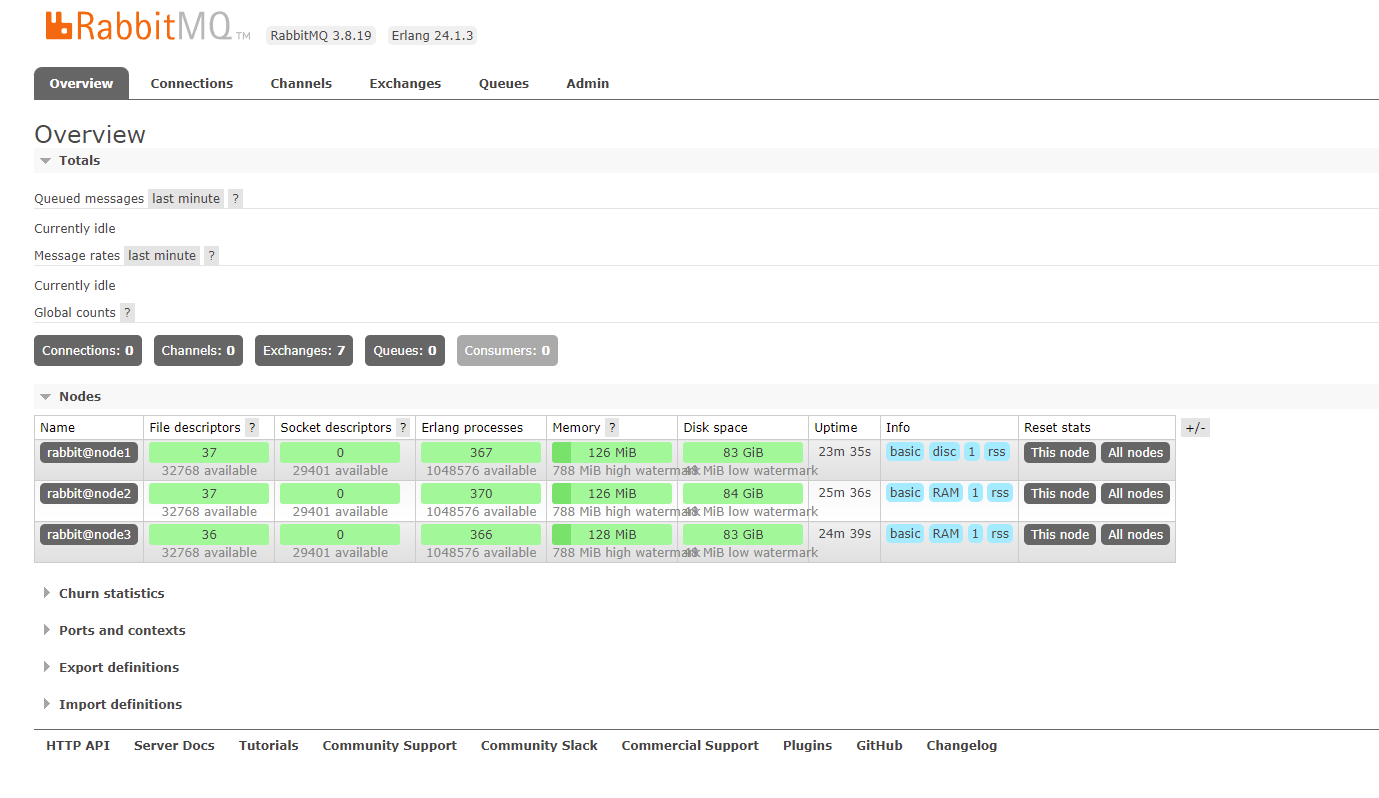
任何一节点web也可查询

 浙公网安备 33010602011771号