linux shell script
Hello World
!/bin/bash
echo 'Hello Bash World'
for loop in one line 一行实现循环调用
for i in {1..5}; do COMMAND1-HERE && COMMAND2-HERE; done
定义function
你可以用function 函数名{}
或者 直接函数名
!/bin/bash
usage(){
function usage(){
echo "sleep seconds"
}
if [ $# == 1 ]; then
getSomeSleep $1
else
usage
fi
input parameters
- $# 是传给脚本的参数个数
- $0 是脚本本身的名字
- $1是传递给该shell脚本的第一个参数
- $2是传递给该shell脚本的第二个参数
- $@ 是传给脚本的所有参数的列表
if [ $# -lt 1 ];then
usage
exit 1
fi
function parameters
function getSomeSleep(){
SLEEP_SEC=$1
SLEEP_MAX_SEC=30
#minus=echo $SLEEP_SEC/1 | bc
if [ $SLEEP_SEC -gt 0 ] && [ $SLEEP_SEC -lt 30 ]; then
echo '###################'
echo 'now try to restart node after ' $SLEEP_SEC ' sec'
echo '###################'
sleep $SLEEP_SEC
else
echo 'sec must between 0 and ' $SLEEP_MAX_SEC ' sec'
fi
}
注意输入参数在函数中, $0 $1 $2 .. $@会被覆盖,但$#不会
call from another script file
直接输入绝对路径或者相对路径
. -- execute
part 2 going deep: Beauty/Standard
option
case
case 实现效果:
$haproxy status/stop/start/reload/restart
option
getopt 实现效果:
$SomeCommand -p 223 -h localhost
opt 语法 github example
help
定义 usage function, 处理-h --help
man
实现效果:
$man 1 sleep1
edit man page file ,then put it in :
/usr/share/man/man1
$sudo cp sleep.sh /bin/sleep1
#see example
$man 1 sleep1
man 1/2/3/.. 7 的差别
section topic
1 Executable programs or shell commands
2 System calls (functions provided by the kernel)
3 Library calls (functions within program libraries)
exit code
$ ./sleep.sh 2 3
usage: sleep seconds
#上一个命令的执行效果,来自于shell script 文件的exit code
$ echo $?
1
$ echo $?
0
path
put your file to $PATH
part 3 going deep: use bash to improve efficiency
alias
- git push origin/ ==> gpo
- find ./* -name ==> f "*.md"
- ...
bin
去扫以下各个文件夹:
$ echo $PATH
/usr/local/bin:/usr/bin:/bin:/usr/sbin:/sbin
path env
grep egrep awk
regex
fucksh zash
tips
经常忘记sudo,快速根据上一个命令重新执行
$apt-get install tree
$sudo !!
写错命令,快速根据上一个命令的参数重新执行
klg@klgaliyun01:~$ vim /etc/init.d/haproxy
klg@klgaliyun01:~$ cat !$
cat /etc/init.d/haproxy
开机启动文件 /etc/rc.local
when system start , run this script
~/.bash_profile ~/.bashrc
when user login, run this script
mount to shared drive
UI Color : make terminal more colorful, tell the diff between dir and file, the diff between execute and unexecute
export CLICOLOR=1
export LSCOLORS=Exfxcxdxbxegedabagacad
# Tell grep to highlight matches
export GREP_OPTIONS='--color=auto'
export TERM="xterm-color"
PS1='[\e[0;33m]\u[\e[0m]@[\e[0;32m]\h[\e[0m]:[\e[0;34m]\w[\e[0m]$ '
copy past without mousee
pbcopy < somefile
pbpaste > somefile_copy
pipe line and redirect
pipe line
| # left output as right output
> >>
< <<
2> #stderr redirect
$somecommand >> file.out.log 2>1 & ## stderr redirect to stdout , then redirect to some file
$ ls x* z* 2>/dev/null ##output redirect to device : /dev/null ## black hole, which means ignore the output
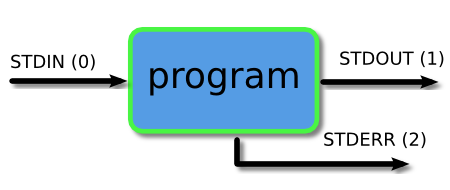
linux pipe line and redirect
IBM pipe line pdf
坑
注意空格:in if then else fi
if [ xx -lt 0 ];
...
还是注意空格:PID=123 ##not PID = 123
debug
$bash -x xxx.sh
debug example

 浙公网安备 33010602011771号