[转载]fastText 快速文本分类器
https://blog.csdn.net/john_bh/article/details/79268850
https://blog.csdn.net/sinat_26917383/article/details/54850933
一、简介
fasttext是facebook开源的一个词向量与文本分类工具,在2016年开源,典型应用场景是“带监督的文本分类问题”。提供简单而高效的文本分类和表征学习的方法,性能比肩深度学习而且速度更快。这个部分由两部分组成,一部分是这篇文章介绍fastText文本分类(paper: A. Joulin, E. Grave, P. Bojanowski, T. Mikolov, Bag of Tricks for Efficient Text Classification(高效文本分类技巧));另一部分是词嵌入学习(paper: P. Bojanowski*, E. Grave*, A. Joulin, T. Mikolov, Enriching Word Vectors with Subword Information(使用子字信息丰富词汇向量))。
fastText结合了自然语言处理和机器学习中最成功的理念。这些包括了使用词袋以及n-gram袋表征语句,还有使用子字(subword)信息,并通过隐藏表征在类别间共享信息。我们另外采用了一个softmax层级(利用了类别不均衡分布的优势)来加速运算过程。
这些不同概念被用于两个不同任务:
- 有效文本分类 :有监督学习
- 学习词向量表征:无监督学习
举例来说:fastText能够学会“男孩”、“女孩”、“男人”、“女人”指代的是特定的性别,并且能够将这些数值存在相关文档中。然后,当某个程序在提出一个用户请求(假设是“我女友现在在儿?”),它能够马上在fastText生成的文档中进行查找并且理解用户想要问的是有关女性的问题。
二、FastText原理
fastText方法包含三部分,模型架构,层次SoftMax和N-gram特征。
2.1 模型架构
将一个词序列(一段文本或一句话)喂入该模型,输出该词序列属于不同类别的概率。
序列中的词和词组组成特征向量,特征向量通过线性变换映射到中间层,中间层再映射到标签。
fastText在预测标签时使用了非线性激活函数,但在中间层不使用非线性激活函数。
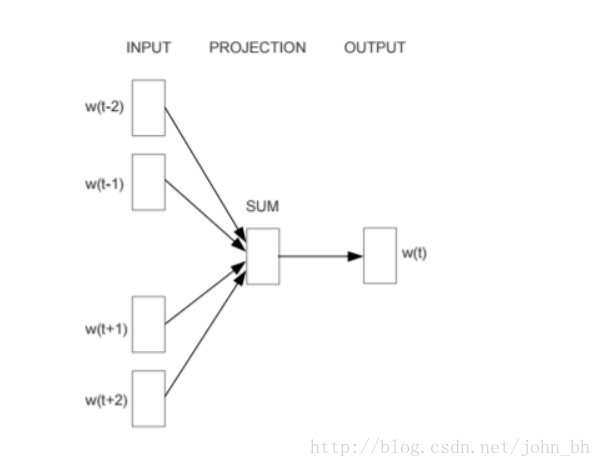
fastText的架构和word2vec中的CBOW的架构类似,因为它们的作者都是Facebook的科学家Tomas Mikolov,而且确实fastText也算是words2vec所衍生出来的。
不同之处在于,fastText预测标签,而CBOW模型预测中间词。
-
Continuous Bog-Of-Words:
2.2 改善运算效率——SoftMax层级
在文本处理领域中深度神经网络近来大受欢迎,但是它们训练以及测试过程十分缓慢,这也限制了它们在大数据集上的应用。
fastText能够解决这个问题,其实现过程如下所示:

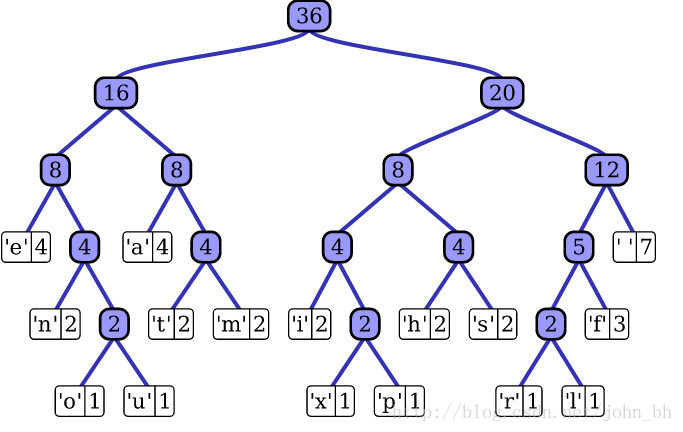
对于有大量类别的数据集,fastText使用了一个分层分类器(而非扁平式架构)。不同的类别被整合进树形结构中(想象下二叉树而非 list)。在某些文本分类任务中类别很多,计算线性分类器的复杂度高。为了改善运行时间,fastText 模型使用了层次 Softmax 技巧。层次 Softmax 技巧建立在哈弗曼编码的基础上,对标签进行编码,能够极大地缩小模型预测目标的数量(参考博客)。考虑到线性以及多种类别的对数模型,这大大减少了训练复杂性和测试文本分类器的时间。
fastText 也利用了类别(class)不均衡这个事实(一些类别出现次数比其他的更多),通过使用 Huffman 算法建立用于表征类别的树形结构。因此,频繁出现类别的树形结构的深度要比不频繁出现类别的树形结构的深度要小,这也使得进一步的计算效率更高。
Huffman编码
2.3 fastText的N-gram特征
fastText 可以用于文本分类和句子分类。不管是文本分类还是句子分类,我们常用的特征是词袋模型(BOW)。但BOW不能考虑词之间的顺序,因此 fastText 还加入了 N-gram 特征。 “我 爱 她” 这句话中的词袋模型特征是 [“我”,“爱”, “她”]。这些特征和句子 “她 爱 我” 的特征是一样的。如果加入 2-gram,第一句话的特征还有 “我-爱” 和 “爱-她”,这两句话 “我 爱 她” 和 “她 爱 我” 就能区别开来了。当然,为了提高效率,我们需要过滤掉低频的 N-gram。
fastText 另外使用了一个低维度向量来对文本进行表征,通过总结对应文本中出现的词向量进行获得。在 fastText中一个低维度向量与每个单词都相关。隐藏表征在不同类别所有分类器中进行共享,使得文本信息在不同类别中能够共同使用。这类表征被称为词袋(bag of words)(此处忽视词序)。在 fastText中也使用向量表征单词n-gram来将局部词序考虑在内,这对很多文本分类问题来说十分重要。
2.4 fastText词向量优势
(1)适合大型数据+高效的训练速度:能够训练模型“在使用标准多核CPU的情况下10分钟内处理超过10亿个词汇”,特别是与深度模型对比,fastText能将训练时间由数天缩短到几秒钟。使用一个标准多核 CPU,得到了在10分钟内训练完超过10亿词汇量模型的结果。此外, fastText还能在五分钟内将50万个句子分成超过30万个类别。
(2)支持多语言表达:利用其语言形态结构,fastText能够被设计用来支持包括英语、德语、西班牙语、法语以及捷克语等多种语言。它还使用了一种简单高效的纳入子字信息的方式,在用于像捷克语这样词态丰富的语言时,这种方式表现得非常好,这也证明了精心设计的字符 n-gram 特征是丰富词汇表征的重要来源。FastText的性能要比时下流行的word2vec工具明显好上不少,也比其他目前最先进的词态词汇表征要好。 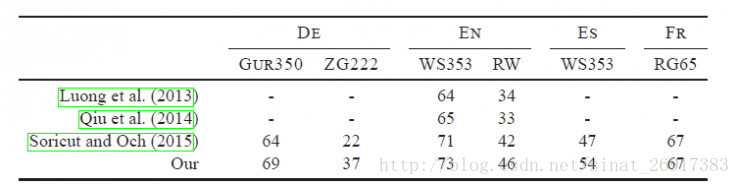
(3)fastText专注于文本分类,在许多标准问题上实现当下最好的表现(例如文本倾向性分析或标签预测)。
FastText与基于深度学习方法的Char-CNN以及VDCNN对比: 
(4)比word2vec更考虑了相似性,比如 fastText 的词嵌入学习能够考虑 english-born 和 british-born 之间有相同的后缀,但 word2vec 却不能(具体参考paper)。
.
三、 基于fastText实现文本分类
FastText默认参数:
 1 $ ./fasttext supervised
 2 Empty input or output path.
 3
 4 The following arguments are mandatory:
 5   -input              training file path
 6   -output             output file path
 7
 8 The following arguments are optional:
 9   -lr                 learning rate [0.1]
10   -lrUpdateRate       change the rate of updates for the learning rate [100]
11   -dim                size of word vectors [100]
12   -ws                 size of the context window [5]
13   -epoch              number of epochs [5]
14   -minCount           minimal number of word occurences [1]
15   -minCountLabel      minimal number of label occurences [0]
16   -neg                number of negatives sampled [5]
17   -wordNgrams         max length of word ngram [1]
18   -loss               loss function {ns, hs, softmax} [ns]
19   -bucket             number of buckets [2000000]
20   -minn               min length of char ngram [0]
21   -maxn               max length of char ngram [0]
22   -thread             number of threads [12]
23   -t                  sampling threshold [0.0001]
24   -label              labels prefix [__label__]
25   -verbose            verbosity level [2]
26   -pretrainedVectors  pretrained word vectors for supervised learning []
Mikolov 在 fastTetxt 的论文中报告了两个实验,其中一个实验和 Tagspace 模型进行对比。实验是在 YFCC100M 数据集( https://research.facebook.com/research/fasttext/)上进行的, YFCC100M 数据集包含将近 1 亿张图片以及摘要、标题和标签。实验使用摘要和标题去预测标签。Tagspace 模型是建立在 Wsabie 模型的基础上的。Wsabie 模型除了利用 CNN 抽取特征之外,还提出了一个带权近似配对排序 (Weighted Approximate-Rank Pairwise, WARP) 损失函数用于处理预测目标数量巨大的问题。 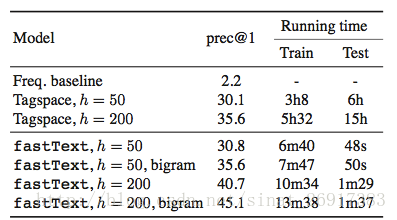
上面就是实验结果,从实验结果来看 fastText 能够取得比 Tagspace 好的效果,并拥有无以伦比的训练测试速度。但严格来说,这个实验对 Tagspace 有些不公平。YFCC100M 数据集是关于多标记分类的,即需要模型能从多个类别里预测出多个类。Tagspace 确实是做多标记分类的;但 fastText 只能做多类别分类,从多个类别里预测出一个类。而评价指标 prec@1 只评价一个预测结果,刚好能够评价多类别分类。
3.1 fastText有监督学习分类
fastText做文本分类要求文本是如下的存储形式:
1 __label__2 , birchas chaim , yeshiva birchas chaim is a orthodox jewish mesivta high school in lakewood township new jersey . it was founded by rabbi shmuel zalmen stein in 2001 after his father rabbi chaim stein asked him to open a branch of telshe yeshiva in lakewood . as of the 2009-10 school year the school had an enrollment of 76 students and 6 . 6 classroom teachers ( on a fte basis ) for a student–teacher ratio of 11 . 5 1 .
2 __label__6 , motor torpedo boat pt-41 , motor torpedo boat pt-41 was a pt-20-class motor torpedo boat of the united states navy built by the electric launch company of bayonne new jersey . the boat was laid down as motor boat submarine chaser ptc-21 but was reclassified as pt-41 prior to its launch on 8 july 1941 and was completed on 23 july 1941 .
3 __label__11 , passiflora picturata , passiflora picturata is a species of passion flower in the passifloraceae family .
4 __label__13 , naya din nai raat , naya din nai raat is a 1974 bollywood drama film directed by
其中前面的label是前缀,也可以自己定义,label后接的为类别。
具体代码:


# -*- coding:utf-8 -*-
import pandas as pd
import random
import fasttext
import jieba
from sklearn.model_selection import train_test_split

cate_dic = {'technology': 1, 'car': 2, 'entertainment': 3, 'military': 4, 'sports': 5}
"""
函数说明:加载数据
"""
def loadData():


    #利用pandas把数据读进来
    df_technology = pd.read_csv("./data/technology_news.csv",encoding ="utf-8")
    df_technology=df_technology.dropna()    #去空行处理

    df_car = pd.read_csv("./data/car_news.csv",encoding ="utf-8")
    df_car=df_car.dropna()

    df_entertainment = pd.read_csv("./data/entertainment_news.csv",encoding ="utf-8")
    df_entertainment=df_entertainment.dropna()

    df_military = pd.read_csv("./data/military_news.csv",encoding ="utf-8")
    df_military=df_military.dropna()

    df_sports = pd.read_csv("./data/sports_news.csv",encoding ="utf-8")
    df_sports=df_sports.dropna()

    technology=df_technology.content.values.tolist()[1000:21000]
    car=df_car.content.values.tolist()[1000:21000]
    entertainment=df_entertainment.content.values.tolist()[:20000]
    military=df_military.content.values.tolist()[:20000]
    sports=df_sports.content.values.tolist()[:20000]

    return technology,car,entertainment,military,sports

"""
函数说明:停用词
参数说明:
    datapath:停用词路径
返回值:
    stopwords:停用词
"""
def getStopWords(datapath):
    stopwords=pd.read_csv(datapath,index_col=False,quoting=3,sep="\t",names=['stopword'], encoding='utf-8')
    stopwords=stopwords["stopword"].values
    return stopwords

"""
函数说明:去停用词
参数:
    content_line:文本数据
    sentences:存储的数据
    category:文本类别
"""
def preprocess_text(content_line,sentences,category,stopwords):
    for line in content_line:
        try:
            segs=jieba.lcut(line)    #利用结巴分词进行中文分词
            segs=filter(lambda x:len(x)>1,segs)    #去掉长度小于1的词
            segs=filter(lambda x:x not in stopwords,segs)    #去掉停用词
            sentences.append("__lable__"+str(category)+" , "+" ".join(segs))    #把当前的文本和对应的类别拼接起来,组合成fasttext的文本格式
        except Exception as e:
            print (line)
            continue

"""
函数说明:把处理好的写入到文件中,备用
参数说明:

"""
def writeData(sentences,fileName):
    print("writing data to fasttext format...")
    out=open(fileName,'w')
    for sentence in sentences:
        out.write(sentence.encode('utf8')+"\n")
    print("done!")

"""
函数说明:数据处理
"""
def preprocessData(stopwords,saveDataFile):
    technology,car,entertainment,military,sports=loadData()

    #去停用词,生成数据集
    sentences=[]
    preprocess_text(technology,sentences,cate_dic["technology"],stopwords)
    preprocess_text(car,sentences,cate_dic["car"],stopwords)
    preprocess_text(entertainment,sentences,cate_dic["entertainment"],stopwords)
    preprocess_text(military,sentences,cate_dic["military"],stopwords)
    preprocess_text(sports,sentences,cate_dic["sports"],stopwords)

    random.shuffle(sentences)    #做乱序处理,使得同类别的样本不至于扎堆

    writeData(sentences,saveDataFile)

if __name__=="__main__":
    stopwordsFile=r"./data/stopwords.txt"
    stopwords=getStopWords(stopwordsFile)
    saveDataFile=r'train_data.txt'
    preprocessData(stopwords,saveDataFile)
    #fasttext.supervised():有监督的学习
    classifier=fasttext.supervised(saveDataFile,'classifier.model',lable_prefix='__lable__')
    result = classifier.test(saveDataFile)
    print("P@1:",result.precision)    #准确率
    print("R@2:",result.recall)    #召回率
    print("Number of examples:",result.nexamples)    #预测错的例子

    #实际预测
    lable_to_cate={1:'technology'.1:'car',3:'entertainment',4:'military',5:'sports'}

    texts=['中新网 日电 2018 预赛 亚洲区 强赛 中国队 韩国队 较量 比赛 上半场 分钟 主场 作战 中国队 率先 打破 场上 僵局 利用 角球 机会 大宝 前点 攻门 得手 中国队 领先']
    lables=classifier.predict(texts)
    print(lables)
    print(lable_to_cate[int(lables[0][0])])

    #还可以得到类别+概率
    lables=classifier.predict_proba(texts)
    print(lables)

    #还可以得到前k个类别
    lables=classifier.predict(texts,k=3)
    print(lables)

    #还可以得到前k个类别+概率
    lables=classifier.predict_proba(texts,k=3)
    print(lables)
3.2 fastText无监督学习词向量
  1 # -*- coding:utf-8 -*-
  2 import pandas as pd
  3 import random
  4 import fasttext
  5 import jieba
  6 from sklearn.model_selection import train_test_split
  7
  8 cate_dic = {'technology': 1, 'car': 2, 'entertainment': 3, 'military': 4, 'sports': 5}
  9 """
 10 函数说明:加载数据
 11 """
 12 def loadData():
 13
 14
 15     #利用pandas把数据读进来
 16     df_technology = pd.read_csv("./data/technology_news.csv",encoding ="utf-8")
 17     df_technology=df_technology.dropna()    #去空行处理
 18
 19     df_car = pd.read_csv("./data/car_news.csv",encoding ="utf-8")
 20     df_car=df_car.dropna()
 21
 22     df_entertainment = pd.read_csv("./data/entertainment_news.csv",encoding ="utf-8")
 23     df_entertainment=df_entertainment.dropna()
 24
 25     df_military = pd.read_csv("./data/military_news.csv",encoding ="utf-8")
 26     df_military=df_military.dropna()
 27
 28     df_sports = pd.read_csv("./data/sports_news.csv",encoding ="utf-8")
 29     df_sports=df_sports.dropna()
 30
 31     technology=df_technology.content.values.tolist()[1000:21000]
 32     car=df_car.content.values.tolist()[1000:21000]
 33     entertainment=df_entertainment.content.values.tolist()[:20000]
 34     military=df_military.content.values.tolist()[:20000]
 35     sports=df_sports.content.values.tolist()[:20000]
 36
 37     return technology,car,entertainment,military,sports
 38
 39 """
 40 函数说明:停用词
 41 参数说明:
 42     datapath:停用词路径
 43 返回值:
 44     stopwords:停用词
 45 """
 46 def getStopWords(datapath):
 47     stopwords=pd.read_csv(datapath,index_col=False,quoting=3,sep="\t",names=['stopword'], encoding='utf-8')
 48     stopwords=stopwords["stopword"].values
 49     return stopwords
 50
 51 """
 52 函数说明:去停用词
 53 参数:
 54     content_line:文本数据
 55     sentences:存储的数据
 56     category:文本类别
 57 """
 58 def preprocess_text(content_line,sentences,stopwords):
 59     for line in content_line:
 60         try:
 61             segs=jieba.lcut(line)    #利用结巴分词进行中文分词
 62             segs=filter(lambda x:len(x)>1,segs)    #去掉长度小于1的词
 63             segs=filter(lambda x:x not in stopwords,segs)    #去掉停用词
 64             sentences.append(" ".join(segs))
 65         except Exception as e:
 66             print (line)
 67             continue
 68
 69 """
 70 函数说明:把处理好的写入到文件中,备用
 71 参数说明:
 72
 73 """
 74 def writeData(sentences,fileName):
 75     print("writing data to fasttext format...")
 76     out=open(fileName,'w')
 77     for sentence in sentences:
 78         out.write(sentence.encode('utf8')+"\n")
 79     print("done!")
 80
 81 """
 82 函数说明:数据处理
 83 """
 84 def preprocessData(stopwords,saveDataFile):
 85     technology,car,entertainment,military,sports=loadData()
 86
 87     #去停用词,生成数据集
 88     sentences=[]
 89     preprocess_text(technology,sentences,stopwords)
 90     preprocess_text(car,sentences,stopwords)
 91     preprocess_text(entertainment,sentences,stopwords)
 92     preprocess_text(military,sentences,stopwords)
 93     preprocess_text(sports,sentences,stopwords)
 94
 95     random.shuffle(sentences)    #做乱序处理,使得同类别的样本不至于扎堆
 96
 97     writeData(sentences,saveDataFile)
 98
 99
100 if __name__=="__main__":
101     stopwordsFile=r"./data/stopwords.txt"
102     stopwords=getStopWords(stopwordsFile)
103     saveDataFile=r'unsupervised_train_data.txt'
104     preprocessData(stopwords,saveDataFile)
105
106     #fasttext.load_model:不管是有监督还是无监督的,都是载入一个模型
107     #fasttext.skipgram(),fasttext.cbow()都是无监督的,用来训练词向量的
108
109     model=fasttext.skipgram('unsupervised_train_data.txt','model')
110     print(model.words)    #打印词向量
111
112     #cbow model
113     model=fasttext.cbow('unsupervised_train_data.txt','model')
114     print(model.words)    #打印词向量
三、总结
3.1 fastText和word2vec的区别
相似处:
- 图模型结构很像,都是采用embedding向量的形式,得到word的隐向量表达。
- 都采用很多相似的优化方法,比如使用Hierarchical softmax优化训练和预测中的打分速度。
不同处:
- 模型的输出层:word2vec的输出层,对应的是每一个term,计算某term的概率最大;而fasttext的输出层对应的是 分类的label。不过不管输出层对应的是什么内容,起对应的vector都不会被保留和使用;
- 模型的输入层:word2vec的输出层,是 context window 内的term;而fasttext 对应的整个sentence的内容,包括term,也包括 n-gram的内容;
两者本质的不同,体现在 h-softmax的使用:
- Wordvec的目的是得到词向量,该词向量 最终是在输入层得到,输出层对应的 h-softmax 也会生成一系列的向量,但最终都被抛弃,不会使用。
- fasttext则充分利用了h-softmax的分类功能,遍历分类树的所有叶节点,找到概率最大的label(一个或者N个)。
3.2 小结
总的来说,fastText的学习速度比较快,效果还不错。fastText适用与分类类别非常大而且数据集足够多的情况,当分类类别比较小或者数据集比较少的话,很容易过拟合。
可以完成无监督的词向量的学习,可以学习出来词向量,来保持住词和词之间,相关词之间是一个距离比较近的情况;
也可以用于有监督学习的文本分类任务:新闻文本分类,垃圾邮件分类、情感分析中文本情感分析,电商中用户评论的褒贬分析。

 浙公网安备 33010602011771号