
uni app uview新增商品页(无限级分类选择和多图上传)
uni app uview新增商品页(无限级分类选择和多图上传)
给自己的牛腩商品库UNI APP加的一个新增功能,就是通用的新增页面,用的uview2(https://uviewui.com/components/intro.html),能选择无限级分类和多图上传,自已觉得这个新增页面在以后做uni app项目的时候很多地方会用到吧,先记下来了,以后用的时候直接复制粘贴代码就好了,其实那个弹出框选择分类的多少还是有点问题的,不过无伤大雅,就这样吧!!!
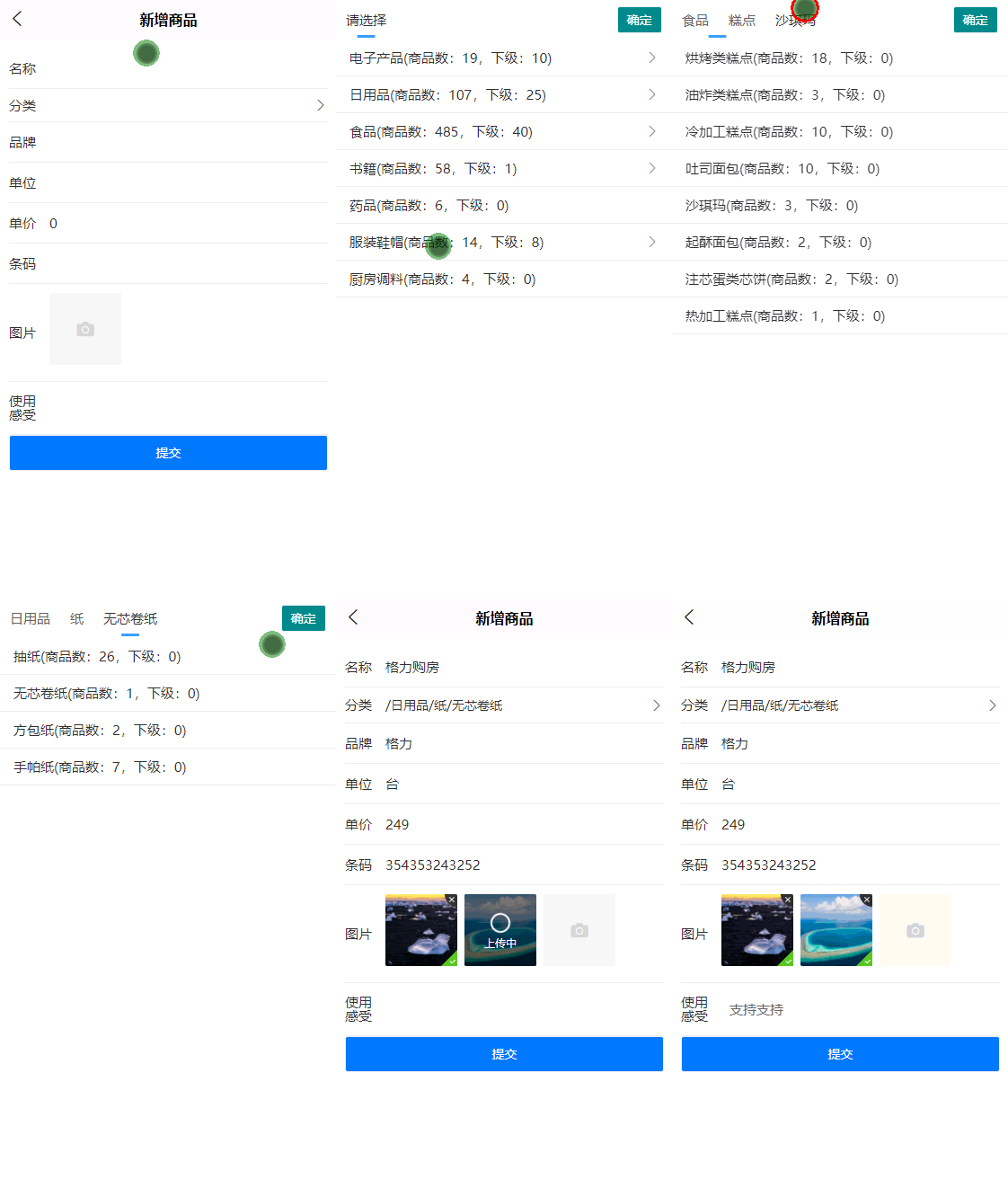
数据库设计:商品表,商品分类表,商品图片表, 商品属性表(这里没有用到)
接口:
上传图片(用牛腩代码生成器生成的HOMEController里有相关的代码,里面加了些代码,生成固定大小的格式,上传到七牛云,)
根据父ID取分类(0为第一级分类)
根据分类ID取上级一连串分类(用于弹出分类框上面那个tabs)
新增商品
上传图片接口代码
    /// <summary>
    /// 图片上传
    /// </summary>
    /// <returns></returns>
    [HttpPost]
    public async Task<IActionResult> ImgUpload()
    {
        var imgFile = Request.Form.Files[0];
        if (imgFile != null && !string.IsNullOrEmpty(imgFile.FileName))
        {
            long size = 0;
            string tempname = "";
            var filename = ContentDispositionHeaderValue
                            .Parse(imgFile.ContentDisposition)
                            .FileName
                            .Trim();
            var fileExt = filename.Substring(filename.LastIndexOf('.'), filename.Length - filename.LastIndexOf('.')); //扩展名,如.jpg

            fileExt = fileExt.Replace("\"", "");

            #region 判断后缀
            if (!fileExt.ToLower().Contains("jpg") && !fileExt.ToLower().Contains("png") && !fileExt.ToLower().Contains("gif"))
            {
                return Json(new { code = 1, msg = "只允许上传jpg,png,gif格式的图片.", });
            }
            #endregion

            #region 判断大小
            long mb = imgFile.Length / 1024 / 1024; // MB
            if (mb > 20)
            {
                return Json(new { code = 1, msg = "只允许上传小于 20MB 的图片.", });
            }
            #endregion

            string nohouzui = "niunanproduct_" + System.Guid.NewGuid().ToString().Substring(0, 6);
            String newFileName = nohouzui + fileExt;


            var path = hostingEnv.WebRootPath; //网站静态文件目录  wwwroot

            //完整物理路径
            string wuli_path = path + $"{Path.DirectorySeparatorChar}upload{Path.DirectorySeparatorChar}";
            if (!System.IO.Directory.Exists(wuli_path))
            {
                System.IO.Directory.CreateDirectory(wuli_path);
            }
            filename = wuli_path + newFileName;
            size += imgFile.Length;
            using (FileStream fs = System.IO.File.Create(filename))
            {
                imgFile.CopyTo(fs);
                fs.Flush();
                fs.Close();
            }

            #region 生成900x900的图片,小于宽900的则不生成
            int img_w = 0;
            int img_h = 0;
            Tool.GetImgWH(wuli_path + newFileName, out img_w, out img_h);

            string filename_upload = ""; //最后返回的文件名
            string tpath = "";
            if (img_w < 900 && img_h<900)
            {
                filename_upload = newFileName;
                tpath = wuli_path + newFileName;
            }
            else
            {
                filename_upload = nohouzui + "_900x900" + fileExt;
                string opath = wuli_path + newFileName; //源路径
                tpath = wuli_path + filename_upload;  //目标路径
                Tool.CreateImage(opath, tpath, 900, 900);

            }
            #endregion
            #region 传到七牛云上
            string endfilepath = ""; //最后返回 的JSON里的Src
            if (webSetting.IsUploadTo7Niu == 1)
            {
                //using Qiniu.Util;
                //using Qiniu.Storage;
                string AccessKey = "WB-23aaaaaaaSZ45kvT_20zbdk2O";
                string SecretKey = "cJRT2FAbbbbbbbXTicRNJClNnu3x27nz3D";
                string Bucket = "niunan-net";
                Mac mac = new Mac(AccessKey, SecretKey);
                PutPolicy putPolicy = new PutPolicy();
                putPolicy.Scope = Bucket;
                putPolicy.SetExpires(3600);
                string jstr = putPolicy.ToJsonString();
                string token = Auth.CreateUploadToken(mac, jstr);
                Config config = new Config();
                config.Zone = Zone.ZoneCnSouth;
                config.UseHttps = false;
                config.UseCdnDomains = true;
                FormUploader fu = new FormUploader(config);
                Stream s = new System.IO.FileInfo(tpath).OpenRead();
                var result = await fu.UploadStream(s, filename_upload, token, null);
                s.Dispose();
                s.Close();
                log.Info($"上传图片到七牛云,文件名【{filename_upload}】,上传结果\r\n{result.Text}\r\n\r\n\r\n");
                endfilepath = "http://qiniu.niunan.net/" + filename_upload;

                //上传完成后要把本地的文件删除掉
                try
                {
                    System.IO.File.Delete(tpath);
                    log.Info($"删除本地文件成功:" + tpath);
                }
                catch (Exception ex)
                {
                    log.Error($"删除本地文件失败:" + ex.Message);
                }
            }
            else
            {
                endfilepath = "/upload/"+filename_upload;
            }


            #endregion

            return Json(new
            {
                code = 0,
                msg = "上传成功",
                data = new
                {
                    src = endfilepath,
                    title = filename_upload
                }
            });
        }
        return Json(new { code = 1, msg = "上传失败", });
    }
根据父ID取分类(0为第一级分类)
    public async Task<IActionResult> GetList(int pid = 0)
    {

        List<Category> list = await _carep.GetListAsync(pid);
        ArrayList arr = new ArrayList();
        foreach (Category c in list)
        {
            arr.Add(new
            {
                categoryID = c.CategoryID,
                categoryName = c.CategoryName,
                proCount = await _carep.GetProCountAsync(c.CategoryID), //商品数量
                xjCount = await _caRepository.CountAsync(a => a.ParentID == c.CategoryID),//下级数量
            });
        }
        return Json(arr);
    }
根据分类ID取上级一连串分类(用于弹出分类框上面那个tabs)
    /// <summary>
    /// 反正该分类的所有上级的JSON
    /// 如【{categoryID:1,categoryName:编程语言,parentid:0},{categoryID:2,categoryName:JAVA,parentID:1},】
    /// </summary>
    /// <param name="caid"></param>
    /// <returns></returns>
    public async Task<IActionResult> GetFullPath(int caid)
    {
        try
        {
            Category ca = _caRepository.FirstOrDefault(a => a.CategoryID == caid);
            if (ca == null)
            {
                throw new Exception("分类不存在!");
            }
            ArrayList arr = new ArrayList();
            if (!string.IsNullOrEmpty(ca.CategoryPath))
            {
                string[] ss = ca.CategoryPath.Split(',');
                foreach (string s in ss)
                {
                    if (string.IsNullOrEmpty(s)) { continue; }
                    Category ca_temp = _caRepository.FirstOrDefault(a => a.CategoryID == int.Parse(s));
                    if (ca_temp == null) { continue; }
                    arr.Add(new { categoryID = ca_temp.CategoryID, categoryName = ca_temp.CategoryName,parentID= ca_temp.ParentID });
                }
            }
            arr.Add(new { categoryID = ca.CategoryID, categoryName = ca.CategoryName,parentID = ca.ParentID });
            return Json(new { code = 0, msg = "success", data = arr });
        }
        catch (Exception ex)
        {
            return Json(new { code = 1, msg = "出错:" + ex.Message });
        }
    }
新增商品接口
    public async Task<IActionResult> Add(Product model, string strsx, string strimg)
    {
        try
        {
            if (string.IsNullOrEmpty(model.ProductName))
            {
                return Json(new { code = 1, msg = "名字不能为空。" });
            }
            if (string.IsNullOrEmpty(model.ThumbnailImage))
            {
                return Json(new { code = 1, msg = "首图不能为空。" });
            }
            if (model.CategoryID == 0)
            {
                return Json(new { code = 1, msg = "分类不能为空。" });
            }
            if (string.IsNullOrEmpty(model.BrandName))
            {
                model.BrandName = "无品牌";
                model.BrandID = 0;
            }
            if (string.IsNullOrEmpty(model.Unit))
            {
                model.Unit = "";
            }
            if (string.IsNullOrEmpty(model.Code))
            {
                //如果条码是空则给他一个22+guid 前11位
                model.Code ="22"+ Guid.NewGuid().ToString().Replace("-","").Substring(0,11);
            }

            if (websetting.IsUploadTo7Niu == 1 && !model.ThumbnailImage.StartsWith("http"))
            {
                //首图不为空,前台传过来的只是名字,还得加前缀
                model.ThumbnailImage = "http://qiniu.niunan.net/" + model.ThumbnailImage;
            }
            else
            {
                if (model.ProductID==0 && !model.ThumbnailImage.StartsWith("http"))
                {
                    //新增的时候传入的才只是文件名,修改时不管
                    model.ThumbnailImage = "/upload/" + model.ThumbnailImage;
                }
            }
            model.LastUpdateTime = DateTime.Now;
            if (model.ProductID > 0)
            {
                #region 编辑

                model.Images = GetImg(strimg, model.ProductID);
                model.ShuXings = GetSX(strsx, model.ProductID);
                await _prorep.UpdateAsync(model);
                return Json(new { code = 0, msg = "商品编辑成功。" });
                #endregion

            }
            else
            {
                #region 新增
                Niunan.SPK.Models.Product pro = await _productRepository.FirstOrDefaultAsycn(a => a.Code == model.Code);
                if (pro != null)
                {
                    throw new Exception("条码重复,数据库中已有对应条码的商品【" + pro.ProductName + "】");
                }
                model.Images = GetImg(strimg, 0);
                model.ShuXings = GetSX(strsx, 0);
                if (await _prorep.HasSameName(model.ProductName))
                {
                    return Json(new { code = 1, msg = "已有同名商品,不能新增。" });
                }
                model.CreatedTime = DateTime.Now;

                if (string.IsNullOrEmpty(model.ThumbnailImage) && model.Images.Count > 0)
                {
                    model.ThumbnailImage = model.Images[0].RelativeUrl;
                }
                int proid = await _prorep.AddAsync(model);
                if (proid == 0)
                {

                    return Json(new { code = 1, msg = "新增商品失败" });
                }
                else
                {
                    if (websetting.IsUploadTo7Niu==1)
                    {
                        //只有图片传到七牛云的时候才删除大图
                        DeleteDaTu(proid);
                    }

                    return Json(new { code = 0, msg = "新增商品成功,新增的商品ID:" + proid });
                }
                #endregion
            }
        }
        catch (Exception ex)
        {
            return Json(new { code = 1, msg = "出错:" + ex.Message });

        }
    }
    /// <summary>
    /// 删除服务器上的大图
    /// </summary>
    /// <param name="proid"></param>
    /// <exception cref="NotImplementedException"></exception>
    private async void DeleteDaTu(int proid)
    {
        if (websetting.IsUploadTo7Niu==1)
        {
            //传到七牛云上的时候才删除本地磁盘的
            string tou = hostingEnv.WebRootPath + "/upload/";
            List<Niunan.SPK.Models.ProductImage> list = _productimageRepository.GetAllList(a => a.ProductID == proid);
            foreach (var item in list)
            {
                string filename = item.Comments.Replace("_900x900", "");
                string fullfilename = tou + filename;
                if (!System.IO.File.Exists(fullfilename))
                {
                    log.Error(fullfilename + "不存在。");
                    continue;
                }
                try
                {
                    System.IO.File.Delete(fullfilename);
                }
                catch (Exception ex)
                {
                    log.Error(ex);
                    continue;
                }

            }
        }
    }

    //根据字符串取产品图片集合  imgid:img^imgid2:img2...
    private List<ProductImage> GetImg(string strimg, int productid)
    {
        List<Niunan.SPK.Models.ProductImage> listimg = new List<ProductImage>();
        if (!string.IsNullOrEmpty(strimg))
        {
            string[] ss = strimg.Split('^');
            foreach (var s in ss)
            {
                if (!string.IsNullOrEmpty(s))
                {
                    string[] ss2 = s.Split(':');
                    string imgpath = ss2[1];
                    if (websetting.IsUploadTo7Niu == 1)
                    {
                        if (!imgpath.StartsWith("http")) {
                            imgpath = "http://qiniu.niunan.net/" + imgpath;
                        }

                    }
                    else {
                        imgpath = "/upload/"+imgpath;
                    }
                    listimg.Add(new ProductImage()
                    {
                        ImageID = int.Parse(ss2[0]),
                        ProductID = productid,
                        Comments = ss2[1],
                        RelativeUrl = imgpath,
                        Title = ss2[2],
                    });
                }
            }
        }
        return listimg;
    }

    //根据字符串取产品属性集合   sxid:name:value^sxid:name2:value2...
    private List<ProductShuXing> GetSX(string strsx, int productid)
    {
        List<Niunan.SPK.Models.ProductShuXing> listsx = new List<ProductShuXing>();
        if (!string.IsNullOrEmpty(strsx))
        {
            string[] ss1 = strsx.Split('^');
            foreach (var s in ss1)
            {
                if (!string.IsNullOrEmpty(s))
                {
                    string[] ss2 = s.Split(':');
                    if (ss2.Length == 3 && !string.IsNullOrEmpty(ss2[1]))
                    {
                        listsx.Add(new ProductShuXing()
                        {
                            ShuXingID = int.Parse(ss2[0]),
                            ProductID = productid,
                            SXName = ss2[1],
                            SXValue = ss2[2]
                        });
                    }
                }
            }
        }
        return listsx;
    }
uni APP中新增商品的页面代码
<template>
<view style="padding:10px;">
<u--form labelPosition="left" ref="uForm">
<u-form-item label="名称" borderBottom>
<u--input v-model="product.productname" border="none"></u--input>
</u-form-item>
<u-form-item label="分类" borderBottom @click="showca = true;">
{{cafullname}}
<u-icon slot="right" name="arrow-right"></u-icon>
</u-form-item>
<u-form-item label="品牌" borderBottom>
<u--input v-model="product.brandname" border="none"></u--input>
</u-form-item>
<u-form-item label="单位" borderBottom>
<u--input v-model="product.unit" border="none"></u--input>
</u-form-item>
<u-form-item label="单价" borderBottom>
<u--input v-model="product.unitprice" type="number" border="none"></u--input>
</u-form-item>
<u-form-item label="条码" borderBottom>
<u--input v-model="product.code" border="none"></u--input>
</u-form-item>
<u-form-item label="图片" borderBottom>
<u-upload :fileList="fileList1" @afterRead="afterRead" @delete="deletePic" name="1" multiple
:maxCount="10"></u-upload>
</u-form-item>
<u-form-item label="使用感受" borderBottom>
<u--textarea v-model="product.usefeel" autoHeight border="none"></u--textarea>
</u-form-item>
</u--form>
<u-button text='提交' @click="sub()" class="niunanbtn2"></u-button>
<!--选择分类(无限级)-->
<u-popup :show="showca">
<view>
<u-row>
<u-col span="10">
<u-tabs :list="tabs" keyName="categoryName" :current="currentIndex"
@change="changeTabs"></u-tabs>
</u-col>
<u-col span="2">
<u-button text="确定" class="niunanbtn" @click="selca_ok()"></u-button>
</u-col>
</u-row>
<u-list>
<u-list-item v-for="(item, index) in calist" :key="index">
<u-cell :isLink="item.xjCount==0?false:true" @click="toxiaji(item)">
<view slot="title" class="u-slot-title">
{{item.categoryName}}(商品数:{{item.proCount}},下级:{{item.xjCount}})
</view>
</u-cell>
</u-list-item>
</u-list>
</view>
</u-popup>
<!--选择分类(无限级)end -->
</view>
</template>
<script>
export default {
components: {},
data() {
return {
showca: false,
product: {
productid: 0,
productname: '',
brandname: '',
categoryid: 0,
unit: '',
unitprice: 0,
usefeel: '',
code: '',
strsx: '',
strimg: '',
ThumbnailImage: '',
},
cafullname: '',
tabs: [{
categoryID: 0,
categoryName: "请选择"
}],
currentIndex: 0,
calist: [{
"categoryID": 1,
"categoryName": "电子产品",
"proCount": 19,
"xjCount": 10
}, ],
fileList1: [], //图片集合
}
},
onLoad() {
console.log(common.apiurl, 'apiurl');
this.getcalist(0);
},
methods: {
sexSelect(e) {
this.model1.userInfo.sex = e.name
this.$refs.uForm.validateField('userInfo.sex')
},
//选择商品分类
selca(caid) {
uni.showToast({
title: caid + ""
})
},
//取商品分类
getcalist(caid) {
var that = this;
var url = "http://localhost:5000/category/getlist?pid=" + caid
console.log(url)
uni.request({
url: url,
method: 'GET',
success: (res) => {
that.calist = res.data
}
})
},
//变更分类选项卡
changeTabs(e) {
console.log(e)
this.getcalist(e.parentID);
},
//跳转到下级分类列表
toxiaji(ca) {
var that = this;
console.log(JSON.stringify(ca))
var url = "http://localhost:5000/category/getfullpath?caid=" + ca.categoryID;
console.log(url)
uni.request({
url: url,
method: 'GET',
success: (res) => {
if (res.data.code == 0) {
that.tabs = res.data.data;
if (ca.xjCount != 0) {
//有下级,新加一个选项卡, 取下级列表
that.tabs.push({
categoryID: 0,
categoryName: '请选择',
parentID: 0
});
console.log(JSON.stringify(that.tabs), '当前选项卡')
that.currentIndex = that.tabs.length - 1;
console.log(that.currentIndex, '当前选项卡索引')
that.getcalist(ca.categoryID)
} else {
console.log(that.tabs, that.currentIndex)
that.currentIndex = that.tabs.length - 1;
}
} else {
uni.showModal({
content: '' + res.msg,
showCancel: false
})
}
}
})
},
//选择某一分类后点确定
selca_ok() {
this.showca = false;
this.cafullname = '';
var str = "";
var len = this.tabs.length;
for (var i = 0; i < len; i++) {
var oneca = this.tabs[i];
str += '/' + oneca.categoryName;
if (i == len - 1) {
//最后一项,赋值商品模型的分ID
this.product.categoryid = oneca.categoryID;
}
}
this.cafullname = str;
},
//提交
sub() {
var that = this;
if (that.fileList1.length == 0) {
uni.showToast({
title: '请上传至少一张图片!',
icon: 'none'
})
return;
}
that.product.ThumbnailImage = that.fileList1[0].url; //默认第一张为首图
//拼接图片集合 imgid:img^imgid2:img2... 新增时ID为0
var imgs = '';
for (var i = 0; i < that.fileList1.length; i++) {
var one = that.fileList1[i];
imgs += '0:' + one.url + '^';
}
that.product.strimg = imgs;
// uni.showModal({
// content: JSON.stringify(this.product),
// showCancel: false
// })
uni.showLoading({
title: "加载中..."
})
var addurl = "http://localhost:5000/product/add";
uni.request({
url: addurl,
method: 'POST',
header: {
"content-type": "application/x-www-form-urlencoded"
},
data: that.product,
success: (res) => {
uni.hideLoading();
console.log("新增后返回:" + JSON.stringify(res));
if(res.data.code==1){
uni.showModal({
content:res.data.msg,
showCancel:false
})
}else {
uni.showModal({
content:'新增成功',
showCancel:false,
success: () => {
uni.switchTab({
url:'/pages/index/index'
})
}
})
}
}
})
},
// 删除图片
deletePic(event) {
this[`fileList${event.name}`].splice(event.index, 1)
},
// 新增图片
async afterRead(event) {
// 当设置 multiple 为 true 时, file 为数组格式,否则为对象格式
let lists = [].concat(event.file)
let fileListLen = this[`fileList${event.name}`].length
lists.map((item) => {
this[`fileList${event.name}`].push({
...item,
status: 'uploading',
message: '上传中'
})
})
for (let i = 0; i < lists.length; i++) {
const result = await this.uploadFilePromise(lists[i].url)
console.log("上传一张图片,返回:" + JSON.stringify(result));
var imgurl = result.data.src;
console.log(imgurl, "imgurl");
let item = this[`fileList${event.name}`][fileListLen]
this[`fileList${event.name}`].splice(fileListLen, 1, Object.assign(item, {
status: 'success',
message: '',
url: imgurl
}))
fileListLen++
}
},
uploadFilePromise(url) {
return new Promise((resolve, reject) => {
let a = uni.uploadFile({
url: 'http://localhost:5000/home/ImgUpload', // 仅为示例,非真实的接口地址
filePath: url,
name: 'file',
formData: {
user: 'test'
},
success: (res) => {
var json = JSON.parse(res.data);
setTimeout(() => {
resolve(json)
}, 1000)
}
});
})
},
}
}
</script>
<style lang="scss">
.niunanbtn {
width: 50px !important;
height: 30px !important;
background-color: darkcyan !important;
color: white !important;
}
.niunanbtn2 {
background-color: $uni-color-primary !important;
color: white !important;
}
</style>
注:用本地 H5测试的话记得把接口那加上允许跨域的相关代码!!!
撸码:复制、粘贴,拿起键盘就是“干”!!!

 浙公网安备 33010602011771号